
Appspace Workplace
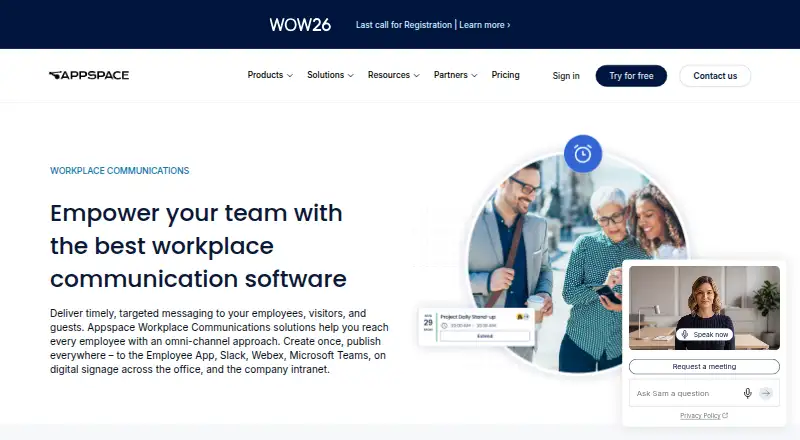
Appspace Workplace helps organizations publish workplace messages through the Employee App, Slack, Webex, Microsoft Teams, digital signage, and an intranet.
What Appspace Workplace is
Appspace Workplace helps organizations publish workplace messages through the Employee App, Slack, Webex, Microsoft Teams, digital signage, and an intranet. The intranet serves as a hub for project files, announcements, and company conversation. The Employee App delivers messages to employees and can provide access to space reservation and visitor management. Digital signage supports screens in conference rooms, meeting areas, and public spaces, including connected display walls. Organizations can customize workplace content templates to match brand guidelines and publish them across channels. Appspace can share dynamic information from RSS and XML sources and connect to intranets, wikis, and collaboration products through APIs. Named integrations include Office 365, Atlassian, WordPress, SharePoint, Outlook, Okta, and Google Search. The free account includes one compatible device, two Premium Users, up to two Admins, 5GB storage, and 5GB monthly bandwidth. A separate bundle offers a 30-day free trial for up to 500 intranet users and 25 signage screens without a credit card.
Good
- Publishes messages across multiple listed channels
- Templates can be customized to brand guidelines
- Connects to RSS and XML information sources
- Free account includes one device and two users
Watch out
- Free account allows one compatible device
- Free account includes 5GB storage
- Free account includes 5GB monthly bandwidth
Who it suits
Appspace Workplace suits organizations that need to distribute company communications across employee, collaboration, and signage channels. The free account’s device, user, storage, and bandwidth limits may suit a small initial setup.
Verdict
Appspace Workplace brings intranet, employee messaging, and digital signage into a cross-channel communications platform. Review the free account’s device and storage limits before choosing it for a larger deployment.
Plans and prices
From Appspace Workplace's own pricing page, checked 14 Oct 2026.
| Plan | Price | What it gives you |
|---|---|---|
| Free | Free | 2 Premium Users · 1 Appspace Device ID · 5GB storage/month · 5GB bandwidth/month · credit card only · unlimited duration |
| Enterprise | — | 50 Premium Users · 50+ Device IDs · 50GB+ storage/month · 50GB+ bandwidth/month · Premium-Elite support · month-to-month or annual; contact sales |
| Express | — | 25 Premium Users · 25 Device IDs · 25GB storage/month · 25GB bandwidth/month · advanced support · month-to-month or annual; contact sales |
The facts
Each one read from Appspace Workplace's own pages, with the date it was checked.
What it does
- AI capabilities
- Appspace Intelligence can generate writing and visuals, summarize and narrate content, translate it, auto-tag it, answer questions conversationally and provide engagement insights.checked 14 Oct 2026
- API
- Appspace exposes API v3 documentation for services including accounts, devices, campaigns, libraries, users, spaces, tokens and webhooks.checked 14 Oct 2026
- API restrictions
- The usage policy permits account-data API access but allows suspension for excessive requests and prohibits reverse engineering or use of non-public APIs.checked 14 Oct 2026
- APIs and feeds
- Appspace says it can share dynamic information from RSS and XML sources and pull information from intranets, wikis, and collaboration products through APIs.checked 30 Sep 2026
- Backups
- Appspace says platform database and content backups occur at least every four hours and are retained for at least three months.checked 30 Sep 2026
- Communities
- Employee communications include public or private communities, profiles, reactions, mentions and recognition features.checked 14 Oct 2026
- Content integrations
- Content feeds and connectors cover RSS/XML, social networks, WordPress, SharePoint, Okta, Tableau, Power BI and other sources.checked 14 Oct 2026
- Content templates
- Appspace supplies ready-made workplace templates that customers can brand and reuse across channels.checked 14 Oct 2026
- Custom widgets
- Developers can build widgets with schema.json and authenticated API calls, OAuth Passports, template variables and GET, POST, PUT and DELETE methods.checked 14 Oct 2026
- Deployment
- Appspace supports hosted cloud, private cloud, on-premises and hybrid deployment models.checked 14 Oct 2026
- Digital signage
- Digital signage distributes messages to conference rooms, meeting areas and public spaces.checked 14 Oct 2026
- Documentation
- Base support includes online documentation and video tutorials, while higher tiers add chat support and defined response times.checked 14 Oct 2026
- Encryption
- Appspace states customer data is encrypted with TLS 1.2 or higher in transit and AES256 at rest.checked 30 Sep 2026
- Growing business bundle
- Appspace advertises a 30-day free trial bundle for up to 500 intranet users and 25 signage screens, with no credit card required.checked 30 Sep 2026
- Integrations
- The integrations page names Slack, Microsoft Teams, Webex, Office 365, Atlassian, WordPress, SharePoint, Outlook, Okta, and Google Search among its connections.checked 30 Sep 2026
- Intranet
- The intranet provides a hub for files, announcements and company discussions.checked 14 Oct 2026
- Licence
- The user agreement grants a limited, non-exclusive, non-transferable right to use the subscription services, indicating proprietary software rather than an open-source licence.checked 14 Oct 2026
The company
- Company history
- Appspace says it began as a digital signage company in 2002 and later expanded into visitor management, space reservation, an Employee App, and an intranet.checked 30 Sep 2026
- Company identity
- LinkedIn lists Appspace as a privately held software-development company founded in 2002 with 201–500 employees and headquarters in Tampa, Florida.checked 14 Oct 2026
- Founded
- 2002checked 23 Sep 2026
- Headquarters
- Tampa, Florida, United Stateschecked 23 Sep 2026
Where it runs
- Employee app
- The mobile Employee App delivers company updates and links to space reservation and visitor-management functions.checked 14 Oct 2026
- Limit: Android usability
- Google Play reviewers describe controls hidden under phone interface bars, many taps for room booking and intermittent loading failures.checked 14 Oct 2026
Money
- Free tier limit
- The free account allows one compatible device, two Premium Users, up to two Admins, 5GB storage, and 5GB monthly bandwidth.checked 30 Sep 2026
The full review of Appspace Workplace
Overview
Appspace Workplace combines employee communications with intranet content and digital signage for organizations reaching both office-based and frontline staff. It suits teams that need several channels coordinated in one platform; the free account is better for a small pilot than a broad rollout.
Messages can reach employees through the Employee App, Slack, Webex, Microsoft Teams, digital signage, and the company intranet. The intranet gathers project files, announcements, and company discussion, while the Employee App can also act as a route to space reservation and visitor management. That breadth is useful when workplace operations and communications overlap, but may be more than a communications-only team needs.
Appspace began as a digital signage company in 2002 and expanded into other workplace tools. Its signage supports displays in meeting rooms and public areas, including connected display walls.
Key features
Multi-channel publishing
Content templates can be adapted to brand guidelines and published across channels. Email publishing, audience targeting, content approvals, and mobile access give communications teams ways to tailor and govern messages rather than treating every channel as a separate effort. The benefit is greatest when a company actually uses several of those channels.
Integrations and dynamic content
Named connections include Slack, Microsoft Teams, Webex, Office 365, Atlassian, WordPress, SharePoint, Outlook, Okta, and Google Search. Appspace can also draw dynamic information from RSS and XML sources and use APIs to pull information from intranets, wikis, and collaboration products. That makes it a plausible fit for organizations with content already distributed across workplace systems.
Security and support
Appspace states that it encrypts customer data with TLS 1.2 or higher in transit and AES256 at rest, and that platform database and content backups occur at least every four hours and are retained for at least three months. Its trust credentials include SOC 3 Type II, ISO 27001, ISO 27017, and Cloud Security Alliance credentials. Base support includes managed cloud infrastructure, current releases, online documentation, and video tutorials; chat or phone support and stated response times come with higher support tiers.
Pricing
The pricing model is freemium, with a free plan and a free trial. The Free plan costs nothing and allows two Premium Users, one Appspace Device ID, up to two Admins, 5GB storage per month, and 5GB bandwidth per month. Those caps make it suitable for a limited evaluation, not a sizeable deployment.
Express and Enterprise have custom pricing and are offered month-to-month or annually. Express includes 25 Premium Users, 25 Appspace Device IDs, 25GB storage per month, and 25GB bandwidth per month, a better fit for a smaller organization moving beyond the free limits. Enterprise starts at 50 Premium Users and 50+ Device IDs, with 50GB+ monthly storage and bandwidth, for larger deployments needing more capacity.
A separate growing-business bundle offers a 30-day free trial for up to 500 intranet users and 25 signage screens, with no credit card required. This is a more meaningful test of a multi-channel rollout than the small free account, though it is time-limited.
Platforms
Appspace supports Android, iOS, web, and Windows, and provides an API. The Employee App and signage extend its reach beyond a browser-based intranet, which matters for organizations with employees away from desks.
Who it's for
Appspace is strongest for organizations coordinating internal messages across collaboration tools, employee devices, intranet pages, and physical displays. Frontline channels, targeting, approvals, and mobile access help communications teams serve different audiences. It is less compelling for a small team seeking only a basic messaging tool, particularly if the free account's device and storage ceilings are too restrictive.
Pros and cons
- Pros: Multiple publishing channels, including workplace displays, can bring office and frontline communications into one operation.
- Pros: Integrations, APIs, and RSS/XML feeds can connect existing workplace content to communications.
- Pros: The 30-day trial bundle reaches up to 500 intranet users and 25 screens without requiring a credit card.
- Cons: The free plan is tightly capped at one device, two Premium Users, 5GB storage, and 5GB monthly bandwidth, limiting its usefulness beyond a pilot.
- Cons: Express and Enterprise use custom pricing, so buyers must obtain a quote to assess cost at scale.
- Cons: Chat or phone support and stated response times require higher support tiers.
Alternatives
Employee Communication Software and Workplace Management Software offer broader category comparisons. For a free option with a stated allowance of up to 200 users and communications, social, recognition, surveys, and instant messaging, consider HubEngage. Choose Cerkl Broadcast if its Foundations plan's 5,000 monthly email sends, three communicator seats, and one instance suit an email-led program; extra sends cost $.09 each and extra seats $75/mo.
Netpresenter, Blink, DeskAlerts, SnapComms, Talkfreely, and Flip are other alternatives to compare.
Verdict
Choose Appspace Workplace if your organization needs coordinated communications across employee apps, collaboration tools, intranet content, and physical signage, with workplace services alongside them. Its channel breadth and content controls are the main reasons to shortlist it. Look elsewhere if you need a low-cost, broadly usable free deployment: the free tier's small user and device allowances make it a trial point, not a practical substitute for a larger paid rollout.
Getting started
- Visit the Appspace Workplace website
- Choose the free account or review the available plans
- Use the listed Android, iOS, web, or Windows platform
- For a growing business bundle, start its 30-day trial for up to 500 intranet users and 25 signage screens without a credit card
Limits worth knowing
The free account allows one compatible device, two Premium Users, up to two Admins, 5GB of storage, and 5GB monthly bandwidth. The growing business bundle trial covers up to 500 intranet users and 25 signage screens for 30 days.
Questions
Is Appspace Workplace free?
Yes. The Free plan costs nothing and includes two Premium Users, one Appspace Device ID, 5GB storage per month, 5GB bandwidth per month, and two Admins.
Is there a free trial?
Yes. A growing business bundle offers a 30-day trial for up to 500 intranet users and 25 signage screens, with no credit card required.
Which platforms does Appspace support?
The listed platforms are Android, iOS, web, Windows, and API.
What integrations are named?
Named connections include Slack, Microsoft Teams, Webex, Office 365, Atlassian, WordPress, SharePoint, Outlook, Okta, and Google Search.
Alternatives to Appspace Workplace
- 1
HubEngage
Free planAndroidiOSWebAPI8.2From $1 a month - 2
Cerkl Broadcast
Free planAndroidiOSWebAPI7.4Free plan - 3

Blink
AndroidiOSWebmacOS7.2From $4.50 a month - 4

Talkspirit
AndroidiOSWebLinux7.1From €5 a month - 5

Workvivo
AndroidiOSWebAPI7.1 - 6

Firstup
AndroidiOSWebAPI7.0