
Appspace Intranet
Appspace Intranet connects office, remote, and frontline employees with personalized content, information-finding tools, and built-in AI.
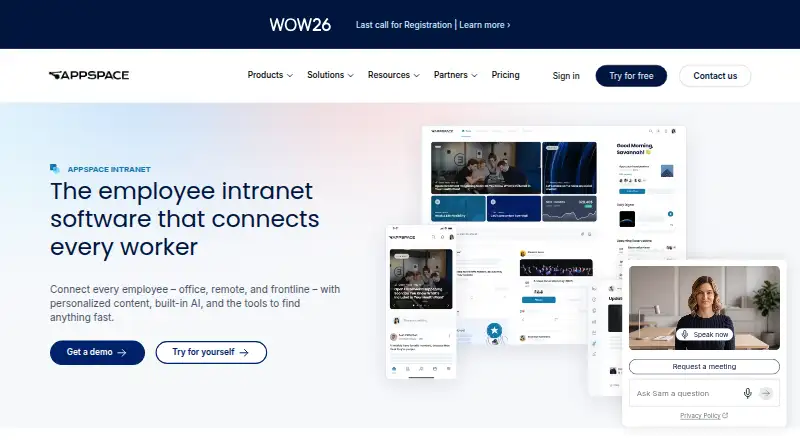
What Appspace Intranet is
Appspace Intranet connects office, remote, and frontline employees with personalized content, information-finding tools, and built-in AI. Teams can publish messages to the intranet, email, chat, and digital signage in one workflow, targeting campaigns by team, location, or role. AI supports content generation, summarization, translation, narration, question answering, and analytics without a separate license for those content workflows. It can also tag and categorize content, while search covers documents, people, and other content, including colleague searches by expertise or role. Employee communities, groups, posts, polls, praise, and comments provide engagement features; mobile access serves frontline workers who may not have company email. Listed integrations include Microsoft Teams, Microsoft 365, SharePoint, Slack, Google Workspace, Salesforce, and Webex. The free account includes two Premium Users, one device ID, up to two admins, 5GB of storage, and 5GB monthly bandwidth. Express and Enterprise pricing is not listed. A growing-business bundle advertises a 30-day free period without automatic billing afterward.
Good
- Messages can reach intranet, email, chat, and digital signage.
- Campaigns can target teams, locations, or roles.
- AI supports translation, summarization, and question answering.
- Search covers documents, people, and content.
- Free account includes two Premium Users.
Watch out
- Free account is limited to one device ID.
- Free storage is limited to 5GB.
- Free monthly bandwidth is limited to 5GB.
- Express and Enterprise prices are not listed.
Who it suits
It is aimed at IT leaders, internal communications and HR teams, and digital workplace professionals in mid-market or enterprise organizations. Its mobile access and audience targeting may suit distributed, hybrid, or frontline workforces.
Verdict
Appspace Intranet brings publishing, employee engagement, search, and AI workflows together for distributed teams. Its free tier has specific user, device, storage, and bandwidth limits.
Plans and prices
From Appspace Intranet's own pricing page, checked 14 Oct 2026.
| Plan | Price | What it gives you |
|---|---|---|
| Free | Free | 2 Premium Users · 1 Appspace Device ID · 5GB storage · 5GB monthly bandwidth · Unlimited account duration |
| Enterprise | Priced on request | 50 Premium Users · 50+ Device IDs · 50GB+ storage · 50GB+ monthly bandwidth · Advanced channels · Device tasks · Month-to-month or annual |
| Express | Priced on request | 25 Premium Users · 25 Device IDs · 25GB storage · 25GB monthly bandwidth · Single sign-on · Month-to-month or annual |
The facts
Each one read from Appspace Intranet's own pages, with the date it was checked.
What it does
- AI
- Built-in AI supports content generation, summarization, translation, narration, question answering, and analytics without a separate license for those content workflows.checked 30 Sep 2026
- AI assistant
- The conversational assistant can find documents and people and book rooms.checked 14 Oct 2026
- AI content tools
- Built-in AI can write, summarize, translate and narrate content.checked 14 Oct 2026
- API
- Appspace API v3 exposes methods for channels, feeds and other cloud or platform services, with online method documentation.checked 14 Oct 2026
- API documentation
- The API documentation lists authentication, pagination, roles, access tokens, accounts and user services, while older APIs are marked deprecated.checked 14 Oct 2026
- Campaign analytics
- Communications teams can target campaigns by team, location or role and track readership.checked 14 Oct 2026
- Communications
- Teams can publish messages across the intranet, email, chat, and digital signage from one workflow, and target campaigns by team, location, or role.checked 30 Sep 2026
- Communities
- Users can create communities for teams, projects or interests with posts, polls, praise and comments.checked 14 Oct 2026
- Deployment
- Appspace supports cloud, on-premises and hybrid deployment models.checked 14 Oct 2026
- Developer extensibility
- Custom widgets can call authenticated third-party APIs through Appspace Passports, which handle OAuth credentials and token refresh.checked 14 Oct 2026
- Documentation
- The public Knowledge Center contains platform-management, signage, intranet, workspace and visitor-management guides.checked 14 Oct 2026
- Encryption and backups
- Cloud traffic uses TLS 1.2 or higher, passwords use one-way hashes, and encrypted backups run at least every four hours with at least three months retention.checked 14 Oct 2026
- Engagement
- The platform includes employee communities, groups, posts, polls, praise, and comments, with mobile access for frontline workers who may not have company email.checked 30 Sep 2026
- Frontline access
- The mobile app is intended to reach frontline workers without requiring a company email address.checked 14 Oct 2026
- Implementation
- Appspace says most teams go live in weeks and can configure and launch the intranet through communications or IT teams without custom coding.checked 30 Sep 2026
- Integrations
- Appspace lists Microsoft 365, Teams, SharePoint, Slack, Google, Salesforce, Workday, ServiceNow and Jira integrations.checked 14 Oct 2026
- Intended customers
- Appspace says its intranet is built for IT leaders, internal communications managers, HR teams, and digital workplace professionals at mid-market and enterprise organizations, especially those with distributed, hybrid, or frontline workforces.checked 30 Sep 2026
- Knowledge management
- Appspace automatically tags and categorizes content and searches documents, people and other content from one bar.checked 14 Oct 2026
- Licence
- The end-user agreement grants a limited, non-exclusive subscription right and reserves product intellectual property to Appspace and its licensors.checked 14 Oct 2026
The company
- Company facts
- LinkedIn lists Appspace as a privately held software company founded in 2002 with 201–500 employees and headquarters in Tampa, Florida.checked 14 Oct 2026
- Founded
- 2002checked 28 Sep 2026
- Headquarters
- Tampa, Florida, USAchecked 28 Sep 2026
- Legal maker
- The end-user agreement identifies the maker as Appspace, Inc., a Delaware corporation with offices at 400 N Tampa Street, Suite 1725, Tampa, Florida.checked 14 Oct 2026
Money
- Free-tier restriction
- The free account supports one compatible device, two Premium Users, up to two Admins, 5GB storage, and 5GB monthly bandwidth; free accounts cannot buy extra device IDs, storage, or bandwidth.checked 30 Sep 2026
The full review of Appspace Intranet
Overview
Appspace Intranet is a workplace platform for sharing information with office, remote, and frontline employees. It brings company communications, searchable knowledge, employee communities, and content publishing together, with personalized content and audience targeting to help people find information relevant to their team, location, or role.
Appspace is aimed at mid-market and enterprise organizations, especially those with distributed, hybrid, or frontline workforces. Its intranet includes an employee directory, news publishing, a page builder, single sign-on support, and native mobile access. The company was founded in 2002 and is headquartered in Tampa, Florida, USA. Appspace says communications or IT teams can configure and launch the intranet without custom coding, and that most teams go live in weeks.
For a broader look at this category, see our Intranet Software list.
Key features
One workflow for workplace communications
Teams can publish messages to the intranet, email, chat, and digital signage through one workflow. Campaigns can be targeted by team, location, or role, helping organizations direct updates to particular employee groups.
AI for content and knowledge
Built-in AI can generate and summarize content, translate it, narrate it, answer questions, and support analytics. Appspace says these content workflows do not require a separate AI license. AI also tags and categorizes content, while search spans documents, people, and other content. Employees can look up colleagues by expertise or role.
Employee communities and mobile access
Communities include groups, posts, polls, praise, and comments. Native mobile access is particularly relevant for frontline employees who may not have a company email address.
Integrations and security
Listed integrations include Microsoft Teams, Microsoft 365, SharePoint, Slack, Google Workspace, Salesforce, and Webex, as well as other workplace tools. Appspace's trust information lists SOC 3 Type II, ISO 27001, ISO 27017, and Cloud Security Alliance. It states that customer data is encrypted using TLS 1.2 or higher in transit and AES256 at rest.
Pricing
Appspace uses a freemium model, with a free plan and a free trial. The growing-business intranet bundle advertises a 30-day free period; Appspace says customers choose whether to continue afterward and are not billed automatically.
| Plan | Price and billing | Included limits and support |
|---|---|---|
| Free | free | 2 Premium Users, 1 Appspace Device ID, 5GB storage, 5GB monthly bandwidth, and up to 2 Admins |
| Express | Price not listed; billed Month-to-Month or Annual | 25 Premium Users, 25 Device IDs, 25GB storage, 25GB monthly bandwidth, and Advanced support |
| Enterprise | Price not listed; billed Month-to-Month or Annual | 50 Premium Users, 50+ Device IDs, 50GB+ storage, 50GB+ monthly bandwidth, and Premium or Elite support |
The free account is tightly bounded: it supports one compatible device, two Premium Users, up to two Admins, 5GB of storage, and 5GB of monthly bandwidth. Free accounts cannot purchase additional device IDs, storage, or bandwidth. Support tiers range from Base access to online documentation and tutorials to Elite support, which includes a customer success manager, phone and ticket support, and stated response times.
Platforms
Appspace lists Android, iOS, Linux, macOS, web, and Windows, as well as API availability. Native mobile access supports employees using phones, including frontline staff without company email.
Who it's for
Appspace identifies IT leaders, internal communications managers, HR teams, and digital workplace professionals at mid-market and enterprise organizations as its intended customers. Its combination of audience targeting, multi-channel publishing, mobile access, and searchable workplace knowledge is oriented toward organizations coordinating distributed, hybrid, or frontline teams.
Pros and cons
- Pros: Communications can be distributed across several channels from one workflow, with targeting by team, location, or role.
- Pros: AI supports both content workflows and knowledge discovery, including colleague searches by expertise or role.
- Pros: The free plan provides a way to start without a listed subscription charge, and the bundle page describes a 30-day free period without automatic billing afterward.
- Cons: The free account is limited to one compatible device, two Premium Users, two Admins, and fixed storage and bandwidth, with no option to purchase more capacity.
- Cons: Express and Enterprise prices are not listed, so their cost cannot be assessed from the available plan details.
Alternatives
Organizations comparing employee intranets can also consider Zoho Connect, HubEngage, Netframe, MangoApps, Blink, Silverpeas, Akumina, and Axero.
Verdict
Appspace Intranet combines internal communications, searchable knowledge, employee communities, mobile access, and AI-supported content workflows in one workplace platform. Its targeting and channel options suit organizations that need to reach different employee groups across office, remote, and frontline settings. The free plan is useful for a limited start, but its device, user, storage, and bandwidth caps are restrictive for larger rollouts. Teams considering paid plans should also account for the fact that Express and Enterprise prices are not listed.
Getting started
- Visit the Appspace Intranet website.
- Choose the free account or review the Express and Enterprise plan options.
- Use the advertised 30-day free period for the growing-business intranet bundle if it fits your needs.
- Configure and launch through communications or IT teams; Appspace says custom coding is not required.
- Access the platform on supported web, desktop, mobile, and other listed platforms.
Limits worth knowing
The Free plan includes two Premium Users, one Appspace Device ID, up to two Admins, 5GB storage, and 5GB monthly bandwidth. Free accounts cannot purchase additional device IDs, storage, or bandwidth.
Questions
Is there a free plan?
Yes. Free includes two Premium Users, one device ID, up to two Admins, 5GB storage, and 5GB monthly bandwidth.
Is a free trial available?
The growing-business intranet bundle advertises a 30-day free period. Customers choose whether to continue afterward, without automatic billing.
Which platforms are supported?
Listed platforms are Android, API, iOS, Linux, macOS, web, and Windows.
What integrations are listed?
They include Microsoft Teams, Microsoft 365, SharePoint, Slack, Google Workspace, Salesforce, and Webex.
What security standards and protections are listed?
The trust page lists SOC 3 Type II, ISO 27001, ISO 27017, and Cloud Security Alliance. It states customer data is encrypted with TLS 1.2+ in transit and AES256 at rest.
Alternatives to Appspace Intranet
- 1

Netframe
Free planOpen sourceAndroidiOSWebLinux8.3From €3 a month - 2
HubEngage
Free planAndroidiOSWebAPI8.2From $1 a month - 3

Noodle
Free planAndroidiOSWebAPI8.0From $4 a month - 4

MangoApps
AndroidiOSWebAPI7.9From $9 a month - 5

Silverpeas
Free planAndroidiOSWebAPI7.3From €2 a month - 6

Axero
AndroidiOSWebAPI7.2From $500 a month