
Zoho Connect
Zoho Connect is an organization’s private social network for bringing teams, partners, and vendors together to communicate and coordinate work.
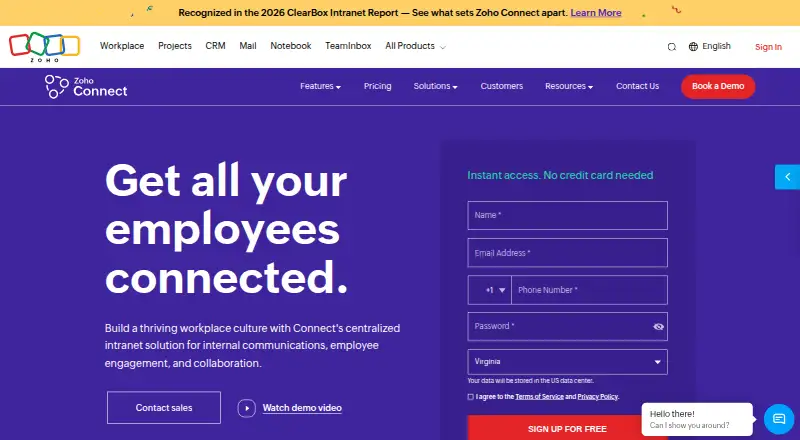
What Zoho Connect is
Zoho Connect is an organization’s private social network for bringing teams, partners, and vendors together to communicate and coordinate work. Its communication tools include feeds, direct messages, group chat, channels, announcements, polls, questions, and forums. Groups add spaces for discussion, file sharing, and task management, while tasks and boards help teams assign responsibilities and follow project progress. Manuals and articles can hold reference material, including company policies on topics such as leave, hiring, training, and ethics. Zia features offer writing assistance, sentiment analysis, post summaries, and town hall highlights. Listed integrations include Zoho apps, Zoom, Microsoft Teams, Google Drive, Google Calendar, Jira, and Zapier; Zoho Flow links Connect with 200+ business apps. It runs on the web, Android, iOS, Windows, macOS, and Linux. A free plan is listed, with paid plans from $0.40/user/mo billed annually. Zoho describes encryption, invitation-based membership, granular user data controls, password-protected exports, and GDPR compliance.
Good
- Communication includes feeds, channels, polls, and forums.
- Groups support discussion, file sharing, and task management.
- Zia offers writing assistance and post summaries.
- Available on web, mobile, Windows, macOS, and Linux.
Watch out
- Free-plan user limits differ across listed descriptions.
- Ultimate and Enterprise start at 10 users.
- Paid plans have no listed plan-specific prices.
Who it suits
Zoho Connect suits organizations that want a shared space for team communications, project tasks, and company knowledge. Its listed platforms and integrations may fit teams already using those tools.
Verdict
Zoho Connect brings internal communication, project organization, and company reference material into one service. Check the applicable free-plan user limit and paid-plan terms against your organization’s needs.
Plans and prices
From Zoho Connect's own pricing page, checked 30 Sep 2026.
| Plan | Price | What it gives you |
|---|---|---|
| Free | Free | Up to 5 users |
| Enterprise | — | Starts at 10 users · 2 GB file storage per member · Monthly or yearly; yearly saves up to 20% |
| Starter | — | For 25 users · 25 GB file storage · 10 Zoho app integrations · Monthly or yearly; yearly saves up to 20% |
| Ultimate | — | Starts at 10 users · 2 GB file storage per member · Monthly or yearly; yearly saves up to 20% |
The facts
Each one read from Zoho Connect's own pages, with the date it was checked.
What it does
- AI tools
- Zia features include writing assistance, sentiment analysis, post summaries, and town hall highlights.checked 30 Sep 2026
- Collaboration
- Groups provide spaces for team discussions, file sharing, and task management.checked 30 Sep 2026
- Communication
- The product includes feeds, direct messaging, group chat, channels, announcements, polls, questions, and forums.checked 30 Sep 2026
- HIPAA
- Zoho says Connect does not collect, use, store, or maintain protected health information for its own purposes, which it says supports HIPAA compliance for an organization.checked 30 Sep 2026
- Integrations
- Listed integrations include Zoho apps, Zoom, Microsoft Teams, Google Drive, Google Calendar, Jira, and Zapier; Zoho Flow connects Connect with 200+ business apps.checked 30 Sep 2026
- Knowledge management
- Manuals provide a knowledge base, and articles can organize company policies such as leave, hiring, training, and ethics.checked 30 Sep 2026
- Purpose
- Zoho Connect is an organization's private social network for bringing teams, partners, and vendors together to communicate and get work done.checked 30 Sep 2026
- Security and privacy
- Zoho Connect describes encryption, invitation-based membership, granular user data controls, and password-protected exports, and states GDPR compliance.checked 30 Sep 2026
- Support
- Classic support is free; Premium Support is available for Enterprise and Ultimate for 20% of the license fee, with a stated 3-hour response time and weekday 24-hour email and live chat coverage.checked 30 Sep 2026
- Tasks and projects
- Tasks and boards let teams organize projects, assign responsibilities, and track progress.checked 30 Sep 2026
Where it runs
- Desktop apps
- Zoho Connect offers desktop downloads for Windows, macOS, and Linux.checked 30 Sep 2026
- Mobile apps
- Zoho Connect has Android and iOS mobile apps.checked 30 Sep 2026
The company
- Founded
- 1996checked 23 Sep 2026
- Headquarters
- Chennai, Indiachecked 23 Sep 2026
Money
- Free plan limits
- The plan comparison lists the free plan for up to 5 users; a Zoho help page says the post-trial free plan allows up to 25 users and limits active groups, boards, manuals, and custom apps to three each.checked 30 Sep 2026
The full review of Zoho Connect
Overview
Zoho Connect is a workplace network that combines employee communication with tools for coordinating team work and maintaining company guidance. It is a strong fit for organizations that want those jobs in one service; teams looking only for a dedicated project tool may not need its broader mix.
Key features
Communication and collaboration
Feeds, direct messages, group chat, channels, announcements, polls, questions, and forums cover both quick exchanges and more structured discussion. Groups add spaces for team conversations, file sharing, and task management, which makes Connect useful when collaboration needs to sit alongside company-wide communication. The breadth may be unnecessary for teams that simply need a messaging channel.
Projects and company knowledge
Tasks and boards let teams assign responsibilities and track project progress. They offer a way to keep coordination within the same service, though organizations looking for a specialized project-management system may prefer a dedicated tool. Manuals and articles can organize reference material, including company policies on leave, hiring, training, and ethics; that gives Connect a practical role as an internal knowledge hub, not just a social feed.
AI, integrations, and controls
Zia provides writing assistance, sentiment analysis, post summaries, and town hall highlights. Integrations include Zoho apps, Zoom, Microsoft Teams, Google Drive, Google Calendar, Jira, and Zapier; Zoho Flow connects Connect with more than 200 business apps. These connections help it fit into an existing work environment, while the mix of Zoho and third-party integrations is most useful to organizations already using those services.
Zoho Connect describes encryption, invitation-based membership, granular user-data controls, and password-protected exports, and states that it complies with GDPR. Zoho says Connect does not collect, use, store, or maintain protected health information for its own purposes, which it says supports an organization's HIPAA compliance; that is not a claim that the service itself handles protected health information.
Pricing
Connect uses a freemium model, with paid service starting at $0.40/user/mo (annual). The Free plan is free and is shown for up to 5 users. A Zoho help page describes a post-trial free plan for up to 25 users, but limits active groups, boards, manuals, and custom apps to three each. Because those caps differ, organizations should confirm which applies to their intended plan before relying on the free tier.
Starter is for 25 users and includes 25 GB of file storage and 10 Zoho app integrations. Enterprise and Ultimate start at 10 users and include 2 GB of file storage per member. Paid plans can be billed monthly or yearly, with yearly billing saving up to 20%; the Starter, Enterprise, and Ultimate plan prices are custom pricing. Premium Support is available for Enterprise and Ultimate at 20% of the license fee, with a stated three-hour response time and weekday, 24-hour email and live chat coverage. Classic support is free.
A free trial is available. Connect also offers native Android and iOS apps, desktop downloads for Windows, macOS, and Linux, and platforms including web and API access.
Platforms
Zoho Connect supports Android, iOS, Linux, macOS, web, Windows, and API access. Desktop downloads are available for Windows, macOS, and Linux, while mobile apps provide native access on Android and iOS.
Who it's for
Connect suits organizations that want internal communication, team collaboration, project coordination, and company reference material gathered in one service. Its employee directory, news publishing, page builder, SSO support, and audience targeting add options for organizations managing communication across a workforce. It is less compelling for teams that need only messaging or that want a dedicated project-management product.
Pros and cons
Pros
- Communication and collaboration in one service: feeds, chats, forums, groups, file sharing, tasks, and boards support different kinds of team work without splitting those functions across separate Connect spaces.
- Structured company guidance: manuals and articles can organize policies and reference material for employees.
- Broad integration coverage: Zoho Flow links Connect with 200+ business apps, alongside named integrations such as Google Drive, Jira, and Microsoft Teams.
- Free entry point: the Free plan costs nothing, with a free trial also available.
Cons
- Unclear free-plan user ceiling: the plan comparison says up to 5 users, while the post-trial help-page description allows up to 25 and caps several active resources at three each.
- Paid plan prices require a quote: Starter, Enterprise, and Ultimate have custom pricing, making it harder to compare expected costs from the plan details alone.
- Paid tiers have minimum or defined seat counts: Starter is for 25 users, while Enterprise and Ultimate start at 10; those structures may not fit smaller teams as neatly as the free tier.
- Premium Support adds a percentage-based charge: Enterprise and Ultimate customers pay 20% of the license fee for it.
Alternatives
For a broader comparison, browse Intranet Software.
Appspace Intranet is another freemium option with a free plan for 2 Premium Users, 1 Appspace Device ID, 5GB storage, 5GB monthly bandwidth, and up to 2 Admins. HubEngage has a free Starter plan for up to 200 users with communications, social, recognitions, surveys, and instant messaging, making it worth considering for a larger free-tier audience.
Silverpeas offers a free basic collaborative platform, but additional modules are unsupported, hosting is at your expense, and it requires IT skills. MangoApps is a paid alternative with a Communications & Intranet plan from $9 a month, billed from 200 employees. Blink is paid and has a Core plan at $4.50 a month, billed per user per month, with internal communications, real-time collaboration, and a knowledge hub.
Akumina is another paid alternative. Axero is paid, with a Standard plan covering workspaces and groups, communication tools, content management, notifications, task management, and gamification. CentricMinds Intranet is paid, with a Core plan at $10 a month billed per user, per month, and a minimum of 50 users.
Verdict
Choose Zoho Connect if your organization wants communication, collaboration, and company knowledge under one roof, particularly if Zoho Flow and its integrations suit your existing tools. Look elsewhere if you need clear paid-plan costs up front or a free plan with a dependable user cap: the conflicting limits make the free tier harder to assess.
Getting started
- Visit the Zoho Connect website.
- Choose the free plan or review the paid plans, which can be billed monthly or yearly.
- Start with the free trial if you want to try the service before choosing a plan.
- Access it on the web, or download a Windows, macOS, or Linux desktop app.
- Install the Android or iOS app for mobile access.
Limits worth knowing
The plan comparison lists the free plan for up to five users. A help page describes post-trial free access for up to 25 users, with active groups, boards, manuals, and custom apps each limited to three.
Questions
Does Zoho Connect have a free plan?
Yes. The plan comparison lists a free plan for up to five users. A help page describes post-trial free access for up to 25 users with limits on active groups, boards, manuals, and custom apps.
How much does Zoho Connect cost?
Paid pricing starts at $0.40/user/mo with annual billing. The listed paid plan details do not give prices.
Which platforms does Zoho Connect support?
It is available on Android, iOS, Linux, macOS, the web, and Windows. Desktop downloads are available for Windows, macOS, and Linux, and mobile apps are available for Android and iOS.
What integrations are listed?
Listed integrations include Zoho apps, Zoom, Microsoft Teams, Google Drive, Google Calendar, Jira, and Zapier. Zoho Flow connects Connect with 200+ business apps.
What support is available?
Classic support is free. Premium Support is available for Enterprise and Ultimate for 20% of the license fee, with a stated three-hour response time and weekday 24-hour email and live chat coverage.
What does Zoho say about security and privacy?
Zoho describes encryption, invitation-based membership, granular user data controls, and password-protected exports, and states that Zoho Connect is GDPR compliant.
Alternatives to Zoho Connect
- 1

Netframe
Free planOpen sourceAndroidiOSWebLinux8.3From €3 a month - 2
HubEngage
Free planAndroidiOSWebAPI8.2From $1 a month - 3

Noodle
Free planAndroidiOSWebAPI8.0From $4 a month - 4

MangoApps
AndroidiOSWebAPI7.9From $9 a month - 5

Appspace Intranet
Free planAndroidiOSWebAPI7.4Free plan - 6

Silverpeas
Free planAndroidiOSWebAPI7.3From €2 a month