Focus To-Do
Focus To-Do combines task management with a Pomodoro timer, helping organize tasks and work through them in timed sessions.
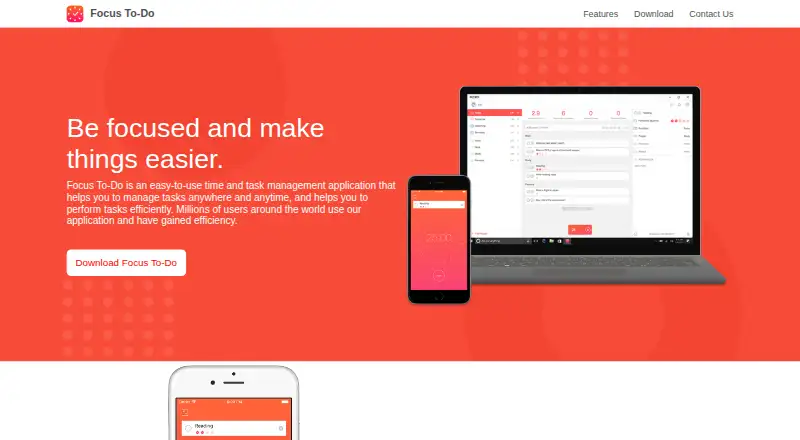
What Focus To-Do is
Focus To-Do combines task management with a Pomodoro timer, helping organize tasks and work through them in timed sessions. You can arrange tasks and projects, set due dates and reminders, add subtasks and notes, and create repeating tasks. Timer controls include adjustable work and break lengths, pause and resume, skipped breaks, and continuous mode. The app can also be used to plan work or study, keep shopping lists, set birthday reminders, and arrange schedules. Its reports summarize work time, completed tasks, daily, weekly, and monthly time, and project time ratios. Focus To-Do syncs data across multiple devices, including Android, iPhone, Mac, Windows, iPad, and Apple Watch. Local mode does not require registration, but local data cannot sync across devices and is lost if the app is uninstalled. The free plan is available; the listed three-month Premium in-app purchase costs $3.99 a month. The privacy policy says synced task data is collected for synchronization and personal information is stored in China.
Good
- Combines task management with Pomodoro timers
- Supports subtasks, notes, and recurring tasks
- Reports work time and completed tasks
- Syncs across mobile and desktop devices
Watch out
- Local data cannot sync across devices
- Uninstalling the app erases local-mode data
- Personal information is stored in China
Who it suits
Focus To-Do suits people who want a task list and timed focus sessions in one app. Its task, schedule, and reminder features can support work, study, household lists, and personal reminders.
Verdict
Focus To-Do brings task organization, focus timers, and time reports together across several platforms. Choose between syncing across devices and local mode, which keeps data on one device but is lost on uninstall.
Plans and prices
From Focus To-Do's own pricing page, checked 20 Sep 2026.
| Plan | Price | What it gives you |
|---|---|---|
| Focus To-Do Premium | — | — |
| 3 Months | $3.99 a month | Premium in-app purchase · 3 Months |
| Free | Free | Free download · in-app purchases |
| Lifetime | $11.99, paid once | Premium in-app purchase · Lifetime |
The facts
Each one read from Focus To-Do's own pages, with the date it was checked.
What it does
- Core features
- Listed features include reports, cross-device synchronization, due dates, reminders, subtasks, repeating tasks, and notes.checked 30 Sep 2026
- Data location
- The privacy policy states that personal information collected and generated by the product is stored in the People's Republic of China.checked 30 Sep 2026
- Data practices
- The privacy policy says synced task data is collected for synchronization and that the company will not read list and task content.checked 30 Sep 2026
- Local mode
- The privacy policy says users can use local mode without registering, but local data cannot sync across devices and is lost when the app is uninstalled.checked 30 Sep 2026
- Pomodoro
- The app is based on the Pomodoro Technique, letting users set execution time for tasks and focus until the timer ends.checked 30 Sep 2026
- Product purpose
- Focus To-Do is a time and task management application for managing tasks and performing them efficiently.checked 30 Sep 2026
- Reports
- Historical statistics analyze work time, completed tasks, daily, weekly, and monthly time, and project time ratios.checked 30 Sep 2026
- Support
- The Google Play listing provides [email protected] and says support replies within 24 hours.checked 30 Sep 2026
- Synchronization
- Focus To-Do synchronizes data between multiple devices, including iPhone, Mac, Android, Windows, iPad, and Apple Watch.checked 30 Sep 2026
- Task management
- The app listing describes task and project organization, recurring due dates, reminders, subtasks, color-coded priorities, estimated Pomodoro counts, and notes.checked 30 Sep 2026
- Task uses
- The homepage says users can plan work and study, record shopping lists, set birthday reminders, and arrange schedules.checked 30 Sep 2026
- Timer modes
- The app listing says Pomodoro timers support pause and resume, customizable work and break lengths, short and long breaks, skipped breaks, and continuous mode.checked 30 Sep 2026
- Transport security
- The privacy policy states that registered premium-member data is transmitted to devices using SSL encryption.checked 30 Sep 2026
Money
- Free plan
- Yeschecked 20 Sep 2026
The company
- Headquarters
- Shenzhen, Guangdong, Chinachecked 23 Sep 2026
The full review of Focus To-Do
Focus To-Do combines timed focus sessions with task and project organization for people who want their planning tied to the time they spend working. It is strongest for users who want one system across devices and useful time reports; people who prefer a simple timer or keep data only on-device should weigh its trade-offs.
Overview
Built around the Pomodoro Technique, Focus To-Do lets you assign execution time to a task and focus until the timer ends. Its task list can also cover work and study plans, shopping lists, birthday reminders, and schedules, making it more versatile than a work-only planner.
The central benefit is the link between plans and time: organize tasks and projects, estimate how many Pomodoro sessions they need, then review historical work patterns. That makes it a sensible choice for people who want to understand where their time goes as well as remember what to do. For someone who only wants a countdown timer, the broader task and project tools may be unnecessary.
Key features
Flexible focus sessions
The timer supports pausing and resuming, adjustable work and break lengths, short and long breaks, skipped breaks, and continuous mode. That range accommodates different routines without forcing every session into the same cadence. Estimated Pomodoro counts attached to tasks can help translate a project into manageable focus blocks.
Task structure and reports
Tasks can be grouped into projects and given due dates, recurring schedules, reminders, subtasks, color-coded priorities, and notes. These are useful tools for keeping follow-up work visible, though they also make Focus To-Do a fuller organizer rather than a minimal timer. Historical statistics cover work time, completed tasks, daily, weekly, and monthly time, and project time ratios. Those views suit users who want to review both output and how effort is distributed.
Sync and local mode
Focus To-Do syncs across multiple devices, including iPhone, Mac, Android, Windows, iPad, and Apple Watch. That breadth is a practical advantage for people who switch between devices. Local mode avoids registration, but its data stays on one device and is lost if the app is uninstalled, so it is a poor fit for anyone relying on the app as the only copy of important tasks. For registered premium members, synced data is transmitted using SSL encryption; the privacy policy says task data is collected for synchronization and that the company will not read list and task content. Personal information collected and generated by the product is stored in China.
Pricing
Focus To-Do is freemium, with a free download and in-app purchases. The Free plan costs nothing. It gives readers a way to use the product without committing to a paid plan, but the free-plan feature limits are not defined here, so users should not assume it includes every premium capability.
The 3 Months plan is $3.99 a month (billed 3 Months; Premium in-app purchase). Focus To-Do Premium and Lifetime are also named plans, both with custom pricing. Lifetime may suit someone seeking a one-time purchase, but the price and terms are custom; Premium may suit readers seeking paid access without a stated lifetime commitment. No seat limits or renewal terms are stated.
Platforms
Focus To-Do is available on Android, iOS, macOS, web, Windows, and as an extension. That cross-platform reach is a strong reason to choose it over a timer tied to one operating system, particularly when tasks and focus sessions need to travel between desktop and mobile.
Who it's for
Choose Focus To-Do if you want task management, Pomodoro timing, and time reports in one cross-platform app. It is especially well suited to people who plan several kinds of work, use recurring reminders or subtasks, and want to compare time across projects. A dedicated timer is likely a better fit if task organization is not useful to you. Local mode is best reserved for low-stakes tasks, since uninstalling erases its data.
Pros and cons
- Pros: A task can carry an estimated Pomodoro count, so planning and focusing stay connected.
- Pros: Daily, weekly, and monthly time views and project ratios help users examine both working patterns and project allocation.
- Pros: Android, iOS, desktop, web, and extension support make it practical for users moving between platforms.
- Cons: Local data cannot sync and is lost on uninstall, making local mode risky for important task records.
- Cons: Premium and Lifetime have custom pricing, and the Free plan's specific caps are not defined, making it harder to compare the cost of long-term use.
- Cons: Personal information is stored in China, a consideration for readers with data-location requirements.
Alternatives
For a broader starting point, browse Pomodoro Timer Apps or To-do list apps.
- Pomodoist is worth considering if open-source software under the AGPL-3.0-only license matters to you; it also has a free plan, a free trial, and Linux support.
- Pomofocus suits users who want a web, Linux, macOS, or Windows timer with a free plan that includes estimated finish times, templates, visual reports, and custom settings; Premium features include projects, yearly reports, and CSV downloads.
- PomodoroTimers is a free option for Android, iOS, and web users who want core focus tools without choosing a paid plan.
- PomoTimer is a free web and Windows alternative for someone who prefers a timer maintained independently by its named developer.
- Session is an option for Apple users who want a free tier with unlimited sessions and rest, two days of analytics, and calendar events inside the app; it also offers a free trial.
- PomoTodo may suit web users who want a free plan with unlimited focus sessions, tasks, projects, and boards, plus reporting over the last 30 days.
- Focus Keeper is another freemium option with Android, iOS, macOS, and web support.
- Pomodoro® Web Timer is a free browser-based option with task naming and customizable sound alerts.
Verdict
Focus To-Do is a strong pick for people who want a task organizer, Pomodoro timer, and useful time reporting to work together across platforms. Its main reason to choose is that connection between planned tasks and measured focus; look elsewhere if you need transparent paid-plan terms, or avoid local-only use for tasks you cannot afford to lose.
Getting started
- Visit the Focus To-Do website.
- Install it on Android, iOS, macOS or Windows, or use the web version or extension.
- Use local mode without registering, or register.
- Create tasks or projects and set due dates, reminders or Pomodoro estimates.
- Start a Pomodoro session and adjust work and break settings as needed.
Limits worth knowing
Local mode cannot synchronize data across devices, and its data is lost when the app is uninstalled. The listed three-month Premium in-app purchase costs $3.99 a month; no feature quota for the free plan is stated.
Questions
Is Focus To-Do free?
Yes. It has a free plan, listed as a free download with in-app purchases.
Which platforms are supported?
Focus To-Do is available on Android, iOS, macOS, web, Windows and as an extension. Synchronization is described across devices including iPhone, Mac, Android, Windows, iPad and Apple Watch.
Can I use Focus To-Do without registering?
Yes. Local mode does not require registration, but its data cannot sync between devices and is lost if the app is uninstalled.
What does the timer include?
It supports adjustable work and break lengths, pause and resume, short and long breaks, skipped breaks and continuous mode.
How much is the listed Premium option?
The three-month Premium in-app purchase is listed at $3.99 a month.
Where is personal information stored?
The privacy policy says personal information collected and generated by the product is stored in the People's Republic of China.
Alternatives to Focus To-Do
- 1
Pomodoist
Free planOpen sourceAndroidiOSWebAPI9.2Free plan - 2

Any.do
Free planAndroidiOSWebmacOS8.8Free plan - 3

TickTick
Free planAndroidiOSWebLinux8.7From $49.99 a year - 4

Routine
Free planAndroidiOSWebLinux8.7From $5 a month - 5

Nozbe
Free planAndroidiOSWebmacOS8.6From $6 a month - 6

Vikunja
Free planAndroidiOSWebAPI8.5From €4 a month