
Pomofocus
Pomofocus is a customizable Pomodoro timer for desktop and mobile browsers, with downloads for Linux, macOS, and Windows.
What Pomofocus is
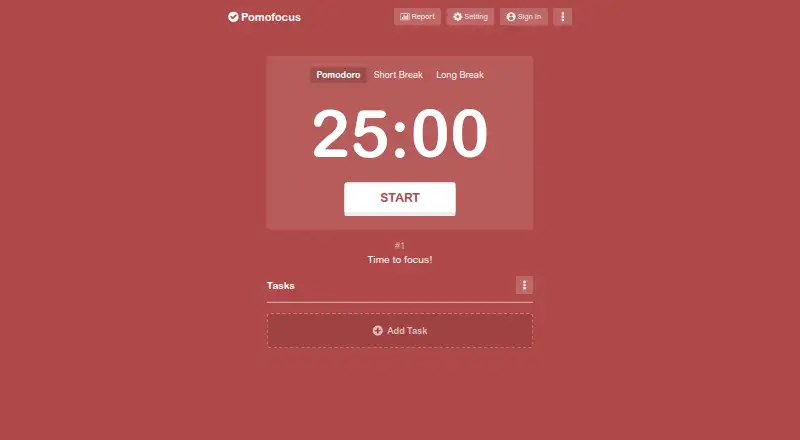
Pomofocus is a customizable Pomodoro timer for desktop and mobile browsers, with downloads for Linux, macOS, and Windows. It is designed to help people focus on work such as studying, writing, or coding. Add tasks, estimate the number of Pomodoro sessions each needs, select a task, then work in 25-minute blocks with five-minute breaks. Focus and break durations, alarm sounds, and background sounds can be adjusted. The free plan includes estimated finish times, task templates, visual reports of focused time by day, week, and month, and custom settings. Templates let users save recurring tasks for one-click addition. Premium adds project time tracking, yearly reports, CSV downloads, more than three templates, Todoist and webhook integrations, and an ad-free experience. Todoist can bring tasks into Pomofocus, while webhooks connect it with services such as Zapier and IFTTT. Desktop downloads are available for Mac, Windows, and Linux; Windows may show an unsafe-app warning because its application is not signed with a developer certificate. Use is limited to personal, non-commercial purposes. The service may collect cookies and usage data, and information from users outside Japan may be processed in Japan.
Good
- Adjustable focus and break durations, sounds, and other settings
- Daily, weekly, and monthly visual focus reports
- Task templates can be added with one click
- Desktop downloads for Linux, macOS, and Windows
- Todoist and webhook integrations are available with Premium
Watch out
- Use is limited to personal, non-commercial purposes
- Windows may show an unsafe-app warning
- The privacy policy says absolute data security cannot be guaranteed
Who it suits
Pomofocus suits people who want structured focus and break intervals while studying, writing, coding, or handling other tasks. Its task templates and reports may help people who want a record of focused time, while Premium is aimed at users who need project tracking, exports, or integrations.
Verdict
Choose Pomofocus if you want a browser-based Pomodoro timer with customizable intervals, task templates, and focus reports.
Plans and prices
From Pomofocus's own pricing page, checked 30 Sep 2026.
| Plan | Price | What it gives you |
|---|---|---|
| Free | Free | estimate finish time · templates · visual reports · custom settings |
| Premium | Priced on request | projects · yearly reports · CSV downloads · more than 3 templates · Todoist integration · webhook integration · no ads |
The facts
Each one read from Pomofocus's own pages, with the date it was checked.
What it does
- Advertising
- The privacy policy says Pomofocus works with third-party advertising partners that may use cookies or similar technologies.checked 30 Sep 2026
- Basic features
- Basic features include estimated finish times, task templates, daily, weekly, and monthly visual reports, and customizable focus and break times, alarm sounds, and background sounds.checked 30 Sep 2026
- Basic reporting
- Visual reports show focused time by day, week, and month.checked 30 Sep 2026
- Customization
- Users can personalize focus and break durations, alarm sounds, background sounds, and other settings.checked 30 Sep 2026
- Data location
- The privacy policy says information from users outside Japan may be transferred to and processed in Japan.checked 30 Sep 2026
- Desktop downloads
- The site provides downloads for Mac, Windows, and Linux and warns that Windows may show an unsafe-app warning because the app is not signed with a developer certificate.checked 30 Sep 2026
- Integrations
- The site says Todoist can load tasks into Pomofocus and webhooks can connect it to other apps such as Zapier and IFTTT.checked 30 Sep 2026
- Premium exports
- Premium users can view yearly focus reports and download focus history in CSV format.checked 30 Sep 2026
- Premium features
- Premium features include project tracking, yearly reports, CSV report downloads, more than three templates, Todoist and webhook integrations, and an ad-free experience.checked 30 Sep 2026
- Premium projects
- Premium features include projects for tracking time spent on each project.checked 30 Sep 2026
- Privacy data
- The privacy policy says the service may collect cookies and usage data, including IP address, browser details, pages visited, visit times, and diagnostic data.checked 30 Sep 2026
- Purpose
- Pomofocus is a customizable Pomodoro timer for desktop and mobile browsers intended to help users focus on tasks such as studying, writing, or coding.checked 30 Sep 2026
- Refunds
- The legal notice says full refunds are accepted within seven days of the payment date.checked 30 Sep 2026
- Security
- The privacy policy says the service strives to use commercially acceptable means to protect personal data but cannot guarantee absolute security.checked 30 Sep 2026
- Security statement
- Pomofocus says it uses commercially acceptable measures to protect personal data but cannot guarantee absolute security.checked 30 Sep 2026
- Support
- The contact page offers support by email, Twitter, and Facebook.checked 30 Sep 2026
- Task workflow
- The site describes adding tasks, estimating pomodoros for each task, selecting a task, and working in 25-minute intervals followed by five-minute breaks.checked 30 Sep 2026
- Templates
- Users can save repetitive tasks as templates and add them with one click.checked 30 Sep 2026
- Usage terms
- The terms permit personal, non-commercial use and prohibit reverse-engineering, decompiling, or disassembling the website.checked 30 Sep 2026
- Use limits
- The terms say Pomofocus may be used for personal, non-commercial purposes.checked 30 Sep 2026
- What it does
- Pomofocus is a customizable Pomodoro timer for desktop and mobile browsers intended to help users focus on tasks such as studying, writing, or coding.checked 30 Sep 2026
The company
- Headquarters
- Shibuya-ku, Tokyo, Japanchecked 23 Sep 2026
Where it runs
- Windows warning
- The Windows application is not signed with a developer certificate, so Windows may display an unsafe-app warning.checked 30 Sep 2026
The full review of Pomofocus
Overview
Pomofocus is a task-oriented Pomodoro timer that runs in desktop and mobile browsers, with downloads for desktop systems. It is best suited to people who want a simple structure for individual study or focused work. Its free plan covers the core timer, task list, and short-term reports; project tracking and data exports are reserved for Premium.
Flexible intervals and reusable templates make it more adaptable than a fixed-cycle timer, while its personal, non-commercial terms rule it out for some workplace uses. The Windows download may also trigger an unsafe-app warning because it is unsigned.
Key features
Tasks and timing
Users can add tasks, estimate how many Pomodoros each needs, select one, and work in 25-minute sessions with five-minute breaks. Focus and break durations are customizable, as are alarm and background sounds. That makes the standard cycle a useful default rather than a constraint for people who prefer shorter or longer sessions.
Estimated finish times help with planning, and templates let users add recurring tasks with one click. Free includes templates, but Premium is needed to keep more than three. This is a practical distinction for users with a small routine, less so for anyone organizing many repeatable tasks.
Reports and integrations
Daily, weekly, and monthly visual reports show focused time. They should be sufficient for a quick view of recent activity; Premium adds yearly reports and CSV downloads for users who want a longer history or to work with the data elsewhere. Premium project tracking also separates time by project, a useful upgrade for people managing several streams of work.
Todoist integration can load tasks into Pomofocus, while webhooks can connect it with services such as Zapier and IFTTT. Both are Premium features. The service does not offer calendar integration, so users who need a timer tied to a calendar workflow should look elsewhere.
Pricing
Pomofocus is freemium. Free costs nothing and includes estimated finish times, templates, visual reports, and custom settings. It is a reasonable fit for a personal routine that stays within three templates and needs reports only through the monthly view.
Premium has custom pricing. It adds project tracking, yearly reports, CSV downloads, more than three templates, Todoist and webhook integrations, and an ad-free experience. It is the better fit for users who need those tracking and workflow tools, but the free plan remains the more sensible choice for basic timed work.
Full refunds are accepted within seven days of the payment date. The terms permit personal, non-commercial use and prohibit reverse-engineering, decompiling, or disassembling the website.
Platforms
Pomofocus supports web, Linux, macOS, and Windows, with desktop downloads for the three computer operating systems. The Windows app is not signed with a developer certificate, so Windows may display an unsafe-app warning. The service is based in Shibuya-ku, Tokyo, and says data from users outside Japan may be transferred to and processed in Japan.
Its privacy policy says it may collect cookies and usage data, including IP address, browser details, pages visited, visit times, and diagnostic data. Third-party advertising partners may use cookies or similar technologies. Pomofocus says it uses commercially acceptable measures to protect personal data but cannot guarantee absolute security.
Who it's for
Pomofocus suits students and individual writers, coders, or other users who want task-based timed sessions and a quick record of focused time without paying for the core routine. Premium makes more sense for people who need project-level tracking, yearly summaries, CSV exports, or integrations. It is not a fit for commercial use under its stated terms, or for users who require calendar integration.
Pros and cons
- Pros: Custom focus and break durations let users adapt the timer to their preferred work rhythm.
- Pros: The free plan combines tasks, templates, estimated finish times, and daily-to-monthly reports.
- Pros: Premium offers project tracking, CSV exports, yearly reports, and integrations for users with more involved workflows.
- Cons: Free templates are limited to three, and project tracking, yearly reports, exports, and integrations require Premium.
- Cons: Personal, non-commercial terms exclude business use.
- Cons: The Windows app may show an unsafe-app warning, and the privacy policy allows usage-data collection and transfers to Japan for users outside the country.
Alternatives
For an offline, open-source timer that keeps session logs and preferences on the device, choose Pomozen; it also supports mobile platforms alongside desktop and web. For study-group tools or more structured tracking, StudiesTimer is an alternative, with its free plan including labels, a weekly goal, study groups, AI credits, and a limited to-do list.
If flashcards are the priority rather than timed task sessions, Brainscape focuses on flashcards, with a Basic plan offering 2,500 pre-loaded cards and a Pro plan at $7.99 a year. For other study-timer choices, see Study Timer Apps or Pomodoro Timer Apps.
Verdict
Choose Pomofocus for an adaptable, task-based Pomodoro routine with useful free reports and a clear path to project tracking and exports. Look elsewhere if you need commercial-use rights, calendar integration, or an offline-first setup; for everyone else who wants focused sessions without a paid plan, its free tier is a strong starting point.
Getting started
- Open https://pomofocus.io/ in a desktop or mobile browser
- Add tasks and estimate the Pomodoro sessions needed for each
- Select a task and begin a 25-minute work interval followed by a five-minute break
- Adjust focus and break times, alarm sounds, and background sounds as desired
- Download the Mac, Windows, or Linux application from the site if you prefer a desktop app
Limits worth knowing
The free plan includes estimated finish times, templates, visual reports, and custom settings. Project tracking, yearly reports, CSV downloads, more than three templates, Todoist and webhook integrations, and the ad-free experience are Premium features.
Questions
Is Pomofocus free?
Yes. The Free plan is free and includes estimated finish times, templates, visual reports, and custom settings.
What platforms does Pomofocus support?
It works in desktop and mobile browsers, and desktop downloads are available for Mac, Windows, and Linux.
What does Premium add?
Premium includes project tracking, yearly reports, CSV report downloads, more than three templates, Todoist and webhook integrations, and an ad-free experience.
Does Pomofocus integrate with other apps?
Premium includes Todoist and webhook integrations. Todoist can load tasks into Pomofocus, and webhooks can connect it to apps such as Zapier and IFTTT.
Can Pomofocus be used for commercial work?
The terms permit personal, non-commercial use.
What data does Pomofocus say it may collect?
Its privacy policy says it may collect cookies and usage data, including IP address, browser details, pages visited, visit times, and diagnostic data. Information from users outside Japan may be transferred to and processed in Japan.
Alternatives to Pomofocus
- 1
Pomodoist
Free planOpen sourceAndroidiOSWebAPI8.6Free plan - 2

Forest
Free planAndroidiOSWebExtension8.1From $35.99 a year - 3
Pomodoro PWA Timer
Free planAndroidiOSWebAPI8.0From $49 a month - 4
Focus To-Do
Free planAndroidiOSWebExtension7.6Free plan - 5
PomoDial
Free planWebExtension7.2From $2.99 a month - 6
Pomodorome
Free planiOSmacOS6.9$5 one-time