Pomozen
Pomozen is an open-source Pomodoro timer for arranging focused work periods and breaks.
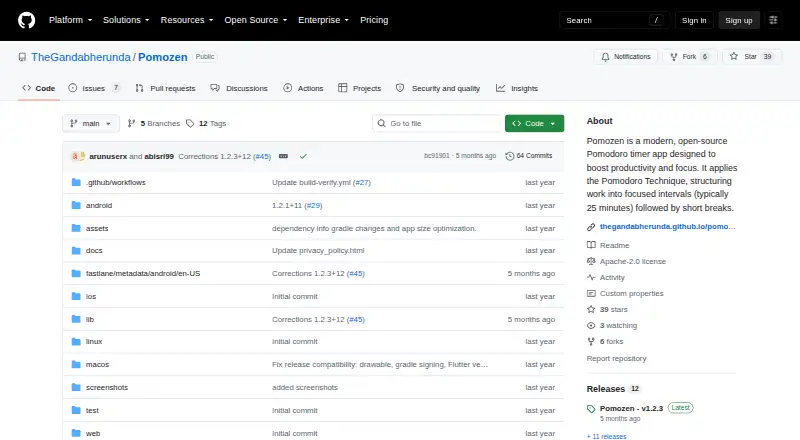
What Pomozen is
Pomozen is an open-source Pomodoro timer for arranging focused work periods and breaks. Its default cycle sets 25 minutes of focus, a 5-minute short break, and a 15-minute long break; users can change durations, session count, and reminder behavior. Presets make it possible to select timer values quickly. Custom notifications help mark transitions between focus and break periods, and separate reminders prompt users to drink water. Pomozen tracks focus sessions, break times, and productivity patterns, with custom labels for tasks or activities. The maker says the timers, logs, and all other features work offline. Session logs and preferences are stored on the device, and the maker says the app collects no data. It is licensed under Apache License 2.0 and listed as free, with no free trial. The releases page identifies v1.2.3 as the latest release and describes Ambient Mode in that version. The README directs Android users to download a release and install the APK. The maker invites bug reports, feature suggestions, and pull requests; its contributing guide is marked as coming soon.
Good
- Customizable focus and break durations
- Tracks sessions and productivity patterns
- Timers and logs work offline
- Preferences and logs stay on device
Watch out
- No third-party integrations are listed
- Glyph feature support was dropped in v1.1.0
- Contributing guide is marked as coming soon
Who it suits
Pomozen suits people who want a customizable Pomodoro timer with task labels, progress statistics, and offline logs. The provided installation instructions are for Android APKs.
Verdict
Pomozen combines configurable work-break cycles with offline tracking and on-device storage. Android users can follow the listed APK installation route; users of Glyph-supported devices should note the stated removal of Glyph support.
Plans and prices
From Pomozen's own pricing page, checked 9 Oct 2026.
| Plan | Price | What it gives you |
|---|---|---|
| Free | Free | Open-source Pomodoro timer; offline use; session logs and preferences stored on device |
The facts
Each one read from Pomozen's own pages, with the date it was checked.
What it does
- Distribution
- The README directs users to download a release and install the APK on Android.checked 8 Oct 2026
- Hydration
- Pomozen includes reminders to drink water throughout the day.checked 9 Oct 2026
- Integrations
- The maker's README lists no third-party integrations.checked 8 Oct 2026
- License
- Pomozen is licensed under the Apache License 2.0.checked 9 Oct 2026
- Offline use
- The maker says timers, features, and logs work offline.checked 9 Oct 2026
- Privacy
- The maker says Pomozen collects no data and stores session logs and preferences only on the device, without sending them to external servers or third parties.checked 9 Oct 2026
- Purpose
- Pomozen is an open-source Pomodoro timer app for focused work intervals and breaks.checked 9 Oct 2026
- Release
- The releases page lists v1.2.3 as the latest release and says it added Ambient Mode and Ukrainian language support.checked 9 Oct 2026
- Release limitation
- The maker says v1.1.0 dropped support for the Glyph feature, affecting devices that support Glyph.checked 9 Oct 2026
- Reminders
- Customizable notifications help users transition between focus and break periods.checked 9 Oct 2026
- Statistics
- The app tracks focus sessions, break times, and productivity patterns, with custom labels for tracking tasks or activities.checked 9 Oct 2026
- Support and contributions
- The maker invites users to report bugs, suggest features, and submit pull requests; the linked contributing guide is marked as coming soon.checked 9 Oct 2026
- Timer
- The default Pomodoro cycle is 25 minutes of focus, a 5-minute short break, and a 15-minute long break, and users can customize the durations and session count.checked 9 Oct 2026
- Timer presets
- Predefined timer presets let users quickly select timer values.checked 9 Oct 2026
- Timer settings
- The default cycle is 25/5/15, and users can adjust focus time, short and long breaks, session count, and reminder behavior.checked 8 Oct 2026
Where it runs
- Platforms
- The repository includes web, Windows, macOS, Linux, iOS, and Android project directories, and its getting-started instructions describe installing an Android APK.checked 9 Oct 2026
The full review of Pomozen
Overview
Pomozen is an open-source timer for structuring focused work and breaks. It suits Android users who want adjustable cycles, personal session tracking and offline operation. Its appeal is a simple, private workflow; the trade-off is Android-only support and APK installation.
Key features
The default cycle is 25 minutes of focus, a 5-minute short break and a 15-minute long break. You can adjust those durations, the number of sessions and reminder behavior, or choose a preset for faster setup. That flexibility makes Pomozen a reasonable fit when a standard Pomodoro rhythm needs tweaking, though it remains a timer-centered tool rather than a connected productivity suite.
Customizable notifications mark focus-to-break transitions, and separate hydration reminders can prompt a pause for water. Logs track focus sessions and break times; productivity patterns and custom task labels help organize the record by activity. Those features support personal review, but the README lists no third-party integrations, so Pomozen is a poor fit if timer activity needs to flow into other services.
The maker says timers, logs and other features work offline, with preferences and session logs kept on the device and no data collected. That is a meaningful advantage for people who prefer local tracking, although it also means the product is not presented as a cross-service or cloud-synced tracker. The latest release is v1.2.3, which introduces Ambient Mode. Users of Glyph-supported devices should be aware that support for the Glyph feature was dropped in v1.1.0.
Pricing
Pomozen is free: the Free plan costs nothing and includes the open-source Pomodoro timer, offline use, and session logs and preferences stored on the device. There is no free trial because the software is free rather than a time-limited offer. The Apache License 2.0 and invitation to submit bug reports, feature suggestions and pull requests make it a fit for users comfortable with open-source software. The contributing guide is marked as coming soon, so prospective contributors should not expect a completed contribution process.
Platforms
Pomozen is supported on Android. The README directs Android users to download a release and install its APK, which requires more manual setup than installing through a typical app store. It is not a fit for readers who need the same timer on desktop, web or iOS.
Who it's for
Choose Pomozen if you want a free, configurable focus timer with break and hydration reminders, task labels and on-device logs, and you are comfortable installing an Android APK. Look elsewhere if you need integrations, Glyph support, or a timer available across multiple operating systems.
Pros and cons
- Pro: Adjustable focus and break durations, session count and reminder behavior make the cycle adaptable to different routines.
- Pro: Offline operation and on-device logs suit users who want sessions kept local.
- Pro: Custom labels and productivity patterns add useful context to session and break tracking.
- Con: Android APK installation takes more manual effort than a standard store install.
- Con: No third-party integrations limits its usefulness in connected workflows.
- Con: Glyph feature support was removed, ruling it out for users who rely on that device feature.
Alternatives
Browse Study Timer Apps for a wider set of study-focused options. Choose Pomofocus instead if you want Linux, macOS, web or Windows support, templates, visual reports and an estimate of finish time; its Premium plan adds projects, yearly reports and CSV downloads. Brainscape is the better fit for flashcard study, with 2,500 pre-loaded cards in Basic and a Pro plan that includes unlimited AI flashcard creation and certified flashcards.
Study Bunny is another option for Android, iOS and macOS users who want a study app with ads and in-app purchases. YPT - Yeolpumta likewise spans Android, iOS and macOS, with a free-to-download app that contains ads and in-app purchases. Choose EstudyLog if you want core study tracking on its free plan or unlimited sessions and up to 20 courses on its $3.99 per month plan.
FlashPrep is an alternative for Android and web users, with a free plan priced at ₹0 forever. FLIP offers Android and iOS support and a free download with ads and in-app purchases; its $0.99 per month membership adds unlimited goals, groups and to-do lists. StudiesTimer is worth considering if you want Android, iOS or web access and a free plan with three labels, one weekly goal and access to study groups.
Verdict
Pomozen is a solid choice for Android users who want a free, adjustable Pomodoro timer with offline, on-device tracking. Its privacy-minded local approach is the main reason to choose it; APK setup, no integrations and the loss of Glyph support are good reasons to look elsewhere.
Getting started
- Visit the Pomozen GitHub website.
- Download a release from the GitHub project.
- On Android, install the downloaded APK.
- Set focus and break durations, session count, and reminder behavior.
- Choose a preset or label tasks and activities.
Questions
How much does Pomozen cost?
The listed plan is free. Pomozen is open source, and there is no free trial.
Which platforms are supported?
The listed platform set includes Android, iOS, Linux, macOS, web, and Windows. The README describes downloading a release and installing the APK on Android.
Is Pomozen open source?
Yes. It is licensed under Apache License 2.0.
Does it work offline?
The maker says all features, timers, and logs work offline. Session logs and preferences are stored on the device.
Does Pomozen integrate with other services?
The maker's README lists no third-party integrations.
Does Pomozen support Glyph?
The maker says v1.1.0 dropped Glyph support, affecting devices that support Glyph.
Alternatives to Pomozen
- 1

Brainscape
Free planAndroidiOSWebAPI8.2From $7.99 a month - 2

Forest
Free planAndroidiOSWebExtension8.1From $35.99 a year - 3
Study Bunny
Free planAndroidiOSmacOS7.8$1.99 one-time - 4
Cloud Outliner
Free planiOSmacOS7.7$4.99 one-time - 5
FLIP
Free planAndroidiOS7.4From $8.99 a year - 6
FlashPrep
Free planAndroidWeb7.3From ₹499 a year