
PomoTimer
PomoTimer is a focus timer for browser-based work sessions and breaks.
What PomoTimer is
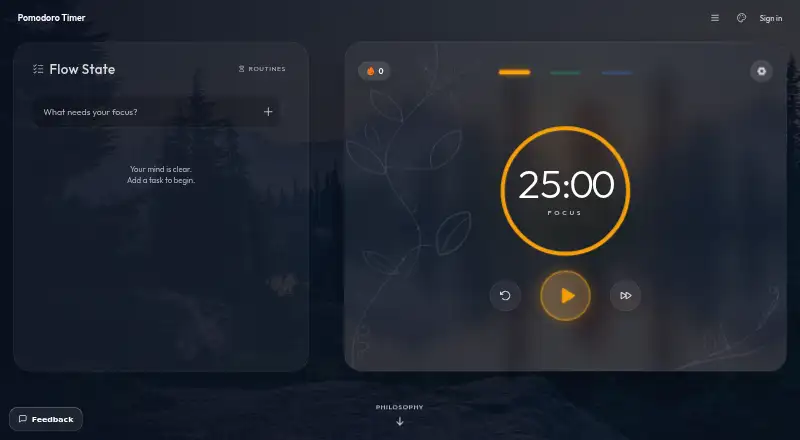
PomoTimer is a focus timer for browser-based work sessions and breaks. Its standard cycle is 25 minutes of focus followed by a break, with presets for 25/5, 50/10, 90/20, and 15/3. You can also choose custom focus and break lengths, and breaks can start automatically. Completed sessions are saved in the browser for daily and all-time counts. The web timer can sit in an always-on-top Picture-in-Picture window in desktop Chrome and Edge. A free Windows desktop app adds a frameless floating window, adjustable opacity and frost, a draggable minimised keycap, in-window settings, chimes, and click-through mode; it also runs offline after installation. Unsigned-in web users’ tasks, settings, and history remain in browser storage and are not sent to the site. Google sign-in is needed to download the desktop app and sync data. Signed-in users appear on a public leaderboard by default, with an option to hide their listing in Preferences. The maker is Gazala Farheen, who works independently.
Good
- Free web timer requires no sign-up.
- Custom focus and break durations are available.
- Completed sessions have daily and total counts.
- Installed Windows app runs offline.
- Web data stays in browser storage when unsigned in.
Watch out
- The native desktop app supports Windows only.
- Google sign-in is required for desktop downloads and syncing.
- Leaderboard listing is public by default for signed-in users.
- Support has no ticket system or support desk.
Who it suits
PomoTimer suits people who want a browser focus timer with customizable work and break intervals, or a floating Windows desktop timer. It also fits users who want local session counts and an offline-running installed app.
Verdict
PomoTimer offers a free browser timer with flexible intervals and locally stored session counts. The Windows app adds offline use and floating controls, but downloading it and syncing require Google sign-in.
Plans and prices
From PomoTimer's own pricing page, checked 3 Oct 2026.
| Plan | Price | What it gives you |
|---|---|---|
| Free desktop app | Free | Windows only · Google sign-in required · unsigned build |
| Free web timer | Free | No sign-up · no paywall · runs in browser |
The facts
Each one read from PomoTimer's own pages, with the date it was checked.
What it does
- Analytics and advertising
- The site says it uses Google Analytics 4 and may show Google AdSense ads; in the EEA, UK and Switzerland, these cookies are off until consent.checked 3 Oct 2026
- Data storage
- For unsigned-in web users, tasks, settings and session history stay in browser local storage and are not sent to the site.checked 3 Oct 2026
- Desktop features
- The desktop float includes adjustable opacity and frost, a minimised draggable keycap, in-window settings, chimes and click-through ghost mode.checked 3 Oct 2026
- Floating timer
- The web timer can open in an always-on-top Picture-in-Picture window in Chrome and Edge on desktop.checked 3 Oct 2026
- Leaderboard
- Signed-in users appear on the public leaderboard by default, and can turn off their listing in Preferences.checked 3 Oct 2026
- Offline use
- The installed desktop app keeps running offline.checked 3 Oct 2026
- Session tracking
- Completed sessions are saved locally in the browser so users can view daily and total counts.checked 3 Oct 2026
- Support
- Support is by email to the independent maker, who aims to reply within a few days; there is no support desk or ticket system.checked 3 Oct 2026
- Sync and account data
- Google sign-in is required for desktop downloads and syncing; signed-in data includes email, account ID, sessions, task list and preferences.checked 3 Oct 2026
- Timer presets
- Presets include 25/5, 50/10, 90/20 and 15/3, and users can set custom focus and break durations.checked 3 Oct 2026
- What it does
- A browser based focus timer that runs 25-minute work sessions followed by breaks.checked 3 Oct 2026
Where it runs
- Desktop app
- A free native desktop app provides a frameless, always-on-top window and currently supports Windows only.checked 3 Oct 2026
The company
- Maker
- The about page says the timer is built and maintained by Gazala Farheen, working independently.checked 3 Oct 2026
Alternatives to PomoTimer
- 1
Pomodoist
Free planOpen sourceAndroidiOSWebAPI8.6Free plan - 2

Forest
Free planAndroidiOSWebExtension8.1From $35.99 a year - 3
Pomodoro PWA Timer
Free planAndroidiOSWebAPI8.0From $49 a month - 4
Focus To-Do
Free planAndroidiOSWebExtension7.6Free plan - 5
PomoDial
Free planWebExtension7.2From $2.99 a month - 6

Pomofocus
Free planWebLinuxmacOSWindows7.0Free plan