Explain Everything
Explain Everything is a digital whiteboard for teaching, creating interactive lessons, recording tutorials, and collaborating.
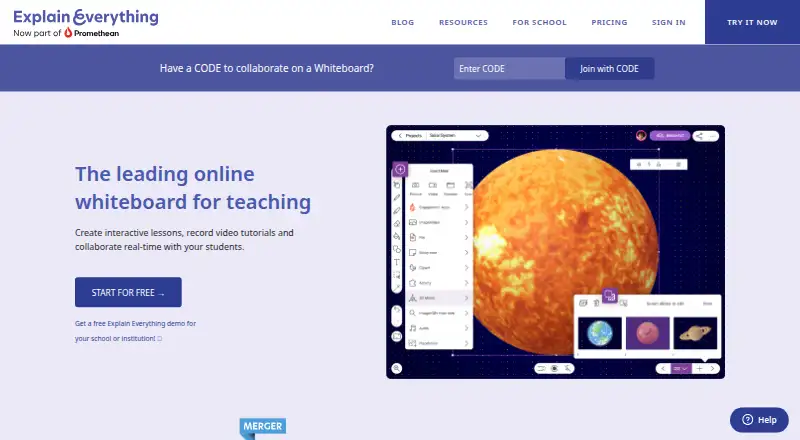
What Explain Everything is
Explain Everything is a digital whiteboard for teaching, creating interactive lessons, recording tutorials, and collaborating. Its canvas has no fixed edge and accepts documents, presentations, images, audio, and video for users to work with. Users can record narration and board activity, edit recordings, and render videos in Explain Drive. Collaboration can be live or asynchronous, with invitations by link or access code and built-in voice chat. Integrations include Dropbox, Google Drive, YouTube, OneDrive, and Schoolwork, along with LMS assignment tools including Canvas, Schoology, Moodle, and Blackboard. It runs on Android, iOS, and the web. The free plan permits three projects, one slide per project, videos up to three minutes, one collaborator, 15-minute collaboration sessions, and 500 MB of cloud storage. Pro is $9.99 per month; Team is $9.99 per user per month. Explain Everything has been a teaching platform since 2010 and is part of Promethean.
Good
- Whiteboard supports documents, presentations, images, audio, and video.
- Recordings can include narration and canvas activity.
- Collaboration supports voice chat and asynchronous work.
- Integrates with several cloud services and LMS platforms.
- Runs on Android, iOS, and the web.
Watch out
- Free plan is limited to three projects.
- Free videos are limited to three minutes.
- Free storage is limited to 500 MB.
- Pro costs $9.99 per month.
Who it suits
Explain Everything suits teachers and schools creating lessons, as well as tutors, creatives, facilitators, and business consultants who need a whiteboard and video creation tools. Teams can use it for live or asynchronous collaboration.
Verdict
Explain Everything combines a flexible whiteboard with lesson and tutorial recording, plus live and asynchronous collaboration. The free plan has tight project, video, collaboration, and storage limits; Pro and Team are paid options.
Plans and prices
From Explain Everything's own pricing page, checked 19 Oct 2026.
| Plan | Price | What it gives you |
|---|---|---|
| Free | Free | Up to 3 projects · 1 slide per project · 3-minute videos · 1 collaborator · 15-minute collaboration · 500 MB storage · €0; no credit card required |
| Pro | $7.49 a month | Unlimited projects and slides · unrestricted video length · 20 GB storage · up to 8 collaborators · email support · Billed yearly; €9.99/month billed monthly |
| Team | $7.49 a month | Team settings and management · shared folders · 20 GB pooled storage per person · data-region choice · onboarding for teams above 50 · Per user, billed yearly; €9.99/month billed monthly |
| School | Priced on request | 100 student licenses per teacher license |
| Advanced | €59 a year | Unlimited projects and slides · unrestricted video length · 1 collaborator · 30-minute collaboration · 7.5 GB storage · Polling, Timer and Spinner · €59 / year |
| Custom Pricing for Schools | Priced on request | Custom features and volume pricing · LMS integrations · Flexible license deployment · Expanded collaboration · Professional development |
The facts
Each one read from Explain Everything's own pages, with the date it was checked.
What it does
- API and SDKs
- The official site and Help Center pages opened describe integrations and deployment controls but do not list a public API or SDK.checked 19 Oct 2026
- Audience
- The maker describes Pro as designed for tutors, creatives, facilitators, and business consultants, and says schools, universities, and companies use the product.checked 4 Oct 2026
- Collaboration
- Users can invite others by link or access code, collaborate synchronously or asynchronously and use built-in voice chat.checked 19 Oct 2026
- Data storage
- The maker states that data is stored in an AWS SOC2-certified data center in North Virginia.checked 4 Oct 2026
- Documentation and support
- The Help Center provides quick-start, account, media, licensing and platform articles; paid plans include email support, while larger teams can receive onboarding and training.checked 19 Oct 2026
- Google for Education
- Schools can provision Explain Everything licenses through the Google Admin console, and students can sign in with Google EDU accounts.checked 4 Oct 2026
- Group controls
- Administrators can set parental gates, browser passwords, analytics preferences, import/export destinations, voice-chat controls and ad-hoc iOS collaboration.checked 19 Oct 2026
- Infinite canvas
- The whiteboard provides an expandable infinite canvas for drawings and visual notes.checked 19 Oct 2026
- Integrations
- Official integrations include Google Drive, Dropbox, YouTube, OneDrive, Schoolwork and LMS connections for Canvas, Schoology, Moodle and Blackboard.checked 19 Oct 2026
- Interactive presentations
- Users can import presentations, draw on them and add slides for interactive teaching.checked 19 Oct 2026
- Licence
- The terms grant permission to use the service and prohibit copying or distributing it; Explain Everything is described as a proprietary Promethean trademark.checked 19 Oct 2026
- Limit: Google Drive workflow
- A G2 reviewer reports that importing Google Drive files on iPad requires installing the Drive app, which complicates shared-device use.checked 19 Oct 2026
- Limit: learning curve
- G2 reviewers say first-time users and younger students may need instruction because the feature set can initially feel difficult.checked 19 Oct 2026
Where it runs
- Apple features
- On iPad, the product lists Split View drag and drop, 3D objects through Sketchfab, SharePlay on FaceTime, and screen mirroring.checked 4 Oct 2026
- Limit: Android reliability
- A Google Play reviewer reported reverted changes, an unexpected app closure and lost edits on the Android version.checked 19 Oct 2026
The company
- Company
- The About page says Explain Everything has been a teaching platform since 2010, lists Wrocław, Poland as its headquarters, and identifies Promethean as its parent brand.checked 4 Oct 2026
- Company facts
- LinkedIn lists Explain Everything as privately held, founded in 2015, headquartered in New York and sized at 51–200 employees.checked 19 Oct 2026
- Company legal name
- Crunchbase lists the legal name as Explain Everything, Inc.checked 19 Oct 2026
- Company locations
- LinkedIn lists a primary New York address and an additional location in Wrocław, Poland.checked 19 Oct 2026
- Company ownership
- Crunchbase lists Explain Everything as acquired by and a sub-organization of Promethean.checked 19 Oct 2026
- Founded
- 2010checked 28 Sep 2026
- Headquarters
- Wrocław, Polandchecked 28 Sep 2026
Money
- Free-plan limits
- The free plan allows up to three projects, one slide per project, videos up to three minutes, and 500 MB of cloud storage.checked 4 Oct 2026
- Limit: free-plan restrictions
- A Google Play reviewer objected that the free plan limits users to one slide and requires payment for broader functionality.checked 19 Oct 2026
The full review of Explain Everything
Explain Everything is a teaching-oriented whiteboard and recording tool for turning visual explanations into lessons or tutorials. It is best suited to educators, tutors, and facilitators who need a shared canvas as well as a way to record it. Its broad workflow is compelling, but the free plan is too constrained for regular projects.
Overview
The service brings an infinite canvas, video creation, and collaboration into one workspace. Users can place documents, presentations, images, audio, and video on the canvas, then record narration and canvas activity, edit the recording, and render it in Explain Drive. That makes it a stronger fit for teaching and guided explanations than for a basic board used only to exchange notes.
Collaboration works synchronously or asynchronously, with access by link or code and built-in voice chat. Presentation mode, diagramming, guest collaboration, and voting tools broaden its usefulness for structured sessions. The three-board limit remains a practical constraint for people who want multiple ongoing workspaces.
Key features
Canvas and recording
The open canvas can bring varied source material into one explanation, and recording captures both the narration and activity on the board. Editing and cloud rendering complete a workflow from lesson to video. This is useful for educators making reusable tutorials, though it is more machinery than needed for simple note sharing.
Collaboration and integrations
Live and asynchronous modes let participants contribute at different times, while voice chat supports real-time sessions. Dropbox, Google Drive, YouTube, and OneDrive integrations connect the board with external cloud services; LMS project assignments are supported for Canvas, Schoology, Moodle, and Blackboard. Schools can provision licenses through Google Admin, and students can sign in with Google EDU accounts.
On iPad, the product also supports Split View drag and drop, Sketchfab 3D objects, SharePlay on FaceTime, and screen mirroring. These features make it particularly relevant to Apple-based teaching workflows, rather than establishing a reason for every user to choose it.
Pricing
The free plan costs nothing and caps users at three projects, one slide per project, three-minute videos, one collaborator, 15-minute collaboration sessions, and 500 MB of cloud storage. Those limits are enough to explore the workflow, but they sharply restrict classroom use or recurring video production.
Pro costs $9.99 a month, billed monthly. It removes project, slide, and video-length limits, provides 20 GB of storage, allows up to eight collaborators without a time limit, and includes email support. This is the clearest fit for an individual tutor, creative, facilitator, or consultant who needs room to produce and collaborate regularly.
Team costs $9.99 a month per user, billed monthly. It adds team settings and management, shared folders, 20 GB of pooled storage per person, and a choice of data residency region. Teams above 50 people also receive an account manager and onboarding. The per-user charge makes this a more deliberate choice than Pro for groups needing shared administration.
Advanced has custom pricing, 7.5 GB of storage, one collaborator, and 30-minute collaboration sessions. School has custom pricing and provides 100 student licenses per teacher license. Custom Pricing for Schools has custom pricing and includes LMS integrations, flexible license deployment, expanded collaboration, professional development, and custom features and volume pricing. All plans include an online Help Center; Pro adds email support, while school custom plans include priority email support.
Platforms
Explain Everything is available on Android, iOS, and the web. Its iPad-specific tools make the iOS option especially capable for users who teach or present from an iPad.
Who it's for
Teachers and tutors who need to assemble mixed media, explain it on a canvas, and preserve the result as a video are the strongest match. Facilitators and business consultants can also benefit from the presentation and collaboration tools. People seeking only a lightweight shared whiteboard, or who need a generous free workspace, should look elsewhere.
Promethean says it complies with GDPR for collection, use, and retention of personal information from EU member countries. The service is not certified by an FTC-approved COPPA safe harbor program. Data is stored in an AWS SOC2-certified data center in North Virginia, a relevant consideration for schools and organizations assessing privacy and data-location requirements.
Pros and cons
- Pros: An infinite canvas accepts multiple media types, and narration plus canvas recording turns lessons into editable videos.
- Pros: Synchronous and asynchronous collaboration, guest access, and voice chat support different teaching formats.
- Pros: LMS assignments and Google EDU provisioning make it a practical candidate for school workflows.
- Cons: The free plan's project, slide, video, collaborator, session, and storage caps limit sustained use.
- Cons: The three-board limit may frustrate users maintaining several continuing workspaces.
- Cons: School and custom school plans use custom pricing, so institutions cannot compare a fixed published cost.
Alternatives
For a broader category comparison, browse Explainer Video Software, Presentation Recording Software, Collaborative Whiteboard Software, or Online Whiteboard Tools.
Choose Animaker when animation tools and premium assets matter more than a teaching whiteboard; its free exports are watermarked and premium assets are limited. Powtoon is another option for screen recording and template-based video, though its free plan is limited to 720p and three-minute videos and adds a watermark. Doratoon offers a free animation-oriented plan with 150+ templates and 10 downloads per month, but exports carry a watermark and are limited to 720p.
Golpo AI is an alternative for AI video creation, with one one-minute video on its free plan. Mango Animation Maker is a desktop alternative for macOS and Windows. Renderforest Slideshow Maker is an alternative for slideshow creation, while Steve AI is an alternative for AI video creation. CoAnimator is an alternative for animation creation.
Verdict
Choose Explain Everything if you teach, tutor, or facilitate and want one workspace for mixed-media explanations, collaboration, and recorded lessons. Its decisive advantage is that it can turn activity on a flexible whiteboard into a video. Look elsewhere if you need a generous free tier, many boards, or a published school price before committing.
Getting started
- Open the Explain Everything website
- Choose the free plan, Pro, Team, Advanced, School, or custom school option
- Use Explain Everything on Android, iOS, or the web
- Create a whiteboard project and import supported documents, presentations, images, audio, or video
- Invite collaborators with a link or access code
- Schools can provision licenses through Google Admin and students can sign in with Google EDU accounts
Limits worth knowing
The Free plan permits up to three projects, one slide per project, three-minute videos, one collaborator, 15-minute collaboration sessions, and 500 MB of cloud storage. Pro removes project, slide, and video-length limits, with 20 GB storage and up to eight collaborators; Team provides 20 GB pooled storage per person.
Questions
Is Explain Everything free?
Yes. The Free plan costs nothing and includes three projects, one slide per project, three-minute videos, one collaborator, 15-minute sessions, and 500 MB storage.
What does Pro cost?
Pro costs $9.99 a month, billed monthly.
Which platforms are supported?
Explain Everything runs on Android, iOS, and the web.
What integrations are available?
Listed integrations include Dropbox, Google Drive, YouTube, OneDrive, Schoolwork, Canvas, Schoology, Moodle, and Blackboard.
Can schools manage licenses centrally?
Schools can provision licenses through the Google Admin console, and students can sign in with Google EDU accounts.
Who makes Explain Everything?
The product is part of Promethean, whose About page identifies Wrocław, Poland as headquarters.
Alternatives to Explain Everything
- 1

Fliki
Free planAndroidiOSWebAPI8.2From $28 a month - 2

Renderforest Slideshow Maker
Free planAndroidiOSWebAPI8.2From $8 a month - 3

Doratoon
Free planAndroidiOSWebAPI8.1From £5 a month - 4

mySimpleshow
Free planAndroidiOSWebAPI8.1From $5.99 a month - 5

Powtoon
Free planAndroidiOSWebExtension7.9From $8 a month - 6
Wideo
Free planAndroidWebAPI7.9Free plan