
FigJam
FigJam is an online collaborative whiteboard for teams working through ideas, decisions, and plans.
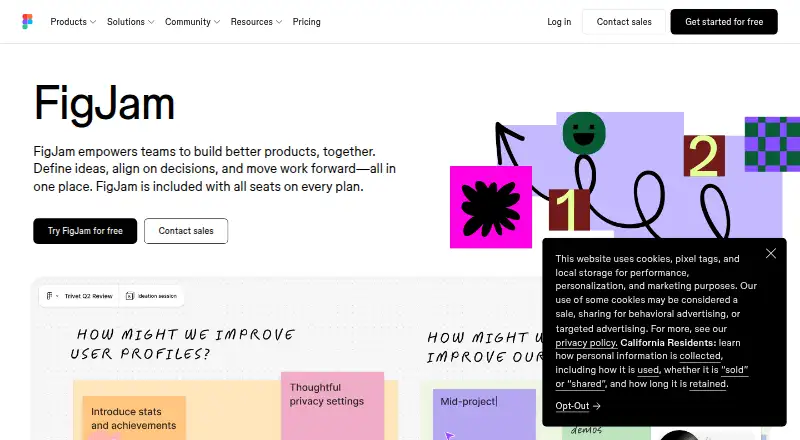
What FigJam is
FigJam is an online collaborative whiteboard for teams working through ideas, decisions, and plans. Teams can use it for brainstorming, diagramming, meetings, sprint retrospectives, project planning, and roadmapping. It includes more than 300 ready-made templates, and users can create their own. FigJam AI can generate templates and visuals, group sticky notes by theme, and turn board content into action items. Collaboration tools include audio conversations, live chat, comments, stamps, emotes, and Spotlight mode. People outside a team or company can join an open session for 24 hours without logging in. Integrations include Asana, Jira, GitHub, Slack, Zoom, Microsoft Teams, Google Workspace, Notion, and Confluence. FigJam is available on Android, iOS, macOS, web, and Windows, with an iPad app for gathering inspiration and exploring ideas. The free Starter plan allows unlimited collaborators in three editable files. Figma says it does not offer phone or live-chat support.
Good
- Over 300 ready-made templates, plus custom templates
- AI can group notes and produce action items
- Open sessions allow guest participation without login
- Available across web, desktop, mobile, and iPad
Watch out
- Free Starter is limited to three editable files
- Phone and live-chat support are not offered
Who it suits
FigJam suits teams that need a shared space for workshops, planning, and decision-making, including people without prior design-tool experience. It also accommodates short-term contributors from other teams or companies through open sessions.
Verdict
FigJam brings whiteboarding, workshop activities, and team collaboration into one tool. Its free plan allows unlimited collaborators, but limits editable files to three.
Plans and prices
From FigJam's own pricing page, checked 15 Oct 2026.
| Plan | Price | What it gives you |
|---|---|---|
| Starter | Free | Free limited access · unlimited drafts · UI kits and templates |
| Professional — Collab seat | $3 a month | FigJam included · paid plan · $3/mo |
| Professional Collab seat | $3 a month | FigJam, Slides, Buzz and Specs access · unlimited files and projects · 500 AI credits/month · monthly |
| Enterprise — Collab seat | $5 a month | FigJam included · billed annually · $5/mo |
| Organization Collab seat | $5 a month | FigJam, Slides, Buzz and Specs access · shared libraries and fonts · centralized administration · annually |
| Enterprise Collab seat | $5 a month | FigJam, Slides, Buzz and Specs access · custom team workspaces · design-system theming and APIs · SCIM seat management · annually |
| Organization — Collab seat | $5 a month | FigJam included · billed annually · $5/mo |
The facts
Each one read from FigJam's own pages, with the date it was checked.
What it does
- Agile workflows
- FigJam supports stand-ups, retrospectives and other sprint conversations.checked 15 Oct 2026
- AI
- FigJam advertises AI assistance and diagram generation for coding-agent projects and brainstorms.checked 15 Oct 2026
- AI features
- FigJam AI can generate templates and visuals, sort sticky notes into themes, and summarize board output into action items.checked 30 Sep 2026
- API and SDKs
- Developer resources include REST APIs, plugin APIs, widget APIs, an Embed kit and SCIM API documentation.checked 15 Oct 2026
- Brainstorming
- Teams can build on ideas together in real time during brainstorming sessions.checked 15 Oct 2026
- Collaboration
- FigJam supports audio conversations, live chat, comments, stamps, emotes, and Spotlight mode.checked 30 Sep 2026
- Desktop installation
- Native desktop applications are available for macOS 12 or later and Windows 10 or later in 64-bit environments, including Windows ARM.checked 15 Oct 2026
- Diagramming
- Shapes and grid-snapping connectors support user-flow, process and system diagrams.checked 15 Oct 2026
- Documentation and support
- Official developer documentation provides APIs, guides and references, while Help Center articles cover plans, desktop apps, iPad use and troubleshooting.checked 15 Oct 2026
- Integrations
- The official product page names Asana, Jira and GitHub integrations, while the integrations catalog also lists Google Workspace, Slack, Zoom and Microsoft Teams.checked 15 Oct 2026
- Intended users
- Figma describes FigJam as a collaborative tool for teams and says users do not need prior knowledge of design tools.checked 30 Sep 2026
- iPad
- Figma provides a FigJam app for iPad for gathering inspiration and exploring ideas.checked 30 Sep 2026
- iPad transition
- The standalone FigJam iPad app was scheduled for retirement on January 8, 2026, with FigJam continuing inside the Figma app or web.checked 15 Oct 2026
- Licence
- The hosted Figma and FigJam services are proprietary and the terms prohibit reverse engineering, copying or creating derivative works.checked 15 Oct 2026
- Limit: large boards
- G2 reviewers report clutter, slower performance, weak organization and missing advanced diagramming controls on large or complex boards.checked 15 Oct 2026
- Limit: mobile editing
- Google Play reviewers complain that the mobile app is mainly view, comment and mirror oriented and cannot start sharing sessions or provide full editing.checked 15 Oct 2026
- Limit: precision and offline use
- TrustRadius reviewers describe the experience as less precise, heavier than alternatives and weak for offline work and peripheral support.checked 15 Oct 2026
- Meetings and workshops
- The product includes facilitation features intended for team rituals and large-group conversations.checked 15 Oct 2026
- Open sessions
- Users can invite people from other teams or companies to contribute free for 24 hours without logging in.checked 30 Sep 2026
The company
- Company facts
- LinkedIn lists Figma as privately held, founded in 2012, headquartered in San Francisco and employing 1,001–5,000 people.checked 15 Oct 2026
- Company legal name
- The mobile app identifies its developer as Figma, Inc.checked 15 Oct 2026
- Founded
- 2012checked 23 Sep 2026
- Funding and ownership
- Crunchbase lists Figma as a San Francisco company with 50 investors and nine funding rounds, including post-IPO equity.checked 15 Oct 2026
Money
- Limit: price and search
- GetApp reviews include requests for a lower starting price and better search within complex files; one reviewer also found cursor chat annoying in large discussions.checked 15 Oct 2026
The full review of FigJam
FigJam is an online whiteboard for teams that need to think through ideas together and carry decisions into project work. It is best suited to groups running workshops, planning sessions, and retrospectives; teams needing a large permanent free workspace should look elsewhere.
Overview
FigJam combines an infinite canvas with diagramming and voting tools, making it suitable for both open brainstorming and structured group activities. Teams can use it for meetings, sprint retrospectives, project planning, and roadmapping. More than 300 templates, plus the ability to create custom ones, help give sessions a starting structure rather than leaving every group to build a board from scratch.
Collaboration includes audio conversations, live chat, comments, stamps, emotes, and Spotlight mode. Open sessions let people outside a team or company contribute for 24 hours without logging in. That lowers the barrier for a guest workshop, but is less suited to continuing work with external partners. Integrations with Asana, Jira, and GitHub help teams move projects forward after ideation; Figma also lists integrations with Slack, Zoom, Microsoft Teams, Google Workspace, Notion, and Confluence.
Key features
Templates and AI
FigJam AI can generate templates and visuals, sort sticky notes into themes, and summarize board output into action items. These functions can help a team move from a crowded discussion to organized themes and next steps. They complement the template library rather than removing the need to decide how a session should run.
Participation and access
Live communication and reactions give participants several ways to contribute without relying only on comments. FigJam is intended for teams and does not require prior knowledge of design tools, which makes it a plausible option for cross-functional groups rather than only design teams. The iPad app is positioned for gathering inspiration and exploring ideas.
Pricing
FigJam is freemium. Starter costs nothing and includes FigJam, three editable files, and unlimited collaborators. That is a notably open invitation for large groups, but three editable files is a tight ceiling for teams that want to keep several active projects or workshops in rotation.
The Professional Collab seat costs $3 a month, billed $3/mo, and includes FigJam as a paid plan. It is the least expensive paid option and the natural upgrade for teams that need more than the free editable-file allowance. Organization and Enterprise Collab seats each cost $5 a month, billed $5/mo annually. Their prices are higher and annual billing applies; the plan details provided do not distinguish their included FigJam features, so teams should weigh the pricing terms rather than assume a specific capability difference.
Platforms
FigJam is available on Android, iOS, macOS, web, and Windows. Figma also provides an iPad app for inspiration gathering and idea exploration, extending its use beyond desktop sessions.
Who it's for
FigJam fits teams that want a shared canvas for workshops, brainstorming, diagrams, and planning, especially groups that value templates and several modes of live participation. Its unlimited free collaborators can work well for occasional large sessions. It is a weaker fit for teams expecting the free plan to hold many ongoing boards or for external collaboration that must remain open beyond a 24-hour guest session.
Pros and cons
- Pro: Unlimited collaborators on the free plan make it possible to invite a large group without paying per participant, while the three-file cap still limits ongoing use.
- Pro: More than 300 templates, custom templates, diagramming, and voting tools support structured workshops as well as freeform ideation.
- Pro: AI can organize sticky notes and turn board output into action items, helping groups focus on outcomes after discussion.
- Con: Three editable files on Starter can force teams with multiple active initiatives to upgrade or rotate boards.
- Con: Open sessions last 24 hours, making them convenient for a guest workshop but not a standing external workspace.
- Con: Figma says it does not offer phone or live-chat support; instant answers come through its AI support chatbot, and email support is offered for Professional, Organization, and Enterprise plans.
Alternatives
AI Whiteboard Software is a useful category to explore for readers prioritizing AI whiteboarding. For broader choices, compare the Online Whiteboard Tools, Design Collaboration Software, and Collaborative Whiteboard Software lists.
- Boardmix is worth comparing if a free plan with three editable boards and a stated 100-object-per-board limit suits your needs.
- Copera Whiteboards offers a free plan described as always free, with unlimited members and 5 GB of files; consider it if those terms fit your team.
- HuddleIQ has a free plan for three team members and three whiteboards, so it may suit a small group willing to work within those caps.
- Miro offers three editable boards on its free plan alongside 7,000+ templates and 250+ integrations; compare it if breadth of templates and integrations matters most.
- MURAL allows unlimited murals with three editable at a time, unlimited members, and unlimited view-only visitors on its free plan, making it a relevant option for teams that need broad viewing access.
- Overboard offers three free boards with one collaborator per board, so it is less suitable than FigJam for large collaborative sessions but may fit solo board work.
- Collaboard includes three free whiteboards, five participants per board, core features, and 200+ templates; consider it if a smaller participant limit is workable.
- Creately offers unlimited free canvases and collaborators but caps each canvas at 45 items, a different trade-off for teams whose boards stay relatively compact.
Verdict
Choose FigJam if your team wants an approachable workshop canvas with strong participation options, a broad template collection, and unlimited free collaborators. Its key limitation is the three-editable-file free plan: teams that need many persistent boards should compare alternatives or budget for a paid seat.
Getting started
- Open the FigJam website
- Choose the free Starter plan or a paid collaboration seat
- Use FigJam on Android, iOS, macOS, web, or Windows
- Start with a template or create your own board
- Invite collaborators or open a 24-hour guest session
- Connect services such as Asana, Jira, or GitHub
Limits worth knowing
The free Starter offering allows unlimited collaborators in three editable files. Professional seats cost $3 per user monthly; Organization and Enterprise seats cost $5 per user monthly when billed annually.
Questions
Is FigJam free?
Yes. The Starter plan is free and includes FigJam with unlimited collaborators in three editable files.
What does FigJam cost beyond the free plan?
Professional collaboration seats are $3 per user per month. Organization and Enterprise collaboration seats are $5 per user per month when billed annually.
Which platforms support FigJam?
FigJam is available on Android, iOS, macOS, web, and Windows. Figma also provides an iPad app.
Can guests join without an account?
People from other teams or companies can contribute to an open session for 24 hours without logging in.
Which integrations are available?
FigJam integrates with Asana, Jira, and GitHub. Figma also lists Slack, Zoom, Microsoft Teams, Google Workspace, Notion, and Confluence.
What support does Figma provide?
An AI support chatbot provides instant answers. Email support is offered for Professional, Organization, and Enterprise plans; phone and live-chat support are not offered.
Alternatives to FigJam
- 1
Boardmix
Free planAndroidiOSWebAPI9.0From $5 a month - 2
Explain Everything
Free planAndroidiOSWebmacOS9.0Free plan - 3

Miro
Free planAndroidiOSWebAPI8.9From $8 a month - 4

Creately
Free planWebAPILinuxmacOS8.8Free plan - 5

Limnu
Free planAndroidiOSWebAPI8.7From $5 a month - 6

Scribble Together
Free planAndroidiOSWebmacOS8.6From $4.16 a month