DOSBox PSP
DOSBox PSP is a free, open-source DOSBox port for the PlayStation Portable, intended to run MS-DOS software on the handheld.
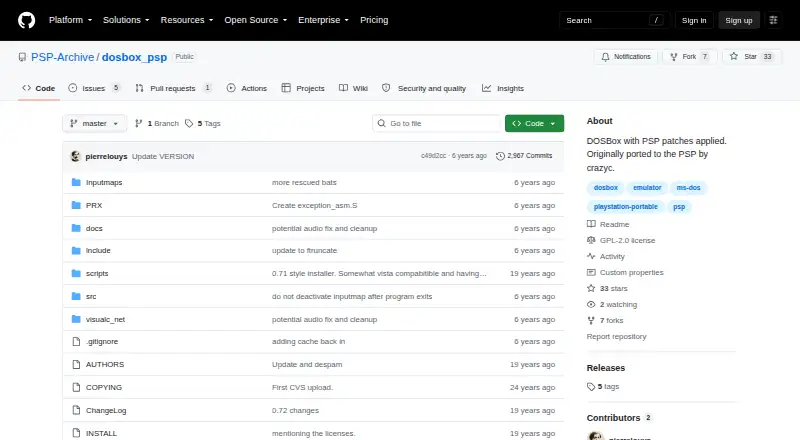
What DOSBox PSP is
DOSBox PSP is a free, open-source DOSBox port for the PlayStation Portable, intended to run MS-DOS software on the handheld. The project describes it as DOSBox with PSP patches and credits crazyc with the original port. It supports CUE/BIN disk images, gamepads, audio CDs, and Neo Geo CD. Settings are stored in dosbox.conf; some can be changed through batch files, while others require direct edits. CPU cycle settings are the main determinant of game performance and may take trial and error to tune. The dynamic CPU core can improve performance for most games, but its extra speed may reduce stability. Memory depends on the PSP model: the PSP 1000 is limited to around 12 MB, while PSP 2000, 3000, and Go models can allocate about 42 MB by changing memsize in dosbox.conf. Higher memory settings can cause instability. The initial prerelease build starts at a command line and has no file manager; the project recommends adding a third-party launcher such as LaunchBox for MS-DOS. The repository lists a GPL-2.0 license. Its wiki covers configuration, input mapping, compatibility, batch files, IR keyboard support, and launchers.
Good
- Runs on the PlayStation Portable.
- Supports CUE/BIN images, gamepads, and audio CDs.
- Supports Neo Geo CD.
- Wiki covers configuration and compatibility resources.
- Open source under GPL-2.0.
Watch out
- PSP 1000 memory is around 12 MB.
- Higher memory settings may cause instability.
- The initial prerelease has no file manager.
- The on-screen keyboard was noted as largely broken.
Who it suits
DOSBox PSP suits PSP owners who want to run MS-DOS software and are willing to adjust configuration settings. It may suit users comfortable adding a launcher and tuning settings for individual games.
Verdict
DOSBox PSP brings DOSBox to the PSP, with several disc and input formats supported. Expect configuration work: performance tuning may take trial and error, and the initial prerelease requires a separate launcher for a file-manager-like starting point.
Plans and prices
From DOSBox PSP's own pricing page, checked 7 Oct 2026.
| Plan | Price | What it gives you |
|---|---|---|
| DOSBox PSP | Free | PlayStation Portable port · DOSBox with PSP patches |
| Free | Free | No paid plans stated; PSP port |
The facts
Each one read from DOSBox PSP's own pages, with the date it was checked.
What it does
- Base version
- A release describes DOSBox PSP as based on DOSBox 0.72.checked 7 Oct 2026
- Build requirement
- Building the project requires the PSP toolchain, and the README documents compiling and packaging a PSP executable.checked 7 Oct 2026
- Build requirements
- The repository build instructions require installing the PSP toolchain.checked 7 Oct 2026
- Compatibility resources
- The project wiki lists configuration, input mapping, compatibility information, batch files, IR keyboard support and launchers among its resources.checked 7 Oct 2026
- Configuration
- DOSBox settings are stored in dosbox.conf, with some options changeable through batch files and others requiring direct edits to the configuration file.checked 7 Oct 2026
- Documentation
- The project wiki lists pages about configuration, input methods and mapping, compatibility, batch files, IR keyboard support, and launchers.checked 7 Oct 2026
- Dynamic core
- A prerelease says support for the dynamic core was restored.checked 7 Oct 2026
- Game tuning
- The project says CPU cycle settings are the main determinant of game performance and may require trial and error.checked 7 Oct 2026
- Keyboard limitation
- A release notes that the on-screen keyboard was still pretty much broken.checked 7 Oct 2026
- Launch behavior
- The first prerelease boots to the command line and does not include a file manager.checked 7 Oct 2026
- Launcher
- The initial pre-release build has no file manager and boots to a command line; its release notes recommend including a third-party launcher such as LaunchBox for MS-DOS.checked 7 Oct 2026
- Launcher workaround
- The project recommends adding a third-party launcher such as LaunchBox for MS-DOS to the DOSBox folder and configuring dosbox.conf to start it.checked 7 Oct 2026
- License
- The repository lists a GPL-2.0 license.checked 7 Oct 2026
- Memory limit
- A release says PSP 2000, 3000, and Go owners can allocate about 42 MB by changing memsize in dosbox.conf.checked 7 Oct 2026
- Memory limits
- The PSP 1000 is limited to around 12 MB of memory, while later models may use up to around 44 MB; higher values can cause instability.checked 7 Oct 2026
- Model support
- A release says support was restored for PSP 2000, 3000 and Go models, which can allocate about 42 MB by changing memsize in dosbox.conf.checked 7 Oct 2026
- Origin
- The project describes itself as DOSBox with PSP patches applied and says it was originally ported to PSP by crazyc.checked 7 Oct 2026
- Performance
- The dynamic CPU core can improve performance for most games, though the extra speed may reduce stability.checked 7 Oct 2026
- Purpose
- DOSBox PSP is a port of DOSBox for the PlayStation Portable.checked 7 Oct 2026
- Slim model support
- A prerelease says support for PSP Slim models was restored.checked 7 Oct 2026
- What it does
- DOSBox PSP is a port of DOSBox for the PlayStation Portable.checked 7 Oct 2026
The full review of DOSBox PSP
DOSBox PSP is a free DOSBox 0.72 port for PlayStation Portable, built for owners who want MS-DOS software on Sony’s handheld. It suits technically minded players comfortable editing configuration files and adjusting each game. The trade-off is substantial setup work, especially when memory, CPU cycles and controls need careful balancing.
Overview
This open-source project applies PSP patches to DOSBox, originally ported by crazyc, and remains focused on running MS-DOS programs rather than providing a polished console-style front end. Gamepad support, audio CD support, CUE/BIN disc images and Neo Geo CD support give it a useful base for varied software, but there are no save states and the on-screen keyboard is described as largely broken.
Its command-line launch behavior is another practical hurdle. The initial prerelease has no file manager, so users must navigate DOS commands or add a separate launcher before browsing games feels convenient. That makes the port better suited to enthusiasts than to anyone expecting immediate, controller-friendly game selection.
Key features
- File-based configuration: DOSBox settings are kept in dosbox.conf. Batch files can alter some options, while others require direct edits. This gives experienced users precise control, but every new game can become a configuration task.
- Performance tuning: CPU cycle settings are the main influence on game speed and may require trial and error. The dynamic CPU core can improve performance for most games, although the additional speed may reduce stability, so maximum settings are not automatically the best settings.
- Model-dependent memory: PSP 1000 hardware is limited to around 12 MB. PSP 2000, 3000 and Go models can allocate about 42 MB by changing memsize in the configuration file. Later models therefore offer more headroom, but excessive values can make the emulator unstable.
- Disc and input support: The port supports CUE/BIN images, audio CDs, Neo Geo CDs and gamepads. The project wiki adds guidance on input mapping, compatibility, batch files, IR keyboards and launchers, which is valuable when a title does not work correctly at default settings.
- Launcher workaround: The first prerelease boots directly to a command line. The project recommends placing a third-party launcher such as LaunchBox for MS-DOS in the DOSBox folder and configuring dosbox.conf to start it, adding another installation step but improving everyday navigation.
Pricing
| Plan | Price | Includes |
|---|---|---|
| Free | free | No paid plans stated; PSP port |
| DOSBox PSP | free | PlayStation Portable port; DOSBox with PSP patches |
Both listed plans cost nothing, and the project is open source under GPL-2.0. There is no trial period because the software is free, with no paid tier or subscription terms to weigh. Choose it when zero software cost and source access matter; the price does not offset the time required for setup and tuning.
Platforms
DOSBox PSP runs on PlayStation Portable hardware and targets MS-DOS software. PSP 2000, 3000 and Go owners have a memory advantage over the PSP 1000, while Slim-model support was restored in a prerelease. Building from source requires the PSP toolchain, with the repository documenting compilation and packaging of a PSP executable.
Who it's for
This is a strong fit for PSP owners who already manage homebrew software, understand DOS paths and are willing to tune cycles and memory per game. It is also appealing to developers or preservation-minded users who value GPL-licensed source and detailed technical documentation. Casual players, users dependent on an on-screen keyboard, and anyone wanting save states or a ready-made library browser should look elsewhere.
Pros and cons
Pros
- Free, open-source PSP port with GPL-2.0 licensing and source access.
- Gamepad, audio CD, CUE/BIN and Neo Geo CD support broaden the software it can launch.
- Dynamic core and per-game cycle controls offer meaningful performance options.
- Wiki resources cover configuration, compatibility, input mapping, IR keyboards and launchers.
Cons
- CPU cycles often need trial and error, so compatibility is not a set-and-forget experience.
- Memory is tight on PSP 1000 and aggressive values can destabilize later models.
- The on-screen keyboard remains largely broken, limiting text-heavy DOS software.
- No save states are provided.
- The initial prerelease starts at a command line without a file manager, requiring an external launcher for easier browsing.
Alternatives
For broader category browsing, see MS-DOS Emulators and Neo Geo Emulators.
- Virtual Jaguar is the better choice for Android, iOS, Linux, macOS, web or Windows users; it is free and open source but requires a libretro frontend such as RetroArch.
- GnGeo suits Linux users seeking a free Neo Geo emulator, provided they can supply SDL 1.2.x, libz and a NeoGeo BIOS; commercial use of the whole program is forbidden.
- NeoCD/SDL is a free Linux and Windows option for NeoGeo CD software, requiring an original BIOS and restricting reuse and sale to non-commercial terms.
- NeoDS is another free Neo Geo emulator when non-commercial use is acceptable.
- DREAMNEOCD is a free Neo Geo CD alternative with non-commercial restrictions.
- NeoCD/PS2 is intended for self-hosted use and requires a NeoGeo CD BIOS.
- NeoRAGEx is a free Windows emulator, with games and BIOS supplied separately.
- Geolith is another free Neo Geo-focused alternative.
Verdict
Choose DOSBox PSP if you specifically want MS-DOS software on a PSP and are prepared to edit dosbox.conf, tune CPU cycles and work around the missing launcher and unreliable keyboard. Its broad disc support, dynamic core and free GPL source make it a capable enthusiast tool. Look elsewhere if you need dependable text input, save states, simple game selection or a platform beyond PSP.
Alternatives to DOSBox PSP
- 1

DOSBox-X
Free planOpen sourceLinuxmacOSSelf-hostedWindows7.4Free plan - 2
DOSBox Pure
Free planOpen sourceLinuxmacOSSelf-hostedWindows7.2Free plan - 3
DOSBox Staging
Free planOpen sourceAPILinuxmacOSSelf-hosted7.2Free plan - 4
DOSBox
Free planOpen sourceLinuxmacOSSelf-hostedWindows7.1Free plan - 5
Magic DosBox
Free planAndroid7.1$3.99 one-time - 6
DOS Browser
Free planAndroidWebLinuxmacOS6.7Free plan