DOSBox
DOSBox is a free, open-source DOS emulator for running older programs and games that may not run on newer computers.
What DOSBox is
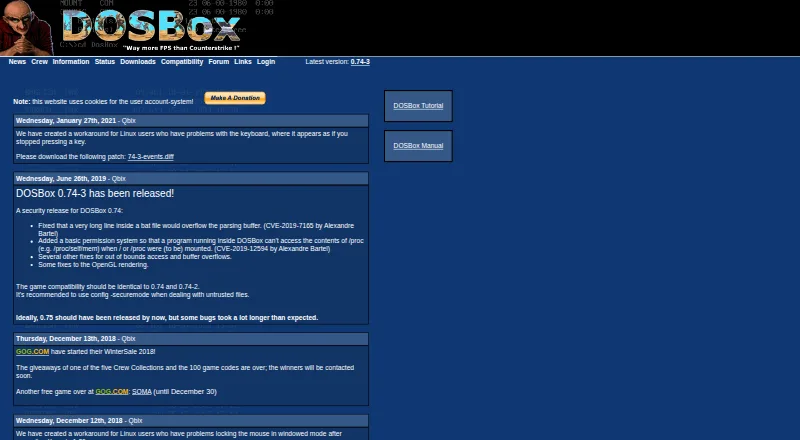
DOSBox is a free, open-source DOS emulator for running older programs and games that may not run on newer computers. It emulates 286 and 386 CPUs in real and protected modes, along with XMS and EMS memory. Its graphics emulation covers Tandy, Hercules, CGA, EGA, VGA, and VESA, while its sound emulation includes SoundBlaster and Gravis UltraSound cards. DOSBox can mount floppy and CD-ROM images, including ISO and CUE/BIN formats. It also supports IPX networking through its internal IPXNET program and can emulate a serial nullmodem connection over a network or the internet. The site identifies version 0.74-3 as the latest version and lists packages for Mac OS X, Windows, Fedora, and Debian, as well as source code. Its compatibility list labels games as runnable, playable, or supported. For untrusted files, the site recommends secure mode, which disables MOUNT, IMGMOUNT, and BOOT. Questions about use or a specific game can be directed to the forum.
Good
- Free and open source
- Emulates 286 and 386 CPUs and XMS/EMS memory
- Supports multiple legacy graphics and sound standards
- Mounts floppy and CD-ROM images
- Supports IPX networking and serial nullmodem connections
Watch out
- The site identifies 0.74-3 as the latest version
- Secure mode disables MOUNT, IMGMOUNT, and BOOT
Who it suits
DOSBox suits people who want to run older DOS games or programs on Windows, Linux, or macOS. Its emulation and disk-image support may also suit users working with older DOS software or game media.
Verdict
DOSBox is a no-cost option for running older DOS software, with a broad range of hardware emulation and disk-image support. Users handling untrusted files should note that the recommended secure mode disables several mounting and boot commands.
Plans and prices
From DOSBox's own pricing page, checked 15 Oct 2026.
| Plan | Price | What it gives you |
|---|---|---|
| DOSBox | Free | x86 DOS emulator · free of charge · open source |
The facts
Each one read from DOSBox's own pages, with the date it was checked.
Where it runs
- Android port features
- The Magic DosBox Android port advertises touch controls, mouse, keyboard, sound, gamepad support and IPX networking.checked 15 Oct 2026
- Browser port
- The js-dos repository describes an Emscripten port that compiles DOSBox to JavaScript for browser play and is GPL licensed.checked 15 Oct 2026
- Independent platform description
- ComputerBase describes DOSBox as freeware for Windows, Linux and macOS with 286/386, classic graphics, sound, keyboard, mouse and DOS filesystem emulation.checked 15 Oct 2026
What it does
- Compatibility
- The site maintains a game compatibility list with statuses including runnable, playable and supported.checked 28 Sep 2026
- Configuration
- Settings are controlled through command-line options and text configuration files that are generated automatically.checked 15 Oct 2026
- Controller support
- The manual documents joystick and gamepad emulation, button mapping and configurable joystick types.checked 15 Oct 2026
- CPU emulation
- It emulates 286 and 386 processors in real and protected modes, with XMS and EMS memory.checked 15 Oct 2026
- Current official version
- The official site lists 0.74-3 as the latest version.checked 15 Oct 2026
- Developer build
- The source can be compiled on systems with SDL and a decent C++ compiler, supporting self-hosted builds.checked 15 Oct 2026
- Disk images
- The manual says IMGMOUNT can mount floppy disk images and CD-ROM images, including ISO and CUE/BIN formats.checked 28 Sep 2026
- Documentation
- The project provides a large v0.74-3 manual, FAQ, tutorial and configuration wiki covering installation, controls, networking and troubleshooting.checked 15 Oct 2026
- Downloads
- The download page lists DOSBox 0.74-3 builds or packages for Mac OS X, Windows, Fedora and Debian, as well as source code.checked 28 Sep 2026
- Frontends
- The official downloads page lists numerous community frontends for Windows, macOS, Linux and other systems.checked 15 Oct 2026
- Graphics
- DOSBox emulates Tandy, Hercules, CGA, EGA, VGA and VESA graphics.checked 28 Sep 2026
- Graphics emulation
- Supported display hardware includes Tandy, Hercules, CGA, EGA, VGA and VESA modes.checked 15 Oct 2026
- Licence
- Open Hub identifies DOSBox as GNU General Public License version 2.0 or later.checked 15 Oct 2026
- Limit: gaming focus
- The official FAQ says non-gaming DOS applications are not the project's primary focus and lists parallel ports, long filenames and Ctrl-Break as unsupported.checked 15 Oct 2026
- Limit: hardware edge cases
- A SourceForge reviewer reported that a game failed with a configuration error, while another requested better optimization for low-end hardware.checked 15 Oct 2026
- Limit: learning curve
- Reviewers describe setup, mounting drives and editing configuration files as tricky for newcomers.checked 15 Oct 2026
- Limit: missing save states
- An Open Hub reviewer praised smooth gameplay and upscaling but said save and load machine-state support was missing.checked 15 Oct 2026
- Limit: single-core performance
- The manual states that DOSBox uses one host CPU core, so performance is limited by that core's available power.checked 15 Oct 2026
- Memory emulation
- DOSBox emulates XMS and EMS memory.checked 28 Sep 2026
- Networking
- DOSBox supports IPX networking through its internal IPXNET program.checked 28 Sep 2026
The company
- Maker structure
- The official crew page identifies Peter Veenstra, Sjoerd Harekiet, Tommy Frössman and Ulf Wohlers as the people behind DOSBox.checked 15 Oct 2026
The full review of DOSBox
DOSBox recreates a DOS-era PC so older programs and games can run on Windows, Linux, and macOS. It is a strong fit for people working with legacy software or games that expect period hardware; its range is useful, but a specific title may still need compatibility checking.
Overview
By emulating 286 and 386 CPUs in real and protected modes, plus XMS and EMS memory, DOSBox offers a fuller environment for older software than a basic DOS prompt. That breadth is valuable when a program depends on a particular generation of PC hardware, although the maintained game compatibility list—with runnable, playable, and supported statuses—is a sensible place to check a title before committing to it.
DOSBox also supports IPX networking and can emulate a serial nullmodem connection over a network or the internet. Those capabilities make it relevant to some legacy multiplayer setups, but they add to the care needed when handling files from untrusted sources.
Key features
Hardware, sound, and controls
Graphics emulation spans Tandy, Hercules, CGA, EGA, VGA, and VESA, while sound support covers SoundBlaster and Gravis UltraSound. Gamepad and audio CD support add useful options for software built around those devices. The breadth is a practical strength for period games, but it should not be mistaken for a guarantee that every title will run as intended.
Disk images and security
IMGMOUNT supports floppy and CD-ROM images, including ISO and CUE/BIN formats; supported formats also include CUE/IMG and hard-drive images. This makes DOSBox useful for working with software distributed as disk images. For untrusted files, the site recommends config -securemode. That mode disables MOUNT, IMGMOUNT, and BOOT, so it trades some of the emulator's central mounting and booting functions for a safer operating mode.
Compatibility and help
The compatibility list gives readers a way to check game status, and the forum is the place to ask about using DOSBox or getting a particular game running. These resources help with a broad compatibility target, but they do not remove the need to check individual titles.
Pricing
DOSBox is free and open source: its DOSBox plan costs free. There are no paid plan trade-offs to weigh; it suits readers who want a no-cost emulator and access to its source. The site identifies version 0.74-3 as its latest version.
Platforms
DOSBox supports Windows, Linux, and macOS. The download page lists builds or packages for Mac OS X, Windows, Fedora, and Debian, as well as source code, giving users on those systems a direct starting point.
Who it's for
DOSBox is best for people who need to run DOS-compatible programs or games on a modern computer and value emulation of several generations of graphics, sound, memory, and CPU hardware. Its disk-image support and networking options also suit users preserving older software setups or revisiting multiplayer titles. Readers handling untrusted files should use secure mode and account for the mounting and boot commands it disables.
Pros and cons
- Broad period hardware emulation: multiple CPU modes, memory types, graphics standards, and sound cards give older software a substantial range of expected hardware.
- Flexible image support: floppy, CD-ROM, and hard-drive images cover common ways of working with DOS software.
- Useful legacy networking: IPX and serial nullmodem emulation support older network and multiplayer arrangements.
- Compatibility is title-specific: the maintained list helps set expectations, but users should check the status of the game or program they care about.
- Secure mode limits core commands: MOUNT, IMGMOUNT, and BOOT are unavailable in the recommended mode for untrusted files.
Alternatives
MS-DOS Emulators is a useful starting point for comparing options across the category. Choose DosKit if you need a free option spanning Android, iOS, Linux, macOS, web, and Windows. DOS Browser is another free option for a wider set of platforms, including Android and web; its free plan uses browser indexed storage, which can be cleared, and does not offer cross-device play.
DOSBox Staging suits readers looking for a free option on Windows, Linux, or macOS that is explicitly intended for personal, low-stakes use and carries no warranty. DOSBox Pure is a free standalone desktop emulator for those same desktop platforms, with donations welcome. DOSBox-X is a free, open-source DOS emulator for Windows, Linux, and macOS.
js-dos is worth considering if web or self-hosted use matters, as well as Linux; its core features are free. Android users can consider Magic DosBox, which is freemium. For a browser-based emulator that can be self-hosted, DOS Wasm X offers a free plan with selectable hard-drive and RAM options.
Verdict
Choose DOSBox if you want a free, open-source way to run DOS software on Windows, Linux, or macOS and value broad period hardware and disk-image support. Its main reason to choose it is the combination of hardware emulation and legacy media options; look elsewhere if you need a different platform or if the title you depend on is not a good fit according to the compatibility list.
Getting started
- Open the DOSBox website
- Choose the download package for Windows, Linux, or macOS
- Select a listed Mac OS X, Windows, Fedora, or Debian build, or source code
- Install and launch DOSBox
- Mount required floppy or CD-ROM images with the supported image formats
- Use config -securemode when opening untrusted files
Limits worth knowing
The free plan costs 0.00 USD and is free of charge. Secure mode disables MOUNT, IMGMOUNT, and BOOT.
Questions
Is DOSBox free?
Yes. The DOSBox plan is free, and the project is open source.
Which platforms does DOSBox support?
DOSBox supports Windows, Linux, and macOS. Downloads include Mac OS X, Windows, Fedora, and Debian packages, plus source code.
What disk images can DOSBox mount?
It supports ISO, CUE/BIN, CUE/IMG, floppy images, and hard-drive images, including floppy and CD-ROM images through IMGMOUNT.
Does DOSBox support multiplayer networking?
Yes. IPX networking works through IPXNET, and DOSBox can emulate a serial nullmodem connection over a network or the internet.
How does DOSBox handle untrusted files?
The site recommends config -securemode. This mode disables MOUNT, IMGMOUNT, and BOOT.
Where can users ask for help?
The DOSBox crew page directs questions about using DOSBox or running a specific game to the forum.
Alternatives to DOSBox
- 1

DOSBox-X
Free planOpen sourceLinuxmacOSSelf-hostedWindows7.4Free plan - 2
DOSBox Pure
Free planOpen sourceLinuxmacOSSelf-hostedWindows7.2Free plan - 3
DOSBox Staging
Free planOpen sourceAPILinuxmacOSSelf-hosted7.2Free plan - 4
Magic DosBox
Free planAndroid7.1$3.99 one-time - 5
DOS Browser
Free planAndroidWebLinuxmacOS6.7Free plan - 6
DosKit
Free planAndroidiOSWebLinux6.7Free plan