DOSBox Staging
DOSBox Staging runs MS-DOS and Windows 3.1 software on modern Windows, macOS and Linux computers through built-in MS-DOS emulation.
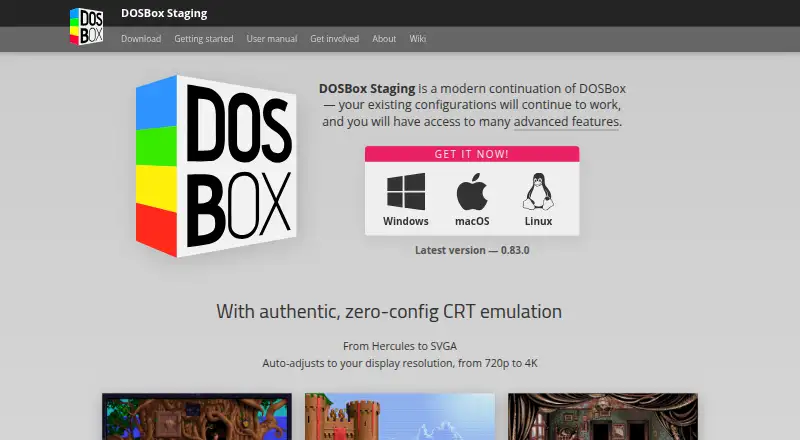
What DOSBox Staging is
DOSBox Staging runs MS-DOS and Windows 3.1 software on modern Windows, macOS and Linux computers through built-in MS-DOS emulation. Its main compatibility goal is PC Booter, DOS and Windows 3.1 games released from 1981 to 2000. Sensible defaults are intended to let most games and applications run without changes, and existing DOSBox configurations continue to work. Graphics features include CRT emulation, aspect-ratio-correct output, VGA and 3dfx Voodoo emulation, and custom shaders. Audio options include Roland MT-32 and SC-55, FluidSynth MIDI, OPL, Gravis UltraSound and PC speaker sound. It supports Ethernet through SLiRP and ENet modem transport, along with clipboard integration, physical CD-ROM mounting and high-DPI support. An optional HTTP REST API can inspect or alter emulator state, including CPU registers and memory. The API is disabled by default and binds to localhost; exposing it to untrusted networks gives them full control of the emulator. The project says it collects no personal information and makes no network connection unless initiated by the user. It is free for personal use, comes with no warranty and is intended for low-stakes scenarios.
Good
- Free for personal use.
- Supports Windows, macOS and Linux hosts.
- Existing DOSBox configurations continue to work.
- Includes graphics and audio emulation options.
- No personal information is collected, according to the project.
Watch out
- No warranty or guaranteed compatibility.
- Does not target Windows 9x/Me.
- API exposure to untrusted networks grants emulator control.
Who it suits
DOSBox Staging suits people seeking to run DOS or Windows 3.1-era software on Windows, macOS or Linux. It is intended for personal, low-stakes use rather than guaranteed compatibility.
Verdict
DOSBox Staging provides a broad set of emulation and host-integration features for older DOS and Windows 3.1 software. Its stated compatibility scope and lack of warranty make it important to check whether it suits your particular use.
Plans and prices
From DOSBox Staging's own pricing page, checked 15 Oct 2026.
| Plan | Price | What it gives you |
|---|---|---|
| DOSBox Staging | Free | Free for personal use · no warranty · intended for low-stakes scenarios |
The facts
Each one read from DOSBox Staging's own pages, with the date it was checked.
What it does
- API security
- The API is disabled by default, binds to localhost on port 8086 and gives full emulator control, so the documentation warns against exposing it to untrusted networks.checked 15 Oct 2026
- Audio
- Emulated sound options include Roland MT-32 and SC-55, FluidSynth MIDI, OPL, Gravis UltraSound, and PC speaker audio.checked 30 Sep 2026
- Audio emulation
- Supported sound devices include PC speaker, AdLib, Sound Blaster, Roland MT-32 and Sound Canvas, Gravis UltraSound, FluidSynth and several rarer cards.checked 15 Oct 2026
- Compatibility
- Its primary goal is to run PC Booter, DOS, and Windows 3.1 games released from 1981 to 2000.checked 30 Sep 2026
- Compatibility focus
- The project primarily targets PC Booter, DOS and Windows 3.1 games from 1981 through 2000.checked 15 Oct 2026
- Configuration model
- Plain-text configuration files support global settings plus per-game local overrides through configuration layering.checked 15 Oct 2026
- CRT emulation
- Adaptive CRT shaders are selected automatically according to emulated video mode and host resolution from 720p through 4K.checked 15 Oct 2026
- Current release
- The homepage identifies version 0.83.0 as the latest release and provides Windows, macOS and Linux downloads.checked 15 Oct 2026
- Developer stack
- The project lists C++23, CMake with Ninja or Visual Studio 2022, vcpkg, continuous integration, static and dynamic analysis, formatting checks and unit tests.checked 15 Oct 2026
- Documentation depth
- The manual covers installation, command-line use, configuration, storage, captures, Windows 3.1, graphics, sound, input, networking and API endpoints.checked 15 Oct 2026
- Drop-in migration
- Existing DOSBox configuration files are intended to keep working as a mostly drop-in replacement.checked 15 Oct 2026
- Easy setup
- Sensible defaults mean most games and applications work without tweaking, and existing DOSBox configurations continue to work.checked 30 Sep 2026
- Graphics
- Features include zero-configuration CRT emulation, aspect-ratio-correct output, accurate VGA emulation, custom shaders, and 3dfx Voodoo emulation.checked 30 Sep 2026
- Graphics emulation
- Graphics support includes Hercules, CGA, EGA, VGA, SVGA, expanded S3 emulation, custom CGA colors and 3dfx Voodoo 1.checked 15 Oct 2026
- Host integration
- Host features include clipboard integration, physical CD-ROM mounting, high-DPI support, and Windows 3.1 seamless mouse integration.checked 30 Sep 2026
- HTTP API
- An optional REST API exposes emulator state, CPU registers, memory access, DOS information and system information for external tools.checked 15 Oct 2026
- Independent distribution status
- SourceForge identifies its DOSBox Staging listing as an exact mirror, says it is not affiliated with the project, and showed 19 downloads in the week displayed.checked 15 Oct 2026
- Independent news: host performance
- Heise cautioned that software emulation of the complete graphics hardware requires a somewhat more capable host system.checked 15 Oct 2026
- Independent news: shader changes
- Heise reported that version 0.81.0 reimplemented and improved the shaders used to reproduce CRT appearance and automatically selected them for the video mode and monitor.checked 15 Oct 2026
- Independent news: Voodoo support
- Heise reported that version 0.81.0 introduced software emulation of the 3dfx Voodoo 1 graphics card using code from MAME.checked 15 Oct 2026
- Independent review praise: graphics
- Softpedia highlighted sharper graphics, correct aspect ratio by default, many shaders, expanded S3 emulation and a custom CGA palette.checked 15 Oct 2026
- Independent review praise: usability
- Softpedia described the project as regularly updated with comprehensive documentation and advanced graphics and sound features.checked 15 Oct 2026
- Input support
- The emulator provides mouse-wheel handling, serial-mouse options, controller support, joystick calibration, dual-mouse gaming and key remapping.checked 15 Oct 2026
Where it runs
- API wrapper
- The source tree includes ready-to-use HTML tools, a JavaScript API wrapper and TypeScript definitions.checked 15 Oct 2026
The full review of DOSBox Staging
Overview
DOSBox Staging is an MS-DOS emulator for running older DOS and Windows 3.1 software on modern desktop computers. It suits players and users who want a broad range of graphics, audio, and host-integration options without giving up compatibility with existing DOSBox configurations. Its personal-use focus and lack of compatibility guarantees make it a poor fit for anyone who needs dependable support for newer Windows systems or mission-critical work.
Key features
Sensible defaults are intended to get most games and applications running without manual adjustments, and existing DOSBox configurations carry over. That lowers the barrier for newcomers and gives DOSBox users a practical path to try this version; it does not promise that every title will work.
Graphics options span accurate VGA emulation, aspect-ratio-correct output, custom shaders, and 3dfx Voodoo emulation. CRT emulation requires no configuration, a useful shortcut for users who want that display treatment without tuning it themselves. Audio emulation ranges from PC speaker and OPL to Gravis UltraSound, FluidSynth MIDI, and Roland MT-32 and SC-55.
Networking includes Ethernet support through SLiRP and ENet modem transport. Clipboard integration, physical CD-ROM mounting, high-DPI support, and Windows 3.1 seamless mouse integration help bridge the gap between older software and a current host system. Gamepad and audio CD support, along with IMG, IMA, CUE/BIN, ISO, MDS/MDF, and VHD disk-image formats, cover common ways of interacting with legacy games and media.
An optional HTTP REST API lets external tools inspect and alter emulator state, including CPU registers and memory. It is disabled by default and binds to localhost; exposing it to untrusted networks gives them full control of the emulator. Most users can leave it off, while developers and tooling projects may value the access. The project says it collects no personal information and makes no network connection unless the user initiates one.
Pricing
DOSBox Staging costs nothing. The free plan is for personal use, carries no warranty, and is intended for low-stakes scenarios. There is no paid plan or free trial to weigh against it, but the no-warranty terms mean it should not be treated as a supported platform for work that depends on guaranteed compatibility.
Platforms
DOSBox Staging supports Windows, macOS, and Linux hosts. Its target is MS-DOS software, with a primary compatibility goal of PC Booter, DOS, and Windows 3.1 games released from 1981 to 2000. It does not aim to support Windows 9x/Me, end-of-life operating systems, or legacy physical hardware, so users focused on those environments should look elsewhere.
Who it's for
This is a strong fit for people running older DOS games or applications on a modern desktop, especially those with an existing DOSBox setup or a specific need for varied emulated graphics and sound. Its host integrations also suit users who need to move between old software and modern peripherals or desktop workflows. The stated personal, low-stakes scope rules it out for anyone who needs guaranteed compatibility or warranty-backed support.
Pros and cons
- Pro: Sensible defaults and compatibility with existing DOSBox configurations reduce setup friction for common use.
- Pro: Broad emulated graphics and audio options serve users seeking either period-style output or specific legacy hardware modes.
- Pro: Clipboard, CD-ROM, high-DPI, and Windows 3.1 mouse integration address practical host-computer friction.
- Con: The compatibility target is narrow by design; Windows 9x/Me, end-of-life operating systems, and legacy physical hardware are outside its aims.
- Con: Free use comes with no warranty or compatibility guarantee, making it unsuitable where reliability is a formal requirement.
- Con: The HTTP API can give full emulator control if exposed to an untrusted network, so it needs to remain local or disabled unless deliberately secured.
Alternatives
For a wider starting point across this category, browse MS-DOS Emulators. Choose DOSBox Pure instead if you want a free standalone desktop emulator; it supports Linux, macOS, and Windows. DOS Browser suits someone who wants to play through a browser across web and desktop or Android, though its free plan uses browser-indexed storage that can be cleared and does not sync play across devices; cloud saves and progress sync are part of js-dos Premium.
DOSBox is another free, open-source option for Windows, macOS, and Linux. DosKit is a free alternative spanning Android, iOS, desktop, and web platforms. DOS Wasm X is the browser-based choice, with configurable hard-drive and RAM options. Magic DosBox is an Android alternative with a free Lite plan. Windows users can also consider DOSBox Optionals, while DOSBox-X is a free option for Windows, macOS, and Linux.
Verdict
Choose DOSBox Staging for personal desktop use when your priority is running DOS or Windows 3.1 software with flexible emulated graphics, sound, and useful host integration. Its sensible defaults and existing DOSBox configuration support make it approachable without sacrificing options. Look elsewhere if you need Windows 9x/Me support, legacy hardware support, or a compatibility guarantee.
Getting started
- Visit the DOSBox Staging website.
- Choose the version for Windows, macOS, or Linux.
- Install and launch it on your computer.
- Run DOS or Windows 3.1 software using the emulator's sensible defaults, or use an existing DOSBox configuration.
Limits worth knowing
The plan is free and is for personal use, with no warranty and use intended for personal, low-stakes scenarios. The project does not guarantee compatibility.
Questions
How much does DOSBox Staging cost?
The plan is free, and the pricing model is free.
Is there a free plan or trial?
Yes, it has a free plan. There is no free trial.
Which platforms does it support?
It runs on Windows, macOS, and Linux.
Is DOSBox Staging open source?
Source is available, and it is licensed under GNU GPL version 2 or later.
What software is it designed to run?
Its primary compatibility goal is PC Booter, DOS, and Windows 3.1 games released from 1981 to 2000.
Who maintains DOSBox Staging?
The project says it is maintained by the DOSBox Staging team.
Alternatives to DOSBox Staging
- 1

DOSBox-X
Free planOpen sourceLinuxmacOSSelf-hostedWindows7.4Free plan - 2
DOSBox Pure
Free planOpen sourceLinuxmacOSSelf-hostedWindows7.2Free plan - 3
DOSBox
Free planOpen sourceLinuxmacOSSelf-hostedWindows7.1Free plan - 4
Magic DosBox
Free planAndroid7.1$3.99 one-time - 5
DOS Browser
Free planAndroidWebLinuxmacOS6.7Free plan - 6
DosKit
Free planAndroidiOSWebLinux6.7Free plan