DOS Browser
DOS Browser is an app for playing DOS games from the DOS.Zone website.
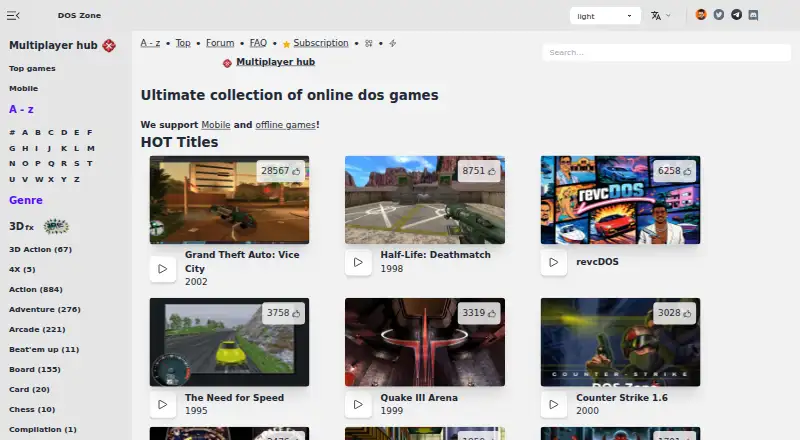
What DOS Browser is
DOS Browser is an app for playing DOS games from the DOS.Zone website. It is based on Chrome and supports multiplayer games, save states, and the MS-DOS target. Its dynamic core is designed to provide a performance boost over WebAssembly in regular browsers. DOS.Zone describes its classic games as free and without ads. The app is available on Windows, macOS, Linux, Android, the web, and Steam Deck. Desktop downloads cover Windows 10/11, Mac x64 and Arm64, several Linux distributions, Flathub, and Steam Deck; Android is available through Google Play. The Free plan costs nothing and keeps data in browser indexed storage, where the database can be cleared. The project makes its source available and describes its team as a non-profit community of enthusiasts working to make classic games accessible. It says it opposes piracy and illegal distribution and uses open-source software under open licenses. Google Play lists the developer declaration as no data shared with third parties and no data collected.
Good
- Plays DOS games from the DOS.Zone website.
- Supports multiplayer games and save states.
- Dynamic core provides a performance boost over WebAssembly in regular browsers.
- Classic games are described as free and without ads.
- Source is available under open-source licensing.
Watch out
- Free plan data stays in browser storage and can be cleared.
- Free plan does not support cross-device play.
Who it suits
DOS Browser suits people who want to play classic DOS.Zone games on desktop, Android, or Steam Deck, including multiplayer titles. It may also suit players who want save states or cloud-synced progress across devices with Premium.
Verdict
Choose DOS Browser if you want to play DOS.Zone games across supported desktop, mobile, and Steam Deck platforms, with multiplayer and save states. Look elsewhere if you need cross-device progress on the free plan; cloud saves require Premium.
Plans and prices
From DOS Browser's own pricing page, checked 30 Sep 2026.
| Plan | Price | What it gives you |
|---|---|---|
| Free | Free | browser indexed storage · database can be cleared · no cross-device play |
| js-dos Premium | Priced on request | cloud saves · progress synced across devices |
The facts
Each one read from DOS Browser's own pages, with the date it was checked.
What it does
- Acceleration
- The app provides full support for the dynamic core, which gives a performance boost over WebAssembly in regular browsers.checked 30 Sep 2026
- Cloud saves
- Premium users get cloud saves that synchronize game progress across devices.checked 30 Sep 2026
- Desktop downloads
- Downloads are provided for Windows 10/11, Mac x64, Mac Arm64, Debian/Ubuntu, Red Hat/Fedora/SUSE, Flathub and Steam Deck.checked 30 Sep 2026
- Game access
- The app can play DOS games from the DOS.Zone website.checked 30 Sep 2026
- Legal policy
- The project says it opposes piracy and illegal distribution, uses open-source software under open licenses, and will promptly remove disputed content after an official request.checked 30 Sep 2026
- Mobile download
- An Android download is provided through Google Play.checked 30 Sep 2026
- Multiplayer
- Multiplayer games are supported.checked 30 Sep 2026
- Purpose
- DOS Browser is a browser with hardware acceleration for DOS games.checked 30 Sep 2026
- Support funding
- User support helps cover CDN costs, preserve digital heritage, maintain free access and fund ongoing development.checked 30 Sep 2026
Where it runs
- App data safety
- Google Play lists the developer declaration as no data shared with third parties and no data collected.checked 30 Sep 2026
- Browser basis
- The DOS browser app is based on the Chrome browser.checked 30 Sep 2026
Money
- Free access
- DOS.Zone says its classic games are completely free and without ads.checked 30 Sep 2026
The company
- Maker mission
- The team describes itself as a non-profit community of enthusiasts porting classic games to browsers to make them accessible to everyone.checked 30 Sep 2026
The full review of DOS Browser
Overview
DOS Browser is a dedicated app for running DOS.Zone games, rather than a general-purpose browser or emulator. It is strongest for players who want the site’s games with multiplayer and a dedicated performance boost; whether it fits depends largely on how much you rely on portable saves.
Key features
The app plays games from DOS.Zone and supports multiplayer, so it covers both solo play and titles built for more than one player. Its dynamic core is intended to outperform WebAssembly in regular browsers, giving players a reason to use the app instead of opening the games in an ordinary browser. That is a targeted benefit for DOS.Zone play, not a claim that the app is a broader replacement for a general-purpose browser.
Save states let players preserve progress. On the free plan, that progress stays in browser-indexed storage, which can be cleared, and does not travel between devices. Premium cloud saves synchronize progress across devices, making the paid option more relevant to people who switch hardware or want a portable save. DOS.Zone describes its classic games as free and ad-free.
The app is based on Chrome and targets MS-DOS. The project describes itself as a non-profit community bringing classic games to browsers. It says it opposes piracy, uses open-source software under open licenses, and removes disputed content after an official request. Support helps cover CDN costs, preserve digital heritage, maintain free access, and fund development. Google Play’s developer declaration says no data is shared with third parties and no data is collected.
Pricing
| Plan | Price | What it includes | Best for |
|---|---|---|---|
| Free | free | Browser-indexed storage; database can be cleared; no cross-device play | Players who use one device and can accept locally stored progress |
| js-dos Premium | Custom pricing | Cloud saves with progress synchronized across devices | Players who need to continue across devices |
The free plan removes the cost barrier, but its save limitation is consequential: clearing the storage database can erase progress, and moving to another device does not carry it over. Premium addresses synchronization; without a stated price, its cost cannot be weighed against that convenience.
Platforms
DOS Browser supports Windows, macOS, Linux, Android, and Steam Deck. Desktop downloads cover Windows 10/11, Intel and Apple-silicon Macs, Debian/Ubuntu, Red Hat/Fedora/SUSE, Flathub, and Steam Deck; Android is distributed through Google Play. That range makes it a practical option for players who want the same DOS.Zone game service across desktop, mobile, and handheld hardware, though free saves remain tied to one device.
Who it's for
Choose DOS Browser if your goal is to play DOS.Zone games in a dedicated app, especially when multiplayer, save states, and the dynamic core matter. It is less suitable if you need free cross-device continuity or a standalone emulator for games outside DOS.Zone.
Pros and cons
- Pro: Dynamic-core support offers a performance advantage over WebAssembly in regular browsers.
- Pro: Multiplayer and save states support both shared play and preserving a game session.
- Pro: Downloads span desktop, Android, and Steam Deck, while DOS.Zone says its classic games are free and ad-free.
- Con: Free saves live in browser-indexed storage that can be cleared, with no cross-device play.
- Con: Cloud synchronization requires Premium, whose price is custom.
- Con: Its game access is tied to DOS.Zone, so it is not the right choice for a general-purpose DOS emulation setup.
Alternatives
For a broader comparison, browse MS-DOS Emulators.
- DosKit is another free option with Android, iOS, Linux, macOS, web, and Windows support.
- Choose DOSBox Staging for a free DOS emulator aimed at personal, low-stakes use on Linux, macOS, or Windows.
- DOSBox is a free, open-source alternative for Linux, macOS, and Windows.
- Choose DOSBox Pure if you want a standalone desktop emulator with a free download and optional donations.
- DOSBox-X is another free open-source DOS emulator for Linux, macOS, and Windows.
- js-dos is a free alternative available for web, API, Linux, and self-hosted use.
- Magic DosBox is an Android-only freemium alternative.
- DOS Wasm X is a free browser-based DOS emulator for web or self-hosted use, with selectable storage and memory options.
Verdict
DOS Browser is a strong fit for players who want DOS.Zone’s catalog in a dedicated app, with multiplayer, save states, and broad platform support. The free plan is most compelling for single-device play; look elsewhere or budget for Premium if progress must follow you across devices.
Getting started
- Visit https://dos.zone/.
- Choose a platform: Windows, macOS, Linux, Android, web, or Steam Deck.
- Download the desktop app for Windows 10/11, Mac x64 or Arm64, a listed Linux distribution, Flathub, or Steam Deck.
- Get the Android app through Google Play.
- Use the Free plan, or choose js-dos Premium for cloud saves.
Limits worth knowing
The Free plan costs nothing and uses browser indexed storage, which can be cleared; it has no cross-device play. js-dos Premium adds cloud saves that synchronize progress across devices.
Questions
Is DOS Browser free?
The Free plan is free. DOS.Zone describes its classic games as free and without ads.
What platforms does DOS Browser support?
It supports Windows, macOS, Linux, Android, the web, and Steam Deck. Desktop downloads include Windows 10/11, Mac x64 and Arm64, several Linux distributions, Flathub, and Steam Deck; Android is available through Google Play.
Does it support multiplayer?
Yes. Multiplayer games are supported.
Can game progress sync across devices?
js-dos Premium includes cloud saves that synchronize progress across devices. The Free plan does not support cross-device play.
Is the source available?
Yes. The project says it uses open-source software under open licenses.
What does Google Play say about data safety?
The developer declaration on Google Play says no data is shared with third parties and no data is collected.
Alternatives to DOS Browser
- 1

DOSBox-X
Free planOpen sourceLinuxmacOSSelf-hostedWindows7.4Free plan - 2
DOSBox Pure
Free planOpen sourceLinuxmacOSSelf-hostedWindows7.2Free plan - 3
DOSBox Staging
Free planOpen sourceAPILinuxmacOSSelf-hosted7.2Free plan - 4
DOSBox
Free planOpen sourceLinuxmacOSSelf-hostedWindows7.1Free plan - 5
Magic DosBox
Free planAndroid7.1$3.99 one-time - 6
DosKit
Free planAndroidiOSWebLinux6.7Free plan