Geolith
Geolith is a free emulator for Neo Geo AES, MVS, CD and CDZ systems, available for Linux, macOS, BSD and Windows.
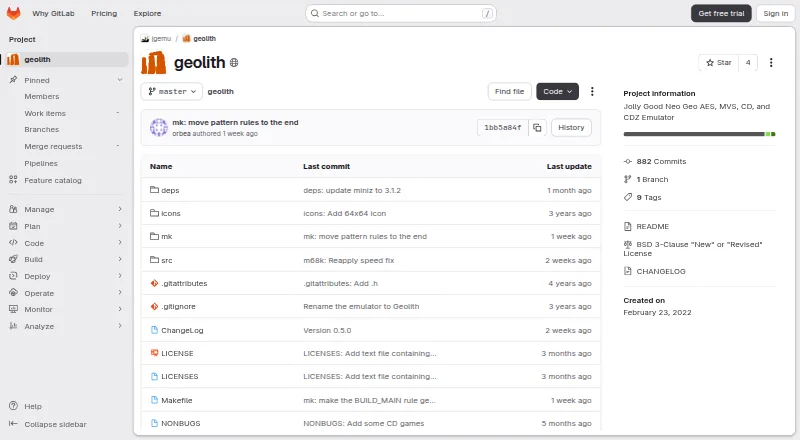
What Geolith is
Geolith is a free emulator for Neo Geo AES, MVS, CD and CDZ systems, available for Linux, macOS, BSD and Windows. The project states compatibility with commercially released AES, MVS and CD games. Cartridge systems accept TerraOnion .NEO files only; CD systems use .bin/.cue and can optionally use .chd images. BIOS files from a recent MAME set are required, with archives varying by system. Settings cover system and BIOS modes, region, free play, memory cards, palette and aspect ratio. Supported inputs include Neo Geo joysticks, a Mahjong Controller, a four-player extension board, V-Liner and the Irritating Maze trackball. Geolith synchronizes its CPUs with video and sound components, but video event timing is best effort and cycle-accurate rendering remains a longer-term goal. It does not support dedicated JAMMA PCB systems or PAL mode, and an early Stakes Winner prototype cannot currently be emulated because data is missing. The BSD-3-Clause project was written for The Jolly Good API and can run in multi-emulator frameworks or standalone binaries.
Good
- Supports AES, MVS, CD and CDZ systems.
- The project states compatibility with commercially released AES, MVS and CD games.
- Supports several specialized Neo Geo controllers.
- Available for Linux, macOS, BSD and Windows.
Watch out
- Recent MAME BIOS files are required.
- Cartridge systems support TerraOnion .NEO files only.
- Dedicated JAMMA PCB systems and PAL mode are unsupported.
- Video event timing is best effort.
Who it suits
It suits Neo Geo users who can supply the required BIOS files and want AES, MVS or CD emulation on a supported desktop platform. Users needing PAL mode or dedicated JAMMA PCB support should look elsewhere.
Verdict
Geolith supports several Neo Geo system types and a range of controller and configuration options. BIOS requirements and the stated system and timing limitations are important considerations.
The facts
Each one read from Geolith's own pages, with the date it was checked.
What it does
- Accuracy
- The emulator synchronizes its CPUs with video and sound components, while video event timing is described as best effort and cycle-accurate rendering remains a longer-term goal.checked 29 Sep 2026
- Accuracy caveat
- Video events use best-effort timing; the project says games are playable with minor differences from real hardware and no known major bugs.checked 30 Sep 2026
- API integration
- Geolith is written for The Jolly Good API and requires that API's header files to compile.checked 29 Sep 2026
- Cartridge format
- Cartridge systems support TerraOnion’s .NEO file format only.checked 30 Sep 2026
- Compatibility
- The project states that Geolith is compatible with 100% of commercially released Neo Geo AES, MVS, and CD libraries.checked 30 Sep 2026
- Disc formats
- CD systems support .bin/.cue and, optionally, .chd disc images.checked 30 Sep 2026
- Emulation detail
- The CPUs are emulated at instruction-level granularity and synchronized with each other, the LSPC video system, and YM2610 sound.checked 30 Sep 2026
- Framework
- Geolith was written for The Jolly Good API and can also be used in multi-emulator frameworks or standalone binaries.checked 30 Sep 2026
- Game formats
- Cartridge systems support TerraOnion .NEO files, while CD systems support .bin/.cue and optionally .chd disc images.checked 29 Sep 2026
- Known limits
- Dedicated JAMMA PCB systems and PAL mode are not supported, and an early Stakes Winner prototype cannot currently be emulated due to missing data.checked 29 Sep 2026
- Latest changelog entry
- Version 0.4.2 lists a fix for an LSPC state leak when switching between CD and cartridge games and support for The Jolly Good API 2.0.0.checked 29 Sep 2026
- License
- The README identifies Geolith as BSD-3-Clause licensed.checked 30 Sep 2026
- Maintainer
- The README credits Rupert Carmichael with Geolith copyright from 2022 through 2026.checked 29 Sep 2026
- Notable limits
- Dedicated JAMMA PCB systems and PAL mode are not currently supported, and an early Stakes Winner prototype cannot yet be emulated.checked 30 Sep 2026
- Project date
- The GitLab project page says it was created February 23, 2022.checked 30 Sep 2026
- Project purpose
- Jolly Good Emulation describes itself as a preservation-oriented emulation project focused on reusability, simplicity, and readable code.checked 29 Sep 2026
- Purpose
- Geolith is a highly accurate emulator for the Neo Geo AES, MVS, CD, and CDZ.checked 30 Sep 2026
- System settings
- Settings allow selection of AES, MVS, or Universe BIOS mode, CD system, region, free play, memory card options, palette, and aspect ratio.checked 29 Sep 2026
- What it does
- Geolith is a highly accurate emulator for the Neo Geo AES, MVS, CD, and CDZ.checked 29 Sep 2026
Where it runs
- BIOS requirement
- BIOS files from a recent MAME set are required.checked 30 Sep 2026
- Build platforms
- The README gives build instructions for Linux, macOS, BSD, and Windows using MSYS2.checked 30 Sep 2026
- Input devices
- Supported input devices include Neo Geo joysticks, the Mahjong controller, a four-player extension board, V-Liner, and the Irritating Maze trackball.checked 30 Sep 2026
The company
- Founded
- 2022checked 23 Sep 2026
- Maker
- The README credits Rupert Carmichael and Romain Tisserand for Geolith copyright.checked 30 Sep 2026
The full review of Geolith
Overview
Geolith is a free emulator for Neo Geo AES and MVS consoles and Neo Geo CD and CDZ systems, aimed at players who want one emulator across cartridge and disc formats. Its careful synchronization and broad system support make it a strong option for preservation-minded users, provided they can supply the required BIOS files and accept a few hardware and timing limits.
Part of Jolly Good Emulation, a project focused on reusable, simple, readable software, Geolith is built around The Jolly Good API. It can also run as a standalone binary or in multi-emulator frameworks; compiling it requires that API’s header files. The README identifies the license as BSD-3-Clause.
Key features
Geolith emulates CPUs at instruction-level granularity and synchronizes them with each other, the LSPC video system and YM2610 sound. That gives the project a strong foundation for accurate play, but its video-event timing is best effort, not cycle-accurate. Games are described as playable with minor differences from real hardware and no known major bugs; cycle-accurate rendering remains a longer-term goal.
Cartridge systems accept TerraOnion .NEO files only. CD systems use .bin/.cue images and optionally .chd, so users with other cartridge formats will need a conversion or a different emulator. BIOS files from a recent MAME set are required, and the required archives vary by system.
Settings cover AES, MVS or Universe BIOS mode, CD system, region, free play, memory-card options, palette and aspect ratio. Input support extends from Neo Geo joysticks to the Mahjong Controller, four-player extension board, V-Liner and Irritating Maze trackball, a useful range for specialized games and controller setups.
The latest changelog entry, version 0.4.2, fixes an LSPC state leak when switching between CD and cartridge games and adds support for The Jolly Good API 2.0.0.
Pricing
Geolith is free, with no free trial or paid plan to weigh against its core features. The cost is practical rather than financial: players must provide compatible game images and the required BIOS files.
Platforms
Geolith supports Linux, macOS, Windows and BSD. Build instructions cover those platforms, with Windows builds using MSYS2; compiling also requires The Jolly Good API header files. That makes the platform range broad, though the API dependency may be a hurdle for users who want to build from source without framework components.
Who it's for
Geolith suits Neo Geo players who want AES, MVS and CD-family emulation in one free project, especially those using supported controller hardware or interested in configurable BIOS, region and memory-card settings. It is less suitable for users who need dedicated JAMMA PCB support, PAL mode, an early Stakes Winner prototype, or cartridge formats beyond .NEO.
Pros and cons
- Pros: Supports AES, MVS, CD and CDZ, with compatibility stated for commercially released AES, MVS and CD games.
- Pros: Instruction-level CPU emulation and synchronization with video and sound components prioritize faithful system behavior.
- Pros: Broad controller support and settings for BIOS mode, region, free play, memory cards, palette and aspect ratio accommodate varied setups.
- Cons: Cartridge support is limited to TerraOnion .NEO files, and a recent MAME BIOS set is required.
- Cons: Video timing is best effort rather than cycle-accurate, and dedicated JAMMA systems and PAL mode are unsupported.
- Cons: The early Stakes Winner prototype cannot currently be emulated because required data is missing.
Alternatives
Choose Neo Geo Emulators to compare more options by category. NeoRAGEx is a free Windows-only emulator; games and BIOS are not included. NeoDS is free to use for non-commercial purposes. GnGeo is a free Linux option that requires SDL 1.2.x, libz and a Neo Geo BIOS; commercial use of GnGeo as a whole is forbidden by its license notes. GxGeo is another free alternative.
NeoCD/SDL is a free Linux and Windows option for CD emulation; it requires an original Neo Geo CD BIOS, and its selling, source-code reuse and technical knowledge are restricted to non-commercial purposes. MVSPSP is another free alternative. Mac users considering a paid option can choose NeoBox, a $14.99 one-time Mac app that requires macOS 14 or later and your own ROMs and BIOS files. NCDZPSP is another free alternative.
Verdict
Geolith is a strong free choice for players seeking broad Neo Geo AES, MVS and CD-family support, configurable systems and an unusually varied range of controllers. Choose it if .NEO or supported CD images and MAME BIOS files fit your setup; look elsewhere if you need PAL or JAMMA support, cycle-accurate video timing or a different cartridge format.
Alternatives to Geolith
- 1
GnGeo
Free planLinux6.2Free plan - 2
NeoCD/PS2
Free planSelf-hosted6.1Free plan - 3
NeoDS
Free plan6.1Free plan - 4
NeoCD/SDL
Free planLinuxWindows6.0Free plan - 5
NeoGeo CD Redux
Free planSelf-hosted6.0Free plan - 6
DREAMNEOCD
Free plan5.9Free plan