NeoRAGEx
NeoRAGEx is a free Neo·Geo emulator for playing arcade games on a Windows PC.
What NeoRAGEx is
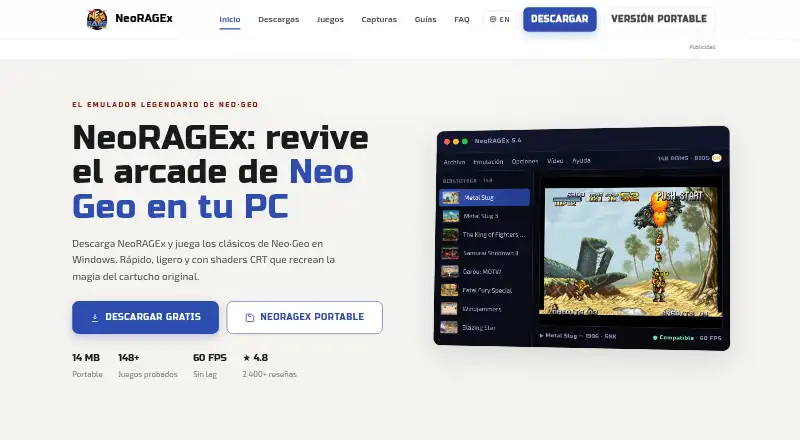
NeoRAGEx is a free Neo·Geo emulator for playing arcade games on a Windows PC. Its portable edition can run from a USB drive without installation. For display, it offers CRT effects such as scanlines, curvature, bloom, and vignette, as well as a pixel-sharp mode. Fullscreen can use integer scaling and either the original 4:3 proportions or widescreen. It supports Xbox, PlayStation, arcade stick, and generic controllers, with automatic detection and button remapping. Save states, rewind, and screenshots help manage play sessions. The listed minimum requirements are 64-bit Windows 10 or 11, a dual-core 2.0 GHz CPU, 2 GB RAM, and a DirectX 9-or-newer compatible GPU. The emulator does not come with games or BIOS: users need a neogeo.zip BIOS file and their own ROM files. The download page provides installer checksums, while the site links to setup and troubleshooting guides. NeoRAGEx describes itself as an independent project unaffiliated with SNK.
Good
- Portable edition runs without installation.
- Supports several controller types and remapping.
- Includes save states, rewind, and screenshots.
- Offers CRT effects and pixel-sharp display mode.
Watch out
- Windows 10 or 11 is required.
- Games and BIOS are not included.
- Requires users’ own ROM files and a neogeo.zip BIOS.
Who it suits
It suits fans of 1990s arcade games who want to play Neo·Geo titles on Windows. Users need to provide their own ROM files and BIOS.
Verdict
NeoRAGEx provides display options, controller support, and session features for Windows-based Neo·Geo emulation. It does not supply games or BIOS, so those must be provided separately.
Plans and prices
From NeoRAGEx's own pricing page, checked 29 Sep 2026.
| Plan | Price | What it gives you |
|---|---|---|
| NeoRAGEx 5.4e | Free | Free emulator; Windows; games and BIOS not included |
The facts
Each one read from NeoRAGEx's own pages, with the date it was checked.
What it does
- Affiliation
- NeoRAGEx describes itself as an independent project with no affiliation with or backing from SNK.checked 29 Sep 2026
- Audience
- The site describes the emulator as made for fans of 1990s arcade games.checked 29 Sep 2026
- Controllers
- Xbox, PlayStation, arcade stick, and generic controllers are supported with automatic detection and button remapping.checked 29 Sep 2026
- Display
- Fullscreen mode supports integer scaling and original 4:3 or widescreen aspect ratios.checked 29 Sep 2026
- Game files
- NeoRAGEx does not include games or BIOS; it requires a neogeo.zip BIOS file and users’ own ROM files.checked 29 Sep 2026
- Portable
- The portable edition runs without installation and can be carried on a USB drive.checked 29 Sep 2026
- Product
- NeoRAGEx is a Neo·Geo emulator for playing arcade classics on a Windows PC.checked 29 Sep 2026
- Requirements
- The download page lists Windows 10 or 11 64-bit, a dual-core 2.0 GHz CPU, 2 GB RAM, and a DirectX 9 or newer compatible GPU as minimum requirements.checked 29 Sep 2026
- Save features
- It supports save states, rewind, and screenshots.checked 29 Sep 2026
- Security
- The download page publishes SHA-256 and MD5 checksums for the installer.checked 29 Sep 2026
- Support
- The site links to guides and an FAQ for installation, configuration, and troubleshooting.checked 29 Sep 2026
- Video
- It offers CRT shaders with scanlines, curvature, bloom, and vignette, plus pixel sharp mode.checked 29 Sep 2026
The full review of NeoRAGEx
Overview
NeoRAGEx is a free emulator for Neo·Geo games on Windows, with both AES and MVS emulation. It is best suited to players who already have the required game files and want configurable display effects and controller support. Its main limitation is fundamental: you must supply the BIOS and ROMs yourself.
The project is independent and unaffiliated with or backed by SNK. Its focus on 1990s arcade games comes through in its CRT effects and play-session tools, while a portable edition offers an option for PCs where you do not want to install software.
Key features
Display and controls
Fullscreen mode supports integer scaling and either the original 4:3 ratio or widescreen. CRT shaders add scanlines, curvature, bloom, and vignette; pixel sharp mode offers a contrasting, crisp presentation. This range gives players useful ways to shape the image, though it is a set of visual choices rather than a substitute for a display mode you specifically need but is not supported.
Xbox, PlayStation, arcade-stick, and generic controllers work with automatic detection and button remapping. That breadth is a practical advantage for players using different hardware or preferring a custom layout. Save states, rewind, and screenshots round out the session tools: they let players preserve progress, revisit play, or capture an image.
Portable edition and setup
The portable edition runs without installation and can be carried on a USB drive, which suits users who want to keep the emulator separate from a PC’s installed software. The trade-off is that portability does not remove the setup prerequisite: NeoRAGEx still needs a neogeo.zip BIOS file and the user's own ROM files, and supplies neither.
Minimum requirements are Windows 10 or 11 64-bit, a dual-core 2.0 GHz CPU, 2 GB of RAM, and a DirectX 9-or-newer-compatible GPU. The download page publishes SHA-256 and MD5 checksums for the installer, and the site links to installation, configuration, and troubleshooting guides and an FAQ.
Pricing
NeoRAGEx 5.4e costs nothing. The free plan is the emulator for Windows; it does not include games or BIOS, so the zero price does not remove the need to provide those files separately. There is no free trial because the software is already offered as a free plan.
Platforms
NeoRAGEx supports Windows 10 and Windows 11. The stated minimum is a 64-bit Windows system; the portable edition can run from a USB drive without installation.
Who it's for
NeoRAGEx is a sensible fit for Windows users who want AES or MVS emulation, configurable retro display effects, flexible controller mapping, and save-state or rewind features. It is not the right choice for someone seeking a ready-to-play package with games and BIOS included, or for someone who needs a platform other than Windows.
Pros and cons
- Pro: Free AES and MVS emulation gives Windows users both Neo·Geo modes without a purchase.
- Pro: Multiple CRT effects, pixel sharp mode, integer scaling, and aspect-ratio choices provide meaningful display flexibility.
- Pro: Automatic controller detection, remapping, save states, rewind, and screenshots support varied setups and play styles.
- Pro: A portable edition runs without installation, and published installer checksums offer a way to verify the download.
- Con: Users must bring both the neogeo.zip BIOS and their own ROMs, making setup less convenient than a self-contained game library.
- Con: Windows-only support rules it out for Linux and macOS users.
Alternatives
Neo Geo Emulators is the broader category to consult when comparing options.
- Geolith is a free alternative for Linux or macOS users, as well as Windows users; its README credits Rupert Carmichael and Romain Tisserand for copyright.
- NeoDS is another free emulator, with code free to use for non-commercial purposes.
- GnGeo is a free Linux option that requires SDL 1.2.x, libz, and a NeoGeo BIOS; commercial use of GnGeo as a whole is forbidden.
- GxGeo is another free alternative.
- NeoCD/SDL is a free Linux and Windows option requiring an original NeoGeo CD BIOS; selling is not allowed, and source-code reuse and technical knowledge are limited to non-commercial purposes.
- MVSPSP is another free alternative.
- NeoBox is a paid Mac-only option at $14.99, paid once. It requires macOS 14 or later, and users provide their own ROMs and BIOS files.
- NCDZPSP is another free alternative.
Verdict
Choose NeoRAGEx if you play Neo·Geo games on Windows and value display customization, controller flexibility, and session features at no software cost. Look elsewhere if you need another operating system or expect games and BIOS to come with the emulator; those prerequisites are the clearest reason its free price may not make it the easiest fit.
Alternatives to NeoRAGEx
- 1
GnGeo
Free planLinux6.2Free plan - 2
NeoCD/PS2
Free planSelf-hosted6.1Free plan - 3
NeoDS
Free plan6.1Free plan - 4
NeoCD/SDL
Free planLinuxWindows6.0Free plan - 5
NeoGeo CD Redux
Free planSelf-hosted6.0Free plan - 6
DREAMNEOCD
Free plan5.9Free plan