delta
Delta is a free, open-source pager for Git and related command-line output, including diffs, grep, ripgrep JSON and blame.
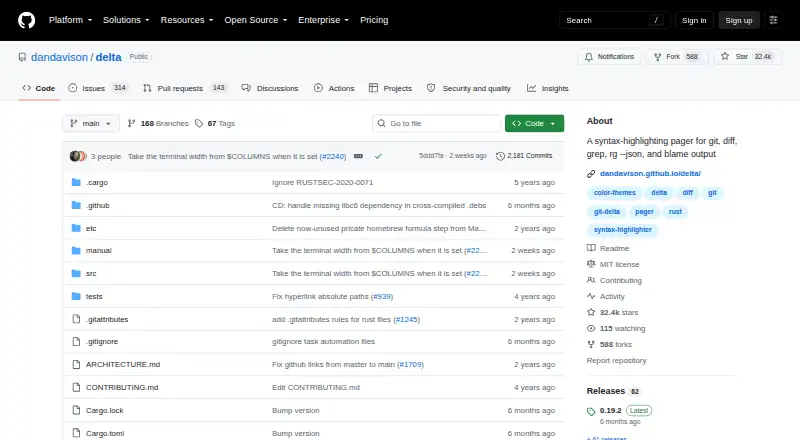
What delta is
Delta is a free, open-source pager for Git and related command-line output, including diffs, grep, ripgrep JSON and blame. It can show diffs side by side with line numbers and automatic wrapping, and highlight edits within a line. Its syntax themes come from bat. Delta can be configured as Git’s pager and interactive diff filter, with guidance for zdiff3 merge conflicts. It can also highlight output from ripgrep, git grep and grep; links in blame and diff views can point to GitHub, GitLab, SourceHut or Codeberg. The manual covers Magit, VS Code, tmux and GNU Screen integrations. Installation options include executables for Linux glibc, Linux musl, macOS and Windows, plus package-manager instructions. Delta uses less for paging, for which the project recommends a reasonably recent version. The 0.20.0 release adds OSC1717 diff-line metadata support for TUIs such as lazygit. Delta is MIT-licensed and available for Linux, macOS and Windows.
Good
- Side-by-side diffs include line numbers and wrapping.
- Highlights edits within lines.
- Supports Git pager and interactive diff filter use.
- Diff and blame links support four hosting services.
- Free, open-source, and MIT-licensed.
Watch out
- Requires a reasonably recent version of less.
- No free trial is listed.
Who it suits
Delta suits command-line users who want clearer Git diffs and syntax-highlighted search or blame output. It also fits workflows involving the documented editors, terminal tools or hosting services.
Verdict
Delta combines readable diffs with highlighting for several kinds of command-line output. Users should account for its dependency on less when choosing it.
Plans and prices
From delta's own pricing page, checked 4 Oct 2026.
| Plan | Price | What it gives you |
|---|---|---|
| git-delta | Free | MIT-licensed software; install via package manager or download an executable |
The facts
Each one read from delta's own pages, with the date it was checked.
What it does
- Dependency
- Delta uses less for paging and says a reasonably recent version should be installed.checked 4 Oct 2026
- Diff views
- It supports side-by-side diffs with automatic line wrapping and line numbers.checked 4 Oct 2026
- Editor integration
- The manual describes using delta with Magit and VS Code.checked 4 Oct 2026
- Git integration
- The project documents configuring delta as Git's pager and interactive diff filter, and using zdiff3 for merge conflicts.checked 4 Oct 2026
- Hosting links
- Its blame and diff hyperlinks support GitHub, GitLab, SourceHut, and Codeberg.checked 4 Oct 2026
- Installation
- The project offers executables for Linux glibc, Linux musl, macOS, and Windows, plus package-manager installation instructions.checked 4 Oct 2026
- License
- The repository includes the MIT License, which permits use, copying, modification, distribution, sublicensing, and sale subject to its stated conditions.checked 4 Oct 2026
- Other integrations
- The manual also has guidance for tmux and GNU Screen.checked 4 Oct 2026
- Purpose
- Delta is a syntax-highlighting pager for Git, diff, grep, ripgrep JSON, and blame output.checked 4 Oct 2026
- Release
- The 0.20.0 release adds OSC1717 diff-line metadata support for TUIs such as lazygit.checked 4 Oct 2026
- Search output
- Delta can syntax-highlight output from ripgrep, git grep, and grep.checked 4 Oct 2026
- Security
- GitHub reports that the project has not set up a SECURITY.md file and has no published security advisories.checked 4 Oct 2026
- Syntax themes
- Delta supports the syntax-highlighting themes available with bat.checked 4 Oct 2026
- Word highlighting
- It highlights changes within lines using a Levenshtein edit inference algorithm.checked 4 Oct 2026
The full review of delta
Delta is a command-line pager that makes Git diffs, search results, and blame output easier to scan. It suits developers who work in a terminal and want syntax-aware comparisons without a software fee. The main caveat is that paging depends on a reasonably recent version of less.
Overview
Delta focuses on presenting differences and related command-line output, rather than offering a general-purpose graphical comparison workspace. Its reach beyond Git diffs—to grep, ripgrep JSON, and blame output—makes it a useful choice for developers who move between reviewing changes and searching code in the terminal.
Its MIT license permits use, modification, redistribution, sublicensing, and sale subject to the license conditions. That is a practical fit for personal use as well as team workflows. The trade-off is the less dependency: anyone choosing Delta needs to account for a reasonably recent version of that pager.
Key features
Diffs that make edits easier to locate
Side-by-side views combine line numbers with automatic wrapping, helping keep long lines readable without losing their context. For edits within a line, Delta uses a Levenshtein edit inference algorithm to highlight the changed text. That makes small revisions easier to distinguish from unchanged surroundings, though the presentation is aimed at terminal workflows rather than a standalone visual diff application.
Syntax highlighting uses the themes available with bat, giving users an established set of styles for code. Delta can also highlight grep, git grep, ripgrep, and ripgrep JSON output, which is useful when a developer wants search results to remain readable in the same command-line environment.
Git and surrounding tools
The project documents configuring Delta as Git's pager and interactive diff filter, and using zdiff3 for merge conflicts. Its blame and diff hyperlinks support GitHub, GitLab, SourceHut, and Codeberg, making it easier to move from terminal output to hosted code. Documentation also covers Magit and VS Code, as well as tmux and GNU Screen, so Delta can fit into several common editor and terminal arrangements.
Installation options include executables for Linux glibc, Linux musl, macOS, and Windows, alongside package-manager instructions. The 0.20.0 release adds OSC1717 diff-line metadata support for TUIs such as lazygit, a targeted improvement for users of terminal interfaces that can consume that metadata.
Pricing
Delta is free and open source. The git-delta plan costs nothing and provides MIT-licensed software, installable through a package manager or by downloading an executable. There is no paid tier or trial to weigh against a free-plan cap; the relevant practical requirement is having a reasonably recent less installed.
Platforms
Delta supports Linux, macOS, and Windows. Its command-line focus makes it most appropriate for users who already work with terminal tools, rather than readers looking for a primarily graphical comparison app.
Who it's for
Choose Delta if you review Git changes in a terminal and want line-level highlighting, syntax themes, and useful coverage of search and blame output without paying for a license. It is also a strong fit for workflows that use supported Git hosting links or the documented editor and terminal integrations. Look elsewhere if you need a pager independent of less or a general-purpose graphical comparison workspace.
Pros and cons
- Broad command-line coverage: highlights Git diffs, blame, grep, and ripgrep output, so it serves more than one review task.
- Useful detail in diffs: side-by-side views, wrapping, line numbers, and within-line change highlighting help clarify what changed.
- Permissive, free license: the MIT terms allow modification and redistribution subject to their conditions, with no software charge.
- Pager dependency: Delta uses less and calls for a reasonably recent version, so it is not self-contained.
- Terminal-oriented scope: its command-line integrations are a strength for terminal users, but it is not positioned as a general graphical diff suite.
Alternatives
Diffchecker is worth considering for a freemium option available on the web as well as Linux, macOS, and Windows; its free Basic plan has limited access to Pro features and some features are constrained by monthly try counts. Its Pro + Desktop plan costs $15 a month.
Diffract is another freemium option with a free plan and trial across Linux, macOS, and Windows. Difftastic is a free, MIT-licensed alternative for readers comparing open-source tools across those same desktop platforms.
KDiff3 is a free, open-source option for Linux, macOS, and Windows. SourceGear DiffMerge is free to use across those platforms. For readers focused on Linux and Windows, Meld is free under GPLv2 or later.
Code Compare offers a free version and a paid Pro tier, with Windows and extension support. Compare Suite is a Windows freemium alternative with a free Light plan for basic file comparison.
For more options, browse Diff and Merge Tools.
Getting started
- Visit https://github.com/dandavison/delta.
- Install a Linux, macOS, or Windows executable, or follow the package-manager instructions.
- Install a reasonably recent version of less for paging.
- Configure delta as Git’s pager or interactive diff filter.
- Consult the manual for integrations such as Magit, VS Code, tmux, or GNU Screen.
Limits worth knowing
The listed git-delta plan is free. Delta uses less for paging, and the project recommends a reasonably recent version.
Questions
Is delta free?
Yes. The listed git-delta plan is free, and the project is open source under the MIT License.
Which operating systems are supported?
The listed platforms are Linux, macOS, and Windows. Executables are offered for Linux glibc, Linux musl, macOS, and Windows.
What output can delta display?
It is a pager for Git, diff, grep, ripgrep JSON, and blame output. It can also syntax-highlight ripgrep, git grep, and grep results.
Does delta support merge workflows?
The project documents using delta as Git’s interactive diff filter and using zdiff3 for merge conflicts. The listed merge scope is three-way.
What license does delta use?
The repository includes the MIT License, which permits use, copying, modification, distribution, sublicensing, and sale subject to its conditions.
What does delta need for paging?
Delta uses less, and the project recommends installing a reasonably recent version.
Alternatives to delta
- 1
Manic EMU
Free planOpen sourceiOSmacOSSelf-hosted8.2Free plan - 2

Provenance
Free planOpen sourceiOSmacOS8.2From $39.99 a year - 3
RetroArch
Free planAndroidiOSWebLinux7.7Free plan - 4
Snes9x
Free planAndroidWebLinuxmacOS7.6Free plan - 5
ares
Free planOpen sourceLinuxmacOSSelf-hostedWindows7.5Free plan - 6

OpenEmu
Free planOpen sourcemacOS7.3Free plan