Manic EMU
Manic EMU is a retro game emulator for iPhone and iPad, supporting more than 30 classic platforms across consoles, arcade, DOS, Symbian, and J2ME.
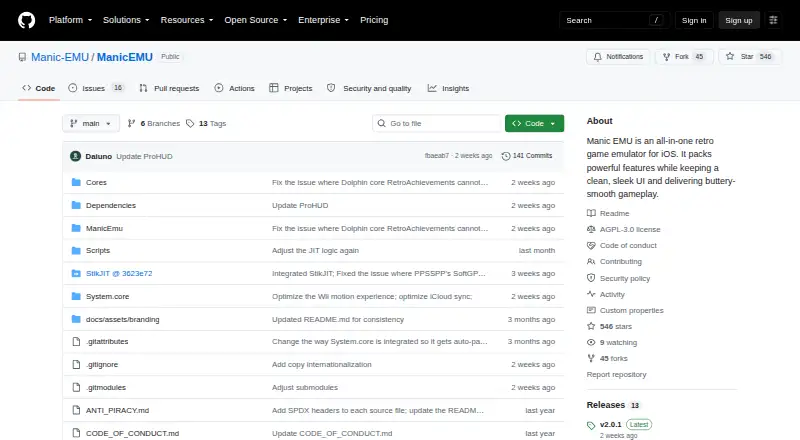
What Manic EMU is
Manic EMU is a retro game emulator for iPhone and iPad, supporting more than 30 classic platforms across consoles, arcade, DOS, Symbian, and J2ME. It includes save states, auto-saves, fast-forward, cheats, shortcuts, filters, screenshots, and custom skins. Cloud import supports Google Drive, Dropbox, OneDrive, Baidu, Aliyun, WebDAV, and SMB. The site says iCloud sync keeps games, saves, and settings encrypted in the cloud across devices. Manic EMU integrates RetroAchievements and supports local multiplayer and Netplay on eligible Libretro cores. The App Store free build limits fast-forward to 2×, save states and cheat codes to three each, and controllers to one player. Premium plans provide higher fast-forward speeds, more save states and cheat slots, and extra controller players; they cost $0.99 a month, $4.99 a year, or $9.99, paid once. A free sideload build includes premium play features, but iCloud save sync is available only in the App Store build. The app does not include ROMs, BIOS files, or game data; users are directed to legally owned backups, homebrew, or public-domain software.
Good
- Supports more than 30 classic platforms
- Imports from multiple listed cloud storage services
- Integrates RetroAchievements
- Supports local multiplayer and Netplay on eligible cores
Watch out
- Free App Store build limits fast-forward to 2×
- Free build allows three save states and three cheat codes
- Sideload builds do not include iCloud save sync
- ROMs, BIOS files, and game data are not included
Who it suits
Manic EMU suits iPhone and iPad users who want to play games from a range of classic systems. It may also suit players interested in RetroAchievements or multiplayer on eligible cores.
Verdict
Manic EMU offers a wide range of supported systems and play features, with limits that differ between the App Store and sideload builds. Game files are not included, and users need to supply eligible software themselves.
Plans and prices
From Manic EMU's own pricing page, checked 15 Oct 2026.
| Plan | Price | What it gives you |
|---|---|---|
| Free | Free | Fast-forward up to 2× · 3 save states · 3 cheat codes · 1-player controllers |
| Sideload | Free | Premium play features included · iCloud save sync unavailable |
| Sideload / GitHub | Free | Premium play features · up to 5× fast-forward · unlimited saves, cheats and players · no iCloud sync |
| Premium Monthly | $0.99 a month | Up to 5× fast-forward · unlimited saves and cheats · unlimited players · iCloud sync · monthly |
| Premium Monthly Plan | $0.99 a month | Higher fast-forward speeds · more save states and cheat slots · extra controller players · Monthly |
| Premium Annual Plan | $4.99 a year | Higher fast-forward speeds · more save states and cheat slots · extra controller players · Annually |
| Premium Annual | $5.99 a year | Up to 5× fast-forward · unlimited saves and cheats · unlimited players · iCloud sync · annually |
| Premium Forever Access | $9.99, paid once | Higher fast-forward speeds · more save states and cheat slots · extra controller players · Lifetime |
| Forever Access | $11.99, paid once | Premium play features · unlimited saves and cheats · unlimited players · iCloud sync · one-time purchase |
The facts
Each one read from Manic EMU's own pages, with the date it was checked.
What it does
- Achievements and multiplayer
- It integrates RetroAchievements and supports local multiplayer and Netplay on eligible Libretro cores.checked 7 Oct 2026
- AirPlay
- The app supports AirPlay mirroring for television or other large-screen play.checked 15 Oct 2026
- API and SDKs
- No public REST API or standalone SDK is documented; extensibility is provided through emulator cores, Swift packages, skins and third-party service keys.checked 15 Oct 2026
- Build requirements
- Building requires macOS with Xcode 26 or newer, iOS SDK 15 or newer, Swift 5.9 or newer, Git LFS and an Apple Developer account for capabilities such as iCloud.checked 15 Oct 2026
- Cheats
- The app offers an online cheat library, custom cheat support and expanded cheat limits for premium users.checked 15 Oct 2026
- Cloud integrations
- Cloud import supports Google Drive, Dropbox, OneDrive, Baidu, Aliyun, WebDAV and SMB.checked 15 Oct 2026
- Controllers
- Supported input includes Joy-Con, DualShock, Xbox, Bluetooth controllers, keyboards and multiple simultaneous controllers.checked 15 Oct 2026
- Distribution
- The app is available through the App Store and sideloading channels including StikStore and SideStore.checked 7 Oct 2026
- Game files
- The app does not include ROMs, BIOS files, or game data; users are directed to use legally owned backups, homebrew, or public-domain software.checked 7 Oct 2026
- Game library
- The app provides a library with cover artwork, metadata, categories, collapsible sections and manufacturer sorting.checked 15 Oct 2026
- iCloud sync
- iCloud can synchronize games, saves and settings with encrypted cloud backup, but it is limited to App Store builds.checked 15 Oct 2026
- Integrations
- Cloud import supports Google Drive, Dropbox, OneDrive, Baidu, Aliyun, WebDAV, and SMB.checked 7 Oct 2026
- License
- The upstream Manic EMU source is licensed under GNU AGPL-3.0, with separate notices for bundled cores and dependencies.checked 15 Oct 2026
- Limit: 3DS performance
- Reviewers report that many 3DS games lag, glitch or have audio problems, especially on older iPhones.checked 15 Oct 2026
- Limit: crashes and lag
- AppsHunter identifies crashes, freezes, lag and compatibility problems as recurring negative themes.checked 15 Oct 2026
- Limit: keyboard input
- A UK App Store reviewer reports that Citra 3DS games can freeze at text-entry screens because keyboard confirmation is not passed through.checked 15 Oct 2026
- Limit: paywalls
- An AppsHunter review complains that cheat-code limits require payment and asks for fewer paywalled features.checked 15 Oct 2026
- Netplay
- Eligible Libretro cores can host or join rooms through LAN or relay, with spectator and password options.checked 15 Oct 2026
- Notable news
- Release 2.0.0 on September 3 removed bundled TrollStore JIT builds and required users to package them themselves using the project guide.checked 15 Oct 2026
- Praise: ease of use
- App Store reviewers describe importing a ROM from Files and launching it directly without a computer as easy.checked 15 Oct 2026
- Praise: performance and breadth
- AppsHunter summarizes repeated praise for smooth performance, intuitive controls and broad emulator coverage.checked 15 Oct 2026
- Project origin
- The official history says Daiuno, Max and Aoshuang began the project in early 2025 and released Manic EMU on April 3, 2025.checked 15 Oct 2026
The company
- Company legal name
- Apple identifies the provider as Shenzhen Aoshuang Future Technology Co., Ltd.checked 15 Oct 2026
Money
- Free tier limits
- The free App Store build limits fast-forward to 2×, save states and cheat codes to three each, and controllers to one player.checked 7 Oct 2026
The full review of Manic EMU
Manic EMU is a broad iPhone and iPad emulator for players whose retro library spans several generations and system types. It is best suited to users who want one flexible app rather than separate console-specific tools. Its strongest appeal is breadth and convenience, while the choice between App Store and sideload builds affects both features and cloud syncing.
Overview
Manic EMU supports more than 30 classic platforms, covering consoles, arcade systems, DOS, Symbian, and J2ME. That makes it a practical single-library solution for mixed collections; someone interested only in one console may find a dedicated emulator more focused. Save states, auto-saves, rewind, fast-forward, cheats, shortcuts, filters, screenshots, and custom skins provide useful control over both pacing and presentation.
Import options are unusually wide. Game files can come from Google Drive, Dropbox, OneDrive, Baidu, Aliyun, WebDAV, or SMB, so the app fits several existing storage setups. The App Store version also uses encrypted iCloud storage to sync games, saves, and settings between devices. Manic EMU supplies none of the ROMs, BIOS files, or other game data: users must provide legally owned backups, homebrew, or public-domain software.
Key features
- Multi-system coverage: Support for more than 30 platforms makes this a strong choice for varied libraries, including older computer and mobile systems that are often absent from console-only apps.
- Progress and pacing tools: Save states and auto-saves reduce the need to replay long sections, while rewind and fast-forward let players correct mistakes or move through familiar material more quickly.
- Customization: Filters, screenshots, shortcuts, and custom skins give users control over appearance and input behavior rather than locking them to a single presentation.
- Cloud and network import: Connections to major cloud drives plus WebDAV and SMB are useful when a collection is already stored across personal or network locations.
- Achievements and multiplayer: RetroAchievements adds achievement tracking, and local multiplayer plus Netplay are supported on eligible Libretro cores. Compatibility therefore depends on the core involved, not every system equally.
- Shaders and cheats: Shader support changes visual output, while cheat support and the listed control options suit players who want more than basic game launching.
Pricing
Manic EMU is open source and has no mandatory purchase. The free App Store plan costs nothing and limits fast-forward to 2×, save states to three, cheat codes to three, and controllers to one player. Those caps are workable for occasional play, but frequent users and multiplayer households will reach them quickly.
The Sideload plan also costs nothing and includes premium play features, including higher fast-forward speeds, more save states and cheat slots, and extra controller players. Its decisive trade-off is that iCloud save sync is unavailable, so it suits users comfortable with sideloading who value unlocked play tools more than automatic device continuity.
Premium Monthly costs $0.99 a month, billed monthly. Premium Annual costs $4.99 a year, billed annually, and Premium Forever Access costs 9.99 USD once, billed as lifetime access. All three add higher fast-forward speeds, more save states and cheat slots, and extra controller players. The annual plan lowers the recurring cost for committed users, while lifetime access is the straightforward choice for players expecting long-term use; the monthly option avoids a larger upfront commitment.
Platforms
Manic EMU is available for iOS, including iPhone and iPad, with macOS also identified as a supported platform. Distribution includes the App Store and sideloading channels such as StikStore and SideStore. The App Store build is the one that provides iCloud save sync, so platform access and distribution method matter when setting up multiple devices.
Who it's for
Choose Manic EMU if you maintain a varied retro collection and want broad system coverage, cloud-import flexibility, shaders, achievements, and modern save controls in one iOS-oriented package. It is also a good fit for local multiplayer or Netplay where the selected Libretro core supports it. Look elsewhere if you need bundled game content, a single-console specialist, or iCloud syncing while using a sideload build.
Pros and cons
Pros
- More than 30 systems cover consoles, arcade, DOS, Symbian, and J2ME in one app.
- Import from major cloud services, WebDAV, and SMB accommodates different file-storage habits.
- Save states, rewind, fast-forward, cheats, filters, skins, RetroAchievements, and multiplayer provide unusually broad play options.
- Free sideload builds include premium play features without a purchase.
Cons
- The free App Store build restricts fast-forward, save states, cheats, and controller players.
- Sideload builds give up iCloud save sync, creating a direct convenience trade-off.
- ROMs, BIOS files, and game data are not included, so users must supply lawful software.
- Netplay and multiplayer depend on eligible Libretro cores rather than applying universally.
Alternatives
RetroArch is the better pick for users who need Android, Linux, Windows, web, and macOS coverage in addition to iOS, with a free and open-source Libretro project.
Virtual Jaguar suits players seeking an open-source emulator core, provided they are willing to use a Libretro frontend such as RetroArch.
bsnes is preferable when the goal is a free SNES emulator rather than broad multi-system support.
bsnes offers a GNU GPLv3, open-source option for Linux, macOS, and Windows users.
SNES Emulator is another free option, though it is a work in progress with incomplete emulation and bugs.
Snes9x is a portable freeware choice for playing most SNES and Super Famicom games on Android, Linux, macOS, and Windows.
ares provides a free, open-source multi-system emulator for Linux, macOS, and Windows.
BizHawk is a free MIT-licensed emulator with Windows and Unix releases.
For focused system browsing, the Multi-System Emulators list is the closest category match; readers targeting one platform can compare the SNES Emulators, Nintendo 3DS Emulators, TurboGrafx-16 Emulators, Sega CD Emulators, or Game Gear Emulators lists.
Verdict
Manic EMU is a strong recommendation for iPhone and iPad owners who want one open-source emulator across a large, varied retro library, especially with flexible imports and extensive play controls. Its main reason to look elsewhere is the App Store feature caps or the loss of iCloud sync when choosing sideloaded premium features; users who want a single-system tool or included game files should choose a different app.
Alternatives to Manic EMU
- 1

Provenance
Free planOpen sourceiOSmacOS8.2From $39.99 a year - 2

Foxol
Free planAndroidiOSWebLinux8.0From €39.99 a year - 3
SkyEmu
Free planOpen sourceAndroidiOSWebLinux8.0Free plan - 4
RetroArch
Free planAndroidiOSWebLinux7.7Free plan - 5
Flycast
Free planOpen sourceAndroidLinuxmacOSSelf-hosted7.6Free plan - 6

QEMU
Free planOpen sourceAPILinuxmacOSSelf-hosted7.6Free plan