
Day Off
Day Off helps HR managers organize employee leave and paid time off through employee profiles, leave balances, requests, and approvals.
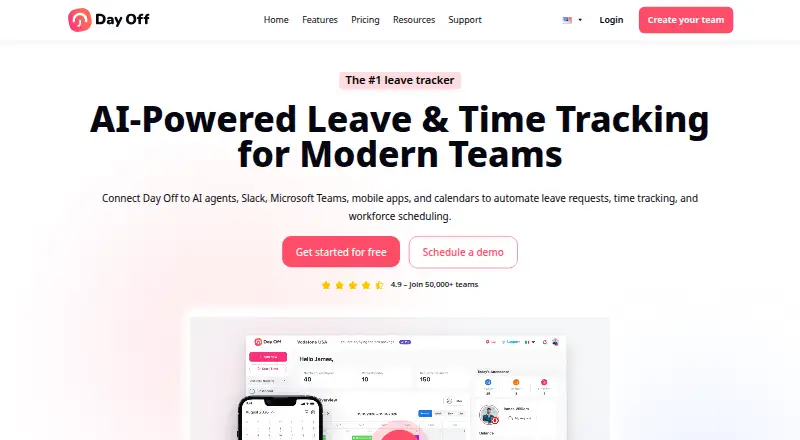
What Day Off is
Day Off helps HR managers organize employee leave and paid time off through employee profiles, leave balances, requests, and approvals. Its policies can automate accruals and carryover, with weekly, biweekly, semimonthly, and monthly schedules. Administrators can assign multiple approvers and approve leave with one click. Integrations include Google Calendar, Outlook Calendar, Slack, Microsoft Teams, and a public API for employee, leave, and company data. Android, iOS, web, and API access are available. The Free Plan costs nothing and covers up to 10 users and 10 employees, with calendar view, customizable leave types, one-step approval, and management reports. Pro costs $2/seat/mo with a $20/month minimum; Pro + Time Tracker costs $3/seat/mo with a $30/month minimum. A 30-day Pro trial is available. Day Off states that its services are not tailored to comply with industry-specific regulations such as HIPAA and FISMA.
Good
- Automates accrual and carryover rules.
- Supports multiple approvers and one-click approvals.
- Connects with calendars and team messaging services.
- Offers Android and iOS apps.
- Free plan includes management reports.
Watch out
- Free plan is limited to 10 users and 10 employees.
- Pro has a $20/month minimum.
- Services are not tailored for HIPAA or FISMA compliance.
Who it suits
Day Off suits HR teams managing employee leave balances, requests, and approval workflows. Its free plan may fit teams with no more than 10 users and 10 employees.
Verdict
Day Off covers core leave administration, with free and paid plans and mobile access. Review the plan limits and regulatory caveat against your organization’s needs.
Plans and prices
From Day Off's own pricing page, checked 1 Oct 2026.
| Plan | Price | What it gives you |
|---|---|---|
| Free Plan | Free | Free forever · up to 10 users · 10 employees · calendar view · customizable leave types · one-step approval · management reports · /month |
| Pro Plan | $2 a month | $20/month minimum · unlimited employees · advanced leave types · advanced work schedules · bulk actions · integrations · save 17% yearly · /seat/mo |
| Pro + Time Tracker Plan | $3 a month | $30/month minimum · task tracking · clock in/out · projects, tasks and clients · detailed and summary reports · attendance review · save 17% yearly · /seat/mo |
The facts
Each one read from Day Off's own pages, with the date it was checked.
What it does
- API
- The public API can retrieve and manage employee, leave and company data using custom API keys with names and expiration dates.checked 1 Oct 2026
- Backups
- Data is backed up daily with encrypted copies in diverse locations and a stated recovery point objective of 24 hours.checked 1 Oct 2026
- Employee management
- The platform centralizes employee profiles, leave balances, approvals and leave requests.checked 1 Oct 2026
- Encryption
- Day Off encrypts data in transit and at rest, and its web and mobile applications use HTTPS/SSL with 256-bit encryption.checked 1 Oct 2026
- Hosting certification
- The hosting provider is described as AICPA, SOC 2 Type II and SOC 3 Type II certified.checked 1 Oct 2026
- Integrations
- Day Off integrates with Google Calendar, Outlook Calendar, Slack, Microsoft Teams and a public API.checked 1 Oct 2026
- Leave policies
- Leave policies support automated accruals and carryover rules, including weekly, biweekly, semimonthly and monthly accrual schedules.checked 1 Oct 2026
- Payments
- Day Off states that it follows PCI DSS for payments and uses Stripe to encrypt payment data.checked 1 Oct 2026
- Purpose
- Day Off helps HR managers plan, track and manage employees’ leave and PTO.checked 1 Oct 2026
- Service limitation
- The terms state that the services are not tailored to comply with industry-specific regulations such as HIPAA and FISMA.checked 1 Oct 2026
- Support resources
- Day Off provides a knowledge base, FAQ and contact support resources.checked 1 Oct 2026
Where it runs
- Approvals
- Administrators can assign multiple approvers and use instant one-click leave approvals.checked 1 Oct 2026
- Platforms
- Day Off is available on iOS, Android and the web, with mobile and web data synchronized in real time.checked 1 Oct 2026
The company
- Headquarters
- London, United Kingdomchecked 28 Sep 2026
Money
- Trial
- Day Off offers a 30-day free trial for the Pro plan and a Basic Forever free plan.checked 1 Oct 2026
The full review of Day Off
Day Off is a leave and PTO administration platform for organizations that want employee records, balances, requests and approvals in one system. It is best suited to small and midsize teams that need configurable leave rules and workplace-calendar integrations. Its free tier is useful for small groups, while paid plans add scale and a separate time-tracking option; organizations with industry-specific compliance needs should look elsewhere.
Overview
Day Off brings employee profiles, leave balances, requests and approvals together, with employee self-service alongside administrator controls. That shared record can make routine leave administration more consistent, particularly when policies vary across a team. Automated accrual and carryover rules support weekly, biweekly, semimonthly and monthly schedules, giving HR managers flexibility to match common pay and accrual cycles.
Administrators can assign multiple approvers, while one-step approvals allow a request to be handled with a single click. Those options suit both teams with layered sign-off and groups that want a shorter approval path. Connections to Google Calendar, Outlook Calendar, Slack and Microsoft Teams bring leave data into familiar workplace tools. A public API can retrieve and manage employee, leave and company data through custom API keys with names and expiration dates, which gives organizations a route to their own integrations.
Day Off says it encrypts data in transit and at rest, and its web and mobile apps use HTTPS/SSL with 256-bit encryption. Its hosting provider is described as AICPA, SOC 2 Type II and SOC 3 Type II certified. Daily encrypted backups are held in diverse locations, with a stated recovery point objective of 24 hours. For payments, the company says it follows PCI DSS and uses Stripe to encrypt payment data. These protections do not change an important limitation: the terms say the service is not tailored to industry-specific regulations such as HIPAA and FISMA.
Key features
- Policy and accrual controls: Automated accrual and carryover rules, with weekly through monthly schedules, make the system more adaptable than a basic request calendar.
- Approval flexibility: Multiple approvers can support more involved sign-off, while one-step approval keeps simpler workflows moving.
- Workplace connections: Google Calendar, Outlook Calendar, Slack and Microsoft Teams integrations reduce the need to manage leave entirely apart from daily tools.
- Public API: Custom keys with names and expiration dates can access employee, leave and company data, useful for teams building connected processes.
- Support resources: A knowledge base, FAQ and contact support provide several routes for help.
Pricing
Day Off has a Basic Forever free plan and a 30-day free trial of Pro. The Free Plan costs nothing and is capped at 10 users and 10 employees. It includes a calendar view, customizable leave types, one-step approval and management reports. That is a meaningful starting point for a small team, but the seat and employee caps make it unsuitable once the organization grows; it also lacks the advanced tools and integrations identified for Pro.
The Pro Plan costs $2 a month billed per seat per month, with a $20/month minimum. It removes the employee limit and adds advanced leave types, advanced work schedules, bulk actions and integrations. The minimum means smaller teams pay at least $20/month even if a per-seat calculation would be lower. Yearly payment saves 17%, making Pro the practical tier for organizations that need more policy flexibility or integrations and can meet the minimum.
The Pro + Time Tracker Plan costs $3 a month billed per seat per month, with a $30/month minimum. It adds task tracking, clock in/out, projects, tasks and clients, detailed and summary reports, and attendance review. Teams that only need leave management have little reason to pay the higher minimum; it is the more relevant choice when attendance and time tracking belong in the same workflow. Yearly payment also saves 17%.
Platforms
Day Off is available on Android, iOS and the web, with a public API for connecting employee, leave and company data. Mobile access is useful for employees submitting requests away from a desk, while administrators can manage policies and approvals through the broader platform.
Who it's for
Day Off is a sound fit for HR managers who need configurable accruals, employee self-service and multiple approval options, especially when calendars and collaboration tools are part of the team's routine. The free tier gives very small teams a low-cost way to centralize leave, and Pro accommodates organizations that have outgrown its caps. It is not the right choice for organizations that require a service tailored to HIPAA, FISMA or comparable industry-specific rules.
Pros and cons
- Pro: Free use covers up to 10 users and 10 employees, with calendar, leave types, one-step approval and reports, giving small teams a usable starting point.
- Pro: Accrual schedules, carryover rules and multiple approvers address policy and sign-off needs beyond basic leave requests.
- Pro: Calendar, chat and API integrations give teams several ways to connect leave data to existing workflows.
- Con: The Free Plan's 10-user and 10-employee ceilings can force a move to a paid plan as the team expands.
- Con: Pro and Pro + Time Tracker carry $20/month and $30/month minimums respectively, so the per-seat starting prices do not tell the whole cost story for small teams.
- Con: The terms exclude tailoring for industry-specific regulations such as HIPAA and FISMA, ruling it out for organizations that depend on that kind of compliance fit.
Alternatives
Leave Management Software is the broader category to explore if Day Off's seat minimums or compliance limitation do not match your needs.
Choose actiPLANS if you want to compare a low-cost annual paid tier: its plan for 41–200 users is $1.20 a month billed yearly at $1.2 per user/mo. Its free tier is limited to 1–3 users and limited functionality, so Day Off gives a more clearly specified free allowance for teams of up to 10.
Calamari is another paid option with a 10-seat minimum subscription and a yearly rate shown as $2 per employee / month; Day Off may suit teams seeking a free tier or a Pro + Time Tracker option instead.
Vacation Tracker has no free plan and its Core tier carries a $550 minimum, so Day Off is the more straightforward option for small organizations prioritizing a free starting tier and lower stated paid minimums.
Staff Leave offers a free plan with unlimited users, mobile holiday booking, request decisions, live calendar export feeds and user/leave imports; consider it if unlimited free users matter more than Day Off's stated accrual and integration capabilities.
DaysPlan is an alternative to consider if you want to compare another paid time-off tracking option.
BookYourPTO is another freemium alternative for readers comparing free plans.
WhosOff is a paid alternative to consider if you prefer to compare another leave management service.
Zoho People offers a free tier for up to five users, so it may be worth considering for a smaller team comparing broader HR software; Day Off's stated free cap is 10 users and 10 employees.
Verdict
Day Off is a good choice for small and growing teams that want leave balances, configurable accruals, approvals and employee self-service in one place, with a free tier and integrations to common workplace tools. Its clearest trade-offs are the paid plans' monthly minimums and the lack of tailoring for industry-specific regulations. Choose it for practical leave administration; look elsewhere if regulatory fit is a deciding requirement or if the minimums outweigh the value of its broader workflow.
Alternatives to Day Off
- 1

Horilla
Free planOpen sourceAndroidiOSWebAPI8.7From $7 a month - 2
Keka
Free planOpen sourceAndroidiOSWebAPI8.6$3.99 one-time - 3

Zoho People
Free planAndroidiOSWebAPI8.3From $1.25 a month - 4

Shiftbase
Free planAndroidiOSWebAPI8.1From €0.50 a month - 5
TNC Track
Free planAndroidiOSWebAPI8.1Free plan - 6

OtisIO
Free planAndroidiOSWebAPI8.0Free plan