AudioPen
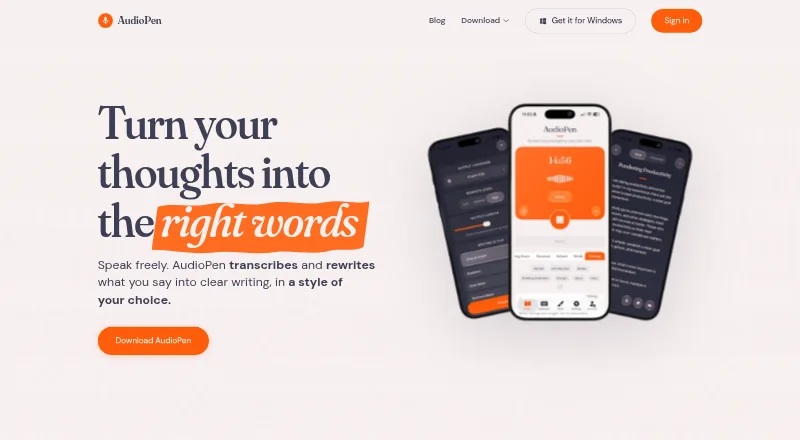
AudioPen transcribes spoken thoughts and rewrites them as clear writing in a style chosen by the user.
What AudioPen is
AudioPen transcribes spoken thoughts and rewrites them as clear writing in a style chosen by the user. Rewrite controls let users select a low, medium, or high level and adjust output length; they can also describe a style or supply a sample to match. It can write in a different language from the spoken input, and its site lists many supported languages. Voice typing works in text fields in apps such as Gmail, Slack, Notion, and Google Docs. AudioPen connects to other apps through Zapier and webhooks, while Prime MCP gives ChatGPT or Claude read-only access to notes. Its iPhone, Android, Mac, and Windows apps offer on-device offline transcription, but AI rewriting requires an internet connection. The free plan supports recordings up to 3 minutes; Prime plans support recordings up to 15 minutes. AudioPen is designed for individual thoughts rather than joining Zoom calls or labeling speakers.
Good
- Free plan includes transcription and rewriting
- Users can adjust rewrite level and output length
- Can write in a different language from the spoken input
- Offline transcription is available in listed apps
- Voice typing works in several named apps
Watch out
- Free recordings are limited to 3 minutes
- Prime recordings are limited to 15 minutes
- AI rewriting requires an internet connection
- Does not join Zoom calls or label speakers
Who it suits
It suits writers, creators, salespeople, lawyers, therapists, and people who find typing slow or painful. It is intended for turning individual spoken thoughts into notes, not for processing meetings with speaker labels.
Verdict
AudioPen turns speech into editable writing with controls for style and length, plus voice typing and integrations. The free plan has short recording limits, and its meeting capabilities are limited by design.
Plans and prices
From AudioPen's own pricing page, checked 14 Oct 2026.
| Plan | Price | What it gives you |
|---|---|---|
| Free | Free | recordings up to 3 minutes · limited voice-typing sessions · all writing styles |
| Prime (3 months) | $33, paid once | Unlimited recordings up to 15 minutes · unlimited voice typing and AI rewrites · unlimited note storage · audio and text uploads · SuperSummaries · AudioPen MCP · 3 months |
| Prime 3 months | $33 a month | recordings up to 15 minutes · unlimited voice typing and storage · audio uploads · text-note processing · SuperSummaries · MCP · $33 for 3 months, one-time pass |
| Prime 1 year | $99 a year | recordings up to 15 minutes · unlimited voice typing and storage · audio uploads · text-note processing · SuperSummaries · MCP · $99 for 1 year, one-time pass |
| Prime (1 year) | $99, paid once | Unlimited recordings up to 15 minutes · unlimited voice typing and AI rewrites · unlimited note storage · audio and text uploads · SuperSummaries · AudioPen MCP · 1 year |
| Prime (2 years) | $159, paid once | Unlimited recordings up to 15 minutes · unlimited voice typing and AI rewrites · unlimited note storage · audio and text uploads · SuperSummaries · AudioPen MCP · 2 years |
| Prime 2 years | $159 a year | recordings up to 15 minutes · unlimited voice typing and storage · audio uploads · text-note processing · SuperSummaries · MCP · $159 for 2 years, one-time pass |
The facts
Each one read from AudioPen's own pages, with the date it was checked.
What it does
- API and SDKs
- The public integration pages document webhooks and MCP, without naming a conventional REST SDK.checked 14 Oct 2026
- Audio uploads
- Prime users can upload up to 100 audio files every four weeks, with each file limited to 100 MB.checked 14 Oct 2026
- Bulk licenses
- Teams and groups can buy up to 100 one-year Prime licenses in one order at a 20% discount.checked 28 Sep 2026
- Custom styles
- Users can describe a writing style or provide a sample for AudioPen to match.checked 28 Sep 2026
- Founder and founding year
- Louis Pereira says he built AudioPen as a solo founder in 2023.checked 14 Oct 2026
- Founder and launch
- Founder Louis says he built AudioPen in 2023 as a solo founder.checked 28 Sep 2026
- Integrations
- AudioPen supports Zapier and webhooks; webhook payloads expose note data as JSON for custom workflows.checked 14 Oct 2026
- Intended users
- The site names writers, creators, salespeople, lawyers, therapists, and people who find typing slow or painful among its intended users.checked 28 Sep 2026
- Languages
- AudioPen can write in a different language from the one spoken, and its site lists many supported languages.checked 28 Sep 2026
- Licence status
- The terms describe a hosted voice-to-text service and prohibit decompiling or reverse engineering the software.checked 14 Oct 2026
- Limit: meeting features
- AudioPen states that it is intended for individual thoughts and does not join Zoom calls or identify speakers.checked 14 Oct 2026
- Limit: privacy wording discrepancy
- An independent review noted that a marketing page described roughly 24-hour audio deletion while the privacy policy states deletion within 48 hours.checked 14 Oct 2026
- Limit: rewrite fidelity
- An App Store reviewer said earlier versions sometimes removed nuance and information when rewriting notes.checked 14 Oct 2026
- MCP connector
- The AudioPen MCP endpoint lets ChatGPT and Claude search and read notes but cannot create, edit, or delete them.checked 14 Oct 2026
- Meeting limitation
- AudioPen says it is built for individual thought and does not join Zoom calls or label speakers.checked 28 Sep 2026
- Multilingual output
- AudioPen says spoken and written languages can differ, allowing dictation in one language and output in another.checked 14 Oct 2026
- Notable news: origin
- The founder's build article says AudioPen originated during a 2023 experiment with OpenAI APIs and a half-day build.checked 14 Oct 2026
- Notion integration
- The Prime Notion connector syncs the library into a Notion database and stops overwriting a page after it is edited in Notion.checked 14 Oct 2026
The company
- Company
- The site footer identifies Nicheless Inc. as the company behind AudioPen.checked 28 Sep 2026
- Company legal name
- AudioPen is operated by Nicheless, Inc.checked 14 Oct 2026
- Headquarters
- Nicheless, Inc. lists 651 N Broad St, Suite 206, Middletown, Delaware 19709, USA.checked 14 Oct 2026
- Independent company description
- An independent AudioPen resource describes the product as launched in 2023 and operated by solo founder Louis Pereira through Nicheless, Inc.checked 14 Oct 2026
Money
- Free converter
- The no-account converter accepts common audio formats up to 60 minutes and 100 MB, but does not label speakers.checked 14 Oct 2026
Where it runs
- Limit: Android account friction
- A Google Play reviewer complained that updates required signing in again and that notes and recordings were separated confusingly.checked 14 Oct 2026
The full review of AudioPen
Overview
AudioPen is a speech-to-writing app for turning spoken ideas into clearer written notes. It transcribes what you say and rewrites it in a style you choose, with controls for how much the wording changes and how long the result should be. It is aimed at individual thought capture, not meeting transcription: AudioPen does not join Zoom calls or label speakers.
Its use cases range from a quick spoken draft to notes you can send into other apps. AudioPen supports voice typing in text fields, works across mobile, desktop, browser, and extension platforms, and offers offline transcription in its iPhone, Android, Mac, and Windows apps. AI rewriting still requires an internet connection.
For broader category browsing, see our AI Voice Note Apps and Voice Note Apps lists.
Key features
- Speech-to-writing: AudioPen transcribes spoken thoughts and rewrites them into clearer prose. Users can select low, medium, or high rewrite levels and adjust the output length.
- Custom writing styles: Describe the style to use or provide a sample for AudioPen to match.
- Different-language output: The resulting text can be written in a language other than the one spoken. AudioPen's site lists many supported languages.
- Voice typing: Dictate into apps with text fields, including Gmail, Slack, Notion, and Google Docs.
- App connections and note access: Zapier and webhooks can send saved notes to other apps. AudioPen Prime MCP gives ChatGPT or Claude read-only access to notes.
- Offline transcription: The iPhone, Android, Mac, and Windows apps can transcribe on-device without internet. Rewriting the transcript with AI does need a connection.
- Audio uploads: Prime users can upload up to 100 audio files every four weeks, each up to 100MB, in listed common formats.
- Privacy and security: AudioPen says voice-note audio is deleted from its servers within 48 hours, voice-typing audio is not saved, data is encrypted at rest, and notes are not used to train AI.
Pricing
AudioPen is freemium, with a free plan and three one-time Prime purchases. The free plan includes recordings up to 3 minutes, transcription and rewrite, and limited voice-typing sessions.
| Plan | Price | Included |
|---|---|---|
| Free | free | Recordings up to 3 minutes; transcription and rewrite; limited voice-typing sessions |
| Prime (3 months) | $33, paid once (billed 3 months) | Unlimited recordings up to 15 minutes, unlimited voice typing and AI rewrites, unlimited note storage, audio and text uploads, SuperSummaries, and AudioPen MCP |
| Prime (1 year) | $99, paid once (billed 1 year) | Unlimited recordings up to 15 minutes, unlimited voice typing and AI rewrites, unlimited note storage, audio and text uploads, SuperSummaries, and AudioPen MCP |
| Prime (2 years) | $159, paid once (billed 2 years) | Unlimited recordings up to 15 minutes, unlimited voice typing and AI rewrites, unlimited note storage, audio and text uploads, SuperSummaries, and AudioPen MCP |
Teams and groups can purchase up to 100 one-year Prime licenses in a single order at a 20% discount.
Platforms
AudioPen is available on Android, iOS, macOS, Windows, and the web, with an extension also listed. A mobile app is available. Although supported desktop and mobile apps offer offline transcription, the offline mode does not cover AI rewriting.
Who it's for
AudioPen names writers, creators, salespeople, lawyers, therapists, and people who find typing slow or painful as intended users. It suits people who prefer to speak a first draft and refine it into readable text, or who want to dictate directly into a text field. Its individual-note focus makes it a less direct fit for capturing multi-speaker meetings.
Pros and cons
Pros
- Rewrite intensity and output length can be adjusted, and users can define or demonstrate a preferred style.
- Voice typing works in apps such as Gmail, Slack, Notion, and Google Docs.
- On-device offline transcription is available in the iPhone, Android, Mac, and Windows apps.
- Notes can be sent to other apps through Zapier or webhooks, with read-only MCP access for ChatGPT or Claude.
Cons
- It does not join Zoom calls or identify individual speakers.
- AI rewriting requires an internet connection, even where offline transcription is available.
- The free plan limits recordings to 3 minutes and provides limited voice-typing sessions.
- Prime recordings are limited to 15 minutes each; the audio upload allowance is up to 100 files every four weeks, at up to 100MB per file.
Alternatives
For other tools in the voice-note space, consider Letterly, Snow, Audionotes, Voicenotes, Memex, Memoth, VoiceJournal, and Cleft.
Verdict
AudioPen is built for turning personal spoken thoughts into polished notes, with meaningful control over style, rewrite level, and length. Its cross-platform availability, voice typing, and offline transcription add flexibility, while the distinction between offline transcription and online AI rewriting is worth keeping in mind. The free plan is constrained by a 3-minute recording cap and limited voice-typing sessions; Prime raises recording length to 15 minutes and adds unlimited voice typing, rewrites, and note storage. If meeting capture with speaker labels is central to your needs, AudioPen is not designed for that job.
Getting started
- Open https://www.audiopen.ai/ or choose an app for Android, iOS, macOS, or Windows; an extension is also available.
- Start with the free plan, which includes recordings up to 3 minutes and limited voice-typing sessions.
- Choose a rewrite level and output length, or describe a style or provide a sample.
- Use voice typing in a text field, or save a voice note for transcription and rewriting.
- Choose a Prime plan for recordings up to 15 minutes, unlimited voice typing and AI rewrites, and unlimited note storage.
Limits worth knowing
The free plan allows recordings up to 3 minutes and limited voice-typing sessions. Prime recordings can be up to 15 minutes; Prime users can also upload up to 100 audio files every four weeks, each up to 100MB. AI rewriting requires an internet connection.
Questions
Is AudioPen free?
Yes. Its free plan costs nothing and includes recordings up to 3 minutes, transcription and rewriting, and limited voice-typing sessions.
What do Prime plans cost?
Prime (3 months) costs $33, paid once, billed 3 months. Prime (1 year) costs $99, paid once, billed 1 year, and Prime (2 years) costs $159, paid once, billed 2 years.
Which platforms does AudioPen support?
AudioPen is available on Android, iOS, macOS, Windows, the web, and as an extension.
Can AudioPen work offline?
The iPhone, Android, Mac, and Windows apps support on-device offline transcription. AI rewriting requires an internet connection.
Does AudioPen integrate with other apps?
It supports Zapier and webhooks for sending saved notes to other apps. Prime MCP provides read-only note access to ChatGPT or Claude.
Who makes AudioPen?
AudioPen's site footer identifies Nicheless Inc. as the company behind it. Founder Louis says he built it in 2023 as a solo founder.
Alternatives to AudioPen
- 1
Voice Notebook
Free planAndroidiOSWebExtension8.1From $16 a year - 2

Voicenotes
Free planAndroidiOSWebAPI8.1From $9 a month - 3

AudioNote
Free planAndroidiOSmacOSWindows7.9$12.99 one-time - 4

Fabric
AndroidiOSWebAPI7.9From $8 a month - 5

Whispr Notes
Free planAndroidiOSWebAPI7.9From $4.17 a month - 6
SpeakPipe
Free planAndroidiOSWeb7.8From $12 a month