
AudioNote
AudioNote connects notes with voice recordings, letting users seek to the audio associated with a particular note.
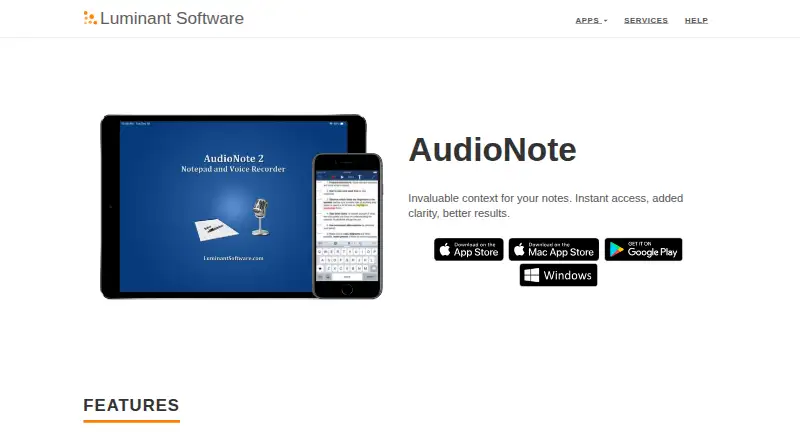
What AudioNote is
AudioNote connects notes with voice recordings, letting users seek to the audio associated with a particular note. Notes can be typed, handwritten, or made from photos, with customizable fonts, colors, and shapes. During playback, notes highlight and scroll automatically; playback speed is adjustable with automatic pitch correction. Users can write directly on PDF slides and sort notes into subject folders. AudioNote is available for Android, iOS, macOS, and Windows, and the maker lists iCloud Drive, Dropbox, and other sharing options for syncing between devices. A one-month free trial of Pro is advertised. On Windows, the free demo allows unlimited viewing of existing notes, but new recordings are limited to five minutes per note until a valid Product Key is entered. The Mac purchase is $14.99, paid once and requires macOS 13.0 or later. Purchases are processed separately by app stores, while the app can be used free to view notes recorded elsewhere. Transcription is not a product feature; the Mac App Store listing says its transcription runs on-device and does not transmit audio or transcripts.
Good
- Links notes to associated audio.
- Supports text, handwriting, and photo notes.
- Notes highlight and scroll during playback.
- PDF slides can be annotated directly.
Watch out
- Windows demo recordings are limited to five minutes per note.
- Mac purchase requires macOS 13.0 or later.
- Purchases are processed separately by app stores.
Who it suits
AudioNote suits students and presenters who want notes linked to recordings or who annotate PDF slides. It also fits people who need to organize notes by subject and move them between devices.
Verdict
AudioNote combines flexible note formats with audio-linked playback and PDF annotation. Windows users should account for the demo recording limit, while the Mac version has a stated OS requirement.
Plans and prices
From AudioNote's own pricing page, checked 8 Oct 2026.
| Plan | Price | What it gives you |
|---|---|---|
| AudioNote for Windows demo | Free | Viewing existing notes is free and unlimited · new recordings limited to 5 minutes per note |
| AudioNote for Windows viewer | Free | Unlimited viewing of existing .audionote files · recording capped at 5 minutes per note until product key |
| AudioNote Pro trial | Free | 1 month free Pro trial |
| AudioNote for iOS | $12.99, paid once | iPhone/iPad app · purchase handled by App Store |
| AudioNote 2 for Mac | $14.99, paid once | Mac only · macOS 13.0 or later |
| AudioNote 2 - Voice Recorder (Mac) | $14.99, paid once | Mac · requires macOS 13.0 or later |
The facts
Each one read from AudioNote's own pages, with the date it was checked.
What it does
- Amplified microphone
- The recorder automatically adapts amplification to room size and volume.checked 15 Oct 2026
- Deleted-note recovery
- On iOS, a Trash folder stores recently deleted AudioNote files.checked 15 Oct 2026
- File format
- AudioNote creates .audionote files that can be opened on iOS, Mac, Windows or Android.checked 15 Oct 2026
- Folders
- Folders organize notes by subject.checked 15 Oct 2026
- Intended users
- The maker's page highlights class and presentation notes, including note-taking directly on PDF slides.checked 8 Oct 2026
- Licence terms
- The EULA says the software is licensed rather than sold, restricts redistribution and reverse engineering, and reserves rights to Luminant Software.checked 15 Oct 2026
- Limit: missing OneDrive sync
- A reviewer said iCloud and Dropbox syncing were simple but requested Microsoft OneDrive support.checked 15 Oct 2026
- Limit: no video notes
- An App Store reviewer requested video recording alongside notes because the app currently records audio and notes only.checked 15 Oct 2026
- Limit: reliability complaints
- A reviewer reported random file and transcript loss, repeated text phrases and ineffective customer support.checked 15 Oct 2026
- Limit: subscription complaint
- A reviewer considered AudioNote 2's monthly subscription poor value for mainly increasing text size compared with the older one-time-purchase version.checked 15 Oct 2026
- Linked playback
- Selecting a typed or drawn note seeks playback to when that note was created.checked 15 Oct 2026
- Note formats
- The app supports text, handwritten, and photo notes, with customizable fonts, colors, and shapes.checked 8 Oct 2026
- Organization
- Folders can be used to organize notes by subject.checked 8 Oct 2026
- PDF annotation
- Users can take notes directly on PDF presentation slides.checked 15 Oct 2026
- PDF notes
- Users can take notes directly on PDF slides.checked 8 Oct 2026
- Playback
- Notes automatically highlight and scroll during playback, and playback speed is adjustable with automatic pitch correction.checked 8 Oct 2026
The company
- Company address
- An independent Android app directory lists Luminant Software, Inc. at 901 Jersey St, Bellingham, Washington 98225.checked 15 Oct 2026
- Company founded
- LinkedIn lists Luminant Software's founding year as 2008.checked 15 Oct 2026
- Company size
- LinkedIn lists Luminant Software as a privately held software-development company with 2–10 employees.checked 15 Oct 2026
- Maker history
- Luminant Software says it was founded in 2008, after Steve Jobs announced the App Store.checked 8 Oct 2026
Where it runs
- Limit: Android maintenance
- An independent Android listing says the last update was January 6, 2015 and some users complained about long update gaps and recording failures.checked 15 Oct 2026
- Mac compatibility
- AudioNote 2 requires macOS 13.0 or later.checked 15 Oct 2026
- On-device transcription
- AudioNote 2 for Mac advertises transcription performed entirely on-device, stating that audio and transcripts are never transmitted.checked 15 Oct 2026
- Platforms
- The maker lists AudioNote for iOS, Mac, Windows, and Android.checked 8 Oct 2026
The full review of AudioNote
AudioNote is built for recording alongside written, handwritten, or photo notes, then returning to the audio through those notes. It is a strong match for students and presenters working through lessons or slide decks, while readers who require searchable speech-to-text should look elsewhere.
Overview
AudioNote makes a recording easier to navigate by associating each note with the moment it was made. During playback, notes highlight and scroll automatically, turning a long lecture or presentation into a sequence of recognizable points rather than an undifferentiated audio file. Text, handwriting, and photos accommodate different ways of capturing information, and folders keep material grouped by subject.
The app’s center of gravity is linked review, not transcription. Transcription is not offered, so AudioNote is not the right tool for producing searchable written records of meetings or interviews. Its maker, Luminant Software, says it has operated since 2008.
Key features
Notes that follow the recording
Create text, handwritten, or photo notes and use them to move through the associated audio. Automatic highlighting and scrolling show where you are as playback progresses. Variable playback speed is paired with automatic pitch correction, allowing faster review or slower listening without the speaker’s voice becoming unnaturally high or low. That combination is particularly useful when revisiting teaching or presentation material; it matters less if your workflow begins and ends with a transcript.
PDF annotation
Notes can be made directly on PDF slides. Students and presenters can therefore keep annotations beside the source material while recording, instead of splitting the session between a document viewer and a separate recorder. Folders provide a straightforward subject-based filing system.
Sync, sharing, and privacy
The maker cites iCloud Drive, Dropbox, and other sharing options for moving notes between devices. Its privacy policy says it collects non-personal usage data, error reports, platform and app settings, and general geographic information. On Mac, the App Store listing says transcription runs on-device and that audio and transcripts are not transmitted; that privacy statement does not change the fact that transcription is not an AudioNote feature. A help section covers playback speed, trimming audio, transferring files, and related tasks.
Pricing
| Plan | Price | What it includes |
|---|---|---|
| AudioNote for Windows demo | 0.00 USD, free | Unlimited viewing of existing notes; new recordings limited to five minutes per note |
| AudioNote 2 - Voice Recorder (Mac) | 14.99 USD, once | Mac app; requires macOS 13.0 or later |
Pro has a one-month free trial. On Windows, entering a valid Product Key removes the five-minute recording ceiling in demo mode, making the free edition suitable for reading shared material or evaluating the workflow rather than sustained recording. Purchases are handled separately by the app stores. AudioNote can still be used free to view notes recorded elsewhere, which is useful when collaborators use different purchase arrangements. Pricing for other platform editions is custom pricing.
Platforms
AudioNote supports Android, iOS, macOS, and Windows. The listed Mac purchase requires macOS 13.0 or later. The Windows demo is the only explicitly described free edition and imposes its five-minute-per-note recording limit; existing-note viewing remains unlimited.
Who it's for
Choose AudioNote if you take notes during classes, presentations, or slide-led sessions and want each note to lead back to its audio context. PDF annotation, subject folders, and adjustable playback make it especially suitable for structured study and review. It is a weaker choice for journalists, meeting-heavy teams, or anyone whose first requirement is transcription, text search, or a written export of speech.
Pros and cons
- Pros: Links text, handwriting, and photos to precise playback context; notes automatically highlight and scroll; speed control includes pitch correction; PDF slide annotation and subject folders support organized study; cross-device sharing options include iCloud Drive and Dropbox.
- Cons: No transcription feature; Windows demo recordings stop at five minutes per note until a Product Key is entered; purchases are separated by app store; the Mac edition requires macOS 13.0 or later.
Alternatives
For a broad starting point, see Voice Note Apps. Pick Voice Notebook instead if web-based transcription is more important: its free Basic service transcribes audio files up to 15 minutes and it runs on Android, iOS, Linux, macOS, Windows, the web, and an extension. AudioPen is the better fit for transcription and rewriting, with a free tier covering recordings up to three minutes and limited voice-typing sessions.
Diktafon suits readers who want a free, open-source recorder with no ads and an MIT license. Choose Whispr Notes when monthly transcription and semantic search are priorities; its free plan includes 10 hours of transcription each month. Easy Voice Recorder is a simpler Android-and-iOS-oriented recorder with no time limits in its free, ad-supported edition.
Voicenotes is preferable for high-volume transcription, offering 100 weekly transcription minutes, unlimited recordings, and 100-plus languages on its free Basic plan. Noted is an iOS/macOS alternative with paid subscriptions and a seven-day trial on its yearly plan. SpeakPipe is aimed at sending voice messages rather than building note-linked study records.
Verdict
AudioNote is a focused choice for students and presenters who want annotated notes, PDF slides, and synchronized playback in one workflow. Its main reason to choose it is the direct link between a note and the moment in the recording; its main reason to look elsewhere is the absence of transcription, compounded on Windows by the five-minute demo recording limit.
Alternatives to AudioNote
- 1
AudioPen
Free planAndroidiOSWebExtension8.2From $99 a year - 2
Voice Notebook
Free planAndroidiOSWebExtension8.1From $16 a year - 3

Voicenotes
Free planAndroidiOSWebAPI8.1From $9 a month - 4

Fabric
AndroidiOSWebAPI7.9From $8 a month - 5

Whispr Notes
Free planAndroidiOSWebAPI7.9From $4.17 a month - 6
SpeakPipe
Free planAndroidiOSWeb7.8From $12 a month