
Memoth
Memoth is a personal AI voice-notes app that records or imports conversations and creates transcripts, summaries, speaker labels, highlights, translations, a…
What Memoth is
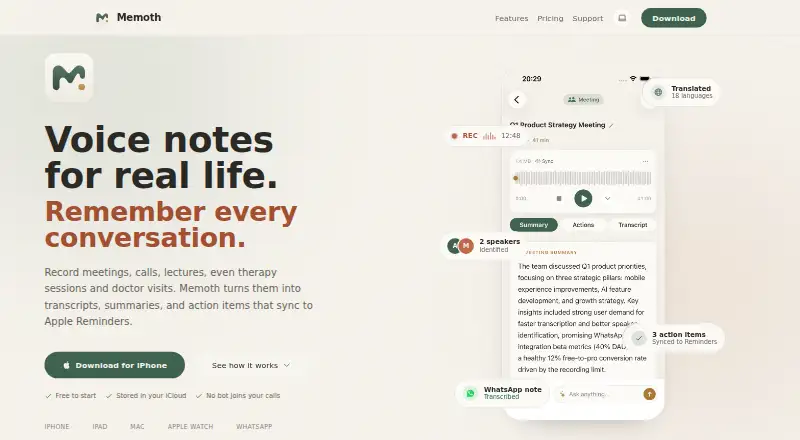
Memoth is a personal AI voice-notes app that records or imports conversations and creates transcripts, summaries, speaker labels, highlights, translations, and action items. It records on iPhone, iPad, Mac, and Apple Watch, accepts audio files, and processes WhatsApp voice messages. On Mac, it can detect meetings and capture audio locally without a bot, calendar access, or meeting invitation; supported sources include Zoom, Microsoft Teams, Google Meet, Webex, FaceTime, and Slack huddles. Users can ask questions using a meeting’s transcript, summary, speakers, and action items as context. Recordings, notes, and transcripts stay in the device library and sync through the user’s own iCloud. Uploaded audio is retained as an AES-256 encrypted backup for 30 days, then deleted automatically. The free account includes 10 minutes per month; Pro is $9.99 a month for 15 hours, and Pro Plus is $24.99 a month for 40 hours. Imported audio and WhatsApp messages count toward the same monthly recording allowance as app recordings.
Good
- Records on iPhone, iPad, Mac, and Apple Watch.
- Mac meeting capture does not use a bot.
- Recordings and notes sync through the user’s iCloud.
- Uploaded audio backup is deleted after 30 days.
Watch out
- Free account is limited to 10 minutes monthly.
- Imported audio uses the same recording allowance.
- Pro costs $9.99 a month.
- Pro Plus costs $24.99 a month.
Who it suits
Memoth may suit students, professionals, researchers, journalists, and others who want transcripts and action items from conversations. Mac users who want locally captured meeting audio may also find its meeting features relevant.
Verdict
Memoth combines voice recording and conversation processing with Apple-device and meeting workflows. Consider the monthly recording allowance, especially if you plan to import audio or use WhatsApp messages.
Plans and prices
From Memoth's own pricing page, checked 15 Oct 2026.
| Plan | Price | What it gives you |
|---|---|---|
| Free | Free | 10 minutes/month · iPhone and iPad · AI transcription and summaries · import audio · 3 folders |
| Guest | Free | 3 minutes · no account · full AI transcription · one recording |
| Pro | $9.99 a month | 15 hours/month · Mac meeting detection · Apple Watch · WhatsApp bot · Reminders sync · audio export · unlimited folders · monthly; also $89.99/year or $2.99/week |
| Pro Plus | $24.99 a month | 40 hours/month · all Pro features · monthly; also $189.99/year or $5.99/week |
The facts
Each one read from Memoth's own pages, with the date it was checked.
What it does
- AI data use
- Memoth says it does not use recordings, transcripts, summaries, or notes to train AI models and requires its AI providers to opt out of training.checked 15 Oct 2026
- AI training policy
- Memoth says recordings are never sold or used to train AI models, and its third-party AI providers are contractually barred from model training.checked 30 Sep 2026
- API and SDKs
- The terms refer to official APIs but provide no public endpoint reference, SDK listing, or developer documentation on the reviewed pages.checked 15 Oct 2026
- Audio retention
- Uploaded audio is retained as an AES-256 encrypted backup for 30 days and then deleted automatically.checked 30 Sep 2026
- Cloud processing
- Audio is uploaded over encrypted connections for transcription, stored as an encrypted backup for up to 30 days, and then automatically deleted.checked 15 Oct 2026
- Data storage
- Recordings, transcripts, summaries, and notes are stored locally and synchronized through the user's private iCloud rather than a Memoth database.checked 15 Oct 2026
- Founder discussion
- In a Reddit launch post, the maker described the product as still early and requested feedback from people recording meetings, lectures, therapy sessions, and calls.checked 15 Oct 2026
- Integrations
- Published integrations include Apple iCloud, Apple Reminders, Zoom, Microsoft Teams, Google Meet, Webex, FaceTime, WhatsApp, and Siri/Shortcuts.checked 15 Oct 2026
- Licence
- The terms identify Memoth software and associated technology as Artlink Live Ltd. property and prohibit reverse engineering, indicating a proprietary product.checked 15 Oct 2026
- Limit: AI accuracy
- The terms warn that AI outputs can contain errors, omissions, inaccuracies, or hallucinations and should be independently verified.checked 15 Oct 2026
- Limit: cloud dependency
- The support documentation says recording, playback, and browsing work offline, but transcription and AI summaries require an internet connection.checked 15 Oct 2026
- Limit: usage rollover
- Unused recording allowance does not roll over and resets on the first day of each calendar month in UTC.checked 15 Oct 2026
- Meeting chat
- Users can ask questions about a recording and receive answers grounded in its transcript, speakers, summary, and action items.checked 15 Oct 2026
- Meeting compatibility
- Mac capture works with Zoom, Microsoft Teams, Google Meet, Webex, FaceTime, Slack huddles, and other Mac audio sources.checked 30 Sep 2026
- Praise: ease of use
- Two visible App Store reviewers praised the app as easy to use and said it worked great.checked 15 Oct 2026
- Product
- Memoth is a personal AI voice-notes app that records or imports conversations and creates transcripts, summaries, speaker labels, highlights, translations, and action items.checked 30 Sep 2026
Where it runs
- App listing details
- The App Store lists Rotem Doron as seller, a 97 MB download, Productivity category, and English plus seven additional languages.checked 15 Oct 2026
- App Store rating availability
- The United States App Store page says the app has not received enough ratings or reviews to display an overview.checked 15 Oct 2026
- Limit: Apple ecosystem
- The maker said on Reddit that Memoth was Apple-only at launch, with Android dependent on future demand.checked 15 Oct 2026
- Mac meeting capture
- The Mac app detects meetings in Zoom, Teams, Google Meet, Webex, FaceTime, Slack huddles, and other apps without a bot or calendar connection.checked 15 Oct 2026
- Mac meetings
- The Mac app detects meetings and records audio locally without a bot, calendar access, or meeting invitation.checked 30 Sep 2026
Money
- Billing limit
- Imported audio and WhatsApp voice messages consume the same monthly recording allowance as app recordings.checked 30 Sep 2026
The company
- Company
- Memoth is operated by Artlink Live Ltd., registered in Israel, and sells consumer subscriptions.checked 15 Oct 2026
- Headquarters
- Israelchecked 28 Sep 2026
The full review of Memoth
Memoth is an AI voice-notes app for recording or importing conversations and turning them into organized, searchable notes. It suits people who work mainly on Apple devices and need both personal voice capture and meeting workflows. Its strongest case is privacy-conscious, multi-source recording; its main trade-off is that every recording source draws from one monthly allowance.
Overview
Memoth records on iPhone, iPad, Mac and Apple Watch, accepts audio-file imports and processes WhatsApp voice messages. It generates transcripts, summaries, speaker labels, highlights, translations and action items, then makes transcripts searchable. That combination covers quick personal notes as well as interviews, classes, research and client conversations.
The Mac app detects meetings and records computer audio locally, without a bot, calendar access or a meeting invitation. It works with Zoom, Microsoft Teams, Google Meet, Webex, FaceTime, Slack huddles and other Mac audio sources. This is a practical advantage for hosts who do not want an automated participant appearing in a call, although meeting detection is reserved for paid plans.
Recordings, notes and transcripts remain in the device library and synchronize through the user’s own iCloud instead of a Memoth database. Uploaded audio is retained as an AES-256-encrypted backup for 30 days before automatic deletion. Memoth says recordings are neither sold nor used to train AI models, while its third-party AI providers are contractually prohibited from training on them.
Key features
Transcription and meeting intelligence
Transcription supports 99 languages overall. Pro adds real-time transcription with live speaker labels in 23 languages, which is the tier to consider for following a conversation as it happens rather than waiting for processing. Afterward, meeting chat lets you ask questions using the transcript, summary, speaker information and action items as context.
Apple and messaging workflow
Action items can synchronize to Apple Reminders on Pro plans, turning a meeting recap into a task list without retyping it. The WhatsApp bot returns a transcript, summary and action items inside the same chat when you send it a voice message. These conveniences are useful, but imported audio and WhatsApp messages consume the same monthly recording quota as recordings made in the app.
Storage and access
Offline recording is supported, and a mobile app is available. iCloud-based synchronization keeps the library in the user’s Apple ecosystem, while the 30-day encrypted upload backup limits how long uploaded source audio is retained.
Pricing
Memoth uses a freemium model. The choice of plan is primarily a choice of recording hours and workflow features, not just storage.
| Plan | Price | What it includes |
|---|---|---|
| Guest | free | No account; one recording up to 3 minutes with full AI transcription. |
| Free | free | 10 minutes per month, iPhone and iPad recording, AI transcription and summaries, audio import and up to three folders. |
| Pro | $9.99 a month | 15 hours per month, Mac meeting detection, Apple Watch recording, WhatsApp bot, Reminders sync, audio export and sharing, and unlimited folders. |
| Pro Plus | $24.99 a month | 40 hours per month, all Pro features and the ability to record every meeting. |
Guest is a no-commitment way to process one short recording. Free works for occasional iPhone or iPad notes, but 10 minutes a month is quickly exhausted by imported files or WhatsApp messages. Pro is the sensible tier for regular meetings and Apple Watch users; its 15-hour quota also makes the allowance worth monitoring. Pro Plus is aimed at people who record most meetings and need 40 hours, rather than users seeking occasional transcription.
Platforms
Memoth is offered as an extension, an iOS app and a macOS app. Recording is also available on iPad and Apple Watch through its Apple-device workflow. Offline recording supports capture when a connection is unavailable.
Who it's for
Students, freelancers, founders, researchers, journalists, professionals, sales teams and other client-facing workers can use Memoth to turn spoken material into structured notes. It is particularly well suited to Apple-device households that want iCloud synchronization, local Mac meeting capture and Apple Reminders integration. People who mainly use Android or Windows, or who need very high-volume importing beyond 40 hours a month, should look elsewhere.
Pros and cons
Pros
- Mac meeting recording works locally without a bot, calendar access or invitation.
- One workflow handles Apple-device recordings, audio imports and WhatsApp voice messages.
- Transcripts, speaker labels, summaries, translations, highlights and action items support more than simple dictation.
- Storage syncs through the user’s iCloud, with encrypted uploaded-audio backups deleted after 30 days.
- Pro connects action items to Apple Reminders and adds export and sharing.
Cons
- The Free allowance is only 10 minutes per month, limiting regular recording.
- Imports and WhatsApp messages reduce the same quota used by app recordings.
- Real-time transcription, live speaker labels and Mac meeting detection require Pro-level plans.
- The strongest integrations are tied to Apple devices and services.
Alternatives
AudioPen is a better fit when Android, Windows or web access matters; its free plan records up to three minutes and includes transcription and rewriting with limited voice-typing sessions.
Audionotes suits users wanting unlimited one-minute voice notes, unlimited text notes and transcripts and summaries in 99+ languages on its free plan.
Voicenotes is preferable for a broader cross-platform setup; its Basic plan provides 100 weekly transcription minutes, unlimited recordings, 30-day history and 100+ languages.
Memex is an Android-and-iOS alternative with a free app, though its AI features require a configured model service that may incur provider charges.
Murble is worth considering for Android, iOS and macOS users who want unlimited recording and on-device transcription on the free plan.
VoiceJournal offers Android, iOS and web access, with a free plan capped at 10 notes and two minutes per recording.
Cleft is a focused iOS and macOS option whose Basic plan includes five-minute recordings, on-device transcription, tags, search and export.
PlancyAI is an Android and web alternative with five voice memos or notes per day and 100 voice minutes per month on its free plan.
For more options, see AI Voice Note Apps.
Verdict
Choose Memoth if you use Apple devices and want local Mac meeting capture, iCloud-based organization and automatic action items across recordings, imports and WhatsApp messages. The main reason to look elsewhere is quota pressure: the Free plan is small, and every source consumes the same allowance, while heavy meeting users may need the $24.99-per-month Pro Plus plan.
Alternatives to Memoth
- 1
AudioPen
Free planAndroidiOSWebExtension8.2From $99 a year - 2
Voicenotes
Free planAndroidiOSWebAPI8.1From $9 a month - 3

VoiceJournal
Free planAndroidiOSWebAPI7.9From $99.99 a year - 4
Audionotes
Free planAndroidiOSWebExtension7.7From $129.99 a year - 5
Murble
Free planAndroidiOSmacOS7.2From $19.99 a year - 6
Letterly
AndroidiOSWebmacOS7.1From $89.99 a year