
Cleft
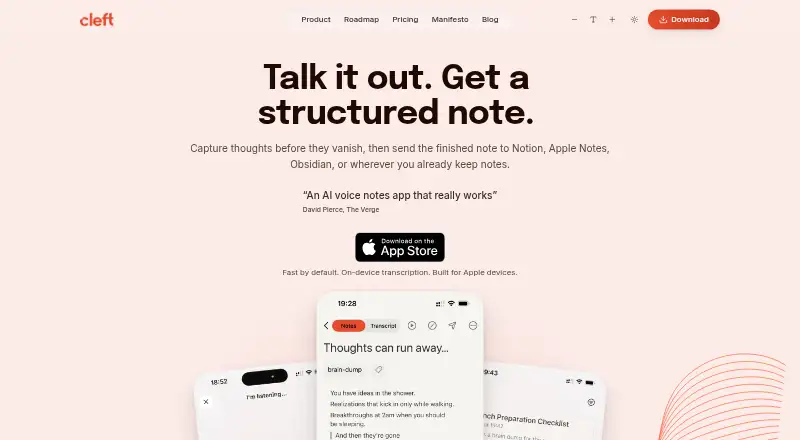
Cleft is an iOS and macOS app that turns spoken thoughts into notes with main points, actions, summaries, and transcripts.
What Cleft is
Cleft is an iOS and macOS app that turns spoken thoughts into notes with main points, actions, summaries, and transcripts. Its built-in formats are Structured, Structured Prose, and Clean Transcript; Plus users can save custom styles. Cleft says it works offline and supports 99 languages, including switching languages mid-sentence. Transcription uses Whisper locally, and the company says audio is not sent to its servers or third parties. Temporary audio is deleted after transcription unless Keep Audio is enabled. Optional cloud formatting sends transcript text, not audio, to OpenAI, with Groq as a backup. Basic recordings are limited to five minutes; Plus allows recordings up to 30 minutes and adds attachments, custom instructions, Notion and Zapier integrations, and Family Sharing for up to five. Export and Local Sync support workflows with apps including Apple Notes, Obsidian, Bear, NotePlan, Drafts, Ulysses, and Logseq. Cleft lists support for iPhone, iPad, Mac, Apple Watch, and CarPlay. Basic is free; Plus costs $6.99 per month or $39.99 per year through the App Store.
Good
- Works offline and supports 99 languages.
- Local Whisper transcription; audio is not sent to outside parties.
- Free Basic plan includes tags, search, and export.
- Plus connects with Notion and Zapier.
- Supports iPhone, iPad, Mac, Apple Watch, and CarPlay.
Watch out
- Basic recordings are limited to five minutes.
- Plus recordings are limited to 30 minutes.
- Plus custom AI instructions are limited to 500 characters.
- Plus costs $6.99 per month or $39.99 per year.
Who it suits
Cleft suits people who want to capture spoken thoughts before organizing them, including people whose thoughts move faster than they can type. It may also suit users who need offline recording, multilingual transcription, and note export or syncing.
Verdict
Cleft brings voice capture, transcription, and structured note formats together, with offline support and a free Basic plan. Check the recording limits and Plus price against your needs, especially if you want longer recordings or custom styles.
Plans and prices
From Cleft's own pricing page, checked 29 Sep 2026.
| Plan | Price | What it gives you |
|---|---|---|
| Basic | Free | 5 minute recordings · 3 built-in output styles · on-device transcription · tags, search & export |
| Cleft Plus (monthly) | $6.99 a month | 30 minute recordings · 500 characters custom instructions · attachments · Notion & Zapier integrations · Family Sharing (up to 5) · Billed through the App Store; renews automatically unless canceled. |
| Cleft Plus (annual) | $39.99 a year | 30 minute recordings · 500 characters custom instructions · attachments · Notion & Zapier integrations · Family Sharing (up to 5) · Billed through the App Store; renews automatically unless canceled. |
The facts
Each one read from Cleft's own pages, with the date it was checked.
Where it runs
- Apple device support
- Cleft lists iPhone, iPad, Mac, Apple Watch, and CarPlay support; its download link goes to the Apple App Store.checked 29 Sep 2026
What it does
- Cloud processing
- Optional cloud formatting sends transcript text, not audio, to OpenAI with Groq as a backup; the page says provider agreements prohibit training on customer content.checked 29 Sep 2026
- Integrations
- Plus sends notes to Notion and Zapier, while export and Local Sync support workflows including Apple Notes, Obsidian, Bear, NotePlan, Drafts, Ulysses, and Logseq.checked 29 Sep 2026
- Intended users
- The founders describe Cleft as built by neurodivergent founders for people whose thoughts move faster than they can type, with a focus on capture before organization.checked 29 Sep 2026
- Notable limits
- Basic recordings are limited to 5 minutes and Plus recordings to 30 minutes; Plus custom AI instructions are limited to 500 characters.checked 29 Sep 2026
- Offline and languages
- Cleft says it works offline and supports 99 languages, including switching languages mid-sentence.checked 29 Sep 2026
- Output styles
- Built-in styles are Structured, Structured Prose, and Clean Transcript; Plus can save custom output styles.checked 29 Sep 2026
- Privacy and compliance
- The Trust Center says users own their notes, transcripts, and audio, that content is not used for AI training or sold, and names GDPR, CCPA, and the EU AI Act in its compliance statement.checked 29 Sep 2026
- Security
- Cleft says notes are encrypted at rest with AES-256-GCM and in transit with TLS 1.2 or higher, and cloud data is hosted in Ireland under a zero-access architecture.checked 29 Sep 2026
- Support
- Plus includes priority support, and the About page says every email is read personally by co-founders Jonathan or Justin.checked 29 Sep 2026
- Transcription and audio
- Voice transcription runs locally using Whisper, and Cleft says audio is never sent to its servers or third parties; temporary audio is deleted after transcription unless Keep Audio is enabled.checked 29 Sep 2026
- What it does
- Cleft captures spoken thoughts and turns them into structured notes with main points, actions, summaries, and transcripts.checked 29 Sep 2026
The company
- Headquarters
- Dublin, Irelandchecked 23 Sep 2026
The full review of Cleft
Overview
Cleft is a voice-note app for turning spoken ideas into transcripts, summaries, action points and organized notes. It is best suited to Apple users who want to capture thoughts by speaking and prefer local transcription. Its five-minute recording cap on the free plan is the main constraint for longer dictation.
The emphasis is on saving a thought before organizing it, an approach aimed in particular at people whose ideas arrive faster than they can type. Cleft pairs that capture-first workflow with three built-in note styles and offline recording.
Compare it with other picks in our AI Voice Note Apps and Voice Note Apps lists.
Key features
Transcription and note formats
Cleft transcribes speech on-device with Whisper, then can present the result as Structured notes, Structured Prose or a Clean Transcript. The formats give users a choice between organized takeaways, readable prose and a transcript-oriented result without requiring a custom setup. Plus adds saved custom output styles and up to 500 characters of custom AI instructions, useful for a recurring format but not a way to exceed the recording limit.
Tags, transcript search and export help users retrieve and move notes after capture. Cleft supports 99 languages, including switching languages mid-sentence, and says it can record offline. That combination suits multilingual or connection-limited capture, while the plan caps still matter for lengthy recordings.
Privacy and cloud formatting
Cleft says audio is not sent to its servers or third parties for transcription. Temporary audio is deleted after transcription unless Keep Audio is enabled. Optional cloud formatting sends transcript text rather than audio to OpenAI, with Groq as a backup; Cleft says provider agreements prohibit training on customer content.
The company says notes are encrypted at rest with AES-256-GCM and in transit with TLS 1.2 or higher, and cloud data is hosted in Ireland under a zero-access architecture. Its Trust Center says users own their notes, transcripts and audio, that content is neither sold nor used for AI training, and names GDPR, CCPA and the EU AI Act in its compliance statement. Those are meaningful privacy commitments for sensitive notes, though users who want no cloud formatting can avoid that optional processing.
Integrations and Apple support
Plus connects to Notion and Zapier. Export and Local Sync support workflows with Apple Notes, Obsidian, Bear, NotePlan, Drafts, Ulysses and Logseq, giving users routes beyond the app without making those services Plus-only integrations. Cleft lists support for iPhone, iPad, Mac, Apple Watch and CarPlay, with its download link leading to the Apple App Store; it is not the broadest choice for households using Android or Windows devices.
Pricing
Basic is free and includes five-minute recordings, the three built-in styles, on-device transcription, tags, search and export. It is a sensible way to capture short thoughts without a subscription, but the cap rules it out for longer sessions.
Cleft Plus costs $6.99 per month or $39.99 per year. Both plans raise the recording limit to 30 minutes and add attachments, Notion and Zapier integrations, custom instructions up to 500 characters, and Family Sharing for up to five people. Plus also includes priority support. The annual plan costs less than paying monthly for a full year, but both subscriptions are billed through the App Store and renew automatically unless canceled. There is no stated trial to factor into the decision.
Choose monthly Plus if you need the longer recording window or integrations but do not want an annual commitment. Annual Plus better fits regular users who expect to keep those features. Even paid recordings stop at 30 minutes, so Cleft is not the fit for sessions that routinely run longer.
Platforms
Cleft is available for iOS and macOS, and lists iPhone, iPad, Mac, Apple Watch and CarPlay support. Offline recording and local transcription are useful when a connection is unavailable. Its Apple-centered reach is a limitation for anyone who needs an Android, Windows or web app.
Who it's for
Cleft suits Apple users who think aloud, want searchable transcripts and summaries, or need a private, offline-capable way to save short spoken notes. Basic can cover quick capture; Plus makes more sense for users who regularly record up to 30 minutes, attach material, or send notes into Notion or Zapier. People who need longer recordings or cross-platform access should look elsewhere.
Pros and cons
- Local transcription and offline recording: useful for privacy-conscious capture and situations without a connection.
- Three built-in formats, plus custom styles on Plus: supports different note-taking preferences without making basic formatting a paid feature.
- Five-minute Basic cap and 30-minute Plus cap: clear limits that may interrupt longer thoughts or dictation sessions.
- Apple-focused platform support: covers Apple devices and CarPlay, but excludes readers needing Android, Windows or web access.
- Family Sharing for up to five on Plus: extends the subscription across a family, though it remains an App Store-billed subscription that renews unless canceled.
Alternatives
Voicenotes is worth considering if you need Android, web, Windows or browser-extension access; its free plan includes 100 weekly transcription minutes, unlimited recordings and 30-day history.
Audionotes may suit users who want broad Android, web and extension support alongside unlimited voice notes, with a one-minute limit per note on its free plan.
AudioPen is another option for cross-platform access, though its free recordings are capped at three minutes.
Memoth offers browser-extension support alongside iOS and macOS.
Memex is a free option for Android and iOS users; its AI features require a configured model service, which may incur provider charges.
VoiceJournal supports Android, iOS and web, and its free plan allows 10 notes total with two-minute recordings.
Notabe is an iOS alternative with five free AI summaries per month.
Murble is another freemium option for iOS and macOS.
Verdict
Cleft is a strong fit for Apple users who want to capture short spoken thoughts, get searchable structured notes and keep transcription local. Its built-in formats, offline recording and considered privacy approach make it more than a voice recorder. The five-minute free cap and 30-minute Plus ceiling are decisive drawbacks for longer dictation, while Apple-only availability narrows its audience. Choose it for privacy-minded, concise voice capture; choose another app if you need longer sessions or broader device support.
Alternatives to Cleft
- 1
AudioPen
Free planAndroidiOSWebExtension8.2From $99 a year - 2
Voice Notebook
Free planAndroidiOSWebExtension8.1From $16 a year - 3
Voicenotes
Free planAndroidiOSWebAPI8.1From $9 a month - 4

AudioNote
Free planAndroidiOSmacOSWindows7.9$12.99 one-time - 5

Fabric
AndroidiOSWebAPI7.9From $8 a month - 6

Whispr Notes
Free planAndroidiOSWebAPI7.9From $4.17 a month