
Aryson Email Backup Wizard
Aryson Email Backup Wizard backs up or migrates mailbox data from web and cloud email clients, saving messages and attachments to local or external drives.
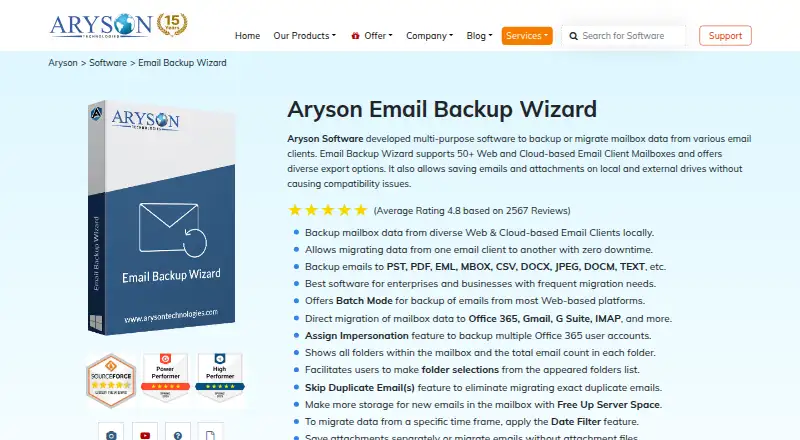
What Aryson Email Backup Wizard is
Aryson Email Backup Wizard backs up or migrates mailbox data from web and cloud email clients, saving messages and attachments to local or external drives. The product says it supports more than 50 mailbox types, including named services such as Gmail, G Suite, Office 365, Yahoo Mail, iCloud, Zoho Mail, and IMAP accounts. Export formats include PST, MSG, MBOX, EML, EMLX, HTML, PDF, CSV, RTF, XPS, DOCX, JPEG, and other document and image formats. It can also migrate mail directly to services including Gmail, Office 365, Hotmail, iCloud Mail, Zoho Mail, Yandex Mail, and Google Workspace. Batch Mode imports account credentials from a CSV file to process multiple mailboxes. Users can select folders, filter by date, preview items, and skip duplicates based on recipient, sender, subject, and message body. Additional controls include splitting PST output, naming conventions, separate attachment saving, and freeing server space after migration. The free version exports 50 emails per folder; paid plans are listed at $99 a year, $299 a year, $599 a year, and $799 a year for different tiers.
Good
- Supports more than 50 mailbox types.
- Offers multiple export formats and direct migration.
- Batch Mode processes accounts from a CSV file.
- Folder selection and date filtering are available.
Watch out
- Free version exports 50 emails per folder.
- Duplicate checks use listed message fields.
Who it suits
It suits individuals or organizations backing up or migrating mailboxes across supported web and cloud services. Batch processing and multiple license tiers may fit users handling several accounts.
Verdict
Aryson Email Backup Wizard provides mailbox backup, export, and migration controls, including batch processing and selective filtering. Review the free-version limit and the listed paid tiers against the number of accounts and user IDs you need.
Plans and prices
From Aryson Email Backup Wizard's own pricing page, checked 8 Oct 2026.
| Plan | Price | What it gives you |
|---|---|---|
| Single User | $99 a year | 20 User IDs (Unlimited Mailboxes) · For Home / Personal Usage · 1 year |
| Administrator | $299 a year | 100 User IDs (Unlimited Mailboxes) · For Business, Corporate & Academic Usage · 3 years |
| Technician | $599 a year | 250 User IDs (Unlimited Mailboxes) · For Commercial/ Business/ Govt./ Firm/ Organization/Technical Usage · 5 years |
| Enterprise | $799 a year | 500 User IDs (Unlimited Mailboxes) · For Commercial/ Business/ Govt./ Firm/ Organization/Technical Usage · 7 years |
The facts
Each one read from Aryson Email Backup Wizard's own pages, with the date it was checked.
What it does
- Additional controls
- The software can free server space after migration, split PST output, follow a naming convention, and save attachments separately or omit them.checked 8 Oct 2026
- Batch processing
- Batch Mode imports a CSV file with account credentials to migrate multiple mailboxes in one operation, and Office 365 backup includes an Assign Impersonation feature.checked 8 Oct 2026
- Demo limit
- The product comparison says the free version exports 50 emails per folder; the full version removes that stated item limit.checked 8 Oct 2026
- Direct migration
- The software can migrate email directly to Gmail, Office 365, Hotmail, IMAP, Hostgator, iCloud Mail, Zoho Mail, Yandex Mail, and Google Workspace.checked 8 Oct 2026
- Duplicate handling
- The Skip Duplicate Emails feature identifies duplicates using recipient, sender, subject, and message body criteria.checked 8 Oct 2026
- Export formats
- The listed export formats include PST, MSG, MBOX, EML, EMLX, HTML, PDF, CSV, RTF, XPS, DOCX, JPEG, and other document and image formats.checked 8 Oct 2026
- Input accounts
- The product page says the wizard supports 50+ web and cloud email client mailboxes, and its feature section names Gmail, G Suite, Office 365, Yahoo Mail, iCloud, Zoho Mail, and IMAP accounts.checked 8 Oct 2026
- Intended users
- Aryson describes the product for personal use as well as business, corporate, academic, government, firm, organizational, and technical use, with license tiers for these audiences.checked 8 Oct 2026
- Purpose
- The product backs up or migrates mailbox data from web and cloud email clients and saves email and attachments to local or external drives.checked 8 Oct 2026
- Security and privacy
- Aryson's privacy policy says most of its software processes data locally and does not access or store customer file contents; the policy lists GDPR, CCPA, HIPAA privacy principles, and ISO/IEC 27001 among its frameworks.checked 8 Oct 2026
- Selective migration
- Users can select mailbox folders and apply a date range filter, with a preview of mailbox items.checked 8 Oct 2026
- Support
- The purchase page lists free technical support 24x7, and the product comparison also advertises 24x7 technical support.checked 8 Oct 2026
The company
- Headquarters
- San Jose, California, USAchecked 28 Sep 2026
- Maker certification
- Aryson says it is ISO 9001:2015 and ISO/IEC 27001:2013 certified.checked 8 Oct 2026
Where it runs
- Platform requirements
- The page offers Windows, Mac, and Linux downloads, while the detailed system requirements list Windows 7, 8, 8.1, 10, 11, and Windows Server 2008, 2012 R2, and 2016.checked 8 Oct 2026
The full review of Aryson Email Backup Wizard
Aryson Email Backup Wizard is a mailbox backup, export and migration utility for web and cloud email accounts. It suits home users, administrators and service providers moving or archiving multiple mailboxes, especially when output format and folder selection matter. Its provider coverage and controls are substantial, but the free edition is mainly a preview because it exports only 50 emails per folder.
Overview
The wizard handles more than 50 web and cloud mailbox types. Named support includes Gmail, G Suite, Office 365, Yahoo Mail, iCloud, Zoho Mail and IMAP, alongside providers such as AOL Mail, Amazon WorkMail, GoDaddy Mail, HostGator, Yandex, FastMail, Bluehost, GMX, Namecheap, Naver, Rediff Mail and Web.de. Mail and attachments can be saved to local or external drives, or sent directly to another mailbox service.
Direct migration targets include Gmail, Office 365, Hotmail, IMAP, Hostgator, iCloud Mail, Zoho Mail, Yandex Mail and Google Workspace. That makes it suitable for both archival projects and platform changes, rather than only producing a static local copy.
Key features
Controlled exports
Export formats include PST, MSG, MBOX, EML, EMLX, HTML, PDF, CSV, RTF, XPS, DOCX, JPEG and other document and image formats. The breadth is useful when a recipient needs Outlook data, a portable mailbox file or readable documents, although choosing among many formats requires a clear retention or handoff plan.
Users can preview mailbox items, choose folders and apply a date-range filter. Duplicate detection compares recipient, sender, subject and message body, helping prevent repeated messages during consolidation. Attachments may be saved separately or omitted, PST output can be split, and naming conventions can be applied. An option to free server space after migration is relevant when the source account has storage pressure, but it should be used only after the exported copy is verified.
Batch and Office 365 administration
Batch Mode imports account credentials through a CSV file and processes multiple mailboxes in one operation. This is a meaningful time saver for organized account lists, while also making credential handling and CSV security an administrative responsibility. Office 365 backup adds Assign Impersonation, a control aimed at delegated or administrator-led work rather than occasional personal exports.
Pricing
A free version and free trial are offered, but the comparison limits the free version to 50 exported emails per folder. The full version removes that stated item cap, so the free edition is best for checking workflow and output rather than completing a large archive.
Single User — $99 a year, billed for 1 year, supports 20 User IDs with unlimited mailboxes and is intended for home or personal use. It is the clearest fit for an individual managing several accounts; the 20-ID ceiling matters if a household or small operation has many identities.
Administrator — $299 a year, billed for 3 years, covers 100 User IDs with unlimited mailboxes for business, corporate and academic use. The longer billing term and higher upfront commitment make it more appropriate for an organization with recurring mailbox work than a short project.
Technician — $599 a year, billed for 5 years, raises capacity to 250 User IDs with unlimited mailboxes for commercial, business, government, firm, organizational and technical use. It targets technicians serving multiple customers or departments, not a single mailbox owner.
Enterprise — $799 a year, billed for 7 years, allows 500 User IDs with unlimited mailboxes for the same broad professional audiences. It offers the largest stated identity allowance, but the seven-year billing term is a substantial commitment. Aryson also presents pricing from $119, so readers should reconcile that starting figure with the named license tier and term before purchase. Free 24x7 technical support is included.
Platforms
Downloads are offered for Windows, macOS and Linux. Detailed Windows requirements cover Windows 7, 8, 8.1, 10, 11 and Windows Server 2008, 2012 R2 and 2016. Aryson says most software processes data locally and does not access or store customer file contents; its privacy policy cites GDPR, CCPA, HIPAA privacy principles and ISO/IEC 27001, while the maker states ISO 9001:2015 and ISO/IEC 27001:2013 certification.
Who it's for
Choose it for personal archiving, business or academic migrations, government and organizational mailbox projects, or technicians handling many user IDs. It is less suitable when you need a completely free full-mailbox backup, a short commitment, or a license model based on storage rather than identities.
Pros and cons
- Pro: More than 50 source mailbox types and direct migration destinations cover varied provider environments.
- Pro: Folder selection, date filters, previews and duplicate criteria provide practical control over what moves.
- Pro: Batch CSV processing and Office 365 impersonation support reduce repetitive administrator work.
- Con: The free edition stops at 50 emails per folder, limiting its usefulness for complete archives.
- Con: Paid tiers are tied to 1-, 3-, 5- or 7-year billing terms, which can be excessive for one-off jobs.
- Con: Capacity is expressed in User IDs, so organizations must map identities to the tier even though mailboxes are unlimited.
Alternatives
Consider MSP360 Backup if you want freemium workstation, file and image backup across Windows, macOS and Linux, including a free personal plan with forum support. VM Backup is a better match for virtual-machine protection, with a free edition covering two VMs per host and a 30-day fully featured trial. GMvault suits readers seeking a free, open-source option under the GNU Affero General Public License v3.
Veeam Agent for Mac is relevant when the requirement is macOS workstation backup; its free edition permits one backup job but not direct object-storage backup. Choose Cove Data Protection for a paid service with per-server or workstation and per-user Microsoft 365 billing. Datto Endpoint Backup for Windows uses consumption-based storage pricing. DRS Softech Microsoft 365 Backup Tool is an alternative with home and administrator licenses. Mailbakup offers one-time per-user Office 365 and Google Apps tools for Windows and macOS.
Browse the Email Backup Software category for more choices.
Verdict
Aryson Email Backup Wizard is a strong choice for users who need broad provider support, many export formats and controlled, batch mailbox migration. Its main reason to look elsewhere is the combination of a 50-email-per-folder free cap and long paid billing terms; buyers with a small, one-time job or a strict free-software requirement should choose a simpler alternative.
Alternatives to Aryson Email Backup Wizard
- 1

SpinOne
WebAPIExtensionLinux7.6From $3 a month - 2
Spanning Backup
AndroidiOSWebAPI7.3 - 3
Cove Data Protection
WebLinuxmacOSWindows6.9 - 4
Rubrik Security Cloud
WebAPILinuxmacOS6.9 - 5

Synology Active Backup for SaaS
Free planSelf-hosted6.7Free plan - 66.6From $18 a year