
Archicad
Archicad is building information modeling software for architects, designers, engineers, and other AEC professionals working on building projects.
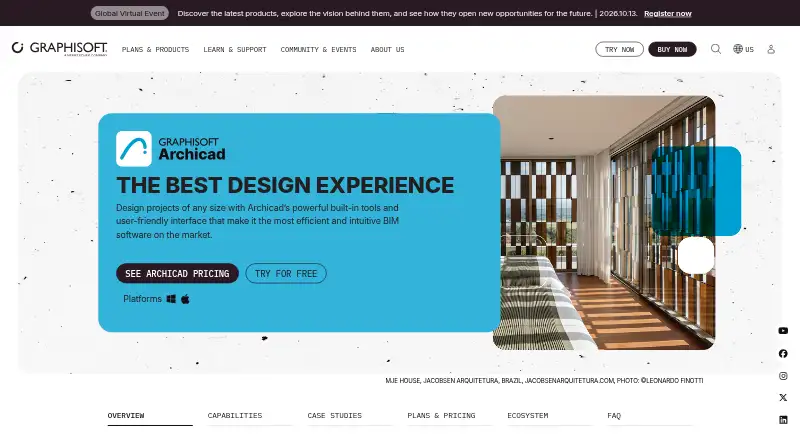
What Archicad is
Archicad is building information modeling software for architects, designers, engineers, and other AEC professionals working on building projects. Its tools cover mass modeling, sketches, optioneering, quantity take-offs, building elements, and custom components. Three-dimensional models can produce coordinated drawings with real-time and automated annotation updates. The software supports openBIM workflows through IFC, BCF, and IDS.
BIMcloud can host a centralized model with live updates and notifications. Archicad Studio includes local teamworking with BIMcloud Basic; Archicad Collaborate adds MEP modeling and Graphisoft-hosted BIMcloud for global Teamwork. Visualization options include photorealistic visuals, fly-throughs, animations, and a cloud-powered AI Visualizer. Archicad runs on macOS and Windows, whose versions are compatible for file formats and Teamwork. Studio is listed at $201 a month, with an upfront $2,414 + tax payment for a one-year subscription per seat. Collaborate is $237 a month, with $2,840 + tax upfront for a one-year term per seat. An educational license is free for eligible non-commercial use, and EDU files carry a watermark.
Good
- Supports IFC, BCF, and IDS openBIM workflows.
- Creates coordinated drawings from 3D models.
- BIMcloud supports centralized models and live updates.
- Includes quantity take-off and multi-discipline capabilities.
- Free educational license available to eligible users.
Watch out
- Studio and Collaborate require upfront annual subscription payments.
- EDU licenses are limited to non-commercial use.
- EDU files carry an irremovable watermark.
Who it suits
It suits AEC professionals who need BIM tools for building design, documentation, collaboration, and delivery. Eligible students, educators, and educational institutions can use the free EDU license for non-commercial work.
Verdict
Archicad combines BIM design and documentation with openBIM workflows and collaboration options. Compare Studio's local teamworking with Collaborate's MEP and hosted BIMcloud, and note the upfront annual subscription terms.
Plans and prices
From Archicad's own pricing page, checked 30 Sep 2026.
| Plan | Price | What it gives you |
|---|---|---|
| Archicad EDU | Free | For eligible students, educators, and educational institutions · non-commercial use · watermark on views and printouts · Free educational license; student/educator licenses valid for 1 year |
| Archicad Studio | $201 a month | Basic-complexity projects · individual or local teams · Archicad · BIMcloud Basic · BIMx Pro Baseline · 50 AI credits/license/month · $2,414 + tax upfront for a 1-year subscription per seat |
| Archicad Collaborate | $237 a month | Medium-complexity projects · multidisciplinary or multi-office teams · BIMcloud SaaS · MEP Designer · BIMx Pro with Teamwork · 50 AI credits/license/month · $2,840 + tax upfront for a 1-year subscription per seat |
| Archicad Max | $475 a month | High-complexity projects · advanced MCP AI · 250 AI credits/license/month · all language versions · ProKit add-ons · full Graphisoft Learn · $5,700 + tax upfront for a 1-year subscription per seat |
The facts
Each one read from Archicad's own pages, with the date it was checked.
What it does
- API and SDK
- The General API Development Kit lets developers extend Archicad with add-ons and includes API, function, structure, error-code and FAQ documentation.checked 14 Oct 2026
- API compatibility limit
- Graphisoft warns that API interfaces change between releases and does not guarantee binary compatibility with older add-ons.checked 14 Oct 2026
- BIMx
- BIMx links 3D models with 2D documentation and provides mobile and desktop viewing, measurement, cutaways and markups.checked 14 Oct 2026
- Collaboration
- BIMcloud can host a centralized model for live updates and notifications; Archicad Collaborate includes Graphisoft-hosted BIMcloud for global Teamwork.checked 30 Sep 2026
- Commercial license requirement
- Archicad 29 commercial use requires a cloud license, CodeMeter software key, or CodeMeter hardware key.checked 30 Sep 2026
- Design tools
- Its tools cover mass modeling, sketches, optioneering, quantity take-offs, building elements, and custom components.checked 30 Sep 2026
- Developer program
- Graphisoft offers developer registration, authorization codes, downloadable development kits, optional developer licensing and support.checked 14 Oct 2026
- Documentation
- BIM workflows generate coordinated drawings, sections, elevations and schedules that update with the model.checked 14 Oct 2026
- Documentation and support
- Graphisoft provides versioned Help documentation, Graphisoft Learn courses, technical support and a user community.checked 14 Oct 2026
- Educational access
- Students and educators can receive a renewable free educational license covering Archicad, BIMx and BIMcloud Basic.checked 14 Oct 2026
- Educational limits
- EDU licenses are for non-commercial learning, teaching, or academic projects, and EDU files carry an irremovable watermark.checked 30 Sep 2026
- Integrations
- Graphisoft lists Bluebeam, BIMplus, Solibri, Autodesk Forma, Revit, Enscape, Twinmotion and D5 connections or extensions.checked 14 Oct 2026
- Intelligent objects
- Customizable doors, windows, stairs, railings and curtain walls support detailed architectural modeling.checked 14 Oct 2026
- Licence
- Archicad is proprietary software governed by an End User License Agreement; it is licensed rather than sold and is not open source.checked 14 Oct 2026
- Limit: custom modeling
- TrustRadius reviewers cite weaker export controls, custom object creation and 3D manipulation as shortcomings.checked 14 Oct 2026
- Limit: interoperability
- Reviewers report difficulty collaborating with firms using Revit or other dominant platforms and describe interoperability as limited.checked 14 Oct 2026
- MEP
- The product page describes parametric mechanical, electrical and plumbing modeling, documentation and clash detection.checked 14 Oct 2026
The company
- Company
- Graphisoft says it was founded in 1982 and develops Archicad, BIM software for architecture and design.checked 30 Sep 2026
- Company founded
- Graphisoft was founded in 1982 and developed Archicad as a BIM solution for architecture and design.checked 14 Oct 2026
- Company headquarters
- Graphisoft is headquartered at Graphisoft Park in Budapest, Hungary.checked 14 Oct 2026
- Company size
- Graphisoft states that it employs more than 700 people across 21 offices in 13 countries.checked 14 Oct 2026
- Headquarters
- Budapest, Hungarychecked 23 Sep 2026
Where it runs
- Limit: BIMx Android
- Google Play reviewers report occasional rendering freezes, compatibility problems and authentication issues on some Android devices.checked 14 Oct 2026
Money
- Limit: cost
- Reviewers say subscriptions, updates, plugins and changing licensing can reduce value, especially for small practices.checked 14 Oct 2026
The full review of Archicad
Overview
Archicad is BIM software for developing and documenting building projects across architecture and related disciplines. It best suits professional teams that need a coordinated model and shared project workflow. Its strongest case is the link between design, documentation, and collaboration; its main trade-off is a substantial annual commitment per seat.
Graphisoft, its Budapest-based developer, was founded in 1982. Archicad runs on macOS and Windows, with compatible file formats and Teamwork between the two versions.
Key features
Archicad combines mass modeling, sketches, design-option exploration, building elements, and custom components with quantity take-offs. This breadth supports work from early design through project documentation, though it is oriented toward building professionals rather than casual home-planning needs.
Drawings are generated from the 3D model, and model changes can update drawings and annotations in real time. That coordination can reduce the gap between the design model and its documentation. IFC, BCF, and IDS support openBIM workflows, while connections include Bluebeam, BIMplus, Solibri, Autodesk Forma, Enscape, Twinmotion, and D5.
Visualization ranges from sketches and photorealistic images to fly-throughs and animations, with a cloud-powered AI Visualizer as another option. BIMcloud can centralize a model for live updates and notifications. Archicad Collaborate adds Graphisoft-hosted BIMcloud for global Teamwork; teams that only need local collaboration can use Studio's BIMcloud Basic instead.
Pricing
Archicad EDU costs nothing. It is for eligible students, educators, and educational institutions, with a one-year license for students and educators. EDU use is limited to non-commercial learning, teaching, or academic projects, and its files carry an irremovable watermark on views and printouts. That makes it suitable for study, not commercial project delivery.
Archicad Studio costs $201 a month, billed as $201 + tax / month, with an upfront payment of $2,414 + tax for a 1-year Subscription Term per seat. It includes architectural design, Archicad, BIMx Pro, and BIMcloud Basic for local collaboration. This is the lower-cost commercial option for teams whose collaboration needs are local and who do not need the Collaborate plan's MEP modeling.
Archicad Collaborate costs $237 a month, billed as $237 + tax / month, with an upfront payment of $2,840 + tax for a 1-year Subscription Term per seat. It includes architectural design, collaboration, MEP design, Archicad, BIMx Pro, and BIMcloud Software as a Service. The extra cost is most relevant to teams that need MEP modeling or Graphisoft-hosted BIMcloud for global Teamwork; otherwise, Studio avoids paying for those additions. Both paid plans require an upfront annual commitment per seat.
The Archicad Studio trial gives one free seat unlimited access to Archicad, BIMcloud Basic, and BIMx for 30 days. Trial eligibility is limited to users who have never purchased a trial and have not applied for one in the last 12 months. Archicad 29 commercial use requires a cloud license, CodeMeter software key, or CodeMeter hardware key.
Platforms
Archicad runs on macOS and Windows. The versions are compatible for file formats and Teamwork. Mobile access is viewer-focused, rather than a replacement for desktop authoring.
Who it's for
Archicad is a strong fit for architects and AEC teams that need model-based documentation, openBIM exchange, quantity take-offs, and coordinated collaboration. Studio suits teams working locally; Collaborate is the better fit when hosted global Teamwork or MEP design is part of the workflow. Students and educators can use EDU for non-commercial work, provided the watermark and academic-use restriction are acceptable. It is less suitable for casual design projects or teams that cannot justify an annual per-seat subscription.
Pros and cons
- Pro: Drawings and annotations update from the 3D model, helping keep documentation coordinated as designs change.
- Pro: IFC, BCF, and IDS support openBIM workflows, and the named integrations connect Archicad with a range of adjacent tools.
- Pro: Studio and Collaborate separate local teamworking from hosted global Teamwork and MEP modeling, giving teams a clear choice based on workflow.
- Con: Paid seats require an upfront one-year subscription payment, which is a meaningful commitment for individuals and small teams.
- Con: The free EDU license is restricted to non-commercial work and adds an irremovable watermark, so it cannot stand in for a commercial license.
- Con: Mobile access is for viewing, leaving full design work to macOS or Windows.
Alternatives
For more options, compare Architecture Software, Architectural Design Software, and BIM Software.
- Live Home 3D is a freemium option with a free plan for readers who want a less costly alternative for home design.
- Graphisoft BIMx is a free viewer for readers who mainly need to open and view projects across mobile, desktop, and web.
- usBIM.platform offers a free basic configuration with 10 GB of cloud storage and online applications for readers seeking a cloud-based alternative.
- Rayon has a free plan with full editing, unlimited public models, and limited PDF and DWG export for readers who want a freemium design tool.
- TAD Designer is a free option for readers seeking a no-cost design tool.
- Twinmotion is a freemium option for readers focused on visualization.
- Bonsai is free and open source, for readers who prefer that model.
- VisualARQ is a paid alternative with a commercial license for readers considering another architecture design product.
Verdict
Choose Archicad if your practice needs coordinated BIM design and documentation, openBIM exchange, and collaboration options that scale from local work to hosted global Teamwork. Studio is the sensible commercial starting point when local collaboration is enough; choose Collaborate for MEP modeling or hosted Teamwork. Look elsewhere if the upfront annual cost, desktop-centered authoring, or professional focus does not match your needs.
Getting started
- Visit the Archicad product page at graphisoft.com.
- Choose Archicad Studio or Archicad Collaborate, or check eligibility for the free EDU license.
- For the Studio trial, apply if you have not purchased a trial or applied in the last 12 months.
- Use the 30-day Studio trial for one free seat, with Archicad, BIMcloud Basic, and BIMx access.
- Install the macOS or Windows version; the two versions support compatible file formats and Teamwork.
Limits worth knowing
The free EDU license is for eligible students, educators, and educational institutions, is non-commercial, and adds an irremovable watermark to views and printouts. The Studio trial lasts 30 days and is valid for one free seat; eligibility excludes users who purchased a trial or applied within the past 12 months.
Questions
How much does Archicad cost?
Studio is $201/user/mo on an annual term, with $2,414 + tax due upfront per seat for a one-year subscription. Collaborate is $237 + tax per month, with $2,840 + tax due upfront per seat for a one-year term.
Is there a free version?
A free EDU license is available to eligible students, educators, and educational institutions for non-commercial use. EDU files have an irremovable watermark.
Does Archicad have a trial?
The Studio trial gives one free seat 30 days of access to Archicad, BIMcloud Basic, and BIMx. Eligibility excludes people who purchased a trial or applied for one within the last 12 months.
Which platforms does Archicad support?
Archicad runs on macOS and Windows. The versions are compatible for file formats and Teamwork.
What is the difference between Studio and Collaborate?
Studio includes local teamwork with BIMcloud Basic. Collaborate includes MEP modeling and Graphisoft-hosted BIMcloud for global Teamwork.
Does Archicad support openBIM and integrations?
It supports IFC, BCF, and IDS workflows. Named connections include Bluebeam, BIMplus, Solibri, Autodesk Forma, Enscape, Twinmotion, and D5.
Alternatives to Archicad
- 1
Home Designer
AndroidiOSmacOSWindows7.8From $495 a year - 2

D5 Render
Free planWebWindows7.6From $360 a year - 3
Live Home 3D
Free planAndroidiOSmacOSWindows7.6From $19.99 a year - 4
AutoCAD
AndroidiOSWebmacOS7.5 - 5
Maket
Free planWebAPI7.5From $20 a month - 6
Arkio
Free planAndroidiOSmacOSWindows7.3From $35 a month