
Graphisoft BIMx
Graphisoft BIMx connects layouts, 3D models and BIM data in a single .bimx file for architects, engineers, construction teams and clients.
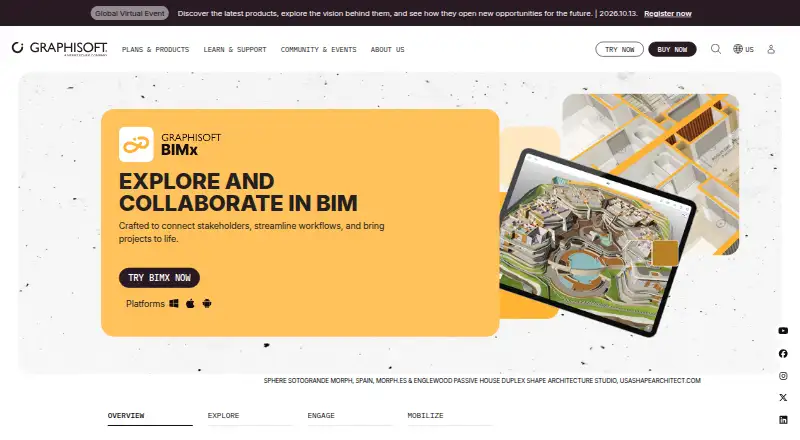
What Graphisoft BIMx is
Graphisoft BIMx connects layouts, 3D models and BIM data in a single .bimx file for architects, engineers, construction teams and clients. It provides 3D navigation and links from Hyper-models to project documentation. BIMx Issues supports markup on 2D and 3D views, with BCF-compliant issues, while Presenter and Gallery support presentations and client exploration. The Web Viewer can be embedded on a website, and model views can show building-element details such as fire ratings and manufacturer-specific properties. Facility managers and owners can integrate Facilities Management databases with BIM models for maintenance. Models can be shared through a web link; private Hyper-model sharing is for Graphisoft Subscribers, SSA and Forward users. BIMx is free on web, Windows, macOS, iOS and Android, but opening projects in the apps or desktop software requires a registered Graphisoft ID. Without signing in, users can access sample content and one additional custom model.
Good
- Free app and browser viewer.
- Available on web, Windows, macOS, iOS and Android.
- Marks up 2D and 3D views.
- Can embed the Web Viewer on a website.
- Shows building-element information.
Watch out
- Opening projects in apps and desktop requires a Graphisoft ID.
- Private Hyper-model sharing has user eligibility limits.
- Unregistered access is limited to sample content and one custom model.
Who it suits
BIMx suits architecture and construction teams that need to view and present connected layouts, models and BIM data. It can also serve clients exploring a project and facility managers or owners connecting maintenance databases.
Verdict
BIMx combines model viewing, documentation links, markup and presentation features across several platforms at no listed cost. Account requirements and the restrictions on private Hyper-model sharing may matter for teams choosing how to distribute projects.
Plans and prices
From Graphisoft BIMx's own pricing page, checked 30 Sep 2026.
| Plan | Price | What it gives you |
|---|---|---|
| BIMx | Free | Free app and browser viewer · a Graphisoft account is required to open projects on iOS, Android, and desktop · private Hyper-model sharing is for Graphisoft Subscribers, SSA, and Forward users |
The facts
Each one read from Graphisoft BIMx's own pages, with the date it was checked.
What it does
- Account requirement
- Opening projects in BIMx on iOS, Android, or desktop requires a registered Graphisoft ID; without sign-in, users can access sample content and one additional custom model.checked 30 Sep 2026
- Facility management
- Graphisoft says facility managers and owners can integrate Facilities Management databases with the BIM model for maintenance.checked 30 Sep 2026
- Markup
- BIMx Issues lets users mark up 2D and 3D views, and the issues are BCF compliant.checked 30 Sep 2026
- Model data
- BIMx displays building-element information, including fire ratings and manufacturer-specific properties.checked 30 Sep 2026
- Navigation
- BIMx offers game-like 3D navigation and hyperlinks from Hyper-models to project documentation.checked 30 Sep 2026
- Offline access
- After sign-in, BIMx remains authenticated for up to one year with occasional online access, or up to seven days while offline.checked 30 Sep 2026
- Presentations
- BIMx Presenter and Gallery support in-person presentations and client exploration on their own time.checked 30 Sep 2026
- Purpose
- BIMx connects layouts, 3D models, and BIM data in a single file for architects, engineers, construction teams, and clients.checked 30 Sep 2026
- Sharing
- Models can be shared from BIMx Model Transfer using a web link, while private Hyper-model sharing is available to Graphisoft Subscribers, SSA, and Forward users.checked 30 Sep 2026
- System requirements
- Graphisoft lists Windows 11 and macOS 26 or macOS 10.15 as BIMx Desktop operating systems, and iOS 15 or Android 11 as minimum mobile requirements.checked 30 Sep 2026
- Web embedding
- The BIMx Web Viewer can be embedded on a website.checked 30 Sep 2026
The company
- Company
- Graphisoft says it was founded in 1982 and is headquartered in Graphisoft Park, Budapest, Hungary.checked 30 Sep 2026
- Founded
- 1982checked 28 Sep 2026
- Headquarters
- Budapest, Hungarychecked 28 Sep 2026
Where it runs
- Platforms
- Graphisoft lists BIMx Mobile, Desktop, and Apple Vision Pro downloads, plus viewing in a browser; its requirements page lists Windows and macOS for Desktop and iOS and Android for Mobile.checked 30 Sep 2026
The full review of Graphisoft BIMx
Overview
Graphisoft BIMx brings building layouts, 3D models, and BIM data into a single .bimx file for architects, engineers, construction teams, and clients. It is best for people who need to inspect a model alongside its documentation or present it to stakeholders. The free viewer is capable, but app access requires a Graphisoft ID and private Hyper-model sharing is limited to eligible Graphisoft users.
Key features
Game-like 3D navigation and links from Hyper-models to project documentation make BIMx more than a model display: users can move between the building and related drawings. It also shows building-element data, including fire ratings and manufacturer-specific properties, useful when reviewers need to inspect model information rather than simply view geometry.
BIMx Issues supports markup on 2D and 3D views, with BCF-compliant issues, and measurement tools are included. This gives project teams a way to annotate views and communicate coordination feedback in context. Presenter and Gallery support live presentations and client exploration on their own time, while the Web Viewer can be embedded in a website.
Models can be shared through a BIMx Model Transfer web link. Private Hyper-model sharing is reserved for Graphisoft Subscribers, SSA, and Forward users, which may complicate controlled distribution for teams without those relationships. Graphisoft says owners and facility managers can integrate maintenance databases with the BIM model, extending its potential use beyond design and construction.
Pricing
BIMx: free. The plan includes the free app and browser viewer, with no free trial needed. It is a strong fit for occasional model review, client exploration, and teams comfortable sharing through links. It gives up private Hyper-model sharing unless users have Graphisoft Subscriber, SSA, or Forward status. Opening projects on iOS, Android, or desktop requires a registered Graphisoft ID; without signing in, users can access sample content and one additional custom model.
After sign-in, BIMx can remain authenticated for up to one year with occasional online access, or up to seven days while offline. That allows some offline use, but teams that rely on longer stretches without connectivity should account for the seven-day offline window.
Platforms
BIMx supports web, Windows, macOS, iOS, and Android, and supports .bimx files. Graphisoft lists Windows 11 and macOS 26 or macOS 10.15 as desktop operating systems, and iOS 15 or Android 11 as minimum mobile requirements. The browser viewer offers a route for clients who do not need the installed app.
Who it's for
BIMx is a practical choice for architects, engineers, construction teams, and clients who need model and documentation access in one viewer, plus markup, measurement, or presentation tools. It also suits owners and facility managers when integrating a maintenance database with BIM data is part of their workflow. It is less suitable for teams that require private Hyper-model sharing but lack the qualifying Graphisoft status, or for people unwilling to register an account to open projects in the apps.
Pros and cons
- Pro: Links between 3D Hyper-models and project documentation keep model inspection connected to drawings.
- Pro: BCF-compliant markup on 2D and 3D views and measurement tools support coordination review without leaving the viewer.
- Pro: Presenter, Gallery, and an embeddable Web Viewer support both meetings and client self-service.
- Con: A Graphisoft ID is required to open projects in mobile and desktop apps; unsigned users are limited to sample content and one extra custom model.
- Con: Private Hyper-model sharing requires Graphisoft Subscriber, SSA, or Forward status, restricting distribution options for other teams.
Alternatives
BIMx Web Viewer is the focused alternative when browser viewing is the priority; its free plan covers browser viewing, while BIMx Pro features on Model Transfer require eligible-company membership and Graphisoft ID sign-in. Choose BIMx Desktop Viewer if a free Windows or macOS desktop viewer is all you need.
Sketchfab may suit broader cross-platform model viewing; its free Basic plan caps each model at 50MB, while Pro is $15 a month billed yearly. For teams that need a free IFC viewer on Linux, macOS, or Windows, Open IFC Viewer is a narrower alternative.
Dalux, Marmoset Viewer, Nanome, and OmniView 3D are other options to compare.
Browse more choices in 3D Model Viewer Software or Architecture Software.
Verdict
Choose BIMx if your project participants need a free, multi-platform way to explore building models alongside documentation, annotate views, and present work. Its main advantage is the combination of model navigation, project links, and coordination tools; look elsewhere if private Hyper-model sharing is essential and your team does not qualify for Graphisoft’s restricted access.
Getting started
- Open the BIMx website or download the app for a supported platform
- Create or use a registered Graphisoft ID
- Open a .bimx project in the web, desktop, or mobile viewer
- Use BIMx navigation, hyperlinks, measurements, or markup tools
- Share a model through BIMx Model Transfer using a web link
Limits worth knowing
Without signing in, BIMx provides sample content and one additional custom model. Private Hyper-model sharing is limited to Graphisoft Subscribers, SSA, and Forward users; offline authentication lasts up to seven days.
Questions
Is BIMx free?
Yes. The BIMx plan is listed as free, with a free app and browser viewer.
Which platforms support BIMx?
BIMx supports web, Windows, macOS, iOS, and Android.
Do I need a Graphisoft account?
A registered Graphisoft ID is required to open projects on iOS, Android, and desktop. Without sign-in, sample content and one additional custom model are available.
Can BIMx mark up models?
Yes. BIMx Issues lets users annotate 2D and 3D views, with BCF-compliant issues.
How can models be shared?
BIMx Model Transfer supports sharing by web link. Private Hyper-model sharing is available to Graphisoft Subscribers, SSA, and Forward users.
Alternatives to Graphisoft BIMx
- 1

Dalux
Free planAndroidiOSWebAPI8.2From 49 DKK a month - 2
Nanome
Free planAndroidiOSWebAPI8.2From $4.17 a month - 3
Sketchfab
Free planAndroidiOSWebAPI8.2From $15 a month - 4
Aspose.3D Viewer
Free planAndroidiOSWebLinux7.3From $4 a month - 5
OmniView 3D
Free planAndroidiOSWeb7.3From $59 a month - 6

BIMcollab
AndroidiOSWebAPI7.2From €12.50 a month