Aspose.3D Viewer
Aspose.3D Viewer is a free online tool for viewing 3D documents in a browser without installing specialized software.
What Aspose.3D Viewer is
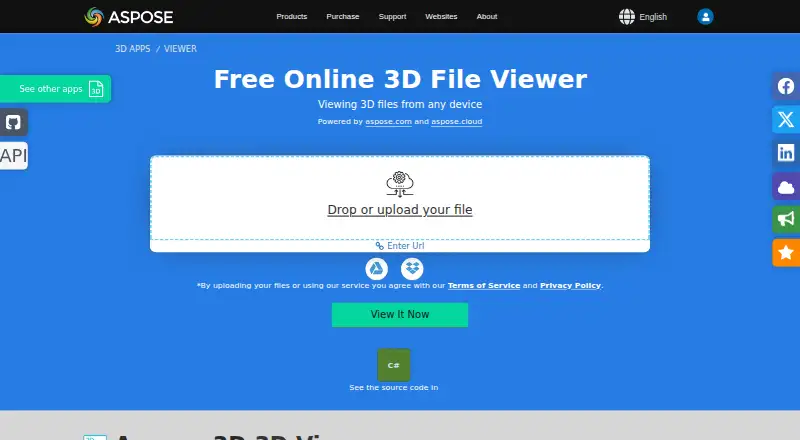
Aspose.3D Viewer is a free online tool for viewing 3D documents in a browser without installing specialized software. Upload a file by dragging it into the drop area, selecting it, or entering a file URL. The interactive viewer lets users inspect content from different perspectives, and the original file can be downloaded afterward. Formats include 3DS, 3MF, AMF, DAE, DXF, FBX, glTF, GLB, JT, OBJ, PLY, PDF, RVM, STL, U3D, VRML, Maya, Blender, OpenUSD, and IFC. It works through a browser on Windows, Linux, macOS, Android, and iOS. Uploaded files are processed on Aspose servers using Aspose APIs and deleted after 24 hours, at which point their viewer and download links stop working. Developers can consult Aspose.3D documentation to implement viewing programmatically. Aspose says it is GDPR compliant and describes encrypted backups, restricted authorized access, and AWS-hosted customer-facing services. Free support is available through its forum; paid priority support is also offered for projects.
Good
- Works through browsers on desktop and mobile platforms.
- Accepts file uploads or a file URL.
- Shows 3D content from different perspectives.
- Users can download the original file.
- Free plan is available.
Watch out
- Uploaded files are deleted after 24 hours.
- Viewer and download links stop working after deletion.
- Uploads are processed on Aspose servers.
Who it suits
This viewer suits people who need to inspect supported 3D documents in a browser without installing specialized software. It may also suit developers looking to implement a viewing feature programmatically.
Verdict
Aspose.3D Viewer offers browser-based viewing for a broad set of 3D formats and allows users to retrieve the original file. Keep its server processing and 24-hour file retention period in mind when choosing it.
Plans and prices
From Aspose.3D Viewer's own pricing page, checked 7 Oct 2026.
| Plan | Price | What it gives you |
|---|---|---|
| Free | Free | Access to Aspose applications · Limited file processing · Encrypted data transfer and storage · Free support · Free forever |
| Premium | $4 a month | Full access to Aspose applications · More advanced tools and features · Extended file processing limits · Free support · billed as one payment of 48USD |
| Business | Priced on request | All Premium features · Flexible payment options · Unlimited file processing · Personal account support manager · Custom price |
The facts
Each one read from Aspose.3D Viewer's own pages, with the date it was checked.
What it does
- API integration
- The viewer page directs developers to Aspose.3D documentation to implement the viewing feature programmatically.checked 7 Oct 2026
- Download
- After viewing, users can download the original file.checked 7 Oct 2026
- File formats
- The viewer supports formats including 3DS, 3MF, AMF, DAE, DXF, FBX, glTF, GLB, JT, OBJ, PLY, PDF, RVM, STL, U3D, VRML, Maya, Blender, OpenUSD, and IFC.checked 7 Oct 2026
- Interactive viewing
- The viewer presents 3D content in an interactive interface that users can view from different perspectives.checked 7 Oct 2026
- Processing
- The product page says uploaded files are processed on Aspose servers using Aspose APIs.checked 7 Oct 2026
- Purpose
- The free online viewer lets users view 3D documents in a browser without installing specialized software.checked 7 Oct 2026
- Retention
- Uploaded files are deleted after 24 hours, after which their download and viewer links stop working.checked 7 Oct 2026
- Security
- Aspose says it is GDPR compliant and describes encrypted backups, restricted authorized access, and AWS-hosted customer-facing services.checked 7 Oct 2026
- Support
- Aspose provides free support through its forum and paid priority support for projects.checked 7 Oct 2026
- Upload methods
- Users can upload a file by dragging it into the drop area, selecting it, or entering a file URL.checked 7 Oct 2026
Where it runs
- Browser platforms
- The viewer works on Windows, Linux, macOS, Android, and iOS through a web browser.checked 7 Oct 2026
The company
- Founded
- 2018checked 28 Sep 2026
- Headquarters
- Suite 163, 79 Longueville Road, Lane Cove, NSW 2066, Australiachecked 28 Sep 2026
- Maker
- Aspose describes itself as a software development company offering file-format APIs and says its first website launched in 2002.checked 7 Oct 2026
The full review of Aspose.3D Viewer
Overview
Aspose.3D Viewer is a free browser-based tool for opening and interactively viewing 3D documents without installing specialist software. It suits people who need to inspect a supported model across different devices and retrieve the source file, rather than edit or manage a 3D project. Its broad format coverage is useful, but server-side processing and 24-hour file retention make it a poor fit for sensitive uploads or dependable long-term sharing.
Key features
Users can drag a file into the upload area, select one from their device, or provide a file URL. Once open, the model can be viewed from different perspectives, and the original file can be downloaded afterward. That makes the viewer practical for quick inspection and format access; it is not presented as a model-editing tool.
Supported formats include 3DS, 3MF, AMF, ASE, DAE, DXF, DRC, FBX, glTF, GLB, JT, OBJ, PLY, PDF, RVM, STL, U3D, VRML, X, Maya files (MA and MB), Blender (BLEND), OpenUSD (USD and USDZ), and IFC. That range spans general 3D assets and building-model formats, so it can serve varied viewing needs without requiring a dedicated desktop application.
Uploads are processed on Aspose servers using Aspose APIs. Files are deleted after 24 hours, and their viewer and download links stop working then. Aspose describes encrypted backups, restricted authorized access, and AWS-hosted customer-facing services, and says it is GDPR compliant. Those measures do not change the practical trade-off: users must upload the file, and the temporary links are unsuitable for lasting access.
Developers can use Aspose.3D documentation to implement the viewing feature programmatically. Aspose also provides free forum support and paid priority support for projects.
Pricing
The viewer is free to use. Aspose’s broader application plans are:
- Free — free, billed Free forever. Includes access to Aspose applications, limited file processing, encrypted data transfer and storage, and free support. It is the natural starting point for occasional use, but the processing limit may constrain heavier workloads.
- Premium — $4 a month, billed as one payment of 48USD. Includes full access to Aspose applications, more advanced tools and features, extended file processing limits, and free support. It suits regular users who need more capacity than the free plan; payment is a single 48USD charge rather than monthly installments.
- Business — custom pricing. Includes Premium features, flexible payment options, unlimited file processing, and a personal account support manager. It is aimed at teams or projects that need unlimited processing and account-level support.
The viewer has no free trial; its free plan is ongoing rather than time-limited.
Platforms
Aspose.3D Viewer runs in a browser on Windows, macOS, Linux, Android, and iOS. That makes it accessible on desktop and mobile without a separate viewer installation.
Who it's for
Choose it for quick, cross-platform viewing of many common 3D and building-model formats, especially when downloading the original file afterward matters. Look elsewhere if you need editing, persistent links, or a workflow that avoids sending uploads to a service’s servers.
Pros and cons
- Pros: Broad format support, including IFC, Blender, and OpenUSD files, gives users one browser viewer for a varied set of 3D documents.
- Pros: Multiple upload methods and original-file download support quick inspection without a specialist installation.
- Cons: Uploads are processed on Aspose servers, which may rule it out for files that cannot be sent to a third party.
- Cons: Viewer and download links expire after 24 hours, so it is not a durable sharing or archive solution.
- Cons: The free application plan has limited file processing; users needing more capacity must consider Premium or custom-priced Business.
Alternatives
3D Model Viewer Software is a broader category directory for comparing viewers.
- Sketchfab is worth considering when its freemium model and 50MB maximum file size per model on Basic fit the job.
- Graphisoft BIMx is another free viewer; opening projects on iOS, Android, and desktop requires a Graphisoft account.
- BIMx Web Viewer offers free browser viewing; BIMx Pro features on Model Transfer require eligible-company membership and Graphisoft ID sign-in.
- F3D is a free, open-source option under the BSD 3-Clause License.
- Marmoset Viewer is included with Toolbag versions 2.07 and newer.
- Dalux may suit project teams looking for a free punch-list tool with unlimited tasks and up to three active projects or buildings under free-use terms.
- Nanome has a free web seat with three workspaces, one project, 50 MARA credits, five most recent files, and seven days of chat history.
- OmniView 3D is a free option for up to three models and 100 MB of storage, with STEP, GLB, OBJ, and FBX support and automatic deletion after three days.
Verdict
Aspose.3D Viewer is a sensible choice for people who want free, browser-based inspection across a wide range of 3D formats and need to download the original afterward. Its strongest advantage is breadth without a specialist installation; its central drawback is that uploads are processed remotely and links expire after a day. Choose it for temporary viewing, not sensitive files or persistent access.
Getting started
- Open https://products.aspose.app/3d/viewer in a browser
- Drag a file into the upload area, select a file, or enter a file URL
- Inspect the 3D document from different perspectives
- Download the original file after viewing
Limits worth knowing
The Free plan includes limited file processing. Uploaded files are deleted after 24 hours, after which their viewer and download links stop working.
Questions
Is Aspose.3D Viewer free?
The viewer is listed as free. The Free plan is free, billed Free forever.
What does the Premium plan cost?
Premium costs $4 a month, billed as one payment of 48USD.
Which platforms can I use it on?
The browser viewer works on Windows, Linux, macOS, Android, and iOS. The supported platforms also include web.
Which file formats can it view?
Formats include 3DS, 3MF, AMF, ASE, DAE, DXF, DRC, FBX, glTF, GLB, JT, OBJ, PLY, PDF, RVM, STL, U3D, VRML, X, MA, MB, BLEND, USD, USDZ, and IFC.
How are uploaded files handled?
Files are processed on Aspose servers using Aspose APIs and deleted after 24 hours. Viewer and download links stop working after deletion.
Who makes Aspose.3D Viewer?
Aspose describes itself as a software development company offering file-format APIs. It says its first website launched in 2002.
Alternatives to Aspose.3D Viewer
- 1

Dalux
Free planAndroidiOSWebAPI8.2From 49 DKK a month - 2
Nanome
Free planAndroidiOSWebAPI8.2From $4.17 a month - 3
Sketchfab
Free planAndroidiOSWebAPI8.2From $15 a month - 4
OmniView 3D
Free planAndroidiOSWeb7.3From $59 a month - 5

BIMcollab
AndroidiOSWebAPI7.2From €12.50 a month - 6
p3d.in
Free planAndroidiOSWebAPI7.1From $6 a month