Arkio
Arkio is a design collaboration tool for architects and other spatial designers.
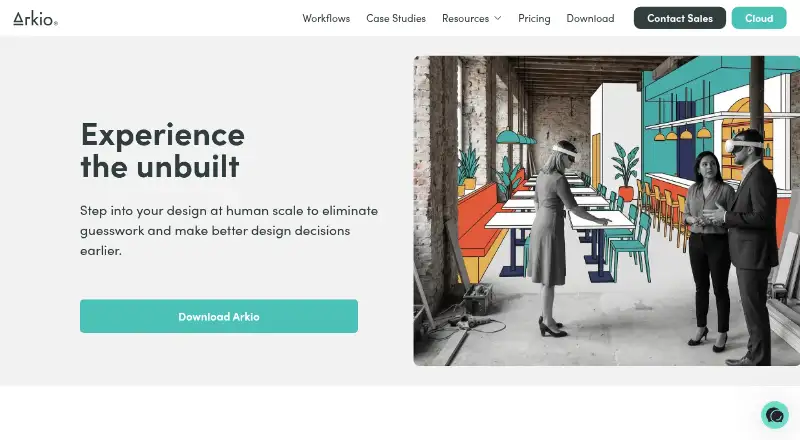
What Arkio is
Arkio is a design collaboration tool for architects and other spatial designers. It combines real-time solid modeling, including boolean operations and parametric volumes, with meetings where participants can view and edit a shared scene. For design review, users can save views, add voice-transcribed notes, create AI renders, and collaborate on 2D frames. Each AI render uses one credit, and included credits renew monthly. Plugins connect Arkio with Archicad, Navisworks, Revit, Rhino, and SketchUp for model and related-data import or export. The free Starter plan includes all modeling tools, one-on-one meetings, and OBJ, GLB, and image import and export. Pro costs $35/user/mo with annual billing or $45/user/mo with monthly billing; Enterprise is $85 per floating license per month, billed annually. Arkio runs on Android, iOS, macOS, and Windows. Pro licenses can be installed on two devices but used on only one at a time.
Good
- Shared scenes can be viewed and edited in real time.
- Modeling includes boolean operations and parametric volumes.
- Plugins support five named design applications.
- Available on Android, iOS, macOS, and Windows.
Watch out
- Starter meetings are limited to one-on-one.
- Pro use is limited to one device at a time.
- Pro and Enterprise are paid plans.
Who it suits
Arkio suits architects and spatial designers who need to model and review shared scenes across meetings. Schools and educational institutions can apply for free educational licenses.
Verdict
Arkio combines collaborative modeling and design review with integrations for several established design tools. Its free Starter plan has one-on-one meetings, while larger meeting capacities are listed for paid plans.
Plans and prices
From Arkio's own pricing page, checked 7 Oct 2026.
| Plan | Price | What it gives you |
|---|---|---|
| Starter | Free | All modeling tools · 1:1 meetings · Import/export OBJ/GLB and images |
| Pro | $35 a month | Up to 6 meeting participants · 500 AI credits/month · Revit, Rhino and SketchUp import/export · Archicad and Navisworks import · $35 month/user if billed annually, else $45 billed per month; tax not included |
| Enterprise | $85 a month | Up to 24 meeting participants · 1000 AI credits/month per license · Floating licenses · Priority support · $85 month/floating license; annual billing only; tax not included |
The facts
Each one read from Arkio's own pages, with the date it was checked.
What it does
- AI rendering
- Each AI render uses one credit, and included AI credits renew monthly.checked 7 Oct 2026
- Collaboration
- Participants can view and edit the same scene together in real time during meetings.checked 7 Oct 2026
- Design review
- Users can save views, add voice-transcribed notes, create AI renders, and collaborate on 2D frames.checked 7 Oct 2026
- Education
- Arkio invites schools and educational institutions to apply for free educational licenses.checked 7 Oct 2026
- Integrations
- Arkio provides plugins for Archicad, Navisworks, Revit, Rhino, and SketchUp to import or export models and related data.checked 7 Oct 2026
- Licensing limit
- A Pro license can be installed on up to two devices but used on only one device at a time.checked 7 Oct 2026
- Modeling
- Arkio provides real-time solid modeling with boolean operations and parametric volumes.checked 7 Oct 2026
- Product
- Arkio is a design collaboration tool for architects and other spatial designers.checked 7 Oct 2026
- Purpose
- Arkio says it aims to help users develop design ideas and work together using XR and mobile devices.checked 7 Oct 2026
- Support
- Arkio lists a help center and community forum, while Enterprise includes priority support, personal onboarding, and custom training plans.checked 7 Oct 2026
Money
- Free plan limit
- Starter meetings are one-on-one, and Starter includes OBJ/GLB and image import/export.checked 7 Oct 2026
- Trial
- Arkio offers a free 14-day Pro trial that includes 20 AI credits.checked 7 Oct 2026
The full review of Arkio
Arkio is built for architects and spatial designers who need to shape, present, and discuss models together. It is particularly well suited to teams working across mobile, desktop, and XR hardware, provided their meeting sizes and visualization workload fit the subscription limits.
Overview
Arkio combines solid modeling and collaborative design review in a shared workspace. Boolean operations and parametric volumes support early form development, while live sessions let participants inspect or change the same scene at the same time. Saved viewpoints, dictated notes, shared 2D frames, and generated images extend the workflow from modeling into critique and presentation.
The software is aimed at design teams rather than passive viewers. Its usefulness rises when decisions are made collectively around a model; teams needing large workshops or heavy AI visualization must choose a higher tier and monitor allowances.
Key features
Modeling and live collaboration
Real-time solid modeling gives users constructive tools for developing geometry instead of merely navigating finished files. Boolean operations and parametric volumes are practical for testing massing and spatial ideas quickly. During a meeting, attendees can view and edit one scene together, keeping discussion tied to the current design.
Starter meetings are restricted to two participants. Pro supports up to six, while Enterprise raises the ceiling to 24, so the product scales from one-to-one reviews to larger coordinated sessions only through paid licensing.
Review and visualization
Saved views provide repeatable reference points for critiques, and voice-transcribed notes capture comments without requiring typed minutes. Collaborative 2D frames support discussion beyond the three-dimensional scene. AI rendering adds a way to turn concepts into visual studies, but every render consumes one credit and the monthly allocation renews rather than accumulating. That makes the feature useful for selective visualization, not unlimited iteration.
Established-tool connections
Plugins connect Arkio with Archicad, Navisworks, Revit, Rhino, and SketchUp for model and related-data import or export. Pro includes Revit, Rhino, and SketchUp exchange, plus Archicad and Navisworks import. Enterprise retains those connections for teams that also need larger meetings and floating licensing.
Pricing
Starter — free
Starter includes all modeling tools, one-to-one meetings, and OBJ, GLB, and image import/export. It is a sensible way for an individual or pair to develop ideas and assess the workflow, but the two-person meeting cap rules it out for group reviews.
Pro — $35 a month
Annual billing is $35 month/user; month-to-month billing is $45 billed per month, with tax not included. Pro allows up to six meeting participants, supplies 500 AI credits each month, and adds Revit, Rhino, and SketchUp import/export alongside Archicad and Navisworks import. It fits small studios that need regular collaboration and established BIM or modeling connections. The six-person ceiling and user-based licensing can become restrictive for larger or frequently changing teams.
Enterprise — $85 a month
Enterprise costs $85 month per floating license on annual billing only, before tax. It supports up to 24 participants, includes 1,000 AI credits per license each month, and adds floating licenses and priority support. This is the appropriate tier for larger review meetings or organizations sharing seats across staff; annual-only billing and the higher per-license price make it excessive for occasional individual use.
A free 14-day Pro trial includes 20 AI credits, giving prospective teams a short period to evaluate higher-capacity meetings and rendering. A Pro license can be installed on two devices but used on only one at a time, an important constraint for people moving between machines. Schools and educational institutions can apply for free educational licenses.
Platforms
Arkio runs on Android, iOS, macOS, and Windows, with mobile viewing and VR/AR support. Its hybrid device coverage suits teams that move between desktop production, phones or tablets, and immersive review hardware.
Who it's for
Arkio is a strong choice for architectural practices, consultants, and spatial-design groups that want modeling and critique in the same live session. Pro is the practical starting point for a small professional team; Enterprise is justified when meetings approach two dozen people or floating seats matter. Solo users and pairs can stay on Starter, while schools should investigate the educational-license route. It is less suitable when collaboration is limited to viewing, when meetings regularly exceed 24 participants, or when AI rendering demand is too high for monthly credits.
Pros and cons
- Pro: Shared editing and viewing keep design decisions connected to a live scene.
- Pro: Boolean and parametric modeling support active form development, not just presentation.
- Pro: Plugins cover major tools including Revit, Rhino, SketchUp, Archicad, and Navisworks.
- Pro: Android, iOS, macOS, Windows, and XR support accommodate mixed-device teams.
- Con: Starter is limited to one-on-one meetings, so group collaboration requires payment.
- Con: AI output is metered monthly at 500 credits on Pro and 1,000 on Enterprise, with one credit per render.
- Con: Pro allows installation on two devices but simultaneous use on only one, which limits concurrent workstation access.
- Con: Enterprise requires annual billing, reducing flexibility for teams wanting a short commitment.
Alternatives
Archicad is the better pick for users seeking a dedicated paid architectural platform with an educational license option across desktop, mobile, and web.
Live Home 3D suits people who prefer a freemium home-design application with free and subscription or lifetime options.
Graphisoft BIMx is preferable when a free browser and device viewer is the priority rather than shared modeling meetings.
usBIM.platform fits teams wanting a free basic configuration with 10 GB of cloud storage and online applications.
Cedreo is an alternative for web and desktop residential visualization with a free tier limited to one project and five watermarked renderings.
Rayon is worth considering for browser-based drafting with a free editing experience and public-model allowance.
TAD Designer is a free option for users comfortable with its Lite edition and teamTAD Discord requirement for the full version.
Twinmotion is the alternative to consider when real-time visualization and cloud-oriented seat options matter more than Arkio's collaborative modeling meetings.
For broader comparisons, see Architecture Software and 3D Visualization Software.
Verdict
Choose Arkio if your architectural or spatial-design team needs to develop and review a shared model live across desktop, mobile, and XR devices. Its combination of solid modeling, synchronized meetings, design-review tools, and established-software integrations is the central reason to buy it. Look elsewhere if you need unrestricted meeting sizes, uncapped rendering, simultaneous multi-device use, or a short-term Enterprise commitment.
Alternatives to Arkio
- 1

CenarioVR
AndroidiOSWebWindows7.6From $5,268 a year - 2
Taqtile Manifest
Free planAndroidiOSWeb7.3Free plan - 3

XMReality Remote Guidance
AndroidiOSWebAPI7.1From $35 a month - 4
Zapworks Studio
AndroidiOSmacOSWindows7.1From $64.99 a year - 5
Frame
AndroidiOSWeb7.0From $10 a month - 6

Gravity Sketch
Free planWebWindowsmacOS7.0From £15.99 a month