
Rayon
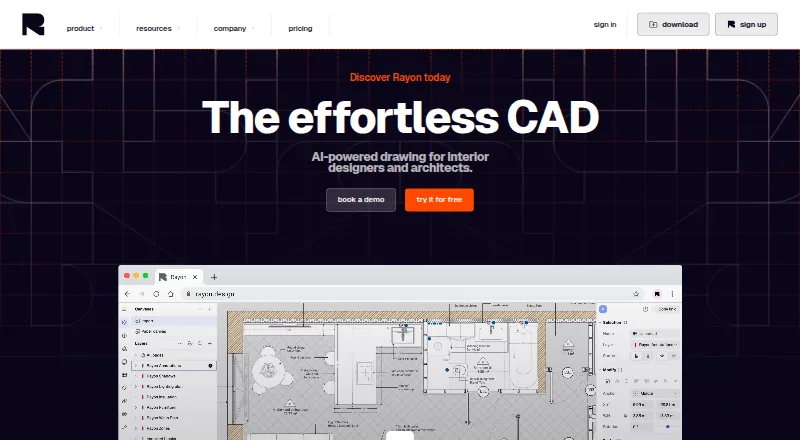
Rayon is AI-powered CAD software for interior designers and architects, centered on 2D architectural drawings rather than 3D modeling.
What Rayon is
Rayon is AI-powered CAD software for interior designers and architects, centered on 2D architectural drawings rather than 3D modeling. It combines drafting commands with BIM tools for creating plans. Its AI features can locate or generate assets, answer CAD questions, make architectural visuals, and convert images into vector sketches or wireframes. Teams can edit together in real time, comment, doodle, and share work through public links. The product includes more than 4,000 elements and more than 100 pre-built templates, with the option to make custom libraries and templates. Rayon imports DWG, DXF, PDF, and image files, with a 25 MB import cap, and exports PNG, PDF, DWG, and DXF. It runs on the web and has desktop apps for Windows and macOS. The Free plan has limited PDF and DWG export and limited block and style libraries. Pro costs $21 a month billed monthly; Team costs $38 a month per editor, billed monthly, and has a 15-day free trial.
Good
- AI features include asset generation and image-to-vector conversion.
- Real-time editing includes comments, doodles, and public links.
- Includes more than 4,000 elements and 100+ templates.
- Exports PNG, PDF, DWG, and DXF.
Watch out
- Rayon is not 3D software.
- DWG, DXF, PDF, and image imports are capped at 25 MB.
- Free plan limits PDF and DWG export.
Who it suits
Rayon may suit interior designers and architects who make 2D plans and want drafting and BIM tools together. Its collaboration features and shared libraries may also suit teams working on drawings together.
Verdict
Rayon combines 2D architectural drafting with BIM tools, AI features, and real-time collaboration. Its import cap and limited Free-plan exports are worth considering, and paid plans have listed monthly prices.
Plans and prices
From Rayon's own pricing page, checked 29 Sep 2026.
| Plan | Price | What it gives you |
|---|---|---|
| Free | Free | Full editing experience · Unlimited public models · Limited PDF & DWG export · Limited block & style libraries · 7 days model history · AI support only |
| Pro | $21 a month | Unlimited private models · Full PDF and DWG export · Full access to Rayon libraries · Unlimited model history · AI support & async personal support · Personal templates and libraries · 100 AI credits per week · per month |
| Team | $38 a month | Unlimited private models · Full PDF and DWG export · Full access to Rayon libraries · Unlimited model history · AI support & live personal support · Team templates and libraries · Team-level billing · 200 AI credits per week · 15-day free trial · per month, per editor |
The facts
Each one read from Rayon's own pages, with the date it was checked.
What it does
- 2D drawings
- Rayon is a 2D drawing tool and is not 3D software.checked 29 Sep 2026
- AI features
- Its AI features include finding or generating assets, answering CAD questions, generating architectural visuals, and converting images into vector sketches or wireframes.checked 29 Sep 2026
- CAD and BIM tools
- The product combines drafting commands with BIM tools for drawing architectural plans.checked 29 Sep 2026
- Collaboration
- Rayon supports realtime collaborative editing, comments, doodles, and sharing through public links.checked 29 Sep 2026
- Import and export
- Rayon imports DWG, DXF, PDF, and images, and exports PNG, PDF, DWG, and DXF.checked 29 Sep 2026
- Import limit
- DWG/DXF, PDF, and image imports are capped at 25 MB.checked 29 Sep 2026
- Libraries and templates
- Rayon offers more than 4,000 elements and more than 100 pre-built templates, and users can create their own libraries and templates.checked 29 Sep 2026
- Privacy
- Rayon says it uses US-based processors and applies appropriate safeguards, including Standard Contractual Clauses where applicable, for transfers of personal data.checked 29 Sep 2026
- Product
- Rayon describes itself as AI-powered CAD software for interior designers and architects.checked 29 Sep 2026
- Support
- Free includes async support and AI support, Pro includes async personal support, and Team includes live personal support.checked 29 Sep 2026
The company
- Company founding
- Rayon says it was co-founded in October 2021 by Bastien Dolla and Stanislas Chaillou.checked 29 Sep 2026
- Company location
- Rayon lists its registered address as 1 Rue de Stockholm, 75008 Paris, France.checked 29 Sep 2026
- Founded
- 2021checked 23 Sep 2026
- Headquarters
- Paris, Francechecked 23 Sep 2026
Where it runs
- Desktop apps
- Rayon provides desktop app downloads for Windows and Mac.checked 29 Sep 2026
The full review of Rayon
Rayon is a 2D architectural drafting tool that pairs CAD commands with BIM tools, AI features, and live collaboration. It suits interior designers and architects who need to develop and share plans in 2D; it is a weaker fit for 3D work or workflows that depend on large imports and unrestricted exports at no cost.
Overview
Rayon brings architectural drafting and model information into one workspace, with AI tools for finding or generating assets, answering CAD questions, creating architectural visuals, and turning images into vector sketches or wireframes. Its collaborative editing, comments, doodles, and public-link sharing make it useful when a plan needs input from others rather than remaining a solo drawing.
The product is explicitly 2D, not 3D software. That distinction matters: Rayon is aimed at making architectural plans, not at replacing a 3D modeling workflow. It imports DWG, DXF, PDF, and image files, but each import is capped at 25 MB. Exports include PNG, PDF, DWG, and DXF, though the Free plan restricts PDF and DWG export.
Key features
Drafting, libraries, and AI
Rayon combines drafting commands with BIM tools, providing a purpose-built setting for architectural plans rather than a general-purpose drawing canvas. A library of more than 4,000 elements and over 100 templates gives users starting material for common drawing needs; the ability to create personal libraries and templates helps teams shape a reusable workflow. Full library access is reserved for paid plans, so Free users face a meaningful constraint if they rely on extensive blocks and styles.
AI features cover several stages of the work: locating or generating assets, answering CAD questions, generating architectural visuals, and converting images into vector sketches or wireframes. Credits are capped weekly on Pro and Team, so those plans provide recurring AI capacity rather than an unlimited allowance.
Collaboration and sharing
Realtime editing, comments, and doodles support review while a plan is being developed. Public links allow drawings to be shared without making every viewer an editor; guest access is also supported. Presentation mode and a brand kit add options for presenting work, though Rayon’s core focus remains 2D drafting.
Pricing
Rayon uses a freemium model, with a Free plan and a 15-day free trial for Team. The paid plan prices below are monthly; Pro is billed per month, while Team is billed per month, per editor.
| Plan | Price | What it includes |
|---|---|---|
| Free | free | Full editing experience, unlimited public models, limited PDF and DWG export, limited block and style libraries, 7 days of model history, and AI support only. |
| Pro | $21 a month | Unlimited private models, full PDF and DWG export, full Rayon library access, unlimited model history, AI support and async personal support, personal templates and libraries, and 100 AI credits per week. |
| Team | $38 a month, per editor | Unlimited private models, full PDF and DWG export, full Rayon library access, unlimited model history, AI support and live personal support, team templates and libraries, team-level billing, 200 AI credits per week, and a 15-day free trial. |
Free is a reasonable way to work with the full editing experience and public models, but limited exports, libraries, and a seven-day history make it less suited to ongoing professional work that needs private models or complete deliverables. Pro is the more direct fit for an individual who needs private models, complete PDF and DWG export, and personal reusable resources; its 100 weekly AI credits and async support set boundaries on AI use and assistance.
Team costs more per editor, but adds team libraries and templates, team-level billing, twice Pro’s weekly AI credits, and live personal support. It suits groups that value shared resources and faster support; because the charge is per editor, the total rises with the number of editors. Pro and Team both provide unlimited private models, full PDF and DWG export, full library access, and unlimited model history.
Platforms
Rayon is available on the web and as desktop apps for Windows and macOS. That covers browser-based access and two desktop environments, but no mobile platform is listed among its supported platforms.
Who it's for
Rayon is best suited to interior designers and architects who want 2D architectural drafting with BIM tools, built-in assets, and collaboration in the same product. It is also a plausible choice for teams that need live review and shared templates, particularly on Team. Look elsewhere if the work requires 3D software, imports larger than 25 MB, or unrestricted PDF and DWG export without a paid plan.
Pros and cons
- Pros: Drafting commands and BIM tools are combined for architectural plans, with a substantial element library and more than 100 templates to help establish a drawing workflow.
- Pros: Realtime editing, comments, doodles, public links, and guest access support collaboration and review.
- Pros: AI covers asset discovery and creation, CAD questions, visuals, and image-to-vector conversion rather than being limited to one task.
- Cons: Rayon is 2D, not 3D software, so it cannot serve as a 3D modeling tool.
- Cons: Imports are capped at 25 MB, which can rule out larger source files.
- Cons: The Free plan limits PDF and DWG export, libraries, and model history; professional users needing complete outputs and longer history will need a paid plan.
Alternatives
For more options in this category, browse Architecture Software or Mood Board Software.
Milanote is worth considering when the priority is collecting and arranging notes, images, or links across shared boards rather than drafting architectural plans. Its Free plan allows 100 notes, images, or links, 10 file uploads, and unlimited shared boards; it is available on web, desktop, mobile, and as an extension.
Moodis is an alternative for local mood boards, with a Free plan that allows unlimited boards for personal, non-commercial use. PureRef is another option to consider; Kanvaz is free forever, MIT licensed, and has no feature paywall. ShopLook keeps its creative canvas and existing features free, while Mattoboard offers a free plan with 5 Matto AI credits, up to 10 images per board, and 4 Deep Renders per month.
MoodBoard AI may suit someone looking for a web-based moodboard tool with AI generations, AI chat, and a free allowance of one board per month. Moodboard is another web-based free option, offering an evolving spatial board with images, notes, links, tasks, files, starter templates, and sharing and review features.
Verdict
Choose Rayon if you need 2D architectural plans supported by BIM tools, AI, and real-time collaboration, and are prepared to pay for full exports, private models, and complete libraries. Its strongest case is a connected drafting and review workflow; its clearest reasons to look elsewhere are the lack of 3D and the Free plan’s export and history limits.
Alternatives to Rayon
- 1

Milanote
Free planAndroidiOSWebExtension8.2From $9.99 a month - 2

Adobe Firefly
Free planAndroidiOSWebAPI7.8Free plan - 3

Mattoboard
Free planWebExtension7.3From $98 a month - 4
ShopLook
Free planAndroidiOSWebExtension7.2From $3.99 a month - 5

Soleil Clusters
Free planAndroidiOSWebAPI7.2From $25 a month - 6

Moodis
Free planWebLinuxWindows6.8From €5 a month