Live Home 3D
Live Home 3D is a home design app for creating floor plans and 3D views of rooms, houses, exteriors, and terrain.
What Live Home 3D is
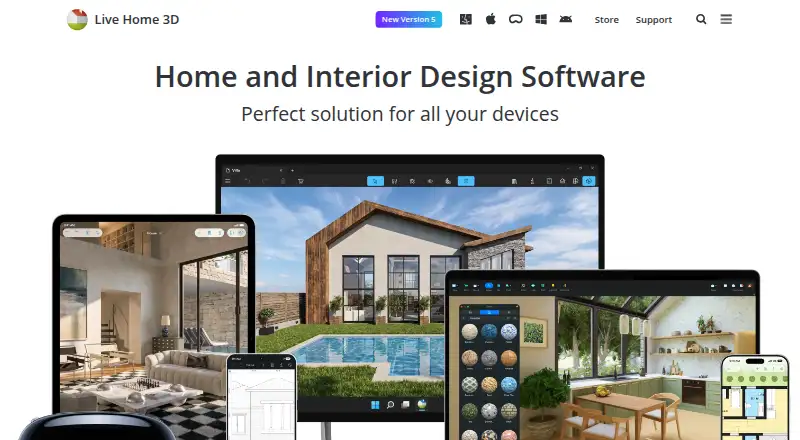
Live Home 3D is a home design app for creating floor plans and 3D views of rooms, houses, exteriors, and terrain. It serves amateur home designers as well as professional designers, and runs on Android, iOS, macOS, and Windows. Floor-planning tools let you draw walls, trace a plan image, mark dimensions, and build multiple stories. Switch to a 3D view to walk through a design or rearrange furniture and finishes. The Mac app library lists 2,400 3D models and 2,100 materials. It also lists imports from Trimble 3D Warehouse and Sketchfab; using Sketchfab requires a free account. Mac imports include FBX, 3DS, COLLADA, and OBJ, while listed exports include PDF floor plans, images, panoramas, walkthrough videos, and 3D model formats. On-device offline ray-tracing renders are supported, while AI cloud rendering uses purchased credits. The free version is limited to two stories and its exports have watermarks; available formats vary by platform.
Good
- Works on Android, iOS, macOS, and Windows.
- Supports traced plans and multiple stories.
- 3D view includes walkthroughs and furniture changes.
- Mac app lists PDF, image, and video exports.
Watch out
- Free version is limited to two stories.
- Free exports contain watermarks.
- AI cloud rendering uses purchased credits.
- Available formats vary by platform.
Who it suits
It suits homeowners and designers who want to draw plans and explore them in 3D. The listed design tools span interiors, exteriors, and terrain.
Verdict
Live Home 3D combines floor planning with 3D visualization and a wide range of listed Mac import and export options. The free version's story and watermark limits may matter if you need more complete output.
Plans and prices
From Live Home 3D's own pricing page, checked 3 Oct 2026.
| Plan | Price | What it gives you |
|---|---|---|
| Live Home 3D (iPhone/iPad/Vision) | Free | Free app; in-app Standard and Pro subscriptions and lifetime licenses |
| Live Home 3D Standard Features (1 Month Subscription) | $5.99 a month | In-app purchase · $5.99 |
| Live Home 3D Pro Features (1 Month Subscription) | $14.99 a month | In-app purchase · $14.99 |
| Live Home 3D Standard Features (1 Year Subscription) | $19.99 a year | In-app purchase · $19.99 |
| Live Home 3D Pro Features (1 Year Subscription) | $39.99 a year | In-app purchase · $49.99$39.99 |
| Live Home 3D Standard (Mac) | $59.99, paid once | Requires macOS 13 or higher · $69.99 $59.99; Lifetime License |
| Live Home 3D Standard Features (Lifetime License) | $59.99, paid once | In-app purchase · $69.99$59.99 |
| Live Home 3D Pro Features (Lifetime License) | $129.99, paid once | In-app purchase · $149.99$129.99 |
| Live Home 3D Pro (Mac) | $129.99, paid once | Requires macOS 13 or higher · $149.99 $129.99; Lifetime License |
The facts
Each one read from Live Home 3D's own pages, with the date it was checked.
What it does
- 3D visualization
- Users can switch from a 2D floor plan to a 3D view, walk through the home, and rearrange furniture and finishes.checked 3 Oct 2026
- Imports and exports
- The Mac page lists object imports in FBX, 3DS, COLLADA, and OBJ and exports including PDF floor plans, image formats, panoramas, walkthrough videos, and several 3D model formats.checked 3 Oct 2026
- Integrations
- The store feature chart lists importing objects from Trimble 3D Warehouse and browsing and importing models from Sketchfab; Sketchfab use requires a free account.checked 3 Oct 2026
- Model library
- The Mac product page lists 2,400 3D models and 2,100 materials in the app library.checked 3 Oct 2026
- Privacy
- The privacy statement says software usage statistics are collected only with permission and that no usage statistics are collected on Windows or Android.checked 3 Oct 2026
- Purpose
- Live Home 3D helps users create detailed floor plans and 3D renderings for rooms, houses, exteriors, and terrain.checked 3 Oct 2026
- Refunds
- The online store page says it offers a 30 day money back guarantee for purchases covered by its refund policy.checked 3 Oct 2026
- Rendering
- The Mac app supports unlimited on-device offline ray-tracing renders using AMD Radeon ProRender or Cycles, while AI cloud rendering uses purchased credits.checked 3 Oct 2026
- Support
- BeLight lists a technical support email address, [email protected].checked 3 Oct 2026
- Who it serves
- The maker describes Live Home 3D as a home design app for amateurs and professional designers.checked 3 Oct 2026
Money
- Floor planning
- Users can draw floor plans with wall tools, trace a plan image, mark dimensions, and create multiple stories.checked 3 Oct 2026
- Free trial
- The maker says a free trial is available for Mac, but does not state its duration on the opened page.checked 3 Oct 2026
- Free-version limits
- The store comparison lists a two-story maximum for Free and says free exports contain watermarks; formats vary by platform.checked 3 Oct 2026
The company
- Maker headquarters
- BeLight Software lists its headquarters in Odesa, Ukraine.checked 3 Oct 2026
The full review of Live Home 3D
Overview
Live Home 3D is a home-design app for turning floor plans into 3D views of rooms, houses, exteriors and terrain. It suits homeowners and designers who want to shape a layout and inspect its appearance in one workflow. Its strongest case is the combination of measured planning and 3D visualization; the free version’s two-story cap and watermarked exports make it less suitable when you need unrestricted output.
Key features
From plan to walkthrough
Wall tools, image tracing and dimension marking support both drawing from scratch and rebuilding an existing plan, while multiple-story layouts help when a single-floor sketch is not enough. Switching between 2D and 3D lets you check how a plan translates into a space, and walkthroughs give you a way to move through it. You can also rearrange furniture and finishes, making the app useful for visual design decisions rather than only drafting.
Models, imports and rendering
The Mac app’s library includes 2,400 3D models and 2,100 materials. The store feature chart also includes imports from Trimble 3D Warehouse and Sketchfab; Sketchfab requires a free account. On Mac, object imports support FBX, 3DS, COLLADA and OBJ, while exports include PDF floor plans, images, panoramas, walkthrough videos and several 3D model formats. That breadth makes the Mac version particularly useful when a design needs to move between formats or be shared as more than a still image; export formats vary by platform.
Mac supports unlimited on-device offline ray-tracing renders through AMD Radeon ProRender or Cycles, so rendering need not depend on cloud credits. AI cloud rendering uses purchased credits, adding a separate cost for that workflow. The product also supports real-time scenes, 360° tours, VR/AR and video export.
Pricing
The iPhone, iPad and Vision app is free, with Standard and Pro subscriptions and lifetime licenses available as in-app purchases. The free version is capped at two stories and adds watermarks to exports, so it is best for trying the workflow or making limited personal designs rather than producing clean final deliverables.
- Standard subscription: $5.99 per month or $19.99 per year. A lower-cost fit for users who want paid Standard features without committing to a lifetime purchase.
- Pro subscription: $14.99 per month or $39.99 per year. It costs more than Standard and is the subscription option for users seeking Pro features.
- Standard lifetime: $59.99 once in-app or $59.99 once for Mac. The Mac edition requires macOS 13 or higher.
- Pro lifetime: $129.99 once in-app or $129.99 once for Mac. The Mac edition requires macOS 13 or higher.
The online store offers a 30-day money-back guarantee for purchases covered by its refund policy. The listed subscription and license prices do not describe feature differences between Standard and Pro, so choose a tier based on which edition you need rather than assuming a particular tool is exclusive to one.
Platforms
Live Home 3D is available on Android, iOS, macOS and Windows. Its Mac-specific model counts, file formats and offline ray-tracing options make Mac the clearest fit for users prioritizing import, export and rendering flexibility. Usage statistics are collected only with permission; the privacy statement says none are collected on Windows or Android.
Who it's for
Homeowners planning a renovation or new layout can use the 2D-to-3D workflow to evaluate room arrangements and finishes. Amateur designers benefit from the model and material library, while professional designers may value the Mac version’s format support, walkthroughs and offline rendering. It is a weaker fit for anyone who needs watermarked-free output or more than two stories without paying, or whose needs center on workflows beyond home design and visualization.
Pros and cons
- Pro: Floor plans, dimensions, multiple stories and 3D walkthroughs work together, helping users assess both layout and appearance.
- Pro: Mac combines broad object import and export support with unlimited offline ray-tracing renders.
- Con: Free exports carry watermarks and free projects are limited to two stories, constraining presentation and larger designs.
- Con: AI cloud rendering requires purchased credits, so that option adds usage-based expense beyond the subscription or license.
- Con: Several of the strongest model, format and rendering details apply specifically to Mac, and export formats vary across platforms.
Alternatives
For a different balance of platform access and price, consider Planner 5D, which has a free plan across Android, iOS, macOS, web and Windows, plus a $59.99 per year Premium plan that includes floor-plan upload and conversion to a 3D project and a full premium furniture catalog.
RoomSketcher is another cross-platform freemium option, with a free plan that starts with two credits, one AI floor-plan conversion, 2D and 3D plans, snapshots and AI Render.
Choose Sweet Home 3D if you want a free desktop or online version and broader listed operating-system coverage, including Linux.
Coohom may suit users seeking a free Starter tier with a 3,000-plus furniture catalog, 10 renders per month and three shareable links.
Floor Plan Creator is worth considering if Android or web access is sufficient and a focused floor-plan workflow is the priority.
HomeByMe offers a free Starter plan with two projects, five Full HD images, unlimited 2D/3D screenshots and a catalog of more than 90,000 products.
For a free plan with unlimited 1K rendering and more than 100,000 free 3D models and materials, consider Homestyler.
DreamPlan Home Design Software is another alternative.
Browse the 3D Home Design Software, Architecture Software, Floor Plan Software and 3D Visualization Software lists for more options.
Verdict
Choose Live Home 3D if you want one app to build measured home plans and develop them into walkthrough-ready 3D designs, especially on Mac, where import, export and offline rendering support are strongest. Look elsewhere if you need clean exports or larger plans without paying, or if your work depends on capabilities outside home design and visualization.
Getting started
- Visit the Live Home 3D website.
- Choose the version for Android, iOS, macOS, or Windows.
- Start with the free plan or select a paid option.
- Draw walls or trace a plan image, then add dimensions and stories.
- Switch to 3D to walk through the design and arrange furniture and finishes.
- For Sketchfab models, create a free Sketchfab account.
Limits worth knowing
The free version allows up to two stories, and its exports contain watermarks. AI cloud rendering requires purchased credits; on-device offline ray-tracing renders are supported.
Questions
Is Live Home 3D free?
Yes. A free plan is available, and the iPhone, iPad, and Vision app is listed as free.
How much do paid plans cost?
The listed Mac lifetime licenses are $59.99 for Standard and $129.99 for Pro.
Which platforms does it support?
Live Home 3D is listed for Android, iOS, macOS, and Windows.
What limits apply to the free version?
Free designs are limited to two stories, and free exports contain watermarks.
Can it import models from Sketchfab?
Yes. Users can browse and import Sketchfab models, and Sketchfab use requires a free account.
Does it offer a free trial?
Yes, a free trial is listed.