Sweet Home 3D
Sweet Home 3D is an interior design application for planning a home in 2D and viewing the result in 3D as you work.
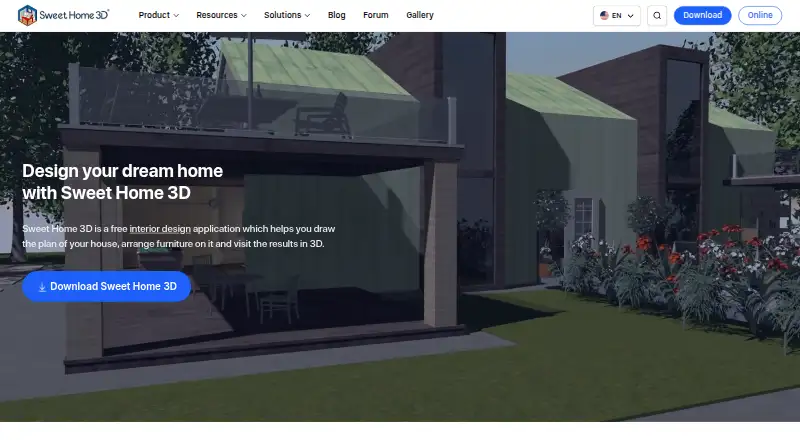
What Sweet Home 3D is
Sweet Home 3D is an interior design application for planning a home in 2D and viewing the result in 3D as you work. Plans can include straight, curved, or sloping walls with precise dimensions, plus room areas, measurement lines, text, arrows, and a compass rose. A live 3D view shows the design from above or from a virtual visitor’s perspective. The software can render images and videos with adjustable lighting and sunlight settings based on time and location. It imports blueprints, 3D models, and textures, and can print or export PDFs, images, videos, and 3D files. The free application is available under the GNU General Public License for personal or commercial use. Free desktop editions have smaller furniture and texture catalogs; the maker advertises a full version with more than 10,000 models and 400 textures. Sweet Home 3D is available for Windows, macOS, Linux, web, Android, and iOS. The Microsoft Store Monthly Premium plan is $9.99 a month and includes a 7-day free trial.
Good
- Live 3D view updates while you design in 2D.
- Imports blueprints, 3D models, and textures.
- Exports plans and designs in several formats.
- Free use is permitted for personal or commercial purposes under GPL.
Watch out
- Free desktop bundles have smaller catalogs.
- Saving designs in the browser requires free registration.
- Monthly Premium renews automatically unless turned off before renewal.
Who it suits
Sweet Home 3D suits people planning interiors who want to draw detailed floor plans and inspect them in 3D. Its professional and school offerings also address design, architecture, real estate, furniture, and event-planning contexts.
Verdict
Sweet Home 3D combines measured 2D plans with a live 3D view and multiple import and export options. Check the smaller free catalogs and the license terms, or consider the paid subscription for its larger catalog.
Plans and prices
From Sweet Home 3D's own pricing page, checked 14 Oct 2026.
| Plan | Price | What it gives you |
|---|---|---|
| Free desktop / online version | Free | Windows, macOS, Linux desktop · online browser version · online saving requires free registration · smaller free catalogs |
| Microsoft Store Monthly Premium | $9.99 a month | +1600 furniture items · +400 textures · 7-day free trial · limited features available free · Monthly Premium subscription; renews automatically unless turned off at least 24 hours before period ends; price may vary by country |
| Monthly Premium | $9.99 a month | unlimited access to app features · more than 1,600 furniture items · more than 400 textures · 7-day trial · auto-renewing monthly subscription |
| Yearly premium | $49.99 a year | premium features · auto-renewing yearly subscription |
The facts
Each one read from Sweet Home 3D's own pages, with the date it was checked.
What it does
- 2D and 3D views
- The editor shows a plan in 2D while also offering aerial and walk-through 3D viewpoints.checked 14 Oct 2026
- Catalogs
- The maker advertises a full version with over 10,000 3D models and 400 textures; free desktop bundles have smaller catalogs, including 100 furniture items and 26 textures for Windows.checked 30 Sep 2026
- Catalog size
- The store editions include more than 10,000 furniture models and 400 textures, while the free SourceForge edition has a smaller bundled catalog.checked 14 Oct 2026
- Current version
- The official site identifies version 7.5 and gives May 5, 2025 as its latest site update date.checked 14 Oct 2026
- Documentation
- Official resources include a detailed user guide, FAQ, plug-in developer guide, JavaScript API docs, tutorials and a forum.checked 14 Oct 2026
- Education
- The school offering is presented for teaching design and architecture concepts through hands-on 2D and 3D projects, and is available for Windows, macOS, and Linux.checked 30 Sep 2026
- Extensions
- Java plug-ins can add features, and the maker lists extensions for tasks such as generating roofs, staircases, terrain, and HTML5 views.checked 30 Sep 2026
- Furniture catalog
- The application provides a searchable, category-based furniture catalog that can be extended.checked 14 Oct 2026
- Import and export
- The software imports blueprints, 3D models and textures and exports PDFs, bitmap or vector images, videos and standard 3D files.checked 14 Oct 2026
- Integrations
- The documented integration mechanisms are imported models and textures, standard file exports, Java plug-ins and derived applications.checked 14 Oct 2026
- JavaScript API
- Sweet Home 3D JS has a separately published JavaScript API and viewer documentation.checked 14 Oct 2026
- License
- The free application, library editors and Sweet Home 3D JS are released under GNU GPL version 2 or any later version.checked 14 Oct 2026
- License constraint
- The maker says the GPL prevents developers who do not own Sweet Home 3D copyrights from making proprietary programs derived from or incorporating it, and directs interested users to ask about other licenses.checked 30 Sep 2026
- Limit: learning curve
- Capterra reviewers say learning all features can take time and that the interface may feel unintuitive to non-designers.checked 14 Oct 2026
- Limit: mobile monetization
- Google Play reviewers complain that the mobile edition puts basic changes behind subscriptions and that some users experienced blank or unusable screens.checked 14 Oct 2026
- Limit: rendering
- Reviewers describe rendering as less capable or slower than more advanced 3D programs, with some reporting crashes during video rendering.checked 14 Oct 2026
Money
- 2D planning
- Users can draw straight, round, or sloping walls with precise dimensions and annotate plans with room areas, dimension lines, text, arrows, and a compass rose.checked 30 Sep 2026
Where it runs
- Browser demo
- Sweet Home 3D Online Manager runs in a WebGL-compatible browser without installation, and users must register for free to save a design.checked 30 Sep 2026
- Doors and windows
- Dragging doors or windows into walls makes the software calculate the required wall openings automatically.checked 14 Oct 2026
The company
- Company headquarters
- Crunchbase places SPACE MUSHROOMS S.R.L. in Milan, Lombardy, Italy.checked 14 Oct 2026
- Company legal name
- Crunchbase lists the maker as SPACE MUSHROOMS S.R.L., an active private for-profit company.checked 14 Oct 2026
- Company size
- Crunchbase reports 11–50 employees, while the Sweet Home 3D LinkedIn page reports 2–10 employees.checked 14 Oct 2026
- Founded
- 2021checked 28 Sep 2026
- Headquarters
- Milan, Italychecked 28 Sep 2026
The full review of Sweet Home 3D
Overview
Sweet Home 3D is an interior-design application for drawing dimensioned home plans and viewing them in 3D. It suits homeowners and design learners who want precise layouts alongside visual presentation. Its mix of free desktop access, live views and broad export options is compelling, though the free editions have smaller catalogs than the paid subscription.
Key features
Measured plans and live views
Draw straight, round or sloping walls with precise dimensions, then add room areas, dimension lines, text, arrows and a compass rose. A live 3D view follows the 2D design, with aerial and virtual-visitor perspectives. That combination helps connect measurements to the appearance of a space; the annotations also make plans more useful for communicating a layout than an unmarked sketch.
Rendering and file support
Sweet Home 3D creates photorealistic images and videos with customizable lights and sunlight settings tied to time of day and geographic location. It can import blueprints, 3D models and textures, and print or export PDFs, bitmap or vector images, videos and standard-format 3D files. This is a flexible set of presentation and exchange options for a home-planning tool. Real-time scenes and video export are supported.
Catalogs and extensions
The free desktop bundles have smaller furniture and texture catalogs; the Windows bundle includes 100 furniture items and 26 textures. The maker advertises a full version with more than 10,000 3D models and 400 textures. Java plug-ins can add capabilities, with extensions for tasks such as generating roofs, staircases, terrain and HTML5 views. The smaller free catalog is a meaningful trade-off for users who want a broad choice of ready-made objects.
Browser access and support
Sweet Home 3D Online Manager runs in a WebGL-compatible browser without installation, but requires free registration to save a design. Documentation, a user guide, video tutorials, FAQs, a forum and contact links provide several support routes.
Pricing
The pricing model is freemium, with a free plan and a free trial on the paid subscription.
| Plan | Price | What it includes |
|---|---|---|
| Free desktop / online version | free | Desktop downloads for Windows, macOS and Linux, or the online version. Free registration is required to save online designs, and downloadable editions have smaller furniture and texture catalogs. |
| Microsoft Store Monthly Premium | $9.99 a month | More than 1,600 furniture items and more than 400 textures, with a 7-day free trial. Limited features are available free. |
The free edition is the sensible starting point for measured plans and 3D views if its smaller catalog is enough. Monthly Premium is aimed at users who need the larger catalog. It renews automatically unless turned off at least 24 hours before the period ends; the price may vary by country.
The free application is distributed under the GNU General Public License, which the maker says permits personal and commercial use. The GPL also prevents developers who do not own Sweet Home 3D copyrights from making proprietary programs derived from or incorporating it; users interested in other licenses are directed to ask about them.
Platforms
Sweet Home 3D is listed for Android, iOS, Linux, macOS, web and Windows, with an extension also listed. Desktop downloads cover Windows, macOS and Linux; the browser version requires WebGL compatibility. Mobile viewing is supported, and the product is categorized as hybrid.
Who it's for
Homeowners and design learners can use the measured 2D plan and live 3D view to work through a layout. The maker also describes professional uses for architects, interior designers, furniture retailers and manufacturers, real estate and event planners. Plug-ins and multiple export formats extend its usefulness for projects that need additional capabilities or portable outputs.
It is less suitable for someone who needs the largest furniture and texture selection without paying, or for developers who want to build a proprietary product derived from or incorporating the GPL application without holding its copyrights.
Pros and cons
- Pros: Precise walls, dimensions and plan annotations support more than rough room sketches.
- Pros: A live 3D view, photorealistic image and video rendering, and multiple export formats serve both planning and presentation.
- Pros: Free desktop editions and browser access provide ways to work without a subscription; the application is GPL-licensed for personal or commercial use.
- Cons: Free desktop bundles have smaller catalogs than the advertised full version, which may limit users who rely on a wide choice of models and textures.
- Cons: Saving a design in the browser requires free registration.
- Cons: The monthly subscription renews automatically unless canceled at least 24 hours before the period ends.
Alternatives
For other options, compare 3D Visualization Software, 3D Home Design Software and Floor Plan Software.
- Planner 5D is another freemium option with a free plan and trial; its Premium plan is $59.99 a year and includes floor-plan upload and conversion to a 3D project plus a full premium furniture catalog. Choose it if those stated capabilities and annual billing suit your needs better.
- RoomSketcher has a free plan with 2 credits to start, one free AI floor-plan conversion, 2D and 3D floor plans, 3D snapshots and AI Render. It is a relevant alternative if those free-plan tools match your project.
- Coohom offers a free Starter plan with a 3,000-plus furniture catalog, 10 renders per month and 3 shareable links, but no 360° panorama or photo-to-3D image conversion. Choose it if its larger free catalog and rendering allowance are more useful than Sweet Home 3D's measured drawing and export mix.
- Live Home 3D has a free app, with Standard and Pro subscriptions and lifetime licenses offered in-app.
- Arkio has a free Starter plan with all modeling tools, 1:1 meetings and OBJ/GLB and image import and export; its Pro plan is $35 a month. Consider it if those tools or its stated upgrade fit your needs.
- Homestyler offers a free Basic plan with unlimited 1K rendering and more than 100,000 free 3D models and materials; 4K renders are purchased separately. It may suit users prioritizing that free catalog and rendering allowance.
- Kuula has a free Basic plan capped at 300 posts and 100 uploads per month, with self support.
- Matterport has a free plan limited to one active space and two users, with limited camera support.
Verdict
Choose Sweet Home 3D if you want measured 2D home plans linked to a live 3D view, plus rendering and varied export options, without paying to get started. Look elsewhere if a large ready-made catalog is central to your work and the smaller free bundles will not do; the paid subscription's automatic renewal also merits attention.
Getting started
- Open the Sweet Home 3D website or install the desktop edition
- Choose Windows, macOS, Linux, web, Android, or iOS access
- Register for free to save designs in the browser version
- Draw walls and annotate the 2D plan
- Switch to the live 3D view and add models or textures
- Start the 7-day trial of Microsoft Store Monthly Premium if desired
Limits worth knowing
The free desktop and online version costs nothing; free downloadable editions include smaller furniture and texture catalogs. The online version requires free registration to save designs. Microsoft Store Monthly Premium costs $9.99 a month, renews automatically unless disabled at least 24 hours before the period ends, and includes a 7-day free trial.
Questions
Is Sweet Home 3D free?
Yes. The Free desktop / online version costs nothing. The application is distributed under the GNU General Public License for personal or commercial use under that license.
What does Microsoft Store Monthly Premium cost?
It costs $9.99 a month and includes a 7-day free trial, plus more than 1,600 furniture items and more than 400 textures.
Which platforms are supported?
Listed platforms are Android, extension, iOS, Linux, macOS, web, and Windows.
Can I save designs online?
Yes, but the browser-based Sweet Home 3D Online Manager requires free registration to save a design.
What can the software import and export?
It imports blueprints, 3D models, and textures. Designs can be printed or exported as PDFs, bitmap or vector images, videos, and standard-format 3D files.
Can it be extended?
Java plug-ins can add features, and listed extensions cover tasks including roofs, staircases, terrain, and HTML5 views.
Alternatives to Sweet Home 3D
- 1

Planner 5D
Free planAndroidiOSWebAPI8.4From $4.99 a month - 2

Coohom
Free planAndroidiOSWebAPI8.3From $299 a year - 3

RoomSketcher
Free planAndroidiOSWebAPI8.3From $12 a month - 4

CloudPano
Free planAndroidiOSWebAPI8.2From $27 a month - 5

Homestyler
Free planAndroidiOSWebAPI8.2From $6.80 a month - 6
Nanome
Free planAndroidiOSWebAPI8.2From $4.17 a month