
Homestyler
Homestyler is an AI-powered 3D interior design platform for designers, homeowners, and home furnishing businesses.
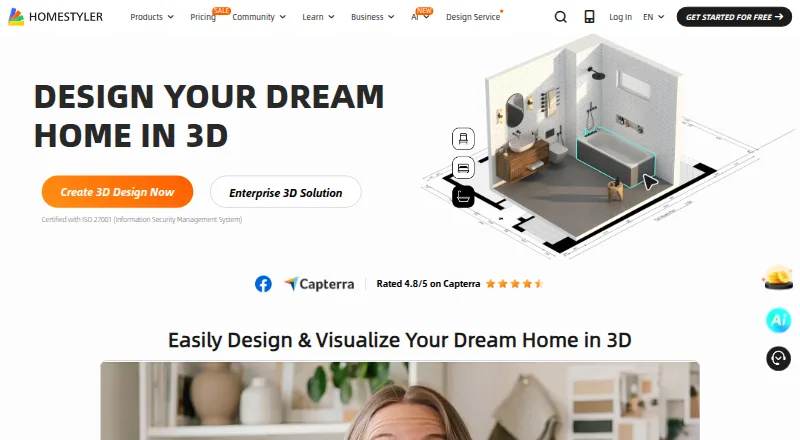
What Homestyler is
Homestyler is an AI-powered 3D interior design platform for designers, homeowners, and home furnishing businesses. Its workflow covers floor plan creation, 3D modeling, decoration, material exploration, rendering, and construction drawing export. Users can upload a 2D floor plan or sketch and convert it into an editable 3D house model. The homepage advertises more than 10 million branded 3D furniture models for room decoration. Its AI tools include planning, staging, moodboards, modeling, texturing, painting, planting, rendering, and animation. Homestyler supports multi-floor DWG imports and model uploads in MAX, RAR, ZIP, GLTF, GLB, and SKP formats. The free Basic plan includes unlimited 1K rendering; 4K renders cost extra on that plan. It is available on Android, iOS, web, and API, and lists real-time scenes, 360° tours, VR/AR support, and video export.
Good
- Converts uploaded floor plans or sketches into editable 3D models.
- Basic includes unlimited 1K rendering.
- Advertises more than 10 million branded furniture models.
- Lists Android, iOS, web, and API availability.
Watch out
- 4K renders must be purchased separately on Basic.
- Enterprise pricing is custom and not listed.
Who it suits
Homestyler suits designers, homeowners, and home furnishing businesses that need 3D room or building design workflows. Its Team plan may suit groups that want shared design space and model libraries.
Verdict
Homestyler combines floor planning, 3D design, rendering, and AI tools, with plans ranging from free Basic to paid tiers. Check the plan details for render allowances and collaboration features that fit your work.
Plans and prices
From Homestyler's own pricing page, checked 15 Oct 2026.
| Plan | Price | What it gives you |
|---|---|---|
| Basic | Free | Cloud 3D floor planner · unlimited 1K rendering · limited coin renders · 4K renders purchased per use · 100,000+ free models/materials · 3 free roof styles |
| Pro+ | $6.80 a month | 75 monthly 2K renders · 75 monthly 4K renders · watermark removal · 300 uploaded models and textures each · 180 AI credits/month · premium assets · Starts from $6.8 /month; save 15% annually |
| Master+ | $11.80 a month | Unlimited 4K image rendering · 500 uploaded models and textures each · larger video and panorama quotas · 380 AI credits/month · designer directory listing · 0% payout fees · Starts from $11.8 /month; save 15% annually |
| Team | $19.90 a month | Master+ features · shared design space · shared model/texture library · sub-account management · custom render logo · unlimited own uploads · 500 AI-credit coupons/month · Starts from $19.9 /seat/month |
| Enterprise | Priced on request | Team features · SSO · 3D model creation · virtual photo studio · white-label environment · custom features · custom API integration · Custom Pricing |
The facts
Each one read from Homestyler's own pages, with the date it was checked.
What it does
- 3D asset library
- The maker advertises more than 10 million branded 3D furniture models with drag-and-drop placement.checked 15 Oct 2026
- AI room redesign
- AI Stager accepts a room photo and generates alternative styles and layouts for spaces such as bedrooms, kitchens and offices.checked 15 Oct 2026
- AI Studio
- AI Studio groups AI Planner, Stager, Render, Gardener, Animator, Moodboard, Modeler, Texturer, Painter, Decor and Spark tools.checked 15 Oct 2026
- AI tools
- The pricing page says AI credits can be used across its AI tools, including AI Planner, Stager, Moodboard, Modeler, Texturer, Painter, Planter, Render, and Animator.checked 28 Sep 2026
- API and extensibility
- Enterprise customers can request custom API integration; the site also links API documentation, but no open SDK or self-hosted package is offered on the cited pages.checked 15 Oct 2026
- Audience
- The company presents solutions for interior design studios, e-commerce, real estate, furniture retail, and other home furnishing businesses.checked 28 Sep 2026
- CAD integration
- The platform supports importing multi-floor DWG files created in AutoCAD.checked 15 Oct 2026
- Cloud rendering
- Homestyler provides built-in cloud rendering so designs can be visualized with one click.checked 15 Oct 2026
- Collaboration
- Team accounts provide shared design space, shared model and texture libraries, member management and protected team assets.checked 15 Oct 2026
- File compatibility
- The pricing page says multi-floor DWG import is supported and model uploads accept MAX, RAR, ZIP, GLTF, GLB, and SKP formats.checked 28 Sep 2026
- Integrations
- Homestyler lists custom API integration as available for Enterprise and describes APIs and white-label platforms as business solutions.checked 28 Sep 2026
- Licence
- The terms grant users a personal, non-exclusive, non-assignable licence and reserve platform intellectual-property rights to Homestyler or other right holders.checked 15 Oct 2026
- Limit: bugs and support
- App-store and Trustpilot reviewers report crashes, glitches, unsaved work, dysfunctional tools and difficulty obtaining effective support or cancelling subscriptions.checked 15 Oct 2026
- Limit: iPad editing
- An Apple reviewer says the iPad app can visualize uploaded plans but does not provide the full editing workflow available on PC.checked 15 Oct 2026
Money
- AI floor-plan conversion
- Its AI can turn an uploaded 2D floor plan or sketch into an editable 3D house model in one click.checked 15 Oct 2026
- AI Planner workflow
- AI Planner generates floor-plan ideas from household needs and lets users convert the result into an editable 3D layout.checked 15 Oct 2026
- Floor plans
- Its homepage says users can upload a 2D floor plan or sketch and convert it into an editable 3D house model with one click.checked 28 Sep 2026
The company
- Company headquarters and size
- LinkedIn lists Homestyler headquarters in Shanghai and company size of 51–200 employees.checked 15 Oct 2026
- Company history
- Homestyler's About page says its prototype Autodesk Dragonfly launched in 2009 and Autodesk launched Homestyler in 2010.checked 28 Sep 2026
- Founded
- 2009checked 23 Sep 2026
- Founded and ownership history
- LinkedIn lists 2009 as the founding year; the maker says Easyhome acquired the Autodesk product in 2016 and Easyhome and Alibaba jointly invested in 2019.checked 15 Oct 2026
- Headquarters
- Pudong, Shanghai, Chinachecked 23 Sep 2026
Where it runs
- Independent review: browser support
- TechRadar found the interface easy to understand and the furnishing/rendering capabilities strong, but described the interface as busy and historically recommended Chrome over Firefox or Safari.checked 15 Oct 2026
- Independent review: GetApp support
- GetApp lists web, Android and iPhone/iPad support plus email, FAQs/forum, knowledge base, chat, phone and live-online training options.checked 15 Oct 2026
The full review of Homestyler
Overview
Homestyler is a 3D interior-design platform for turning floor plans into furnished, rendered spaces. It suits homeowners and design or furnishing businesses that want planning, visualization, and AI tools in one workflow; its broad free tier is appealing, but higher-resolution work and team features require paid plans.
Users can upload a 2D plan or sketch and convert it into an editable 3D house model, then decorate from a library advertised at more than 10 million branded furniture models. Homestyler also supports real-time scenes, 360° tours, VR/AR, video export, and mobile viewing. Its workflow extends from material exploration to construction-drawing export, making it more than a room-staging tool.
The product grew from Autodesk Dragonfly, a prototype launched in 2009; Autodesk launched Homestyler in 2010. Its homepage displays ISO/IEC 27001:2022 certification.
Key features
Planning, modeling, and rendering
Floor plans, 3D modeling, decoration, and rendering sit in one workflow. Multi-floor DWG import supports more involved layouts, while model uploads accept MAX, RAR, ZIP, GLTF, GLB, and SKP files. Construction-drawing export broadens its usefulness beyond visual concepts. For users who only need occasional room layouts, that breadth may be more than necessary.
Basic includes unlimited 1K rendering, but 4K renders are purchased separately. Pro+ adds monthly 2K and 4K allowances; Master+ raises the 4K allowance to unlimited. The distinction matters to users producing polished presentation images: the free tier allows extensive lower-resolution output, not unrestricted high-resolution rendering.
AI and collaboration
AI credits can be spent across AI Planner, Stager, Moodboard, Modeler, Texturer, Painter, Planter, Render, and Animator. This range makes the credit allowance relevant to more than a single visualization feature, though the monthly caps on paid plans constrain heavier use.
Team adds a shared design space and model and texture library, sub-account management, and shared AI Decor templates. Enterprise adds SSO, custom API integration, and a white-label branded environment. These are meaningful business features; solo users have little reason to pay for seat-based collaboration or enterprise deployment.
Pricing
Homestyler is freemium. Basic costs nothing and includes unlimited 1K rendering and more than 100,000 free 3D models and materials; 4K renders cost extra. It is a sensible starting point for learning the workflow or producing lower-resolution designs, but not for dependable free 4K output.
- Pro+: $6.80 a month, billed starting at $6.8/month, with a stated 40% saving. It includes 75 renders each for 2K and 4K per month, 180 AI credits per month, and uploads of up to 300 each of 2D textures and 3D models. Best for an individual whose render needs fit those monthly limits.
- Master+: $11.80 a month, billed starting at $11.8/month, with a stated 40% saving. It includes unlimited 4K image rendering, 380 AI credits per month, and uploads of up to 500 each of 2D textures and 3D models. The clearest upgrade for frequent high-resolution rendering, though AI credits and uploads remain capped.
- Team: $19.90 a month per seat, billed starting at $19.9/seat/month. It includes everything in Master+, shared workspaces and libraries, and 500 AI credit coupons every month. The per-seat price makes it a team purchase rather than a cost-effective solo upgrade.
- Enterprise: custom pricing. It includes everything in Team plus SSO, custom API integration, and white-label and branded environments, for businesses needing those deployment and identity features.
The stated paid entry price is $6.80/user/mo. The plans use “starts from” billing language; the supplied prices do not give a renewal term or trial duration.
Platforms
Homestyler is available on Android, iOS, and the web, with an API also offered. Its mix of desktop-oriented planning workflows and mobile viewing suits users who need to review designs across devices. Custom API integration is an Enterprise feature; APIs and white-label platforms are presented as business solutions.
Who it's for
Homestyler is a strong fit for interior designers, homeowners, and home-furnishing businesses that need to move from a floor plan to a furnished 3D concept and render it. Its advertised furniture library and broad AI toolkit suit visual exploration, while the Team and Enterprise tiers target studios, e-commerce, real estate, furniture retail, and other furnishing businesses. Choose another tool if your priority is only simple floor plans or if you need high-resolution rendering without paying for a higher tier.
Pros and cons
- Pro: The workflow spans plan conversion, modeling, decoration, material exploration, rendering, and construction-drawing export, reducing the need to separate those stages.
- Pro: Unlimited 1K rendering and more than 100,000 free models and materials make Basic useful for substantial exploration without a subscription.
- Pro: Team and Enterprise add concrete collaboration and business deployment options, including shared libraries, SSO, and white-label environments.
- Con: Basic charges separately for 4K renders, so its unlimited rendering does not cover every output quality.
- Con: Pro+ and Master+ cap monthly AI credits and model and texture uploads, while Team charges per seat.
- Con: The advertised library and extensive workflow may be unnecessary overhead for someone who only needs a basic floor-plan tool.
Alternatives
Coohom is another freemium option, with a free Starter plan offering 3,000+ furniture catalog items, 10 renders per month, and 3 shareable links; choose it if those defined free allowances suit your needs better than Homestyler's unlimited 1K rendering.
D5 Render offers a free Community plan for non-commercial use, with 2,100+ official assets and 50 AI trial credits; consider it if that free-use model fits your work.
Matterport has a free plan limited to 1 active space and 2 users, so compare it if those limits match your project.
Planner 5D offers a Premium plan at $59.99 a year with floor-plan upload and conversion to a 3D project; choose it if that annual plan and workflow are a better fit.
Live Home 3D is another option for comparing home-design software across mobile and desktop platforms.
RoomSketcher offers a free plan with 2 credits, one free AI floor-plan conversion, 2D and 3D plans, snapshots, and AI Render; it may suit users who want those specific starter outputs.
Sweet Home 3D is another freemium home-design option with desktop and online versions.
Floorplanner has a free Basic account for up to 5 projects, with 3 floors and 3 designs per project and watermarked SD exports; consider it if those project limits are sufficient.
Browse 3D Visualization Software, AI Interior Design Generators, 3D Home Design Software, and Floor Plan Software for more options by category.
Verdict
Choose Homestyler if you want one platform for converting plans into furnished 3D spaces, exploring materials, and producing renders, with a free tier that supports unlimited 1K output. Its main advantage is the breadth of the workflow; its main trade-off is that 4K rendering, expanded AI capacity, and collaboration push users toward paid plans. For high-resolution work, Master+ is the more straightforward fit; for a solo user who only needs basic layouts, a narrower tool may be preferable.
Alternatives to Homestyler
- 1

Planner 5D
Free planAndroidiOSWebAPI8.4From $4.99 a month - 2

DecorAI
Free planAndroidiOSWeb7.9From $39.99 a year - 3

HomeDesignsAI
Free planAndroidiOSWebAPI7.9From $137 a year - 4
Stagently
AndroidiOSWebAPI7.6From $29 a month - 5

Remodel AI
Free planAndroidiOSWeb7.3From $29 a month - 6
Interior AI
AndroidiOSWeb7.2From $349 a year