
Floorplanner
Floorplanner is a browser-based floor plan editor for laying out rooms and creating architectural visualizations with cloud rendering.
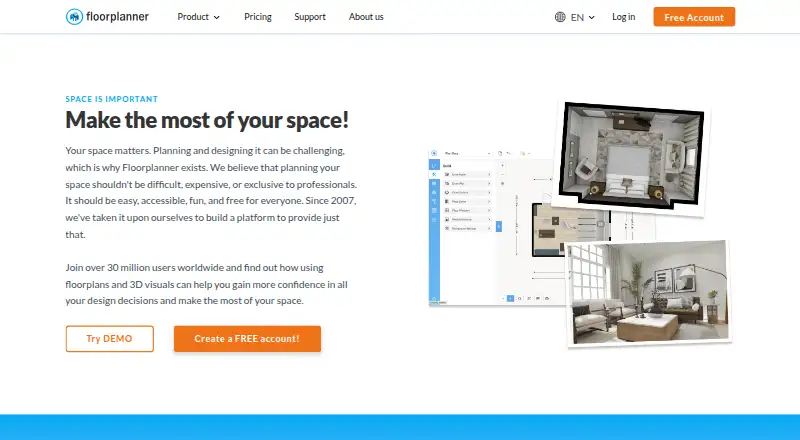
What Floorplanner is
Floorplanner is a browser-based floor plan editor for laying out rooms and creating architectural visualizations with cloud rendering. Users can draw rooms, reposition walls, add doors and windows, and see a real-time 3D view. Its library includes over 260,000 3D models at no extra cost. Projects can produce 2D and 3D images, including photorealistic images, and the site advertises renders up to 8K resolution. A free account allows up to five projects; each free project is limited to three floors and three designs, and SD Lite exports are watermarked at 960 × 540 pixels. One-time credit purchases can expand projects to seven floors and ten designs per floor, remove watermarks, and unlock higher-resolution exports. After upgrading a project to SD or higher, users can pay extra for 3D tours and public Spaceplanner links for interactive viewing or embedding. The editor works in a browser without additional downloads or plug-ins. Floorplanner also offers API and custom integrations, and supports personal, retail, real estate, interior design, and education use.
Good
- Real-time 3D view while editing layouts.
- Library contains over 260,000 3D models at no extra cost.
- Free account supports up to five projects.
- API and custom integration options are available.
- Browser editor requires no downloads or plug-ins.
Watch out
- Free projects allow only three floors and designs.
- Free SD Lite exports carry a watermark.
- 3D tours and public Spaceplanner links cost extra.
Who it suits
Floorplanner suits people planning rooms or creating architectural visuals, as well as retail, real estate, and interior design users. Its browser access and education account may also fit classroom use.
Verdict
Floorplanner provides a free browser editor for room layouts and 3D visualization, with project upgrades available through one-time credit purchases. Review the free project and export limits before relying on it for higher-resolution or interactive presentations.
Plans and prices
From Floorplanner's own pricing page, checked 4 Oct 2026.
| Plan | Price | What it gives you |
|---|---|---|
| Basic | Free | Free account · up to 5 free projects on pricing page · 3 floors and 3 designs per project · SD exports with watermark |
| Credits | $163, paid once | One-off credit purchase; credits can upgrade projects and unlock additional services · 100 credits for $163.00 |
The facts
Each one read from Floorplanner's own pages, with the date it was checked.
What it does
- 3D library
- The homepage says the library contains over 260,000 3D models and is available to users at no extra cost.checked 4 Oct 2026
- Advanced sharing
- After upgrading a project to SD or higher, users can pay extra for 3D tours and public Spaceplanner links for interactive viewing or embedding.checked 4 Oct 2026
- Audience
- The site presents Floorplanner for personal use, retail, real estate, and interior design, and says it has a special education account.checked 4 Oct 2026
- Integrations
- Floorplanner says it can be integrated through its API into property portals or other software, and offers custom integrations.checked 4 Oct 2026
- Paid project upgrades
- Project upgrades are one-time credit purchases; upgraded projects can have up to 7 floors and 10 designs per floor, remove the watermark, and unlock higher-resolution exports.checked 4 Oct 2026
- Payment processing
- Floorplanner says it uses Adyen as its payment platform provider.checked 4 Oct 2026
- Privacy
- The privacy policy says Floorplanner does not sell or distribute personal data to third parties and users can delete their account and personal data from their profile page.checked 4 Oct 2026
- Project limits
- Free projects are limited to 3 floors and 3 designs, and SD Lite exports are 960 × 540 pixels with a Floorplanner watermark.checked 4 Oct 2026
- Purpose
- Floorplanner is a browser-based floor plan editor with cloud-based rendering for creating architectural visualizations.checked 4 Oct 2026
- Support
- Support includes how-to videos, a manual, weekly webinars, a contact form, and a help center FAQ.checked 4 Oct 2026
- Visual exports
- Users can create 2D and 3D images, including photorealistic 3D images, and the homepage advertises renders up to 8K resolution.checked 4 Oct 2026
Where it runs
- Browser access
- The editor runs in a browser without additional downloads or plug-ins and is described as usable from any device.checked 4 Oct 2026
The company
- Founded
- 2007checked 28 Sep 2026
- Headquarters
- Rotterdam, The Netherlandschecked 28 Sep 2026
Money
- Space planning
- The editor lets users draw rooms, move walls, and add doors and windows, with a real-time 3D view.checked 4 Oct 2026
Alternatives to Floorplanner
- 1

RoomSketcher
Free planAndroidiOSWebAPI8.3From $12 a month - 2
AutoCAD
AndroidiOSWebmacOS7.5 - 3
GstarCAD
AndroidiOSWebAPI7.3From $239 a year - 4
ProfiCAD
Free planAndroidmacOSWindows7.1$277 one-time - 5
Solid Edge
AndroidiOSWebWindows7.1 - 6
ZWCAD Professional
AndroidiOSWindows7.1