
DecorAI
DecorAI turns photos of rooms, home exteriors, and gardens into AI redesign visualizations, usually in under 10 seconds.
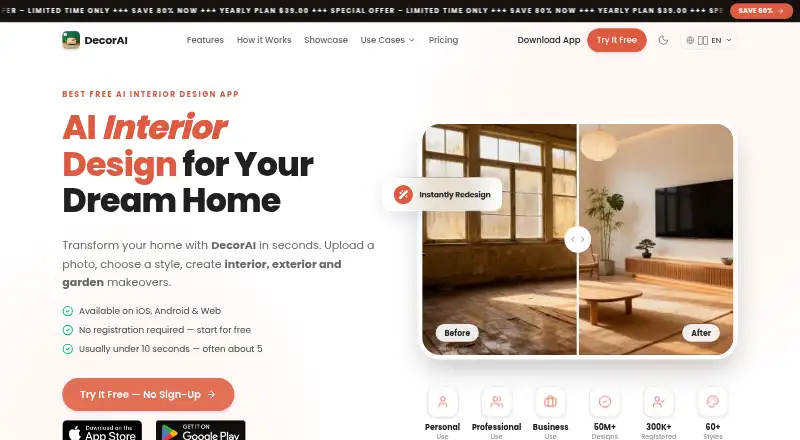
What DecorAI is
DecorAI turns photos of rooms, home exteriors, and gardens into AI redesign visualizations, usually in under 10 seconds. It offers more than 60 styles, 40 room and space types, 40 color schemes, and over 30 design controls. Editing options include masked inpainting, style transfer, floor planning, furniture import, empty-room editing, and virtual staging. You can use images from Pinterest and Instagram as references or as the starting point for a design. The service is available on the web, iPhone, iPad, and Android, and saved designs sync across platforms when you sign in with the same account. Its free plan provides three designs a day, with a short video ad per design and a small watermark; no account or card is required. Pro is $19.99 a month or $39.99 a year, with unlimited generations, no ads or watermark, priority speed, AI Room Analysis, and a Design Report with PDF export. Visualizations are for inspiration, not construction plans.
Good
- Redesigns rooms, exteriors, and gardens from photos.
- More than 60 styles and 40 color schemes.
- Pinterest and Instagram images can guide designs.
- Saved designs sync across web and mobile.
Watch out
- Free plan limits users to three daily designs.
- Free designs include ads and a watermark.
- Visualizations are not construction plans.
Who it suits
DecorAI suits homeowners, renters, designers, real estate agents, home stagers, and renovation professionals who want to explore design ideas from photos. DIY renovators and property managers may also find its design controls useful.
Verdict
DecorAI offers several ways to explore and edit photo-based redesigns across web and mobile. Its free plan has daily limits, while Pro adds unlimited generations and design reports.
Plans and prices
From DecorAI's own pricing page, checked 15 Oct 2026.
| Plan | Price | What it gives you |
|---|---|---|
| Free | Free | 3 AI designs per day · rewarded ad per design · watermark · no account required |
| Pro monthly | $19.99 a month | Unlimited generations · no ads · no watermark · priority speed · Room Analysis · Design Report PDF · monthly |
| Pro yearly | $39.99 a year | Unlimited generations · no ads · no watermark · priority speed · mobile and web · yearly |
| Pro lifetime | — | Permanent Pro access · future updates and premium features · mobile and web · one-time purchase; current amount shown in store |
The facts
Each one read from DecorAI's own pages, with the date it was checked.
What it does
- Account deletion
- Users can delete their account and associated data from app settings, and the privacy policy says removal is permanent.checked 30 Sep 2026
- API and SDK availability
- The official documentation describes app tools, deep links and platform features but provides no public API, SDK or developer integration instructions.checked 15 Oct 2026
- Data and payments
- The privacy policy names Firebase, RevenueCat, AppsFlyer, and Meta SDK as service providers, and says payment card information is not stored by DecorAI.checked 30 Sep 2026
- Design options
- The app lists more than 60 styles, 40 room and space types, 40 color schemes, and 30+ design controls.checked 30 Sep 2026
- Design reports
- Pro Design Reports include a style assessment, hex colour palette, before-and-after changes, prioritized recommendations, cost ranges, an action plan and PDF export.checked 15 Oct 2026
- Documentation depth
- The official documentation lists reference pages for every design tool, controls, styles, platforms, deep links, plans, policies and error messages.checked 15 Oct 2026
- Editing tools
- Features include masked inpainting, style transfer, floor planning, furniture import, empty-room editing, and virtual staging.checked 30 Sep 2026
- Exterior design
- The exterior tool redesigns facades while preserving the building footprint and massing.checked 15 Oct 2026
- Furniture import
- Users can attach up to five furniture reference photos so the generated design incorporates specified pieces.checked 15 Oct 2026
- Garden design
- The garden tool changes planting, surfaces, structures, lighting and seating while preserving plot boundaries.checked 15 Oct 2026
- Generation speed
- Typical generation time is under 10 seconds, often about five seconds, but peak demand can take 20–60 seconds.checked 15 Oct 2026
- Inpainting editor
- Inpainting lets users mask an area and describe a localized replacement while leaving unmasked pixels unchanged.checked 15 Oct 2026
- Integrations
- The privacy policy names Google Firebase for authentication, storage, Firestore, Cloud Functions and analytics, plus RevenueCat, AppsFlyer and Meta SDK services.checked 15 Oct 2026
- Intended users
- The maker lists homeowners, renters, interior designers, real estate agents and home stagers, renovation professionals, property managers, and DIY renovators.checked 30 Sep 2026
- Interior designer
- The main designer supports more than 60 styles, 40 room or space types, 40 colour schemes, 30 design controls, five reference furniture photos and free-text instructions.checked 15 Oct 2026
- Languages
- DecorAI states that it ships in 32 languages across 36 locale variants.checked 15 Oct 2026
- Licence
- Terms say generated images are visualization aids, uploaded originals remain owned by users, and the website and application code are copyright-protected; no open-source licence is published.checked 15 Oct 2026
- Limit: advertising and payment friction
- Reviewers complained about watching ads, being prompted to pay before evaluating results and difficulty restoring purchases.checked 15 Oct 2026
- Limit: generation failures
- Google Play reviewers reported repeated errors after uploading room photos; the developer attributed one incident to a server issue lasting several hours.checked 15 Oct 2026
- Limit: professional use
- The documentation says outputs are not measured plans, construction drawings, code-compliance evidence, exact bills of materials or guarantees of finished results.checked 15 Oct 2026
- Limit: prompt adherence
- Apple reviewers reported that the AI sometimes ignores instructions and adds unwanted furniture or configurations.checked 15 Oct 2026
- Limit: structure changes
- Apple reviewers complained that generations sometimes add windows and doors, alter room configuration and fail to preserve the existing room.checked 15 Oct 2026
Money
- Floor planner
- AI Floor Planner replaces visible flooring with selectable floor types and materials while leaving the rest of the room unchanged.checked 15 Oct 2026
The company
- Headquarters
- Hong Kongchecked 28 Sep 2026
The full review of DecorAI
Overview
DecorAI is a photo-based AI design app for reimagining rooms, home exteriors and gardens. It suits homeowners, renters and property professionals who want to explore visual directions before furnishing, staging or renovating. Its broad editing toolkit is the draw; its generated images are concepts, not construction plans.
Key features
Redesign and editing
Upload a photo or use a text prompt to create a redesign, usually in under 10 seconds. More than 60 styles, 40 room and space types, 40 color schemes and over 30 design controls provide useful range for comparing looks. Masked inpainting and style transfer support targeted changes, while empty-room editing and furniture import help with furnishing ideas. Pinterest and Instagram images can serve as references or starting points.
Floor planning and virtual staging extend DecorAI beyond simple restyling, and output resolution reaches 4K. That breadth makes it useful for early exploration and property presentation, but the terms warn against using its visualizations as exact architectural blueprints or construction plans.
Reports and privacy
Pro includes AI Room Analysis and a Design Report that can be exported as a PDF, with a color palette, recommendations, cost estimates and an action plan. Those planning aids add context to a generated image, though they do not make it a substitute for a construction specification.
Uploaded photos are stored securely with Google Firebase, are not shared with third parties, and are automatically deleted within 30 days. The privacy policy names Firebase, RevenueCat, AppsFlyer and Meta SDK as service providers; DecorAI says it does not store payment card information. Users can permanently delete their account and associated data in app settings.
Pricing
The free plan costs nothing and allows three designs daily. Each design includes a short video ad and a small watermark, but no account or card is required. That is enough for occasional concept work, but the daily cap and interruptions can frustrate anyone comparing many variations.
Pro Monthly costs $19.99 a month, billed monthly. It removes ads and watermarks, offers unlimited generations and priority speed, and includes Room Analysis and the Design Report. This fits a short, intensive project, but costs substantially more over a year than the yearly plan.
Pro Yearly costs $39.99 a year, billed yearly, with the same Pro benefits and a long-term special price. It is the more practical paid choice for continued use. Pro Lifetime offers permanent Pro access on web, iOS and Android, including future updates and premium features, for a one-time payment; the price appears in app or web checkout.
There is no free trial, so the free tier is the way to assess the workflow before paying. Support is available at [email protected], with a typical response time of 24–48 business hours.
Platforms
DecorAI runs on the web, iPhone, iPad and Android. Signing in with the same account syncs saved designs across platforms, which is useful for switching between mobile photo capture and larger-screen review.
Who it's for
DecorAI is a good fit for homeowners and DIY renovators exploring ideas, renters considering room changes, and interior designers, real estate agents, home stagers, renovation professionals and property managers preparing visual concepts. It is less suitable when a project depends on precise measurements, verified material quantities or build-ready plans.
Pros and cons
- Pros: A wide selection of styles, room types, palettes and controls supports varied redesigns.
- Pros: Photo editing, floor planning, furniture import and virtual staging cover more than surface-level styling.
- Pros: Pro reports combine recommendations, cost estimates and an action plan with the visual concept.
- Pros: Cross-platform design sync and automatic photo deletion within 30 days support a flexible workflow.
- Cons: The free plan permits only three daily designs and puts an ad and watermark on each one.
- Cons: Monthly Pro is $19.99 a month, making it a costly way to use the paid features for a full year.
- Cons: The images are for inspiration and should not guide construction as exact plans.
Alternatives
AI Interior Design Generators is a useful place to compare the category. Choose Planner 5D if you want floor-plan uploads converted into 3D projects and a full premium furniture catalog; its Premium plan is $59.99 a year and it offers a free trial.
REimagineHome gives five free designs without a card, making it an alternative for a small initial batch. Remodel AI offers three free designs with all 30-plus interior styles and eight AI tools, so it is worth considering for a capped free trial of its toolset.
HomeDesignsAI offers free generations through three new credits every 24 hours and a free trial, which may suit someone who wants a slower recurring free allowance. Homestyler provides unlimited 1K rendering and over 100,000 free 3D models and materials on its Basic plan; consider it when a large 3D asset catalog matters more than included 4K renders.
Hausey, RoomGPT and Spacely AI are other options in this category.
Verdict
Choose DecorAI if you want a versatile way to turn property photos into redesign concepts and value its broad editing tools, cross-device sync and Pro planning reports. The yearly plan is the clearest paid fit for ongoing use. Look elsewhere if you need reliable construction plans, or if you would rather avoid the free tier’s daily cap and the comparatively expensive monthly subscription.
Getting started
- Open DecorAI on the web or install it on iPhone, iPad, or Android
- Upload a photo of a room, exterior, or garden
- Choose a style, room type, color scheme, or design controls
- Import an inspiration image from Pinterest or Instagram if desired
- Use the Free plan or select Pro Monthly or Pro Yearly
- Sign in with the same account to sync saved designs across platforms
Limits worth knowing
The Free plan allows 3 designs daily, with a short video ad per design and a small watermark. Pro Monthly and Pro Yearly provide unlimited generations; the Lifetime plan has a price shown in the app or web checkout.
Questions
What does DecorAI cost?
The Free plan costs 0.00 USD. Pro Monthly is $19.99 a month, and Pro Yearly is $39.99 a year; Pro Lifetime is a one-time payment with its price shown at checkout.
Which devices and platforms are supported?
DecorAI is available on the web, iPhone, iPad, and Android. Signing in with the same account syncs saved designs.
What is included in the free plan?
Free includes 3 designs daily, a short video ad for each design, and a small watermark. No account or card is required.
What do Pro Monthly and Pro Yearly add?
Pro Monthly and Pro Yearly include unlimited generations, no ads or watermark, priority speed, AI Room Analysis, and a Design Report with PDF export, recommendations, cost estimates, a color palette, and an action plan.
How are uploaded photos handled?
The privacy policy says photos are stored securely using Google Firebase, not shared with third parties, and automatically deleted within 30 days.
Alternatives to DecorAI
- 1

Planner 5D
Free planAndroidiOSWebAPI8.4From $4.99 a month - 2

Homestyler
Free planAndroidiOSWebAPI8.2From $6.80 a month - 3

HomeDesignsAI
Free planAndroidiOSWebAPI7.9From $137 a year - 4
Stagently
AndroidiOSWebAPI7.6From $29 a month - 5

Remodel AI
Free planAndroidiOSWeb7.3From $29 a month - 6
Interior AI
AndroidiOSWeb7.2From $349 a year