
HomeDesignsAI
HomeDesignsAI uses AI to redesign interiors, exteriors, gardens, patios, and other spaces from images.
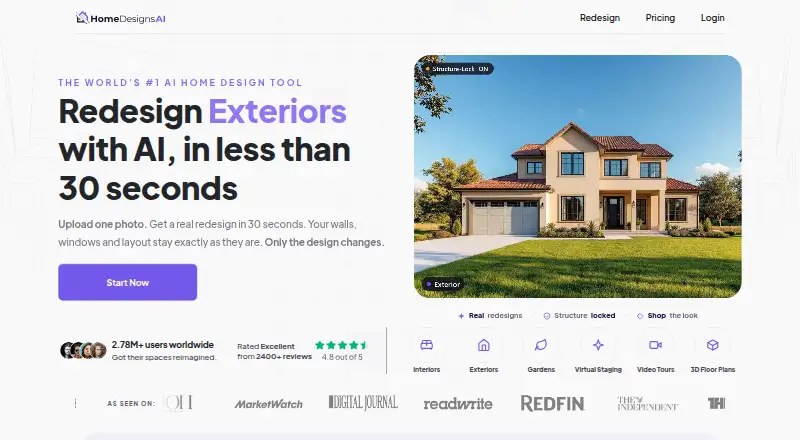
What HomeDesignsAI is
HomeDesignsAI uses AI to redesign interiors, exteriors, gardens, patios, and other spaces from images. Upload a photo, hand sketch, blueprint, or real estate listing image, then change the design while retaining the space’s walls, windows, and layout. Tools include virtual staging, furniture matching, material changes, sky and weather adjustments, and transferring a look from an inspiration image. Furniture Finder can identify matching pieces and provide purchase options. The service also offers photo-to-video walkthroughs and 2D-to-3D floor plans. It runs on web, Android, and iOS, with an API for developers and partners and a widget for enterprise clients. The free plan provides three new credits every 24 hours; photo redesigns use one credit, while richer tools such as video use more. The company describes the product as serving homeowners and property professionals, including agents, designers, architects, landscapers, and developers.
Good
- Accepts photos, hand sketches, blueprints, and listing images
- Preserves walls, windows, and layout during redesigns
- Includes virtual staging and furniture matching
- Offers photo-to-video walkthroughs and 2D-to-3D plans
- Free plan refreshes three credits every 24 hours
Watch out
- Photo redesigns consume credits
- Video and richer tools use more credits
Who it suits
HomeDesignsAI suits homeowners and property professionals who want to explore design changes from images. Its API and enterprise widget may also suit developers and enterprise clients.
Verdict
HomeDesignsAI combines image-based redesign with staging, furniture matching, and floor-plan tools. The free plan offers recurring credits, while paid access starts at $22.00 per month.
Plans and prices
From HomeDesignsAI's own pricing page, checked 7 Oct 2026.
| Plan | Price | What it gives you |
|---|---|---|
| Free | Free | Free generations · 3 new credits every 24 hours |
| Free trial | Free | Unlimited access during trial · Premium+ and Business+ add-ons included · $0 for 7 days; payment details required; converts to Expert at $37/month unless cancelled |
| Unlimited AI Designs add-on | $19, paid once | Removes generation limit across 20+ modules · One-time fee; normal price shown as $47, special price $19 |
| Standard | $22 a month | 100 design credits/mo · up to 5 team seats · commercial license · no watermark · Monthly; yearly option shown as $9/mo billed yearly |
| Individual | $24 a month | 100 designs/month · 40+ styles · 40+ space types · interiors, exteriors, gardens · Displayed as $24/month; page also shows $44 crossed out |
| Pro | $27 a month | Unlimited designs/month · interiors, exteriors, gardens · commercial license · Displayed as $27/month; page also shows $47 crossed out |
| Expert | $37 a month | 2,000 designs/month · 100+ styles · 100+ space types · commercial license · Automatic plan after the 7-day trial |
| Individual | $137 a year | 100 designs/month · 40+ styles · 40+ space types · interiors, exteriors, gardens · $137 billed annually ($12/month); $247 shown crossed out |
| Pro | $167 a year | Unlimited designs/month · interiors, exteriors, gardens · commercial license · $167 billed annually ($14/month); $297 shown crossed out |
The facts
Each one read from HomeDesignsAI's own pages, with the date it was checked.
What it does
- API and widget
- The company offers an API for developers and partners and a widget for enterprise clients.checked 7 Oct 2026
- API availability
- A public API v2 uses the base URL https://homedesigns.ai/api/v2 and requires an account plus purchase of an API plan.checked 15 Oct 2026
- API endpoints
- Documented API capabilities include redesign modes, sketch-to-render, precision, fill spaces, decor staging, furniture removal, color and texture changes, Furniture Finder, Full HD, sky colors and paint visualization.checked 15 Oct 2026
- API licensing
- API access is granted as a paid, non-exclusive, non-transferable and revocable license for integrating AI design features into applications.checked 15 Oct 2026
- API output rights
- The API terms assign the maker’s rights in generated output to the customer for commercial use, subject to the terms.checked 15 Oct 2026
- Authentication
- API requests authenticate with an access token managed in the API Board.checked 15 Oct 2026
- Changelog: August 2026
- August updates launched Virtual Staging API modes, Realtor pages, Pinterest availability, and improved sky-color and material-swap results.checked 15 Oct 2026
- Changelog: September 2026
- September updates added an AI Assistant, improved masking and object selection, and localized free-trial pricing.checked 15 Oct 2026
- Chrome Web Store listing
- A Chrome extension named AI Interior Designer - Home Design AI shows 0 out of 5 from no ratings and offers one free watermarked concept per day.checked 15 Oct 2026
- Design tools
- Listed capabilities include virtual staging, furniture finding, material swaps, sky and weather changes, and design transfer from inspiration images.checked 7 Oct 2026
- Fill Spaces
- Fill Spaces automatically populates empty rooms with furniture and decor and is included in Pro.checked 15 Oct 2026
- Founders
- Crunchbase names Cristian Racsan and Denis Madroane as founders.checked 15 Oct 2026
- Furniture and material tools
- The product includes furniture removal, Furniture Finder with purchase links, Materials Swap, Paint Visualizer and Floor Editor.checked 15 Oct 2026
- Furniture shopping
- Furniture Finder identifies matching furniture and provides direct purchase options.checked 7 Oct 2026
- Input types
- The site says users can upload photos, hand sketches, blueprints, and real estate listing images.checked 7 Oct 2026
- Intended users
- The company describes the product as serving homeowners, real estate agents, interior designers, architects, landscapers, and developers.checked 7 Oct 2026
- Interior and exterior generation
- The service generates AI concepts for both indoor and outdoor areas and offers downloadable high-quality images.checked 15 Oct 2026
Where it runs
- Changelog: mobile apps
- June 2026 release notes say Precision+ and Fill Spaces were added to Android and iOS apps; the iOS app launched in May 2026.checked 15 Oct 2026
The company
- Company headquarters
- Crunchbase lists headquarters in Timisoara, Timis, Romania.checked 15 Oct 2026
- Company legal name
- The Google Play listing identifies the developer as FUTURE TECH FLOW S.R.L. in Timisoara, Romania.checked 15 Oct 2026
- Company size
- LinkedIn lists Home Designs AI as privately held with 2-10 employees; Crunchbase lists 11-50.checked 15 Oct 2026
- Founded year
- Crunchbase’s opened profile does not expose a founded year and instead shows the field as obfuscated.checked 15 Oct 2026
Money
- Floor plans and video
- The product offers photo-to-video walkthroughs and 2D-to-3D floor plans.checked 7 Oct 2026
- Limit: cancellation and billing
- Trustpilot reviewers repeatedly complain that cancellation requires email or is difficult, with unexpected charges and aggressive upgrade prompts.checked 15 Oct 2026
The full review of HomeDesignsAI
HomeDesignsAI is an AI visual-design service for changing the look of rooms, buildings, gardens, patios, and other spaces from images or plans. It fits homeowners and property professionals who need many visual options while keeping an existing layout recognizable. Its breadth is compelling, but credit consumption and the top-tier requirement for advanced planning tools matter when choosing it.
Overview
You can begin with a photograph, hand sketch, blueprint, or real-estate listing image, then guide the result with text prompts and room-editing controls. HomeDesignsAI says its redesigns retain walls, windows, and the uploaded layout while changing finishes and furnishings. That makes comparisons more grounded in the actual property, although an AI image should not be treated as measured construction documentation.
The service covers interiors, exteriors, gardens, patios, and other spaces. It combines virtual staging with furniture matching, material changes, sky and weather adjustments, and the ability to transfer a look from an inspiration image. Furniture Finder identifies matching products and offers direct purchase options, connecting a concept to shopping. HD output is appropriate for presentations and decisions, rather than a promise of architectural-grade drawings.
Key features
- Image-based redesign: A standard photo redesign uses one credit. Preserving the source structure helps homeowners and agents test styles without losing the room’s identity, while repeated iterations will draw down allowances quickly.
- Staging and edits: Virtual staging, material swaps, weather and sky changes, and inspiration-image transfers cover both cosmetic refreshes and property marketing. They are more useful than a single style filter when comparing a complete visual direction.
- Furniture Finder: Matching furniture and purchase links make the feature practical for furnishing decisions, not just mood-board work.
- Video and floor plans: Photo-to-video walkthroughs and 2D-to-3D floor-plan conversion add presentation and spatial-planning value. They consume more credits than basic redesigns and are reserved for Expert subscribers.
- Business access: An API serves developers and partners, while an enterprise widget supports client-facing deployments. These options matter to property platforms and larger teams more than to individual decorators.
- Privacy and help: The service says it uses encryption, secure servers, and regular security assessments, and does not sell personal information. Its help portal combines guides, answers, and contact with human support staff.
Pricing
The Free plan costs nothing and provides free generations with three new credits every 24 hours. Because a photo redesign costs one credit, it is suitable for occasional experimentation, but richer operations use multiple credits and the allowance refreshes rather than accumulating as a large monthly pool.
Standard costs $22 a month, billed monthly, or $9/mo billed yearly. It includes 100 design credits per month, up to five team seats, a commercial license, and no watermark. This is the sensible entry point for agents, designers, or homeowners producing regular still-image concepts; the lower quota limits heavy iteration and excludes the advanced video and floor-plan bundle.
Pro is $29 a month, billed monthly, or $11/mo billed yearly. It raises the allowance to 1,000 design credits while retaining five seats, commercial use, and watermark-free output. Choose it when multiple projects or frequent variations are central to the workflow; Standard is cheaper for light use.
Expert costs $37 a month, billed monthly, or $14/mo billed yearly. It supplies 2,000 credits, up to five seats, a commercial license, no watermark, video walkthroughs, and 2D-to-3D floor plans. It is the only plan for users who need those presentation and spatial features, though the extra credits are worthwhile mainly for sustained professional volume.
Platforms
HomeDesignsAI runs on the web and offers Android, iOS, and API access. The company’s milestones place the official Android and iOS app launch in Q1 2026, while API and widget options address integrations and enterprise delivery.
Who it's for
Homeowners can compare renovations, furnishings, and outdoor ideas against their existing space. Real-estate agents benefit from staging and listing-image redesigns, while interior designers, architects, landscapers, and developers gain a shared visual language for presenting options. It is less suitable for anyone seeking a substitute for surveyed plans or guaranteed build specifications.
Pros and cons
Pros
- Works from photos, sketches, blueprints, and listing images, supporting different project starting points.
- Retains walls, windows, and layout, making before-and-after comparisons more credible.
- Combines staging, shopping matches, outdoor redesign, video, and floor-plan conversion in one service.
- Commercial licensing, five-seat limits, API access, and an enterprise widget support professional use.
- Free credits refresh every 24 hours, allowing ongoing basic trials without a paid commitment.
Cons
- Advanced video and 2D-to-3D floor plans require the $37.00-per-month Expert plan.
- Credit costs vary by tool, so richer workflows are harder to forecast than simple photo redesigns.
- The free plan’s small recurring allowance is restrictive for sustained iteration.
- AI visualizations preserve the stated layout but do not replace measured architectural or construction documents.
Alternatives
AI Interior Design Generators is the broader category guide for comparing multiple services.
Choose Planner 5D instead if you want Android, iOS, macOS, web, and Windows coverage plus a $59.99-per-year Premium plan with floor-plan upload, 3D conversion, and a full premium furniture catalog.
REimagineHome suits users who want five free designs without a card before moving to an Advanced plan with 400 credits per month.
Remodel AI is a lower-commitment freemium option: its free tier gives three designs, 30-plus interior styles, eight AI tools, standard renders, comparisons, and sharing.
DecorAI is preferable for a $19.99-per-month Pro Monthly plan or a free tier with three daily designs, though free results include ads and a small watermark.
Homestyler offers a free Basic plan with unlimited 1K rendering and more than 100,000 free 3D models and materials, with 4K renders purchased separately.
Hausey is a lightweight freemium choice centered on one room, four styles, low-resolution images, and watermarked previews.
RoomGPT is aimed at quick mobile and web concepts, with three guest designs per day or four for a free account, ads, and watermarks.
Spacely AI provides a free-forever plan with 40 trial credits, all features, high-resolution downloads, private mode, and a commercial license.
Verdict
HomeDesignsAI is a strong choice for homeowners and property professionals who want one workspace for structure-aware redesigns, staging, furnishing ideas, and outdoor concepts. Its main reason to choose it is the unusually broad path from image to shopping, presentation video, and 3D floor-plan output. Look elsewhere if you need predictable low-cost volume, measured architectural documentation, or advanced planning without paying for the Expert tier.
Alternatives to HomeDesignsAI
- 1

Planner 5D
Free planAndroidiOSWebAPI8.4From $4.99 a month - 2

Homestyler
Free planAndroidiOSWebAPI8.2From $6.80 a month - 3

DecorAI
Free planAndroidiOSWeb7.9From $39.99 a year - 4
Stagently
AndroidiOSWebAPI7.6From $29 a month - 5

Remodel AI
Free planAndroidiOSWeb7.3From $29 a month - 6
Interior AI
AndroidiOSWeb7.2From $349 a year