Home Designer
Home Designer is desktop software for creating home plans in 2D and 3D.
What Home Designer is
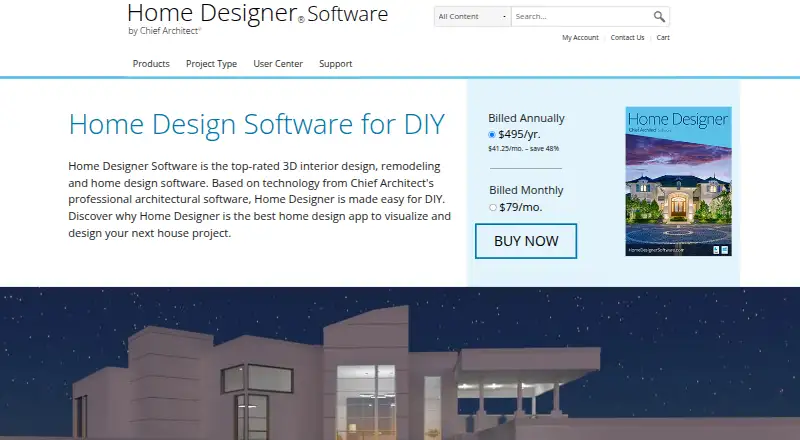
Home Designer is desktop software for creating home plans in 2D and 3D. It runs on Windows and macOS, and its stated device access is desktop. The Home Designer plan costs $79 a month, billed monthly, and includes software upgrades, free catalog downloads, and technical support. Users can import plans in DWG and DXF formats and export plans in those same formats. Measurements are manual, and the software has no collaboration tools. The company behind it was founded in 1992 and is headquartered in Coeur d'Alene, Idaho. The only plan described is paid; no free plan is listed. For home planning on a computer, its key capabilities are 2D and 3D plan work and DWG or DXF exchange. The tradeoffs are the monthly subscription, manual measurements, and lack of collaboration features.
Good
- Supports both 2D and 3D plan work.
- Runs on Windows and macOS.
- Imports DWG and DXF plans.
- Exports plans in DWG and DXF.
- Plan includes upgrades, catalog downloads, and technical support.
Watch out
- Costs $79 a month, billed monthly.
- No free plan is listed.
- Measurements are manual.
- No collaboration tools are available.
Who it suits
It suits people creating home plans on Windows or macOS who need both 2D and 3D work. It may fit users who need to exchange DWG or DXF plans and can work without collaboration tools.
Verdict
Home Designer provides desktop 2D and 3D planning with DWG and DXF import and export. Its monthly cost and manual measurement process are important tradeoffs.
Plans and prices
From Home Designer's own pricing page, checked 22 Sep 2026.
| Plan | Price | What it gives you |
|---|---|---|
| Home Designer | $79 a month | Software upgrades · Free catalog downloads · Technical support · Billed monthly |
| Home Designer | $495 a year | Software upgrades · Free catalog downloads · Technical support · Billed annually |
| Home Designer Pro Rent (legacy) | $59 a month | legacy 2025 product · monthly |
| Home Designer subscription (monthly) | $79 a month | software upgrades · free catalog downloads · technical support · monthly |
| Home Designer (monthly subscription) | $79 a month | Includes software upgrades · free catalog downloads · technical support · Billed monthly |
| Home Designer Suite (legacy) | $129, paid once | legacy 2025 product · one-time payment |
| Home Designer Architectural (legacy) | $249, paid once | legacy 2025 product · one-time payment |
| Home Designer subscription (annual) | $495 a year | software upgrades · free catalog downloads · technical support · annually |
| Home Designer (annual subscription) | $495 a year | Includes software upgrades · free catalog downloads · technical support · Billed annually; $41.25/mo. – save 48% |
| Home Designer Pro (legacy) | $595, paid once | legacy 2025 product · one-time payment |
The facts
Each one read from Home Designer's own pages, with the date it was checked.
What it does
- 3D design
- It provides realistic 3D views, cross-sections, elevations, and real-time ray-trace rendering.checked 7 Oct 2026
- 3D model formats
- Depending on edition and version, it imports OBJ, 3DS, SKP, DAE, STL, DWG and DXF symbols.checked 15 Oct 2026
- 3D rendering
- The program provides real-time ray-traced rendering plus artistic rendering modes.checked 15 Oct 2026
- Activation frequency
- Internet is required for installation, activation, deactivation, catalogs and videos, with license authentication required at least every 14 days.checked 15 Oct 2026
- API and SDK
- The public product pages and documentation describe file import/export and viewer sharing but do not provide a public API or SDK.checked 15 Oct 2026
- Authentication and telemetry
- The EULA says licensing technology and automatic error reporting send installation, system and security information to Chief Architect servers.checked 15 Oct 2026
- Automatic building tools
- Walls, roofs, floors, foundations, ceilings and framing update automatically as the design changes.checked 15 Oct 2026
- Building tools
- Automatic tools generate roofs, floors, foundations, ceilings, and framing as users design.checked 7 Oct 2026
- Cabinet design
- Cabinets snap together, conform to walls and support customizable doors, drawers, counters, woods, paints and stains.checked 15 Oct 2026
- Documentation and support
- Documentation includes a reference manual, illustrated user guide, installation guide, update notes, knowledge-base articles, videos, webinars, phone and online support.checked 15 Oct 2026
- DWG/DXF integration
- The software imports DWG/DXF drawings and exports current views or all floors as line-based DWG/DXF files.checked 15 Oct 2026
- Integration
- Home Designer is compatible with Chief Architect software, allowing homeowners and professional designers to share projects.checked 7 Oct 2026
- Interior design
- The software supports 2D floor plans, 3D visualization, materials takeoffs, customizable smart cabinets, and automatic door and window framing.checked 7 Oct 2026
- Internet and system requirements
- The current system requirements specify Windows 10 or 11 64-bit or macOS Sequoia or Tahoe, 16 GB RAM, 5 GB disk space, and internet access; license authentication requires internet access every 14 days.checked 7 Oct 2026
- Libraries
- Core, bonus and manufacturer catalogs are downloadable, with current-version catalogs included at no extra charge.checked 15 Oct 2026
- Licence
- The EULA grants an individual, non-transferable proprietary licence and prohibits reverse engineering, redistribution and disabling authentication.checked 15 Oct 2026
- Limit: learning curve
- TechRadar says new users can feel intimidated by the feature-rich interface, although tutorials help them become productive.checked 15 Oct 2026
- Limit: mobile viewer performance
- App Store reviewers report out-of-memory errors, slow rendering, awkward floor navigation and requests for layer controls and saved walkthroughs.checked 15 Oct 2026
The company
- Company founding
- LinkedIn states that Chief Architect Software was founded in 1992.checked 15 Oct 2026
- Company size
- LinkedIn lists Chief Architect Software as privately held with 51–200 employees.checked 15 Oct 2026
- Founded
- 1992checked 28 Sep 2026
- Headquarters
- LinkedIn lists the headquarters at 6500 N Mineral Drive, Coeur d'Alene, Idaho, United States.checked 15 Oct 2026
Where it runs
- Doors and windows
- Placed doors and windows automatically frame wall openings and provide customizable styles and shapes.checked 15 Oct 2026
Money
- Limit: price
- TechRadar describes the higher legacy tiers as expensive, citing $249 for Architectural and $595 for Pro.checked 15 Oct 2026
The full review of Home Designer
Overview
Home Designer is a desktop planning package for homeowners and DIY renovators tackling a remodel, new room layout, kitchen, bath, or broader home project. It is most compelling when a simple floor plan is not enough and you need construction-oriented drawings, materials quantities, and cost estimates in the same workspace. The tradeoff is a subscription commitment and a trial that prevents you from producing usable project files.
Published by Chief Architect, Inc., whose software business began in 1992, it runs on Windows and macOS and supports both 2D and 3D work. DWG and DXF import and export make it practical when exchanging drawings with other CAD users, while Chief Architect compatibility gives homeowners and professional designers a route to share projects between products.
Key features
From floor plan to construction documents
Automatic building tools generate roofs, floors, foundations, ceilings, and framing as the design develops. That automation moves Home Designer well beyond a room-arrangement utility, particularly for users planning a substantial addition or remodel. Plans can become scaled construction documents and site plans, with dimensions applied automatically or manually.
Measurements themselves are manual, so the software does not eliminate careful site measurement or verification. Materials takeoffs, lists, and user-assigned prices support estimates, while customizable smart cabinets and automatic door and window framing are useful for kitchen, bath, and interior projects. Those features improve scope and budgeting, but estimates remain only as reliable as the dimensions and prices entered.
Visualization, walkthroughs, and libraries
Designs can be inspected as 2D plans or realistic 3D views, including cross-sections, elevations, and real-time ray-trace rendering. This is valuable when communicating a proposal or checking how a space will read from different viewpoints. You can record virtual-tour walkthrough videos and export interactive 3D Viewer models to Chief Architect cloud for sharing on mobile devices.
Core, bonus, and manufacturer library items broaden the catalog; bonus and manufacturer collections are free downloads. The result is a more practical furnishing and materials workflow than a bare drafting tool, although the trial restricts Library Browser functions.
Pricing
There is no free plan. The Home Designer plan costs $79 a month, billed monthly, and includes software upgrades, free catalog downloads, and technical support. The similarly named Home Designer (monthly subscription) is also $79 a month, billed monthly, with the same upgrades, downloads, and support; it is the straightforward choice for short or uncertain projects.
The Home Designer (annual subscription) costs $495 a year, billed annually, equivalent to $41.25 per month and stated as a 48% saving. It suits a long remodel or regular design work, provided you are comfortable paying for a year up front. No seat or usage quota is given.
A free trial is available, but trial users cannot save, print, export, or record walkthroughs, and Library Browser features are restricted. That makes it useful for evaluating the interface and core design workflow, not for delivering a project or sharing final materials.
Platforms
Home Designer is desktop software for Windows 10 or 11 64-bit and macOS Sequoia or Tahoe. The current requirements call for 16 GB of RAM, 5 GB of disk space, and internet access. License authentication requires an internet connection every 14 days, so it is not a fully offline tool. Free online support is offered around the clock through a knowledge base, webinars, training materials, and the HomeTalk forum.
Who it's for
Choose Home Designer if you are a homeowner or DIY renovator who needs more than a visual sketch: automatic building elements, scaled documents, materials takeoffs, and estimates all address the practical stages of planning. It can also suit designers who exchange DWG or DXF files or collaborate with Chief Architect users.
Look elsewhere if you need mobile-native editing, automatic measurement, built-in collaboration, or a trial that permits saving and exporting. There is no collaboration mode, and the product is intended for desktop use.
Pros and cons
Pros
- Construction-focused automation: roofs, foundations, framing, floors, and ceilings are generated as designs evolve.
- Detailed interior planning: smart cabinets, automatic openings, materials takeoffs, and price assignments support kitchen, bath, and remodeling work.
- Strong presentation options: ray-traced views, sections, elevations, walkthrough videos, and shareable 3D Viewer models explain a design clearly.
- CAD interchange: DWG and DXF import and export help fit projects into existing drawing workflows.
Cons
- Manual measurement: users must capture and verify dimensions themselves.
- Trial output restrictions: saving, printing, exporting, and walkthrough recording are unavailable until you subscribe.
- Desktop and connectivity requirements: there is no collaboration mode, and authentication needs internet access every 14 days.
- Ongoing cost: even the entry subscription is $79 a month, while the lower monthly equivalent requires a 495.00 USD annual payment.
Alternatives
Planner 5D is the better fit for users wanting Android, iOS, web, and desktop access, a free plan, and a Premium annual option at $59.99 a year.
Home Design 3D suits readers seeking a freemium app across mobile and desktop, with platform-specific weekly premium subscriptions.
SmartDraw is an alternative for diagramming across Linux, macOS, web, and Windows, with individual, team, and enterprise plans.
PRO Landscape+ is aimed at professional landscape work on Android, iOS, and Windows.
Vectorworks Landmark is a paid macOS, web, and Windows option for users who want a landscape-design product with an annual plan.
DynaScape Design is a Windows landscape-design alternative with CAD-based drafting and plant libraries.
VizTerra is a Windows landscape-design package with per-seat subscriptions and a free trial.
AutoLANDSCAPE is another Windows option for landscape planning.
For category-specific comparisons, see Landscape Design Software, Floor Plan Software, and Architecture Software.
Verdict
Home Designer is a strong choice for homeowners and DIY renovators who want one desktop tool to turn a measured plan into 2D/3D designs, construction documents, materials lists, and estimates. Choose the annual subscription for sustained projects; choose monthly when flexibility matters. Its main reasons to look elsewhere are the ongoing cost, manual measuring, lack of collaboration, and a trial that cannot save or export work.