
Vectorworks Landmark
Vectorworks Landmark is landscape design software for projects from pre-design and schematic design through construction documents.
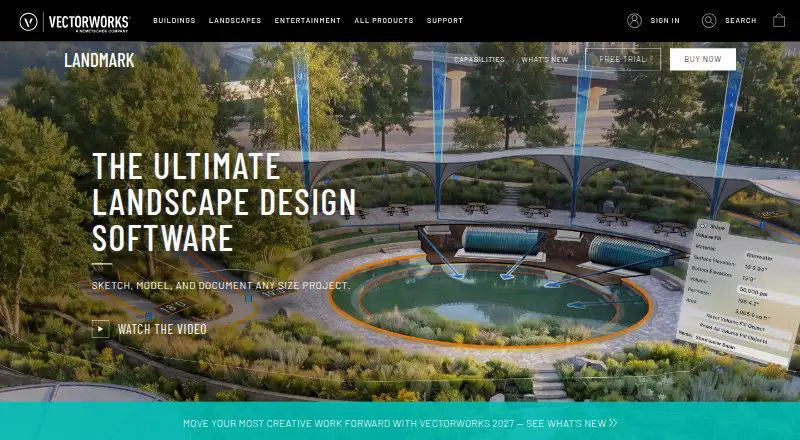
What Vectorworks Landmark is
Vectorworks Landmark is landscape design software for projects from pre-design and schematic design through construction documents. Its BIM tools connect drawings, details, models, and schedules, so a change can be reflected across related project materials. Landscape-specific tools support planting, grading, hardscape, and irrigation design. Terrain analysis can assess cut and fill, slope, and drainage, while other tools evaluate water budgets and track sustainability goals. Worksheets and reports can produce estimates, proposals, quantity take-offs, plant lists, material schedules, and land use reports from site drawings. File workflows include AutoCAD, Revit, SketchUp, Rhino, IFC, DWG, RVT, and BCF. Landmark also supports cloud sharing and processing; its mobile app can review cloud-hosted files and visualize designs with AR and VR. A seven-day free trial of Design Suite includes Landmark capabilities. Annual costs $127.50 a year, billed $1,530.00 billed annually; Monthly costs $170 a month. A license can be installed on up to two machines, but used on one device at a time.
Good
- Landscape tools cover planting, grading, hardscape, and irrigation.
- Terrain analysis includes cut and fill, slope, and drainage.
- Reports can generate plant lists and quantity take-offs.
- Seven-day trial includes Landmark capabilities.
Watch out
- No free plan is listed.
- A license can be used on one device at a time.
- Periodic internet authorization is required.
- Monthly plan costs $170 a month.
Who it suits
Landmark suits landscape design professionals who need tools spanning site analysis, planting, grading, irrigation, and project documentation. It may also suit teams working with BIM and varied design file formats.
Verdict
Landmark brings landscape design, analysis, and reporting tools into a workflow that spans project phases. Review its device limit and authorization requirements alongside the annual or monthly plan options.
Plans and prices
From Vectorworks Landmark's own pricing page, checked 2 Oct 2026.
| Plan | Price | What it gives you |
|---|---|---|
| Monthly | $170 a month | Best for infrequent use · Unlimited Vectorworks University Courses · 10% off online training · $170.00 /M |
| Annual | $1,530 a year | Best for frequent use · Unlimited Vectorworks University Courses · 15% off online training · Save by purchasing annually · $1,530.00 billed annually |
The facts
Each one read from Vectorworks Landmark's own pages, with the date it was checked.
What it does
- BIM and modeling
- Its BIM tools link drawings, details, models, and schedules so a change in one place is reflected throughout the project.checked 2 Oct 2026
- Cloud and mobile
- Landmark capabilities include cloud sharing and processing, while the mobile app can review cloud-hosted files and visualize designs with AR and VR.checked 2 Oct 2026
- File compatibility
- The product supports import, export, and referencing workflows for formats including AutoCAD, Revit, SketchUp, Rhino, IFC, DWG, RVT, and BCF.checked 2 Oct 2026
- Integrations
- Vectorworks identifies AutoTURN and Esri as integrations for Landmark, and its AutoTURN Online partner page describes vehicle swept path analysis within Vectorworks.checked 2 Oct 2026
- Internet requirement
- The software does not require a constant internet connection, but it must contact Vectorworks for authorization at first launch and periodically; active subscribers must connect within three days of renewal.checked 2 Oct 2026
- License limit
- A license can be installed on up to two machines but used on only one device at a time.checked 2 Oct 2026
- Operating systems
- The purchase page lists macOS 26 and macOS 15, plus Windows 11, as supported operating systems.checked 2 Oct 2026
- Purpose
- Landmark is landscape design software for every project phase, from pre-design and schematic design through construction documents.checked 2 Oct 2026
- Reports
- Worksheets and reporting can generate estimates, proposals, quantity take-offs, plant lists, material schedules, and land use reports from site drawings.checked 2 Oct 2026
- Security
- Vectorworks says it maintains technical and organizational safeguards for personal data and will provide applicable audit or certification information, such as SOC 2 or ISO 27001, upon written request.checked 2 Oct 2026
- Site analysis
- Landmark can analyze terrain for cut and fill, slope, and drainage, evaluate water budgets, and track sustainability goals.checked 2 Oct 2026
- Support
- Support includes technical support requests, an online help system, a knowledgebase, community forums, training, and professional services.checked 2 Oct 2026
The company
- Founded
- 1985checked 23 Sep 2026
- Headquarters
- Columbia, Maryland, United Stateschecked 23 Sep 2026
Money
- Planting and grading
- Landscape-specific tools support planting, grading, hardscape, and irrigation design.checked 2 Oct 2026
- Trial
- Vectorworks offers a free 7-day trial of Design Suite, which includes Landmark capabilities.checked 2 Oct 2026
The full review of Vectorworks Landmark
Vectorworks Landmark is professional landscape-design software covering a site project from early planning through construction documentation. It is best for landscape architects, contractors, and teams that need coordinated drawings, terrain analysis, planting design, and schedules. The breadth rewards sustained project work, while its subscription cost and one-device-at-a-time rule make it less suitable for occasional users.
Overview
Landmark’s BIM workflow links drawings, details, models, and schedules, so a revision can flow through related project documents instead of being corrected manually in several places. That coordination is valuable on changing, documentation-heavy jobs. Terrain analysis handles cut and fill, slope, drainage, water budgets, and sustainability goals, giving site constraints a practical role alongside visual design.
Worksheets and reports can produce estimates, proposals, quantity take-offs, plant lists, material schedules, and land-use reports from site drawings. This connects design to construction and client deliverables; users creating only quick concept plans are unlikely to benefit as much from that depth.
Key features
Landscape-specific tools cover planting, grading, hardscape, irrigation, and planting plans. Terrain modeling and a plant library support both the underlying site model and planting documentation. Cloud sharing and processing extend collaboration, while the mobile app can review cloud-hosted files and visualize designs through AR and VR.
Import, export, and reference workflows accommodate DWG, DXF, DWF, IFC, RVT, RFA, SAT, PDF, BMP, JPEG, PNG, TIFF, SketchUp, and Rhino files. Compatibility with AutoCAD, Revit, SketchUp, Rhino, IFC, and BCF workflows can ease coordination with consultants using different applications. Vectorworks identifies AutoTURN and Esri as integrations; AutoTURN’s partner workflow adds vehicle swept-path analysis within Vectorworks, which is particularly relevant to access and circulation studies.
Support includes technical requests, online help, a knowledgebase, community forums, training, and professional services. Vectorworks says it maintains technical and organizational safeguards for personal data and will provide applicable audit or certification information, such as SOC 2 or ISO 27001, upon written request.
Pricing
Annual — $127.50 a year (billed $1,530.00 billed annually). This is the better fit for frequent users: annual billing lowers the stated monthly rate, includes unlimited Vectorworks University courses, and gives 15% off online training. The commitment only makes sense when Landmark is part of regular project work.
Monthly — $170 a month (billed $170.00 /M). Infrequent users get the flexibility of a monthly term, unlimited University courses, and 10% off online training, but pay more over a sustained period. There is no free plan. A free seven-day Design Suite trial includes Landmark capabilities, enough for a short evaluation before subscribing.
A license may be installed on two machines but can be used on only one device at a time. Landmark does not need a constant internet connection, yet it must contact Vectorworks at first launch and periodically; active subscribers must connect within three days of renewal. Those conditions matter to people moving between workstations or working in controlled offline environments.
Platforms
Landmark is offered for macOS, Windows, and web workflows, with cloud and mobile review capabilities. The purchase page lists macOS 26, macOS 15, and Windows 11 as supported operating systems. The two-machine installation allowance helps with a desktop-and-laptop setup, but simultaneous use is not permitted.
Who it's for
Choose Landmark when landscape architecture or contracting work needs one coordinated environment for terrain, planting, grading, irrigation, documentation, and reporting. It is especially persuasive for teams exchanging CAD and BIM files with outside disciplines and for projects where quantities, schedules, and sustainability analysis must stay aligned with drawings.
It is less appropriate for a homeowner, casual visualizer, or small practice seeking a low-cost occasional tool. The paid-only model, relatively high monthly price, authorization checks, and single-device use reduce its appeal when projects are short, budgets are tight, or several people need concurrent access.
Pros and cons
- Pro: BIM links drawings, details, models, and schedules, helping coordinated documentation keep pace with design changes.
- Pro: Cut-and-fill, slope, drainage, water-budget, and sustainability analysis addresses real site-planning decisions rather than just presentation graphics.
- Pro: Reports can produce estimates, proposals, take-offs, plant lists, material schedules, and land-use reports directly from drawings.
- Pro: Broad file compatibility and AutoTURN/Esri integration support multidisciplinary workflows.
- Con: Annual billing is $1,530.00 and monthly billing is $170.00, with no free plan, so occasional users pay for professional depth they may not use.
- Con: One-device-at-a-time licensing limits concurrent workstation use even though installation on two machines is allowed.
- Con: Periodic authorization and a three-day post-renewal connection window can complicate strictly offline operation.
Alternatives
For a broader shortlist, see Landscape Design Software and 3D Landscape Design Software.
Planner 5D is a freemium, cross-platform option with a $59.99-per-year Premium plan, better suited to lighter 3D planning than Landmark’s professional documentation workflow.
Home Design 3D offers free access and low-cost mobile subscriptions, making it a practical choice for simpler home-focused layouts.
SmartDraw suits diagramming across Linux, macOS, web, and Windows, with Individual, Team, and Enterprise plans at custom pricing.
PRO Landscape+ targets professional landscape work on Android, iOS, and Windows, with an annual plan priced at $75 a month.
Home Designer is a paid macOS and Windows alternative with a free trial, aimed at users who prefer Chief Architect’s home-design ecosystem.
DynaScape Design is Windows-only CAD landscape software; its Design plan costs $1,599 a year.
VizTerra is a Windows subscription focused on 3D landscape design, with per-seat monthly or annual billing.
AutoLANDSCAPE is a Windows alternative.
Verdict
Landmark is the right choice for professional landscape teams that need terrain intelligence, coordinated BIM documents, planting and irrigation tools, and report generation in one project workflow. Its main reason to choose it is the way analysis and documentation stay connected across phases. Look elsewhere if you need concurrent users, minimal subscription commitment, or a simpler and cheaper tool for occasional design.
Alternatives to Vectorworks Landmark
- 1
iScape
Free planAndroidiOSWebmacOS8.2Free plan - 2

SmartDraw
AndroidiOSWebAPI7.9From $8.95 a month - 3
Garden Sketchbook
Free planWeb7.4From $39 a year - 4
DynaScape Creator
WebmacOSWindows7.3From $600 a year - 5
Home Outside Yard Planner
AndroidiOSWeb7.3$2.99 one-time - 6
PRO Landscape+
AndroidiOSWindows7.2From $75 a month