iScape
iScape is software for previewing outdoor and landscape work before construction or installation begins.
What iScape is
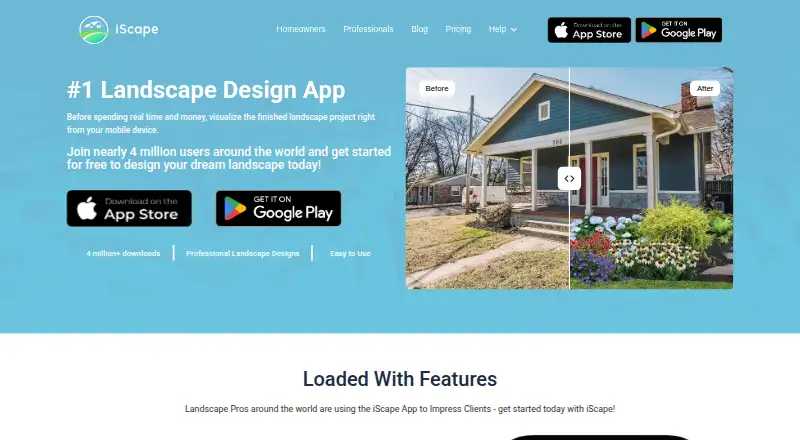
iScape is software for previewing outdoor and landscape work before construction or installation begins. It lets users turn photos of a yard or job site into 2D or 3D augmented-reality designs, then build scenes with plants, pavers, furniture, hardscape elements and other real-world materials from its library. Designs can be shared with clients, relatives or landscape installation professionals for feedback. Pro users can create customizable PDF proposals that include pricing, business information and contact details. The Free plan costs 0.00 USD and provides 2D and 3D design, but its database and feature access are limited, including reduced plant, hardscape and product access. Pro costs $29.99 per user per month and adds the full database, thousands of plants and other products, proposal tools and personal image uploads. PRO annual costs $299.99 per year per user. Enterprise includes multiple licenses, premium customer support, customization and integrations, with pricing not listed. iScape offers a Pro trial with all features. It is presented for homeowners, hobbyists, landscape professionals and DIY enthusiasts, and is available through Android, iOS, macOS and the web.
Good
- Creates 2D and 3D augmented-reality designs
- Includes plants, pavers, furniture and hardscape materials
- Shares designs for client or family feedback
- Pro generates customizable PDF proposals
- Available on Android, iOS, macOS and web
Watch out
- Free access limits database and features
- Free plan reduces plant, hardscape and product access
- Annual 2D and 3D design is specified for iOS only
Who it suits
iScape suits homeowners, hobbyists and DIY enthusiasts who want visual plans before starting outdoor work. Landscape professionals can use its material library, sharing tools and Pro proposal documents with clients or installation teams.
Verdict
Choose iScape if you need to visualize landscape ideas on site photos and share them for feedback. Pro is the relevant choice for full materials access, image uploads and proposal creation. Look elsewhere if you need unrestricted free access or a stated Enterprise price.
Plans and prices
From iScape's own pricing page, checked 15 Oct 2026.
| Plan | Price | What it gives you |
|---|---|---|
| Free | Free | iOS 2D/3D design · limited database/features · reduced plants, hardscapes and products · Free to download and trial; limited features |
| Enterprise | Priced on request | Full features · multiple licenses · premium support · customization and integrations · Custom pricing for multiple licenses |
| Plus Monthly | $14.99 a month | Plus tier; limits not described on the listing · In-app subscription |
| PRO | $29.99 a month | Per user license · Full database and features · Proposal tool · Upload your own images · 2D & 3D design (iOS only) · $29.99 /month (USD) |
| Pro Monthly | $29.99 a month | Full database/features · thousands of plants, hardscapes and products · proposal tool · custom image uploads · Per user license, billed monthly |
| Pro Annual | $299.99 | Full database/features · thousands of plants, hardscapes and products · proposal tool · custom image uploads · Per user license, billed annually; two months free versus monthly |
The facts
Each one read from iScape's own pages, with the date it was checked.
What it does
- 2D design
- The app supports traditional 2D landscape compositions using photographs of a yard or job site.checked 15 Oct 2026
- 3D augmented reality
- Users can create 3D augmented-reality landscape designs directly on property images.checked 15 Oct 2026
- AI roadmap
- The FAQ says an AI landscaping feature using photos of a user's yard is planned for beta launch.checked 15 Oct 2026
- Analytics providers
- The privacy policy names Firebase and Flurry Analytics as third-party analytics services and describes Google and Facebook remarketing.checked 15 Oct 2026
- Auto-save
- Projects automatically save while users work, with an option to disable auto-save and save manually.checked 15 Oct 2026
- Collaboration
- The homeowner page describes collaboration with contractors or household members inside the design workflow.checked 15 Oct 2026
- Custom images
- Pro subscribers can upload their own images as products through the My Products area.checked 15 Oct 2026
- Cutout and clone
- The cutout/clone tool can remove existing objects or copy parts of a background image.checked 15 Oct 2026
- Design catalog
- The catalog contains thousands of plants, hardscapes, pavers, furniture and other outdoor elements.checked 15 Oct 2026
- Design tools
- Users can create 2D or 3D augmented reality designs on photos of a yard or job site.checked 8 Oct 2026
- Documentation depth
- Public documentation consists mainly of FAQs with step-by-step guidance for layers, textures, cutouts, saving and plant search.checked 15 Oct 2026
- Drawing and textures
- Drawing tools let users outline areas and apply grass, mulch, paving and other textures.checked 15 Oct 2026
- Integrations
- The Enterprise plan lists customization and integrations, without naming specific integrations.checked 8 Oct 2026
- Integrations and partnerships
- The partnerships page invites product companies and retailers to add branded 2D/3D assets or build an app experience using iScape technology.checked 15 Oct 2026
- Intended users
- The maker presents iScape for homeowners, hobbyists, landscape professionals and DIY enthusiasts.checked 8 Oct 2026
- Inventory
- iScape can produce an inventory of the materials and products used in a design.checked 15 Oct 2026
- Languages
- The Apple listing specifies English plus French, German, Greek, Italian, Japanese, Korean, Malay, Portuguese, Russian, Simplified Chinese, Spanish and Swedish.checked 15 Oct 2026
- Limit: editing depth
- A reviewer said editing is basic, with limited object manipulation, no AI background tools and difficulty selecting overlapping items.checked 15 Oct 2026
Where it runs
- Apple system requirements
- The App Store listing requires iOS 15 or later, iPadOS 15 or later, macOS 12 or later, and visionOS 1 or later.checked 15 Oct 2026
The company
- Company
- The Google Play developer listing identifies the developer as iScape Holdings Inc. and gives a Dover, Delaware address.checked 8 Oct 2026
- Company legal name
- The service is operated by iScape Holdings, Inc.checked 15 Oct 2026
- Company profile
- LinkedIn lists iScape as a privately held design company with 11–50 employees and headquarters in Arlington Heights, Illinois.checked 15 Oct 2026
- Founded
- LinkedIn lists the company as founded in 2018.checked 15 Oct 2026
Money
- Free access limits
- The free plan has limited database and feature access, with reduced access to plants, hardscapes and products.checked 8 Oct 2026
The full review of iScape
iScape is built for visualizing landscape ideas directly on yard or job-site photos. It suits homeowners, DIY users and landscape professionals who need a visual conversation tool before work starts, with Pro adding the catalog depth and proposal workflow businesses usually require.
Overview
iScape turns an outdoor photo into a working canvas for 2D or 3D augmented-reality designs. Plants, pavers, furniture and other hardscape elements can be placed into the scene, making it easier to discuss choices in the context of an actual property rather than an abstract sketch. Designs can then be shared with clients, family members or installation professionals for feedback.
The free tier is best viewed as a constrained introduction. It includes both 2D and 3D design, but limits database and feature access and reduces the available plants, hardscapes and products. That can be enough to communicate a simple idea, but users developing a detailed planting or materials scheme will quickly find the narrower selection restrictive.
Key features
Photo-based design and materials
Working over a yard or job-site photo keeps proportions and surroundings visible while ideas take shape. The library covers plants, pavers, furniture and other real-world materials, and planting plans are supported. This combination is particularly useful when a homeowner wants to compare possible layouts or a professional needs a visual starting point for a client discussion.
Sharing and proposals
Sharing is aimed at feedback and collaboration rather than keeping a design private: recipients can include clients, relatives or landscape installers. Pro users can also generate customizable PDF proposals containing pricing, business information and contact information. That makes Pro materially more useful for paid landscape work than the free tier, which lacks the proposal tool and full image-upload capability.
Enterprise options
Enterprise includes multiple licenses, premium customer support, customization and integrations. The integration choices are not named, and pricing is custom, so this tier makes sense only for organizations prepared to discuss requirements directly.
Pricing
| Plan | Price | What you get |
|---|---|---|
| Free | free | Free download and trial, 2D and 3D design, limited database and features, and reduced access to plants, hardscapes and products. |
| Pro | $29.99 a month, billed monthly | Full database and feature access, thousands of plants, hardscapes and products, proposal tool and uploads for your own images. |
| PRO annual | $299.99 a year, billed $299.99/year | Per-user license, full database and features, proposal tool, image uploads, and 2D and 3D design on iOS only. |
| Enterprise | Custom pricing | Multiple licenses, premium customer support, customization and integrations. |
Monthly Pro is the clearest fit for professionals who need the complete library and client-ready PDFs without committing to an annual term. The annual license lowers the effective monthly cost for a user who expects to stay with iScape, but its stated 2D and 3D design support is iOS-only. Free is appropriate for a limited preview, not for unrestricted material selection.
Platforms
iScape is available on Android, iOS, macOS and the web. The annual Pro plan specifically limits its 2D and 3D design allowance to iOS, an important distinction for teams choosing devices.
Who it's for
Homeowners and DIY enthusiasts get a way to test ideas against their own outdoor space and gather opinions before buying materials. Hobbyists can use the visual and planting tools for early concepts. Landscape professionals gain a richer catalog, image uploads and proposal PDFs that support client presentations and pricing discussions. Businesses needing several seats or tailored integrations should consider Enterprise, while users seeking a broad unrestricted free catalog should look elsewhere.
Pros and cons
- Pro: 2D and 3D designs on real site photos make landscape ideas easier to evaluate in context.
- Pro: Plants, pavers, furniture and hardscape elements support material-specific planning, including planting plans.
- Pro: Sharing and customizable PDF proposals connect design work with client feedback and professional presentations.
- Con: The free plan restricts the database, features and product selection, limiting serious design exploration.
- Con: Full functionality costs $29.99 per user per month unless the annual term suits you, and Enterprise has custom pricing.
- Con: Annual-plan 2D and 3D design is iOS-only, which can complicate mixed-device use.
- Con: The privacy policy says personal, usage and permitted location data may be collected and that absolute security cannot be guaranteed.
Alternatives
Planner 5D is the better choice for broader home-design coverage, with Android, iOS, macOS, web and Windows support and a freemium model; its Premium plan is $59.99 a year. Choose Terragen instead for Linux, macOS or Windows landscape rendering, with a Professional Indie 50 tier at $10 a month for eligible individual income under $50,000.
usBIM.platform fits users wanting cloud applications and a free 10 GB basic configuration across Android, iOS, web and Windows. World Machine is aimed at terrain generation on Linux, macOS and Windows; its Basic plan caps output at 1025x1025 pixels.
Arcadium 3D suits users who can work within two free projects and 30 objects per project, while its Pro plan is $18 a month billed yearly. AgroForest Designer is a web option for structured agroforestry projects, with a free tier limited to one project, two recipes and five cultivars.
AIGardenPlanner offers a browser-based 3D editor with one free project. Garden Sketchbook is a web alternative with a 2D editor, 3D seasonal preview and 500-plus plants on its free tier, though gardens expire after 24 hours.
The directory's 3D Landscape Design Software and 3D Home Design Software lists are useful starting points when you want to compare a wider field.
Verdict
Choose iScape for photo-based landscape visualization, real-material libraries and a path from shared concept to professional PDF proposal. Pro is the practical plan for working designers; Free is suitable only for limited exploration. Look elsewhere if you need a genuinely unrestricted free catalog, Windows-specific support or clearly published Enterprise pricing.
Getting started
- Open the iScape website or use its Android, iOS or macOS access
- Create a free account or begin with the Free plan
- Upload a yard or job-site photo for a design
- Add plants, pavers, furniture or hardscape elements
- Start the Pro trial for all features, or select Pro or PRO annual
- Share the finished design with clients, family or installation professionals
Limits worth knowing
The Free plan has limited database and feature access, with reduced access to plants, hardscapes and products.
Questions
Is there a free plan?
Yes. Free costs 0.00 USD and includes 2D and 3D design with limited database and feature access.
How much does Pro cost?
Pro is $29.99 per user per month. PRO annual is $299.99 per year per user.
Which platforms are supported?
iScape is listed for Android, iOS, macOS and the web. The annual plan specifies 2D and 3D design on iOS only.
Can users create proposals?
Pro users can generate customizable PDF proposals with pricing, business information and contact information.
Alternatives to iScape
- 1

SmartDraw
AndroidiOSWebAPI7.9From $8.95 a month - 2
Garden Sketchbook
Free planWeb7.4From $39 a year - 3
DynaScape Creator
WebmacOSWindows7.3From $600 a year - 4
Home Outside Yard Planner
AndroidiOSWeb7.3$2.99 one-time - 5
PRO Landscape+
AndroidiOSWindows7.2From $75 a month - 6

VizTerra
iOSWindows7.2From $84 a month