Cedreo
Cedreo is cloud-based 3D home design software for housing professionals, including home builders, contractors, remodelers, and interior designers.
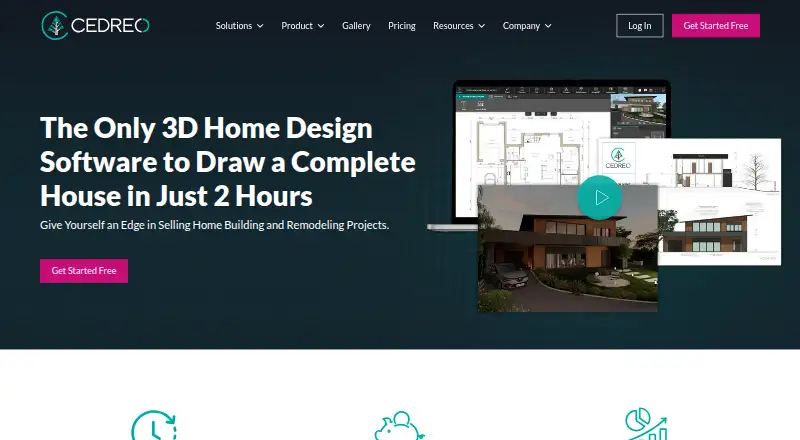
What Cedreo is
Cedreo is cloud-based 3D home design software for housing professionals, including home builders, contractors, remodelers, and interior designers. It runs in a web browser without requiring a download or installation. Users can create terrain, site, floor, cross-section, elevation, and roof plans, along with surface-area tables. Site-plan tools include property boundaries, setbacks, terrain grades, elevation points, and contour lines. Cedreo can turn 2D plans into photorealistic 3D renderings for construction and remodeling projects. A free account includes one project and five photorealistic renderings, with limited furnishing, room symbols, furniture, and materials; its renderings are watermarked for personal use. The free account is accessible for three years, after which its project is deleted if the account has not been upgraded. All plans include the Knowledge Base and tutorial videos. Professional and Enterprise subscribers also get a dedicated Success Manager reachable by phone, chat, or email. Cedreo recommends a stable internet connection and a recent browser, and publishes Windows and Mac system requirements on its pricing page.
Good
- Creates multiple types of plans and surface-area tables.
- Turns 2D plans into photorealistic 3D renderings.
- Site tools include boundaries, grades, and contour lines.
- Free plan includes five renderings and one project.
Watch out
- Free account and project access lasts three years.
- Free-plan renderings are watermarked for personal use.
- Free plan limits furnishing, symbols, furniture, and materials.
Who it suits
Cedreo suits housing professionals who need to prepare plans and 3D visuals for construction or remodeling projects. Its browser-based access may work for people who prefer not to install software.
Verdict
Cedreo combines plan creation with 3D visualization in a browser-based product. Review the free plan's project, rendering, and time limits before relying on it for ongoing work.
Plans and prices
From Cedreo's own pricing page, checked 9 Oct 2026.
| Plan | Price | What it gives you |
|---|---|---|
| Free | Free | 1 project · 5 photorealistic 3D renderings · Limited furnishing, room symbols, furniture, and materials · Watermarked renderings for personal use · Accessible for 3 years |
| Enterprise | Priced on request | For teams · Share projects and collaborate · 80 renderings per user per month · Dedicated team features · Price not stated on the opened English pages |
| Personal | — | 1 project · 20 rendering credits · Full furnishing and materials catalog · Downloadable blueprints · Watermarked renderings for personal use · One-time purchase; price not stated on the opened English pages |
| Professional | — | Unlimited projects · 40 renderings per month · No watermarks · Blueprint downloads · Full catalog access · Monthly rendering allowance; price and billing frequency not stated on the opened English pages |
The facts
Each one read from Cedreo's own pages, with the date it was checked.
What it does
- 3D visualization
- Cedreo transforms 2D plans into photorealistic 3D renderings for construction and remodeling projects.checked 9 Oct 2026
- Audience
- Cedreo describes its users as home builders, contractors, remodelers, and interior designers.checked 9 Oct 2026
- Certification
- Cedreo states that it is B Corp certified and became a mission-driven company in 2022.checked 9 Oct 2026
- Design outputs
- It supports terrain, site, floor, cross-section, elevation, and roof plans, plus surface-area tables.checked 9 Oct 2026
- Product
- Cedreo is cloud-based 3D home design software for housing professionals.checked 9 Oct 2026
- Rendering limits
- Unused monthly renderings on Pro or Enterprise plans expire monthly, while separately purchased renderings do not expire until used.checked 9 Oct 2026
- Support
- All plans include the Knowledge Base and tutorial videos; Professional and Enterprise subscribers get a dedicated Success Manager reachable by phone, chat, or email.checked 9 Oct 2026
- System requirements
- Cedreo recommends a stable internet connection and a recent browser, and publishes Windows and Mac system requirements on its pricing page.checked 9 Oct 2026
- Terrain tools
- Its site-plan tools include property boundaries, setbacks, terrain grades, elevation points, and contour lines.checked 9 Oct 2026
The company
- Company locations
- Cedreo says its team is based in Atlanta, Nantes, and Munich.checked 9 Oct 2026
Money
- Free-plan duration
- A free account is accessible for three years, after which the project is deleted if the account has not been upgraded.checked 9 Oct 2026
Where it runs
- Platform and installation
- Cedreo runs in a web browser and does not require a download or installation.checked 9 Oct 2026
The full review of Cedreo
Cedreo is cloud-based 3D home-design software for housing professionals who need both construction plans and client-facing visuals. It suits builders, contractors, remodelers, and interior designers working on residential projects with meaningful site conditions. The free tier is a useful introduction, but its single-project limit, watermarked output, and fixed access period make paid plans more practical for continuing work.
Overview
Cedreo combines terrain and site plans with floor, cross-section, elevation, and roof plans, plus surface-area tables. It also turns those 2D plans into photorealistic 3D renderings for construction and remodeling projects. That breadth matters when documentation and presentation need to come from the same model; someone seeking only a basic floor-plan sketch is unlikely to need the full range.
Its site-plan tools account for property boundaries, setbacks, terrain grades, elevation points, and contour lines. This makes the product better suited to projects where the lot influences the design than to purely decorative room planning.
Key features
Plans and terrain
The multiple drawing types let housing professionals move from site context to building documentation in one product. Surface-area tables add measurable project information, while terrain controls represent grades and elevation instead of treating every site as flat. This is a substantive advantage for builders and remodelers preparing plans around real property constraints.
3D visualization
Photorealistic renderings provide a visual counterpart to technical plans, useful for explaining a construction or remodeling proposal. Cedreo also supports real-time scenes and AI visualization tools, giving users additional ways to present a design. Rendering quotas still determine how often that presentation workflow can be used on paid plans.
Browser delivery and support
Cedreo runs in a web browser, with no download or installation. Cedreo recommends a stable internet connection and a recent browser, and publishes Windows and Mac requirements on its pricing page. Every plan includes the Knowledge Base and tutorial videos. Professional and Enterprise customers also receive a dedicated Success Manager by phone, chat, or email, a meaningful service difference for teams that need guided help.
Pricing
Free
The Free plan costs free and allows one project with five photorealistic 3D renderings. Furnishing, room symbols, furniture, and materials are limited; renderings carry a watermark and are for personal use. A free account remains accessible for three years, after which its project is deleted if it has not been upgraded. It is appropriate for evaluating the workflow or completing a small personal exercise, not for maintaining a professional portfolio.
Professional
Professional has custom pricing and a monthly rendering allowance. It includes unlimited projects, 40 renderings per month, watermark-free output, blueprint downloads, and the full catalog. It is the clearest fit for an individual or small practice handling several active jobs, although unused monthly renderings expire each month. Separately purchased renderings do not expire until used, which offers more flexibility for uneven workloads.
Personal
Personal uses a one-time purchase with custom pricing. It covers one project, 20 rendering credits, the full furnishing and materials catalog, downloadable blueprints, and watermarked renderings for personal use. Choose it when a single project needs more catalog depth and rendering capacity than Free; the one-project ceiling and watermark make it a poor choice for client-facing, repeated production.
Enterprise
Enterprise has custom pricing for teams. It supports project sharing and collaboration, provides 80 renderings per user per month, and adds dedicated team features. It is the appropriate tier when multiple users must work together, but the same monthly expiry rule means the allowance should be matched to predictable usage.
Platforms
Cedreo's primary platform is the web, and it runs on macOS and Windows through a browser. No installation is required. A reliable connection and recent browser are practical prerequisites, so it is less suitable for work environments where connectivity is intermittent.
Who it's for
Home builders, contractors, remodelers, and interior designers get the strongest case from Cedreo's combination of terrain-aware planning, residential documentation, and photorealistic presentation. Professional is aimed at ongoing individual practice, Personal at a single non-commercial project, and Enterprise at collaborative teams. Casual users who only need a simple 2D layout should look for a narrower tool.
Pros and cons
- Pro: Terrain, site, building, and roof documentation are combined with surface-area tables, reducing the need to split a residential project across separate tools.
- Pro: Photorealistic renderings, real-time scenes, and AI visualization support client presentation as well as planning.
- Pro: Browser access avoids installation and keeps the product available across supported Mac and Windows systems.
- Con: Free is restricted to one project, five renderings, limited content, and watermarked personal-use output.
- Con: Free projects are deleted after three years without an upgrade, so it is not dependable archival storage.
- Con: Professional and Enterprise monthly rendering allowances expire unused, which can penalize seasonal workloads.
Alternatives
For broader architectural workflows, compare Archicad, which has Android, iOS, macOS, web, and Windows versions plus a free educational license for eligible students and educators. usBIM.platform is a better fit when 10 GB of cloud storage and free online applications are the priority.
Choose LibreCAD for permanently free, open-source 2D CAD without subscriptions or license fees, or Bonsai for free open-source BIM with Studio and Viewer. Finch suits users wanting a free single-user plan with editing tools and real-time building-performance metrics.
Hypar is an option for computational design, with a free Personal tier limited to three owned projects and a Professional plan priced at $100 a month per user. GstarCAD is a paid CAD alternative with a perpetual Standard license at $749 a month. Snaptrude is worth considering for browser-only BIM, offering three free projects and basic BIM and Revit export.
For category browsing, see Architectural Design Software, Architecture Software, 3D Home Design Software, Floor Plan Software, and 3D Visualization Software.
Verdict
Cedreo is a strong choice for residential professionals who need site-aware plans and polished 3D presentations in one browser product. Choose Professional for recurring individual work or Enterprise for collaboration; choose Free only to assess the workflow. Look elsewhere if you need unrestricted long-term free storage, simple 2D drafting, or rendering capacity that does not expire monthly.
Alternatives to Cedreo
- 1

Archicad
Free planAndroidiOSWebAPI8.3From $201 a month - 2

RoomSketcher
Free planAndroidiOSWebAPI8.3From $12 a month - 3
Home Designer
AndroidiOSmacOSWindows7.8From $495 a year - 4

Allplan
iOSWebmacOSWindows7.2From €123 a month - 5

Chief Architect
AndroidiOSWebmacOS7.2From $1,995 a year - 6
Vectorworks Architect
AndroidiOSWebmacOS7.2From $1,530 a year