
Bonsai
Bonsai is a free family of open-source apps for creating, reviewing, and sharing IFC models.
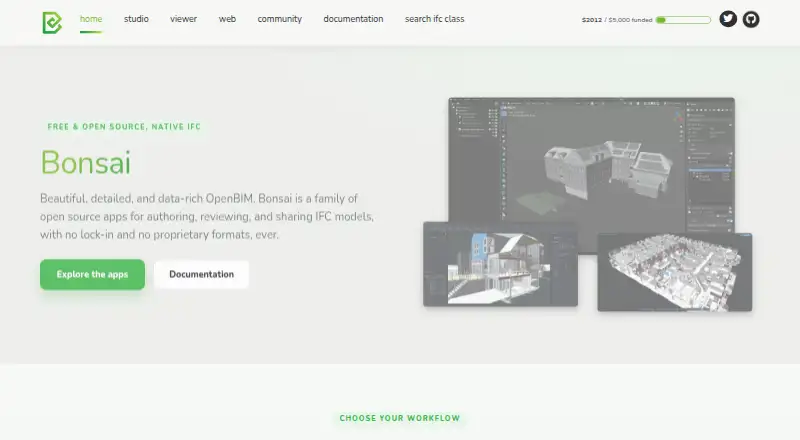
What Bonsai is
Bonsai is a free family of open-source apps for creating, reviewing, and sharing IFC models. Bonsai Studio is an authoring platform built on Blender, with tools for modeling, documentation, coordination, and BIM data management across disciplines. It can generate and annotate linked 2D drawings, and produce schedules and reports from model data. Bonsai Viewer is a separate desktop app for reviewing models, drawings, and data without the authoring environment. It includes model search and filtering, clash detection, BCF issue management, federation of multiple models, and cloud sync for models and issues. Bonsai reads and writes native IFC and says it has no proprietary formats. Studio is powered by IfcOpenShell and supports Python scripting and an API. Described workflows also include structural analysis connections, MEP systems, 4D scheduling, 5D cost estimation, and COBie facility management data. Studio and Viewer support Windows, macOS, and Linux. The Studio page labels the software alpha; Bonsai Web is described as coming soon.
Good
- Free and open source
- Reads and writes native IFC
- Studio generates drawings, schedules, and reports
- Viewer includes clash detection and BCF issue management
- Available on Windows, macOS, and Linux
Watch out
- Studio is labeled alpha
- No mobile access
- Bonsai Web is not yet available
Who it suits
Bonsai suits teams working with IFC models across disciplines, especially those needing authoring and model coordination tools. Viewer can serve people who need to review models without the authoring environment.
Verdict
Bonsai offers distinct authoring and review apps, with broad IFC workflows and no proprietary format requirement. The alpha label for Studio is worth noting, as is the absence of mobile access.
Plans and prices
From Bonsai's own pricing page, checked 3 Oct 2026.
| Plan | Price | What it gives you |
|---|---|---|
| Bonsai | Free | Free software forever · open source · Studio and Viewer |
The facts
Each one read from Bonsai's own pages, with the date it was checked.
What it does
- Additional workflows
- Studio describes structural analysis solver connections, MEP systems, 4D scheduling, 5D cost estimation, and COBie facility management data.checked 3 Oct 2026
- Authoring features
- Studio supports modeling, documentation, coordination, and BIM data management across disciplines.checked 3 Oct 2026
- Cloud sync
- Viewer lists cloud sync for models and issues to support team review and collaboration.checked 3 Oct 2026
- Coordination
- Viewer supports model search and filtering, clash detection, BCF issue management, and federation of multiple models.checked 3 Oct 2026
- Drawings and reports
- Studio can generate and annotate linked 2D drawings and produce schedules and reports from model data.checked 3 Oct 2026
- Integrations
- Studio is built on Blender and powered by IfcOpenShell; its workflows include Python scripting and an API.checked 3 Oct 2026
- Maturity
- The Studio page labels the software alpha.checked 3 Oct 2026
- Open formats
- Bonsai reads and writes native IFC and says it has no proprietary formats or lock-in.checked 3 Oct 2026
- Product
- Bonsai is a family of open source apps for authoring, reviewing, and sharing IFC models.checked 3 Oct 2026
- Studio
- Bonsai Studio is a free, open source IFC authoring platform built on Blender.checked 3 Oct 2026
- Support
- The documentation directs users to live chat, community forums, and GitHub bug reports for help.checked 3 Oct 2026
- Supported systems
- Studio and Viewer list Windows, macOS, and Linux support.checked 3 Oct 2026
- Viewer
- Bonsai Viewer is a free desktop app for reviewing IFC models, drawings, and data without the authoring environment.checked 3 Oct 2026
Where it runs
- Web app status
- Bonsai Web is described as coming soon for viewing and sharing IFC models from a browser.checked 3 Oct 2026
The full review of Bonsai
Bonsai is a free suite of desktop apps for creating and reviewing IFC building models. It is best suited to multidisciplinary BIM users who value open formats and broad authoring and coordination workflows. The main appeal is a wide IFC toolkit without a software fee; Studio’s alpha status is the key reason to weigh alternatives.
Overview
Bonsai divides its work between Studio, an IFC authoring platform built on Blender, and Viewer, a separate app for reviewing models, drawings, and data. Both use IFC, which Bonsai reads and writes natively, and the project says it has no proprietary format requirement. That makes it a strong fit for teams that need to exchange models across disciplines without depending on a closed file format.
The breadth comes with a maturity trade-off: Studio is labeled alpha, making it a less cautious choice for users who need a more settled authoring platform. Bonsai Web, intended for viewing and sharing IFC models in a browser, is coming soon; current Studio and Viewer workflows are desktop-only.
Key features
Authoring and model information
Studio supports modeling, documentation, coordination, and BIM data management across disciplines. It can generate and annotate 2D drawings linked to the model, plus schedules and reports based on model data. This combination is useful when a team needs documentation and structured BIM information alongside model authoring, rather than geometry alone.
Additional workflows include structural analysis solver connections, MEP systems, 4D scheduling, 5D cost estimation, and COBie facility-management data. Studio is built on Blender and powered by IfcOpenShell, with Python scripting and an API. That will appeal to users who want programmable workflows, though it may be less attractive to those seeking a narrowly focused drafting tool.
Review and coordination
Viewer provides a separate desktop review environment without the authoring app. It supports search and filtering, clash detection, BCF issue management, and federation of multiple models. Cloud sync for models and issues supports team review, making Viewer useful for coordination as well as inspection.
Pricing
Bonsai costs nothing, and the plan is free software forever, open source, and includes Studio and Viewer. There is no free trial because the software itself is free, and the plan includes IFC support, multi-discipline coverage, clash detection, quantity takeoff, and API access. That makes it a substantial option for individuals and teams that can use desktop workflows and accept Studio’s alpha label.
There are no paid tiers or seat quotas in the Bonsai plan. The practical limits are platform availability and maturity: there is no mobile access, and browser-based Bonsai Web is still coming soon. Help is directed through live chat, community forums, and GitHub bug reports.
Platforms
Studio and Viewer support Windows, macOS, and Linux. There is no mobile access, so teams that need to review models on phones or tablets should look elsewhere. Bonsai Web is planned for browser viewing and sharing, but it is not yet part of the current workflow.
Who it's for
Bonsai is a good fit for multidisciplinary BIM practitioners who exchange IFC models, need authoring and review tools, and value open formats. Its linked drawings, reports, model coordination, and scripting options also suit teams building structured or customized workflows. It is less appropriate for mobile-first teams or users who are unwilling to work with an alpha-labeled authoring platform.
Pros and cons
- Pros: Native IFC reading and writing without a proprietary format requirement support model exchange across disciplines.
- Pros: Studio combines authoring, linked drawings, schedules, reports, and BIM data management in a free open-source app.
- Pros: Viewer adds clash detection, BCF issue management, model federation, and cloud sync without requiring the authoring environment.
- Cons: Studio is labeled alpha, a meaningful caution for users who need a more mature authoring platform.
- Cons: Windows, macOS, and Linux are the supported systems; mobile access is absent.
Alternatives
Choose Archicad if you need a paid option with a free educational license for eligible students and educators, plus Android, iOS, macOS, web, and Windows support. Choose usBIM.platform if browser-based access and cloud storage matter more; its free basic configuration includes 10 GB of cloud storage and free online applications.
LibreCAD is a free open-source 2D CAD option for readers whose work is specifically 2D rather than IFC BIM. Cedreo offers a free plan for one project and five photorealistic 3D renderings, making it a different fit for limited residential design and presentation work. Finch is worth considering if a free single-user plan with editing tools and real-time building performance metrics fits the workflow.
Hypar may suit users seeking browser-based, API, or Windows access and project-based plans. GstarCAD is a paid alternative with a perpetual-license option for users seeking that licensing model. Snaptrude may fit users who prefer a web-only workflow and a free tier capped at three projects.
Verdict
Choose Bonsai if you want free, open-source IFC authoring and review across disciplines, especially when coordination and open model exchange matter as much as drawing. Its strongest reason to choose it is the range of authoring and review workflows without a proprietary-format requirement. Look elsewhere if mobile access is essential or Studio’s alpha status is too much uncertainty for your work.
Getting started
- Open the Bonsai website
- Download Studio or Viewer for Windows, macOS, or Linux
- Install Studio for authoring or Viewer for model review
- Open or create IFC models in the selected application
- Use the documentation, community forums, live chat, or GitHub for help
Limits worth knowing
The free Bonsai plan includes Studio and Viewer. Studio is labeled alpha, and mobile access is not provided.
Questions
Is Bonsai free?
Yes. The listed Bonsai plan costs nothing and is described as free software forever with open source, Studio, and Viewer.
Which operating systems are supported?
Studio and Viewer support Windows, macOS, and Linux.
Does Bonsai support IFC?
Yes. Bonsai reads and writes native IFC and lists IFC support.
Does Bonsai include clash detection?
Yes. Clash detection is listed in Viewer’s coordination tools.
Is there an API?
Yes. Studio includes Python scripting and an API.
Can Bonsai be used on mobile devices?
Mobile access is listed as none.
Alternatives to Bonsai
- 1

Archicad
Free planAndroidiOSWebAPI8.3From $201 a month - 2

Allplan
iOSWebmacOSWindows7.2From €123 a month - 3
Vectorworks Architect
AndroidiOSWebmacOS7.2From $1,530 a year - 4
IDEA Architecture
Windows6.6€1,395 one-time - 5

FreeCAD
LinuxmacOSWindows6.3 - 6
Edificius
Windows5.5From €799 a year