Allclean
Allclean is a software platform for cleaning businesses, combining online booking, scheduling, dispatch, payments, and customer management.
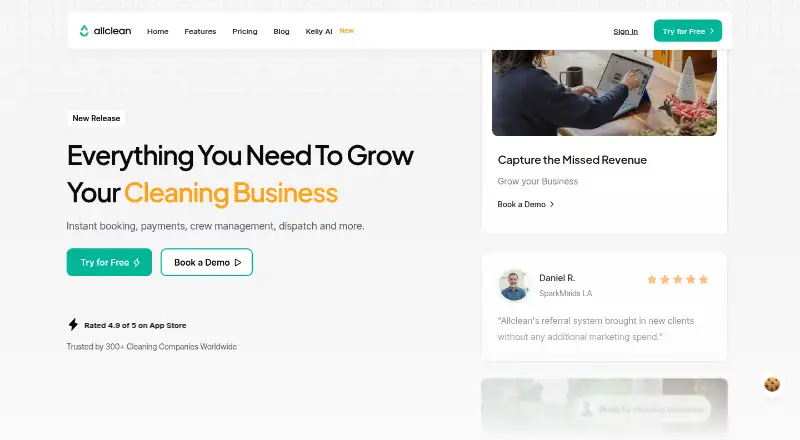
What Allclean is
Allclean is a software platform for cleaning businesses, combining online booking, scheduling, dispatch, payments, and customer management. Customers can book at any time using dynamic pricing, real-time availability, and instant payment. Its calendar brings team availability, jobs, and time off into one view. Payments can be collected when a booking is made or completed, with receipts, invoices, and payouts handled automatically. Reporting dashboards show revenue, job volume, and recurring client rates. The Referral Engine supplies one-click referral links, automated SMS or email reminders, and reward tracking; it is available to beta users. Kelly AI is a phone receptionist designed for residential cleaning companies. It answers calls 24/7, quotes from configured pricing, checks live availability, and books jobs into the Allclean calendar. Kelly can also take deposits or full card payments upfront and synchronize bookings to prevent double bookings. Allclean runs on the web and iOS, with recurring scheduling, a client portal, a cleaner mobile app, and online payments. The Free plan costs nothing for up to three users, while Pro costs $299 a month for up to eight users.
Good
- 24/7 booking with dynamic pricing
- Calendar manages availability, jobs, and time off
- Automatic receipts, invoices, and payouts
- Kelly AI answers calls and books jobs
- Dashboards track revenue and recurring clients
- Web and iOS platforms
Watch out
- Free plan charges 6.9% + 30¢ processing fees
- Free plan supports up to 3 users
- Additional users cost $40/mo each
- Referral Engine is limited to beta users
Who it suits
Allclean suits cleaning companies that need booking, scheduling, dispatch, payments, and customer management in one platform. Residential cleaning businesses may also use Kelly AI for phone answering and booking.
Verdict
Pick Allclean if your cleaning business needs connected booking, scheduling, payments, and customer workflows. Look elsewhere if the user cap or processing fees on the Free plan do not fit, or if you need features outside cleaning operations.
Plans and prices
From Allclean's own pricing page, checked 5 Oct 2026.
| Plan | Price | What it gives you |
|---|---|---|
| Free | Free | up to 3 users · All features · 6.9% + 30¢ processing fees · Additional users $40/mo each · Kelly AI add-on |
| Kelly Starter | $99 a month | 50 minutes included · Allclean Free plan included · 6.9% + 30¢ processing fees · Instant Booking Engine · Overages at $1.99/minute |
| Pro | $299 a month | up to 8 users · All features · 4.9% + 30¢ processing fees · Additional users $40/mo each · Kelly AI add-on |
| Kelly Growth | $499 a month | 500 minutes included · Allclean Free plan included · 4.9% + 30¢ processing fees · Instant Booking Engine · Overages at $0.99/minute |
| Enterprise | Priced on request | Allclean Pro + Kelly Growth · Multi-locations management · All features · Custom processing fees · Premium support · Custom workflows |
| Entreprise | Priced on request | Multiple locations management · All features · Custom processing fees · Premium support · Custom workflows |
The facts
Each one read from Allclean's own pages, with the date it was checked.
What it does
- Data collected
- The privacy policy lists names, phone numbers, email addresses, debit or credit card numbers, and age among information it may collect.checked 5 Oct 2026
- Instant booking
- Customers can book 24/7 using dynamic pricing, real-time availability, and instant payment.checked 5 Oct 2026
- Kelly AI
- Kelly AI is a phone receptionist that answers calls 24/7, quotes using configured pricing, checks real-time availability, and books jobs into the Allclean calendar.checked 5 Oct 2026
- Kelly payments
- Kelly can secure deposits or full payments upfront by card and sync bookings with the Allclean calendar to avoid double bookings.checked 5 Oct 2026
- Payments
- Allclean says it collects payments at booking or completion and handles receipts, invoices, and payouts automatically.checked 5 Oct 2026
- Privacy and SMS
- The privacy policy says transactional texts can include order and appointment updates, and that mobile information from its SMS program is not shared for third-party marketing or promotional purposes.checked 5 Oct 2026
- Purpose
- Allclean describes itself as an all-in-one software platform built specifically for cleaning businesses, covering online booking, scheduling, dispatch, payments, and customer management.checked 5 Oct 2026
- Referrals
- The Referral Engine offers one-click referral links, automated SMS or email reminders, and reward tracking; the homepage says it is available to beta users.checked 5 Oct 2026
- Reporting
- Its dashboards track revenue, job volume, and recurring client rates.checked 5 Oct 2026
- Scheduling
- Its calendar lets businesses manage team availability, jobs, and time off in one place.checked 5 Oct 2026
- Support
- The Enterprise plan lists premium support, and the terms provide an email contact for questions.checked 5 Oct 2026
- Target customers
- Allclean says it is built for cleaning companies, and Kelly is made specifically for residential cleaning companies.checked 5 Oct 2026
The full review of Allclean
Allclean is an operations platform for cleaning companies that links customer booking, scheduling, payment collection and client administration. It is best suited to businesses wanting one connected workflow, particularly residential cleaners that can use its optional phone receptionist. The trade-off is a user-based and transaction-fee structure that rewards careful plan selection.
Overview
Allclean covers the path from a customer request to a completed, paid job. Customers can book 24/7 with dynamic pricing, live availability and immediate payment, while staff manage team availability, jobs and time off in a shared calendar. The platform also handles receipts, invoices and payouts automatically. Revenue, job volume and recurring-client rates appear in reporting dashboards, giving owners operational and retention signals rather than just a list of appointments.
Recurring scheduling, a client portal and a cleaner mobile app extend the system beyond the office. That breadth favors companies replacing several disconnected tools; a business that only needs a basic calendar may be paying for capabilities it will not use.
Key features
- Instant booking: Dynamic prices and real-time availability let customers complete a booking without waiting for a staff response. Instant payment puts collection into the same step.
- Scheduling: One calendar combines jobs, cleaner availability and time off, which is practical for dispatching a changing workforce and avoiding conflicts.
- Payments and documents: Allclean can collect at booking or completion and automatically manage receipts, invoices and payouts. This reduces administrative handoffs, but every card transaction carries a plan-specific processing charge.
- Reporting: Dashboards for revenue, job volume and recurring-client rates help owners monitor demand and repeat business without building separate reports.
- Referral Engine: One-click links, automated SMS or email reminders and reward tracking support structured referral campaigns. It is offered to beta users, so it is not a dependable basis for every marketing plan.
- Kelly AI: The phone receptionist answers 24/7, quotes from configured pricing, checks live availability and books into the Allclean calendar. It can secure a deposit or full card payment and sync the booking to prevent double bookings. Kelly is aimed specifically at residential cleaning companies, and its minute allowances and overage rates make call volume a material cost factor.
Pricing
Allclean uses a freemium model, with paid plans from $299/mo and a free trial. The Free plan costs nothing for up to three users and includes all features, but charges 6.9% + 30¢ processing fees. Extra users cost $40/mo each, and Kelly AI is an add-on. It is a sensible way for a very small operation to establish the workflow, though the user ceiling and relatively high transaction fee can become restrictive as bookings grow.
Kelly Starter is $99 a month with 50 minutes, the Allclean Free plan, Instant Booking Engine and 6.9% + 30¢ processing fees. Extra minutes cost $1.99 per minute. This fits a residential business testing phone answering at modest call volume; frequent callers can quickly outgrow the allowance.
Pro costs $299 a month for up to eight users, all features and a lower 4.9% + 30¢ processing fee. Additional users remain $40/mo each, and Kelly AI is an add-on. It is the clearest core plan for a growing team whose transaction volume makes the lower fee meaningful.
Kelly Growth is $499 a month and includes 500 minutes, the Allclean Free plan, Instant Booking Engine and 4.9% + 30¢ processing fees. Overage is $0.99 per minute. Choose it when phone demand is substantial and predictable; otherwise the included minutes may exceed need.
Entreprise and Enterprise have custom pricing. Entreprise adds multiple-location management, all features, custom processing fees, premium support and custom workflows. Enterprise combines Allclean Pro with Kelly Growth and adds multi-location management, custom fees, premium support and custom workflows. These tiers target larger or more complex organizations rather than teams seeking a published monthly price.
Platforms
Allclean runs on iOS and the web. That combination supports browser-based administration with mobile access for staff and cleaners.
Who it's for
Allclean is a strong fit for cleaning companies that want online self-booking, dispatch, payments and customer records tied together. Residential operators that receive meaningful phone demand are the best candidates for Kelly. Small businesses can start on Free, while teams beyond three users should price the $40 monthly seat additions or move to Pro. It is less suitable when transaction fees, user limits or a cleaning-specific focus do not match the business model.
Pros and cons
Pros
- Connected booking-to-payment flow: Availability, pricing, payment, invoices and payouts sit in one process.
- Useful field coverage: A client portal, cleaner mobile app, recurring scheduling and reporting support both office and on-site work.
- Phone booking option: Kelly can quote, schedule and take deposits without creating duplicate calendar entries.
- Low-cost entry: The Free plan allows three users and includes the core feature set.
Cons
- Processing fees are significant: Free and Kelly Starter charge 6.9% + 30¢ per transaction, while Pro and Kelly Growth charge 4.9% + 30¢.
- Small-team limits: Free is capped at three users and Pro at eight, with $40/mo for each additional user.
- Kelly costs scale with calls: Starter includes 50 minutes at $1.99/minute overage; Growth includes 500 at $0.99/minute.
- Referral features are not universal: The Referral Engine is available to beta users.
Alternatives
For a broader shortlist, see Cleaning Service Software. JobFlowly is a better match if Android support and a free scheduling, invoicing and cleaner-portal plan matter; its Pro plan is $49 a month. Opsycle suits very small operations wanting a web free tier capped at five clients and 15 jobs per month, with a 29.00 USD monthly Starter plan. SweepOS is for mobile teams needing checklists, photo documentation and basic time tracking on Android or iOS.
CleanCloud is a paid platform with Android, iOS, macOS, Windows, web and API coverage. Clean Smarts is another paid option with a payroll add-on. Cleaners App offers paid Solo, Crew and Team tiers for defined user groups. CleanManager is a paid Android, iOS and web choice with client-login access. Janitorial Manager targets larger janitorial operations with a starting monthly price of 1000.00 USD and included training and support.
Verdict
Pick Allclean if your cleaning business needs connected booking, scheduling, payments and customer workflows, especially with residential phone bookings through Kelly. Its strongest reason to choose it is the unified path from live availability and pricing to payment, reporting and field coordination. Look elsewhere if the user cap or processing fees on the Free plan do not fit, if phone volume makes Kelly overages expensive, or if you need software outside cleaning operations.
Getting started
- Open https://allclean.app/
- Start with the Free plan or use the free trial
- Use Allclean through the web or iOS
- Configure services, pricing, availability, and team schedules
- Enable online booking and payment collection
- Add Kelly AI or choose a paid plan for more users and minutes
Limits worth knowing
The Free plan allows up to three users and applies 6.9% + 30¢ processing fees; extra users cost $40/mo each. Kelly Starter includes 50 minutes with $1.99 per-minute overages, while Kelly Growth includes 500 minutes with $0.99 per-minute overages.
Questions
Is Allclean free?
Yes. The Free plan costs nothing for up to three users and includes all features, with 6.9% + 30¢ processing fees.
What does Allclean Pro cost?
Pro costs $299 a month for up to eight users, with 4.9% + 30¢ processing fees.
Which platforms support Allclean?
Allclean is available on iOS and the web. It also provides a cleaner mobile app and client portal.
What is Kelly AI?
Kelly AI is a phone receptionist for residential cleaning companies. It answers calls 24/7, quotes configured prices, checks availability, books jobs, and can secure card deposits or full payments.
Does Allclean offer a free trial?
Yes. Allclean has a free trial.
Does Allclean support recurring scheduling?
Yes. Recurring scheduling is provided.
Alternatives to Allclean
- 1
JobFlowly
Free planAndroidiOSWeb8.0From $49 a month - 2

CleanCloud
AndroidiOSWebAPI7.8From $99 a month - 3
Launch27
AndroidiOSWebAPI7.7From $765 a year - 4
Mopware Pro
AndroidiOSWebAPI7.6From $97 a month - 5
MaidCentral
AndroidiOSWebAPI7.2From $450 a month - 6
Janitorial Manager
AndroidiOSWeb7.1From $1,000 a month