ActivTrak
ActivTrak is a workforce analytics and intelligence SaaS platform that analyzes digital work activity data to help improve how people work in office or remot…
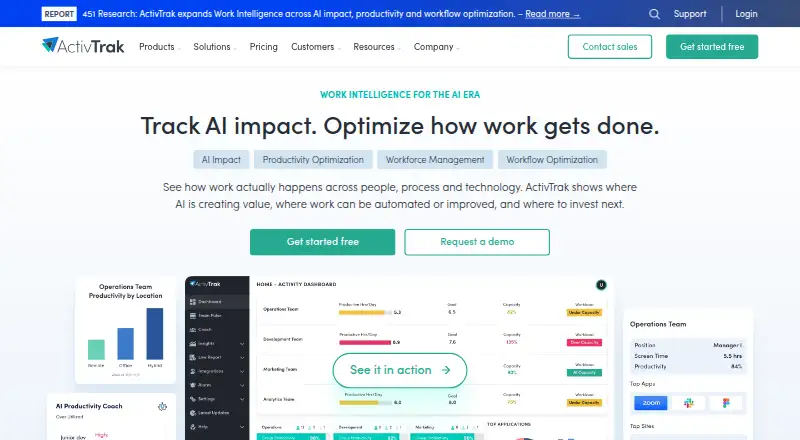
What ActivTrak is
ActivTrak is a workforce analytics and intelligence SaaS platform that analyzes digital work activity data to help improve how people work in office or remotely. Workforce Management offers real-time visibility, productivity trends, and schedule and location adherence. Productivity Optimization separates time into productive, unproductive, and offline work to identify possible improvements. AI Insights includes measurement of AI usage, compliance, adoption maturity, benchmarking, productivity impact, and optimization. ActivTrak says it does not use keystroke logging, email monitoring, camera access, personal-device monitoring, or video recording. Screenshots are not taken or retained by default and require the optional Screen Details add-on. The company states that it has SOC 2 Type 1 and Type 2 certifications and encrypts customer data in transit and at rest. Native integrations include Microsoft Outlook and Google Calendar for calendar and PTO data, plus Microsoft Entra ID and SCIM for user management. The Free plan is free and includes 30 days of data history and basic activity visibility for up to three people. A free account without a login for 30 days is marked inactive and receives an email about pending deletion.
Good
- Work activity data refreshes in real time.
- Screenshots are off by default.
- Native calendar and user-management integrations are listed.
- Free plan includes 30 days of data history.
- Encrypts customer data in transit and at rest.
Watch out
- Free plan limits basic activity visibility to 3 people.
- Free plan includes 30 days of data history.
- Inactive free accounts may receive a pending-deletion email after 30 days.
- Purchases over 50 licenses require a paid support plan.
Who it suits
ActivTrak suits organizations seeking visibility into work activity, productivity patterns, schedule adherence, or AI usage. Its free plan is limited to basic activity visibility for three people.
Verdict
ActivTrak covers workforce activity, productivity, and AI-use analysis, with screenshots disabled by default. The free plan has a three-person visibility limit, and larger license purchases require paid support.
Plans and prices
From ActivTrak's own pricing page, checked 14 Oct 2026.
| Plan | Price | What it gives you |
|---|---|---|
| Free | Free | 3 workers · 30 days data history · limited application functionality · annual contract not required |
| Work Activity Tracking | $10 a month | 6 months data history · working-hours and technology-compliance focus · annual contract, priced per worker/month |
| Workforce Management | $15 a month | 6 months data history · utilization and efficiency features · annual contract, priced per worker/month |
| Productivity Optimization | $17 a month | 1 year data history · productivity and capacity optimization · annual contract, priced per worker/month |
The facts
Each one read from ActivTrak's own pages, with the date it was checked.
The company
- 2026 company change
- ActivTrak’s About page says the company became “The Work Intelligence Company” in 2026.checked 14 Oct 2026
- Company facts
- LinkedIn lists ActivTrak as privately held, headquartered in Austin, Texas, founded in 2009, with 51–200 employees.checked 14 Oct 2026
- Company ownership and backing
- The company profile states that ActivTrak is backed by Elsewhere Partners, Sapphire Ventures, and Francisco Partners.checked 14 Oct 2026
- Founded
- 2009checked 28 Sep 2026
What it does
- 2026 product update
- A release note dated April 27, 2026 describes an integrations-page redesign, early-access SCIM self-service, and multi-instance HRIS support.checked 14 Oct 2026
- ActivConnect API
- The ActivConnect add-on provides API and SQL access to live and historical data plus templates for Power BI, Tableau, and Looker Studio.checked 14 Oct 2026
- AI and workflow products
- ActivTrak offers Workforce and a separate Workflow product, with AI Insights available as an addition to Workforce Management and Productivity Optimization.checked 14 Oct 2026
- AI insights
- AI Insights includes AI usage measurement, AI compliance, adoption maturity and benchmarking, productivity-impact measurement and AI optimization.checked 30 Sep 2026
- API access
- The ActivConnect add-on provides API or SQL access to live and historical ActivTrak data and pre-built templates for Power BI, Looker Studio and Tableau.checked 30 Sep 2026
- API documentation
- The help center provides ActivConnect setup documentation, a data glossary, SQL-access instructions, and SCIM, calendar, HRIS, and identity-management guides.checked 14 Oct 2026
- API key security update
- Since the May 22, 2025 update, newly created API keys can be copied only once at creation.checked 14 Oct 2026
- Automatic time tracking
- Plans include automatic time tracking and activity summaries by user and team.checked 14 Oct 2026
- Compliance
- The pricing comparison lists HIPAA, GDPR, CCPA, SOC 2 Type 2, SSO, and MFA capabilities.checked 14 Oct 2026
- Hosting model
- The subscription agreement grants customers time-limited, non-transferable access to ActivTrak’s hosted service and documentation.checked 14 Oct 2026
- Installation
- Agents are downloaded from the ActivTrak dashboard and installed by running the installer; Mac deployments require users to grant accessibility and screen-recording permissions manually.checked 14 Oct 2026
- Integrations
- Listed connections include Workday, ADP, Microsoft Teams, Outlook, Google Calendar, ServiceNow, Zendesk, ChatGPT, Claude, Gemini, Microsoft Viva, Jira, Salesforce, and Slack.checked 14 Oct 2026
- License
- The agreement reserves ownership of the service and documentation to ActivTrak and its licensors and prohibits copying or derivative works, indicating proprietary software.checked 14 Oct 2026
- License limit
- A paid support plan is required for purchases involving more than 50 licenses.checked 30 Sep 2026
- Limit: missing video recording
- GetApp reviewers say the lack of true continuous video recording limits reconstruction of activity.checked 14 Oct 2026
Where it runs
- Agent platforms
- ActivTrak supplies agents for Windows, macOS, and ChromeOS; its browser extension supplements Windows and Mac agents.checked 14 Oct 2026
- Browser extension
- The ActivTrak Assist Browser Extension works alongside the desktop agent on Windows and Mac to capture more detailed URL data.checked 30 Sep 2026
- ChromeOS limitation
- The ChromeOS agent captures browser activity in Chrome but does not capture application usage outside the browser.checked 14 Oct 2026
Money
- Free-account inactivity
- A Free plan account that receives no login for 30 days is marked inactive and receives an email about pending deletion.checked 30 Sep 2026
- Limit: navigation and billing
- G2 reviewers report difficult navigation, higher-tier report restrictions, cumbersome exports, and subscription-management problems.checked 14 Oct 2026
The full review of ActivTrak
Overview
ActivTrak is a workforce analytics and intelligence platform that uses digital work activity data to help organizations understand how work is happening across office and remote settings. It brings together workforce visibility, productivity analysis, and AI-use insights. Activity data refreshes in real time, and custom dashboards are available.
The platform was founded in 2009. Its focus is on identifying work patterns and possible areas for improvement, rather than recording every interaction: ActivTrak says it does not use keystroke logging, email monitoring, camera access, personal-device monitoring, or video recording. For a broader category view, see Workforce Analytics Software.
Key features
Workforce management and productivity
Workforce Management provides real-time workforce visibility alongside productivity trends and schedule and location adherence. Productivity Optimization sorts time into productive, unproductive, and offline work, giving teams a way to identify where work patterns may be improved.
AI insights
AI Insights covers AI usage measurement, compliance, adoption maturity, and benchmarking. It also addresses the productivity impact of AI and opportunities to optimize its use.
Privacy, security, and data access
Screenshots are not captured or retained by default; they are available only with the optional Screen Details add-on. ActivTrak states that it holds SOC 2 Type 1 and Type 2 certifications and encrypts customer data in transit and at rest.
Native integrations bring in calendar and PTO data from Microsoft Outlook and Google Calendar, while Microsoft Entra ID and SCIM support user management. The ActivConnect add-on provides API or SQL access to live and historical data, with pre-built templates for Power BI, Looker Studio, and Tableau.
ActivTrak offers Windows, macOS, and ChromeOS agents. Its ChromeOS agent can also run in Chrome on Linux systems without a native agent. The ActivTrak Assist Browser Extension works with the desktop agent on Windows and Mac to capture more detailed URL data.
Pricing
ActivTrak has a freemium model, with a free plan and a 14-day trial. The Free plan costs nothing and includes 30 days of data history, basic activity visibility limited to 3 people, and a limit of 3 employees.
Three additional plans are listed, but their prices are not provided:
- Work Activity Tracking: 6 months of data history and 20 configurable work schedules.
- Workforce Management: 6 months of data history and 50 configurable work schedules.
- Productivity Optimization: 1 year of data history and 50 configurable work schedules.
Free accounts with no login for 30 days are marked inactive and receive an email about pending deletion. Purchases involving more than 50 licenses require a paid support plan. ActivTrak offers Digital Support, Premier Support, and Signature Support, all US-based.
Platforms
ActivTrak is available across API, browser extension, Linux, macOS, web, and Windows. Agent options cover Windows, macOS, and ChromeOS; on Linux, the ChromeOS agent can run in Chrome without a native agent. The browser extension complements the Windows and Mac desktop agent rather than replacing it.
Who it's for
ActivTrak is suited to organizations seeking a view of work activity across office and remote teams, including productivity trends, schedule adherence, or location adherence. Its productivity classification and AI-use reporting may also fit teams that want to examine time allocation and the adoption or impact of AI. The free plan is limited to 3 employees, while broader purchasing needs should account for the paid-support requirement above 50 licenses.
Pros and cons
- Pros: Real-time data refresh, custom dashboards, and coverage of workforce management, productivity, and AI insights.
- Pros: The stated privacy controls exclude keystroke logging, email monitoring, camera access, personal-device monitoring, and video recording; screenshots are off by default.
- Pros: Calendar, identity-management, API, and BI-tool options support data connections and analysis.
- Cons: The free plan is limited to 3 employees and has only 30 days of data history.
- Cons: Prices for the three named paid plans are not listed here, and purchases above 50 licenses require a paid support plan.
- Cons: Screenshot functionality requires the optional Screen Details add-on.
Alternatives
Other options to consider include Qualtrics, Worklytics, and Insightful. Related choices include CurrentWare Data Loss Prevention, Peoplelytics, ChartHop, Culture Amp, and Lightcast.
Verdict
ActivTrak combines work-activity visibility with productivity analysis, workforce management, and AI insights, while stating clear limits on intrusive monitoring and keeping screenshots off by default. Its real-time refresh, dashboards, and integration options make it a broad platform for organizations examining how work is structured. The main considerations are the small free-plan limit, inactive-account deletion notice, add-on requirement for screenshots, and the lack of listed prices for its three other plans.
Getting started
- Open the ActivTrak website.
- Choose the Free plan or review the listed paid plans.
- Use the Windows, macOS, or ChromeOS agent; the ChromeOS agent can run in Chrome on Linux systems.
- Install the browser extension alongside the desktop agent on Windows or Mac if you need more detailed URL data.
- Connect supported calendar or user-management integrations as needed.
Limits worth knowing
The Free plan includes 30 days of data history and basic activity visibility for up to three people. Work Activity Tracking includes six months of history and 20 configurable schedules; Workforce Management includes six months and 50 schedules; Productivity Optimization includes one year and 50 schedules.
Questions
Is there a free plan?
Yes. It costs nothing and includes 30 days of data history and basic activity visibility for up to three people.
Is there a free trial?
Yes. The pricing note lists a 14-day trial.
Which platforms have agents?
ActivTrak offers agents for Windows, macOS, and ChromeOS. Its ChromeOS agent can run in Chrome on Linux systems without a native agent.
What do the paid plans include?
Work Activity Tracking includes six months of data history and 20 configurable work schedules. Workforce Management includes six months and 50 schedules, while Productivity Optimization includes one year and 50 schedules.
Does ActivTrak use screenshots or keystroke logging?
ActivTrak says screenshots are not taken or retained by default; they are available through the optional Screen Details add-on. It says it does not use keystroke logging, email monitoring, camera access, personal-device monitoring, or video recording.
What integrations are available?
Native integrations include Microsoft Outlook and Google Calendar for calendar and PTO data, and Microsoft Entra ID and SCIM for user management. The ActivConnect add-on provides API or SQL access to live and historical data and pre-built templates for Power BI, Looker Studio, and Tableau.
Alternatives to ActivTrak
- 1
Qualtrics
Free planAPI7.3From $420 a month - 2

Worklytics
Free planWebAPISelf-hosted7.3From $2,500 a month - 3

Culture Amp
AndroidiOSWebAPI7.1 - 4
Insightful
WebAPILinuxmacOS7.0 - 5
Oracle Fusion HCM Analytics
AndroidiOSWeb7.0From $5 a month - 67.0From $1,250 a month