Xpand Portal
Xpand Portal gives customers, vendors, partners, or contractors self-service access to ERP information and workflows.
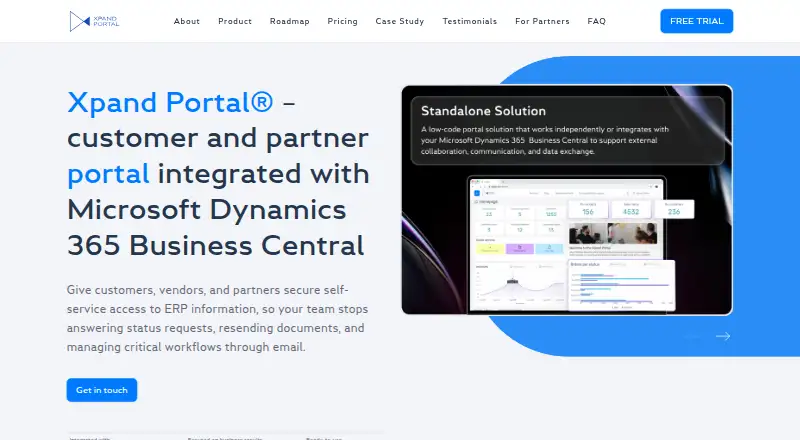
What Xpand Portal is
Xpand Portal gives customers, vendors, partners, or contractors self-service access to ERP information and workflows. Its Business Central Connector synchronizes standard or custom tables and fields, supports multiple companies, and updates orders, invoices, and documents in real time. An API can connect ERP, CRM, SharePoint, and other data sources. The platform includes dashboards, reporting, notifications, configurable rules, calculations, actions, deployment tools, reusable page templates, and stand-alone data storage. Ready-to-use modules cover receivables, customer orders, and customer care, and require additional licenses. Xpand Portal is currently offered as an on-premise solution, typically hosted on the customer's server, with configuration needed after installation. A 30-day free trial costs nothing and allows testing two full modules. Starter costs €399 a month, with a minimum one-year commitment; a Business Central full-user license is also required for synchronization. The FAQ lists multi-factor authentication, role-based access, HTTPS data transfer, OAuth 2.0, audit logs, and user activity tracking. The maker says a basic implementation can go live in 5–7 days.
Good
- Synchronizes Business Central tables and fields in real time.
- Supports multiple Business Central companies.
- API connectivity includes ERP, CRM, and SharePoint.
- Trial lasts 30 days and includes two full modules.
- Security features include multi-factor authentication and audit logs.
Watch out
- Ready-to-use modules require additional licenses.
- Business Central synchronization requires a full-user license.
- Configuration is needed after installation.
- Starter requires a one-year minimum commitment.
Who it suits
Xpand Portal is intended for B2B companies that share ERP-based information and processes with customers, vendors, partners, or contractors. It may fit organizations seeking Business Central synchronization or connections to other data sources.
Verdict
Xpand Portal combines external self-service access with ERP synchronization, configurable workflows, and reporting tools. Consider the required configuration, additional module licenses, and one-year minimum commitment for paid plans when evaluating it.
Plans and prices
From Xpand Portal's own pricing page, checked 9 Oct 2026.
| Plan | Price | What it gives you |
|---|---|---|
| Free for 30 Days | Free | 10 users |
| Starter | €399 a month | 100 users · 5 administrative users · Minimum commitment of 1 year; 5% discount for yearly prepayment or 3% for quarterly prepayment |
| Growth | €599 a month | 500 users · 5 administrative users · Minimum commitment of 1 year; 5% discount for yearly prepayment or 3% for quarterly prepayment |
| Scale | €799 a month | 1,000 users · 5 administrative users · Minimum commitment of 1 year; 5% discount for yearly prepayment or 3% for quarterly prepayment |
| Advanced | €999 a month | 2,000 users · 5 administrative users · Minimum commitment of 1 year; 5% discount for yearly prepayment or 3% for quarterly prepayment |
| Enterprise | Priced on request | >2,000 users · 5 administrative users · On Request; minimum commitment of 1 year |
The facts
Each one read from Xpand Portal's own pages, with the date it was checked.
What it does
- Audience
- Xpand Portal is described as designed for B2B companies sharing ERP-based information and processes with customers, vendors, partners, or contractors.checked 9 Oct 2026
- Business Central integration
- The Xpand Portal Connector synchronizes standard or custom Business Central tables and fields, supports multi-company scenarios, and updates orders, invoices, and documents in real time.checked 9 Oct 2026
- Business Central license
- The FAQ says operation requires one Microsoft Dynamics 365 Business Central full-user license for synchronization.checked 9 Oct 2026
- Compliance
- Xpand states that the portal uses up-to-date components and has built-in GDPR compliance.checked 9 Oct 2026
- Configuration
- The FAQ says some configuration is needed after installation to make the portal fully functional.checked 9 Oct 2026
- Core features
- The platform includes a CMS and admin layer, reusable page templates, a responsive interface, stand-alone data storage, dashboards, reporting, alerts, configurable rules, and deployment tools.checked 9 Oct 2026
- Deployment
- The product page says a vanilla implementation can go live in as quickly as 5–7 days.checked 9 Oct 2026
- Features
- The product page lists dashboards and reporting, notifications and alerts, configurable rules, calculations, actions, deployment tools, reusable page templates, and stand-alone data storage.checked 9 Oct 2026
- Hosting
- The FAQ says Xpand Portal is currently available as an on-premise solution, typically hosted on the customer’s server.checked 9 Oct 2026
- Integrations
- The Xpand Portal Connector synchronizes Business Central tables and fields, supports multiple companies, and keeps portal orders, invoices, and documents updated in real time.checked 9 Oct 2026
- Intended users
- Xpand identifies logistics, freight forwarding, wholesale distribution, manufacturing, warehousing, telecommunications, and IT among the industries it serves.checked 9 Oct 2026
- License requirement
- The FAQ says one Microsoft Dynamics 365 Business Central full-user license is needed for synchronization.checked 9 Oct 2026
- Modules
- Ready-to-use modules include Receivables Management, Customer Order Management, and Customer Care Management, and the FAQ says these modules require additional licenses.checked 9 Oct 2026
- Other data sources
- The product describes API connectivity for ERP, CRM, SharePoint, and other data sources.checked 9 Oct 2026
- Other integrations
- The product page describes an API for connecting ERP, CRM, SharePoint, and other data sources.checked 9 Oct 2026
- Privacy
- The FAQ says the portal has built-in GDPR compliance and that each user only sees data linked to their own account.checked 9 Oct 2026
- Purpose
- Xpand Portal provides customers, vendors, and partners self-service access to ERP information and workflows.checked 9 Oct 2026
- Ready-to-use modules
- The product offers Receivables Management, Customer Order Management, and Customer Care Management modules, which require additional licenses.checked 9 Oct 2026
- Security
- The FAQ lists multi-factor authentication, role-based access controls, HTTPS data transfer, OAuth 2.0, SMTP authentication, audit logs, and user activity tracking.checked 9 Oct 2026
- Setup and customization
- Xpand describes the portal as configurable, with post-installation setup needed; it says a vanilla implementation can go live in 5–7 days.checked 9 Oct 2026
- Support
- The FAQ says a one-month warranty covers bugs found during user acceptance testing, with ongoing support available afterward on a paid basis.checked 9 Oct 2026
The company
- Company
- The maker's imprint identifies Xpand Ukraine LLC and gives its registration address in Kyiv, Ukraine.checked 9 Oct 2026
- Headquarters
- Xpand Ukraine LLC lists its registration address in Kyiv, Ukraine.checked 9 Oct 2026
Money
- Trial
- The site offers a 30-day free trial in which users can test two full modules.checked 9 Oct 2026
The full review of Xpand Portal
Overview
Xpand Portal gives businesses a way to share ERP information and processes with customers, vendors, partners, and contractors. It is best suited to organizations that run Microsoft Dynamics 365 Business Central and need external users to work with account-specific records. Its strongest case is keeping portal workflows tied to live ERP data; its licensing and deployment requirements make it a less natural fit for simpler client portals.
Key features
The Xpand Portal Connector synchronizes standard or custom Business Central tables and fields, supports multiple companies, and updates portal orders, invoices, and documents in real time. That makes it useful when external users need current operational records rather than a disconnected portal view. An API can connect ERP, CRM, SharePoint, and other data sources, although Business Central is the integration described in most depth.
A CMS and administration layer, reusable page templates, responsive interface, dashboards, reporting, alerts, configurable rules, calculations, actions, deployment tools, and stand-alone data storage give teams options for shaping the portal around their workflows. Ready-to-use Receivables Management, Customer Order Management, and Customer Care Management modules can speed up common customer-facing processes, but each requires an additional license.
Security measures include multi-factor authentication, role-based access controls, HTTPS data transfer, OAuth 2.0, SMTP authentication, audit logs, and user activity tracking. Xpand also describes built-in GDPR compliance and account-linked data access, so users see only data associated with their own account.
The portal is currently offered as an on-premise solution, typically hosted on the customer’s server. Xpand says a vanilla implementation can go live in 5–7 days, but configuration is still needed after installation. Operation also requires one Microsoft Dynamics 365 Business Central full-user license for synchronization. A one-month warranty covers bugs identified during user acceptance testing; ongoing support is paid.
Pricing
Xpand Portal offers a 30-day free trial with two full modules to test. The Free for 30 Days plan costs nothing and supports 10 users, but it is a trial rather than an ongoing free tier.
| Plan | Price and terms | Users |
|---|---|---|
| Starter | €399 a month; minimum commitment of 1 year | 100 users; 5 administrative users |
| Growth | €599 a month; minimum commitment of 1 year | 500 users; 5 administrative users |
| Scale | €799 a month; minimum commitment of 1 year | 1,000 users; 5 administrative users |
| Advanced | €999 a month; minimum commitment of 1 year | 2,000 users; 5 administrative users |
| Enterprise | Custom pricing; minimum commitment of 1 year | More than 2,000 users; 5 administrative users |
Starter is the entry point for smaller external-user groups, while Growth, Scale, and Advanced increase capacity without raising the allowance of five administrative users. Enterprise is for deployments above 2,000 users and requires a pricing request. Paid plans offer a 5% discount for yearly prepayment or 3% for quarterly prepayment, but all carry a one-year minimum commitment. Additional module licenses and the required Business Central license should also factor into the total cost.
Platforms
Xpand Portal supports API, self-hosted, and web deployments. Its on-premise hosting model suits organizations that want the portal on their own server, but it rules out a straightforward vendor-hosted setup.
Who it's for
The strongest fit is a B2B company that needs to expose Business Central information and processes to customers, vendors, partners, or contractors. Xpand identifies logistics, freight forwarding, wholesale distribution, manufacturing, warehousing, telecommunications, and IT among its target industries. Teams that need account-specific data access, requests, work tracking, and file sharing can use it to bring external workflows closer to the ERP. Companies without Business Central, or those seeking a hosted service with no configuration burden, should consider other options.
Pros and cons
- Pro: Real-time synchronization of orders, invoices, and documents helps keep external workflows aligned with Business Central records.
- Pro: Multi-company support and configurable rules allow the portal to serve varied business processes and organizational structures.
- Pro: Role-based access, audit logs, activity tracking, and account-linked data access support controlled sharing with external users.
- Con: The required Business Central full-user license and separately licensed ready-to-use modules increase the cost beyond the portal plan.
- Con: On-premise hosting and post-installation configuration require customer-side deployment and setup work.
- Con: Paid plans start at a one-year commitment, and the trial does not provide a permanent free option.
Alternatives
For a broader comparison, see Customer Portal Software.
- FuseBase is worth considering for teams that want a freemium portal with broad platform support and a free plan for one client portal and one workspace.
- Assembly offers a free tier capped at five active contacts, one internal user, three apps, and 50 build credits per month, making it a lower-commitment option for small teams.
- Kitchen.co has a free plan for up to two internal users, with unlimited clients and projects, for teams that prioritize a client-and-project workspace.
- ProjectSend is a free, self-hosted alternative with no caps on users, clients, files, or storage for organizations that want file sharing without a paid portal plan.
- Dock has a free plan capped at 10 workspaces and limited content and AI usage, making it an option for teams whose needs fit those allowances.
- OnBrio offers a freemium alternative.
- Plutio offers a paid plan starting at $19 a month, with a free plan and trial, for teams considering a lower-priced client-management option.
- SuperOkay offers a freemium alternative.
Verdict
Choose Xpand Portal if your business runs Business Central and needs a configurable, account-aware way to give external users live access to ERP workflows. Real-time synchronization and multiple-company support are its clearest advantages. Look elsewhere if you need vendor-hosted software, a permanent free plan, or a shorter commitment without additional module and ERP licensing costs.
Alternatives to Xpand Portal
- 1

FuseBase
Free planAndroidiOSWebAPI8.2From $32 a month - 2

Plutio
AndroidiOSWebAPI7.9From $15 a month - 3

ManyRequests
AndroidiOSWebAPI7.8From $39 a month - 4

Assembly
Free planWebAPImacOSWindows7.7From $29 a month - 5
Salesforce Experience Cloud
AndroidiOSWebAPI7.5 - 6
Kitchen.co
Free planAndroidiOSWeb7.4From $29 a month