
WPS Presentation
WPS Presentation is a presentation app for Windows, macOS, Linux, Android, iOS, and the web.
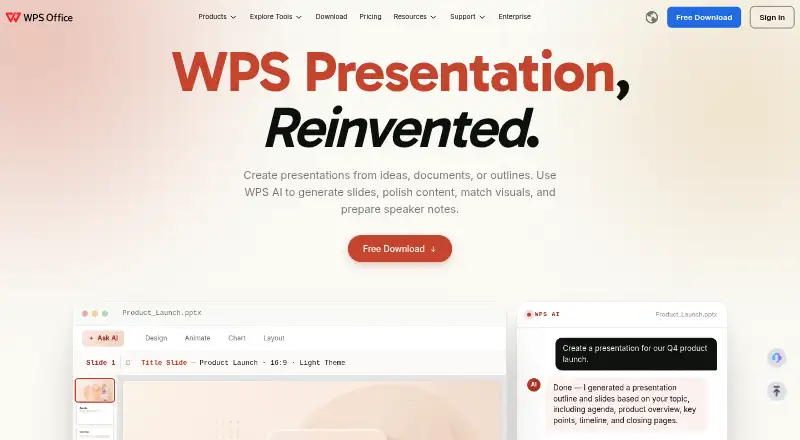
What WPS Presentation is
WPS Presentation is a presentation app for Windows, macOS, Linux, Android, iOS, and the web. It supports PowerPoint files, including .pptx, .ppt, and .ppsx, and can import and export PowerPoint presentations. Presentation tools include 80+ animations, morph transitions, and presenter mode. WPS AI can generate slides, refine content, match visuals, and prepare speaker notes. You can also convert PDFs into editable slides or presentations into PDFs. Sharing permissions let users choose viewing, editing, or commenting access and review version history. The free plan includes 1 GB of cloud storage, limited template downloads, support for 47 file formats, and 46 languages. WPS connects Presentation with Writer, Spreadsheet, and PDF tools in one workspace. Offline access is available.
Good
- Works on Windows, macOS, Linux, iOS, Android, and web
- Imports and exports PowerPoint formats
- AI can generate slides and prepare speaker notes
- Free plan includes 1 GB cloud storage
- Offline access and presenter mode are available
Watch out
- Free plan limits template downloads
- Free plan includes 1 GB of cloud space
Who it suits
It suits people who need to create or present slides across desktop, mobile, and web platforms, including users working with PowerPoint files. It may also suit teams that need shared editing permissions or offline access.
Verdict
WPS Presentation combines slide creation, PowerPoint compatibility, AI assistance, and offline access across several platforms. Check the free plan's template and storage limits against your needs before choosing a paid plan.
Plans and prices
From WPS Presentation's own pricing page, checked 28 Sep 2026.
| Plan | Price | What it gives you |
|---|---|---|
| WPS Standard | Free | No credit card required · 1 GB cloud storage · 47 file formats · 46 languages |
| WPS Pro+ | $5.83 a month | 1 Year · 20 GB cloud storage · Billed $69.99/Year |
| WPS Pro+ Sharing Plan | Free | 3-day free trial; 2 users minimum · 20 GB cloud storage per member · Billed $41.99/Year/user; includes a 3-day free trial |
The facts
Each one read from WPS Presentation's own pages, with the date it was checked.
What it does
- AI assistance
- Yeschecked 20 Sep 2026
- AI presentation tools
- WPS AI generates slides, polishes content, matches visuals, and prepares speaker notes.checked 28 Sep 2026
- Money-back guarantee
- WPS lists a 30-day money-back guarantee.checked 28 Sep 2026
- Office suite integration
- WPS connects Writer, Spreadsheet, Presentation, and PDF tools in one workspace.checked 28 Sep 2026
- Offline access
- Yeschecked 20 Sep 2026
- PDF conversion
- The service converts PDF documents into editable presentation slides and presentations into PDFs.checked 28 Sep 2026
- PowerPoint compatibility
- WPS supports .pptx, .ppt, and .ppsx formats and states 100% compatibility.checked 28 Sep 2026
- PowerPoint export
- Yeschecked 20 Sep 2026
- PowerPoint import
- Yeschecked 20 Sep 2026
- Presentation features
- The product includes 80+ animations, morph transitions, and presenter tools.checked 28 Sep 2026
- Presenter mode
- Yeschecked 20 Sep 2026
- Product scale
- The page states 500M+ downloads worldwide and says it is built for 600M+ people.checked 28 Sep 2026
- Real-time collaboration
- Teams can co-edit presentations in real time across desktop and web.checked 28 Sep 2026
- Sharing permissions
- Users can set viewing, editing, or commenting permissions and review version history.checked 28 Sep 2026
- Support channels
- WPS lists a Help Center, online customer service, and WPS Academy.checked 28 Sep 2026
Where it runs
- Available platforms
- WPS lists Windows, Mac, Linux, Android, iOS, iPad, and online access.checked 28 Sep 2026
- Desktop mobile apps
- Dedicated WPS Office products are listed for Windows, Mac, Linux, Android, and iOS.checked 28 Sep 2026
The company
- Company location
- WPS Software Pte. Ltd. lists an address at 6 Raffles Quay in Singapore.checked 28 Sep 2026
- Founded
- 1988checked 28 Sep 2026
- Headquarters
- Singaporechecked 28 Sep 2026
Money
- Free cloud storage
- The free plan includes 1 GB of cloud space.checked 28 Sep 2026
- Free plan
- Yeschecked 20 Sep 2026
- Free template limit
- The free plan provides limited template downloads.checked 28 Sep 2026
- Free trial
- The sharing plan offers a 3-day free trial.checked 28 Sep 2026
The full review of WPS Presentation
Overview
WPS Presentation is a slide-making app for people who need to create, share, and present decks across desktop, mobile, and web. Its strongest case is flexibility: PowerPoint file support, offline editing, and built-in AI tools sit alongside collaboration in one office suite. It is less compelling if you need generous free cloud storage or unrestricted template downloads.
Key features
Slide creation and delivery
WPS AI can generate slides, refine presentation text, find matching visuals, and draft speaker notes. That makes it useful for getting a first version together or polishing a deck, though AI assistance is only one part of the workflow. The app also includes presenter tools, more than 80 animations, and morph transitions, giving presenters options for delivery and visual movement without changing apps.
Compatibility and conversion
PowerPoint import and export support .pptx, .ppt, and .ppsx files, and WPS states 100% compatibility. That breadth makes WPS Presentation a practical option when colleagues or clients exchange PowerPoint decks. It can also turn PDFs into editable slides and presentations into PDFs, which helps bridge editing and distribution workflows.
Collaboration and suite integration
Real-time collaboration includes viewing, editing, and commenting permissions, as well as version history. These controls help teams share a deck without giving every collaborator the same access. Presentation also shares a workspace with WPS Writer, Spreadsheet, and PDF tools, making it a natural fit for people who want those document tasks together. Offline editing is another useful advantage for work away from a reliable connection.
Pricing
WPS uses a freemium model. WPS Standard has no listed price and requires no credit card; it includes 1 GB of cloud storage, 47 supported file formats, and 46 languages. The free plan limits template downloads, and 1 GB can be restrictive for users who keep many files in the cloud.
WPS Pro+ costs $5.83 a month, billed $69.99/Year, for one year, and includes 20 GB of cloud storage. It suits an individual who needs more space than the free plan provides. WPS Pro+ Sharing Plan costs $41.99, billed $41.99/Year/user, with a 3-day free trial, a two-user minimum, and 20 GB of storage per member. Its per-user billing and minimum seat count make it a team option rather than a cheaper single-user route. WPS lists a 30-day money-back guarantee.
Platforms
WPS Presentation is available on Windows, macOS, Linux, Android, iOS, iPad, and the web. Desktop apps and mobile apps are available, and offline access supports editing when a connection is unavailable. The range is a strength for people moving between devices, though the free cloud allowance remains just 1 GB.
Who it's for
Choose WPS Presentation if PowerPoint exchange, offline editing, AI-assisted slide work, and access across desktop, mobile, and web matter more than a large free cloud quota. It also suits users who want presentations alongside writing, spreadsheets, and PDF tools in one workspace. Look elsewhere if limited free template downloads are a barrier, or if your team cannot meet the Sharing Plan's two-user minimum.
Pros and cons
- Broad PowerPoint file support: import and export for .pptx, .ppt, and .ppsx suit workflows that exchange decks with PowerPoint users.
- Useful AI and presenter tools: slide generation, content polishing, visual matching, speaker notes, animations, and morph transitions cover both preparation and delivery.
- Works across platforms and offline: desktop, mobile, and web access plus offline editing offer flexibility for people working on different devices or without a connection.
- Free plan has tight constraints: 1 GB of cloud storage and limited template downloads may push frequent users toward a paid plan.
- Sharing Plan requires two users: the minimum seat count makes it a poor fit for a solo buyer.
Alternatives
ONLYOFFICE Docs is worth considering if you want a free plan with a community-supported edition for up to 20 recommended users; WPS Presentation is the more directly presentation-focused choice among these options.
Collabora Online has a free on-premise development edition intended for testing and home use, making it an alternative for that setting.
Zoho Writer is a free alternative if your priority is word processing rather than slide creation.
Google Docs is a fit for readers seeking a web-based document tool with real-time collaboration and a free plan; its listed platforms include web, Android, and iOS.
SoftMaker Presentations is another freemium presentation option, with apps for Windows, macOS, Linux, Android, and iOS.
WPS Office is the broader suite alternative if you want WPS Writer, Spreadsheet, Presentation, and PDF tools together.
Dropbox Paper is a free option with 2 GB storage for readers comparing collaborative document tools rather than presentation software.
Microsoft Word offers a free web version with sharing and real-time collaboration for readers whose main need is word processing.
Verdict
WPS Presentation is a strong choice for people who move between devices, exchange PowerPoint files, and want AI and offline editing in the same slide app. Its main trade-offs are the free plan's 1 GB storage and limited template downloads, plus the Sharing Plan's two-user minimum. Pick it for cross-platform presentation work; choose another tool if those limits outweigh the compatibility and workflow breadth.
Alternatives to WPS Presentation
- 1
LibreOffice Impress
Free planOpen sourceAndroidiOSWebAPI9.4$8.99 one-time - 2
Microsoft PowerPoint
Free planAndroidiOSWebmacOS9.1Free plan - 3

Pitch
Free planAndroidiOSWebAPI9.0From €10 a month - 4

Zoho Show
Free planAndroidiOSWebAPI8.9From $2.50 a month - 5

WPS Office
Free planAndroidiOSWebAPI8.9From $41.99 a year - 6
Google Slides
Free planAndroidiOSWeb8.6From $7 a month