Werx
Werx is contractor management software for trade contractors, covering work from an estimate through final payment.
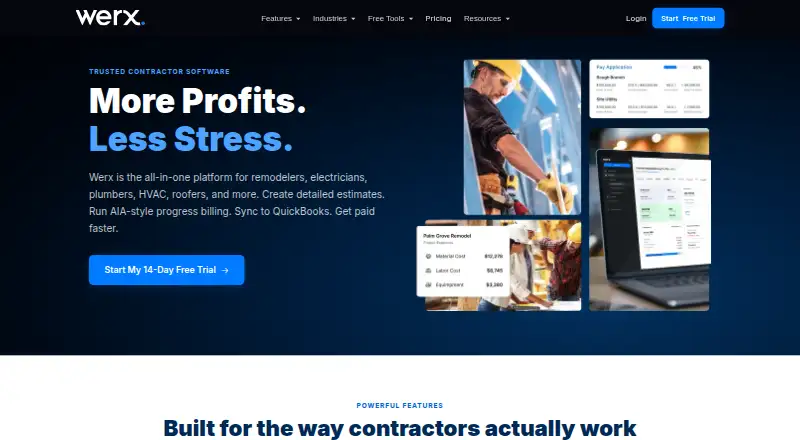
What Werx is
Werx is contractor management software for trade contractors, covering work from an estimate through final payment. Users can prepare itemized or proposal estimates for online client approval, manage AIA-style G702/G703 pay applications, schedules of values, and retainage, and track budget-to-actual costs and profitability by cost code. It also supports time-and-material invoicing with labor and material tracking. Werx syncs with QuickBooks Online in both directions, and that sync is included on every plan; QuickBooks Desktop is not supported. Customers can pay invoices online by credit card or ACH through Stripe. Its Field App for iOS and Android supports time tracking, Extra Work Authorizations, and customer signatures, while a full mobile version is described as coming soon. Plans are month-to-month: Essential costs $49 a month for 10 active projects, Plus costs $89 a month for 20, and Unlimited costs $119 a month for unlimited active projects. There is no free plan, but a 14-day trial requires no credit card. Werx says it is built for small-to-midsized contractors in trades including plumbing, electrical, HVAC, roofing, landscaping, and remodeling.
Good
- Supports AIA-style pay applications and retainage tracking.
- Tracks costs and profitability by cost code.
- QuickBooks Online sync is included on every plan.
- Field App supports time tracking and customer signatures.
- 14-day trial does not require a credit card.
Watch out
- No free plan is available.
- QuickBooks Desktop is not supported.
- Essential is limited to 10 active projects.
- Full mobile version is listed as coming soon.
Who it suits
Werx suits small-to-midsized trade contractors who need estimates, job costing, progress billing, and invoicing. Its listed trades include plumbing, electrical, HVAC, roofing, landscaping, and remodeling.
Verdict
Werx covers estimating, project costs, billing, and QuickBooks Online sync for trade contractors. Compare the active-project caps and note that QuickBooks Desktop and the full mobile version are not currently supported.
Plans and prices
From Werx's own pricing page, checked 8 Oct 2026.
| Plan | Price | What it gives you |
|---|---|---|
| Essential | $49 a month | 10 active projects · month-to-month |
| Plus | $89 a month | 20 active projects · month-to-month |
| Unlimited | $119 a month | Unlimited active projects · month-to-month |
The facts
Each one read from Werx's own pages, with the date it was checked.
What it does
- Estimates
- Users can create itemized or proposal estimates for clients to approve online.checked 8 Oct 2026
- Intended users
- Werx says it is built for small-to-midsized contractors and lists trades and services including plumbing, electrical, HVAC, roofing, landscaping, and remodeling.checked 8 Oct 2026
- Payments
- Customers can pay invoices online by credit card or ACH through Stripe; the site says typical payout is in two business days.checked 8 Oct 2026
- Privacy
- Werx says it does not sell personal information and may share information with service providers, including Stripe, hosting providers, and analytics services.checked 8 Oct 2026
- Product
- Werx is contractor management software for trade contractors, covering work from the first estimate through final payment.checked 8 Oct 2026
- Project limits
- Essential includes 10 active projects and Plus includes 20; inactive projects do not count toward the total.checked 8 Oct 2026
- QuickBooks
- Werx syncs with QuickBooks Online in both directions; QuickBooks sync is included on every plan, and QuickBooks Desktop is not supported.checked 8 Oct 2026
- Security
- Werx says it uses encryption in transit, secure data storage, and access controls, while noting it cannot guarantee absolute security.checked 8 Oct 2026
- Support
- All plans include unlimited email support and free setup help; the Help Center lists [email protected] for assistance.checked 8 Oct 2026
- Time and materials
- The platform supports time-and-material invoicing with labor and material tracking.checked 8 Oct 2026
The company
- Founded
- 2023checked 28 Sep 2026
- Headquarters
- Georgetown, Texas, United Stateschecked 28 Sep 2026
Money
- Job costing
- Werx tracks budget-to-actual costs and job profitability, including costs by cost code.checked 8 Oct 2026
- Progress billing
- Werx supports AIA-style G702/G703 pay applications, schedules of values, and retainage tracking.checked 8 Oct 2026
- Trial
- Werx offers a 14-day free trial with no credit card required, and says customers can cancel anytime.checked 8 Oct 2026
Where it runs
- Mobile app
- The Werx Field App is available on iOS and Android for time tracking, Extra Work Authorizations, and customer signatures; the site says a full mobile version is coming soon.checked 8 Oct 2026
The full review of Werx
Werx is contractor management software that carries trade jobs from estimating through billing and payment. It suits small and midsized plumbing, electrical, HVAC, roofing, landscaping, and remodeling businesses that need job-level financial control alongside field work. The main appeal is its connected estimating, progress-billing, costing, and accounting workflow; the main limitation is a still-narrow mobile experience and no QuickBooks Desktop support.
Overview
Werx brings estimates, project finances, invoicing, payments, and field activity into one contractor-focused system. Clients can approve itemized or proposal-style estimates online, giving a company a direct path from quote to active project. Property-management and client-portal capabilities are also included, so customers can remain part of the approval and billing process without relying solely on email.
This breadth makes Werx a better fit for contractors managing project economics than for a business seeking only a clock-in tool. Security measures include encryption in transit, secure storage, and access controls. Werx says it does not sell personal information, though it may share data with service providers such as Stripe, hosting companies, and analytics providers.
Key features
Estimating and project billing
Online estimate approval keeps the client decision connected to the job record. For contracts billed in stages, Werx supports AIA-style G702 and G703 pay applications, schedules of values, and retainage tracking. Those tools are particularly relevant to formal construction billing; a contractor doing only simple one-off invoices may not need this depth.
Cost control and invoicing
Job costing compares budgeted and actual spending, reports profitability, and organizes expenses by cost code. Time-and-material invoicing tracks labor and materials, helping firms bill changing scopes instead of forcing variable work into a fixed-price invoice. Customers can pay by card or ACH through Stripe, with Werx saying payouts typically arrive in two business days.
Accounting and field work
Two-way QuickBooks Online synchronization is included on every plan, so accounting connectivity is not reserved for a higher tier. QuickBooks Desktop users cannot use that integration. The iOS and Android Werx Field App handles time tracking, Extra Work Authorizations, and customer signatures. Werx says a full mobile version is coming soon, so companies expecting every web workflow on a phone should look elsewhere for now.
All plans include unlimited email support and free setup help. Customers can contact [email protected], which gives smaller firms a guided starting point without a separate implementation fee.
Pricing
Every subscription is billed month-to-month and starts with a 14-day trial that requires no credit card. Customers can cancel anytime. Inactive projects do not count toward the active-project allowance.
| Plan | Price | Active projects | Best for |
|---|---|---|---|
| Essential | $49 a month | 10 | Small contractors with a limited live workload |
| Plus | $89 a month | 20 | Growing firms running more simultaneous jobs |
| Unlimited | $119 a month | Unlimited | Contractors whose active-project count changes frequently |
Essential is the lowest-cost route to the full core workflow, but its 10-project ceiling can force careful project administration as a company grows. Plus doubles that allowance for an additional monthly charge. Unlimited is the logical choice for firms that would otherwise monitor the cap, though smaller businesses may pay for capacity they do not use. QuickBooks Online sync, support, and setup help apply across all three plans.
Platforms
Werx runs on the web and has apps for Android and iOS. The Field App covers field-specific actions rather than presenting the complete desktop experience, and the full mobile version is still forthcoming.
Who it's for
Werx is aimed at small-to-midsized trade contractors who estimate work, manage project budgets, submit progress applications, and invoice customers. It is especially suitable when cost-code profitability, retainage, or AIA-style billing matter. Businesses tied to QuickBooks Desktop, or those needing a fully featured mobile office today, should choose another platform.
Pros and cons
- Pro: Estimates, project costing, progress billing, and invoicing share one workflow, reducing the need to stitch together separate contractor tools.
- Pro: Two-way QuickBooks Online sync is included at every tier, so accounting integration does not require an upgrade.
- Pro: G702/G703 applications, schedules of values, and retainage support formal progress-billing processes.
- Con: QuickBooks Desktop is unsupported, excluding contractors committed to that edition.
- Con: The mobile app covers field tasks but not the full product, which limits phone-first administration.
- Con: Essential and Plus cap active projects at 10 and 20 respectively, creating a scaling constraint before Unlimited becomes necessary.
Alternatives
For a broader time-tracking comparison, see Construction Time Tracking Software. Trade-specific roundups include Concrete Contractor Software, Flooring Contractor Software, and Snow Removal Software.
- Fareclock is a paid option with Android, iOS, Linux, macOS, web, and Windows support; choose it when broad platform coverage and GPS time tracking or shift scheduling matter more than Werx's estimating and progress-billing workflow.
- BusyBusy offers a free plan with GPS time tracking, job costing, equipment tracking, and unlimited users; choose it when avoiding a subscription is the priority.
- Miter Job Costing uses custom quotes based on company size, headcount, and products; choose it when a tailored costing package is preferable.
- Rhumbix provides timekeeping and production tracking tiers; choose it when those field controls are the central requirement.
- Workyard starts at $6.00 per user per month when billed annually, with monthly billing also available; choose it when a lower stated entry price and workforce tracking are more important.
- ClockShark focuses on time and attendance, GPS, jobs, scheduling, approvals, and integrations; choose it for a dedicated workforce-time system.
- mJob emphasizes field time entry, GPS geofencing, compliance, automation, ERP integrations, and offline mode; choose it when those field and compliance functions lead the buying decision.
- QuickBooks Time offers Premium and Elite time plans; choose it when QuickBooks-centered time tracking is the goal rather than an end-to-end contractor project system.
Verdict
Choose Werx if you are a small or midsized trade contractor that wants estimates, job profitability, AIA-style progress billing, payments, and QuickBooks Online synchronization in one subscription. Its strongest reason to buy is the connected project-finance workflow, backed by unlimited support and a no-card 14-day trial. Look elsewhere if you require QuickBooks Desktop, a complete mobile counterpart to the web app, or a product dedicated primarily to workforce time tracking.
Alternatives to Werx
- 1

Fieseros
Free planAndroidiOSWebAPI8.1From $10 a month - 2

ContractorCounter
Free planAndroidiOSWebmacOS7.4From $10 a month - 3

BrickControl
AndroidiOSWebLinux7.2From $64 a month - 4
Readymix ERP by D4A
WebAPI6.8From $299 a year - 5

C-Ment Dispatch
AndroidiOSWeb6.7From $4,389 a year - 6

P2P Estimating
Free planWeb6.6From $99 a month