Rhumbix
Rhumbix is a workforce management platform for construction contractors that brings field labor and job-cost information together.
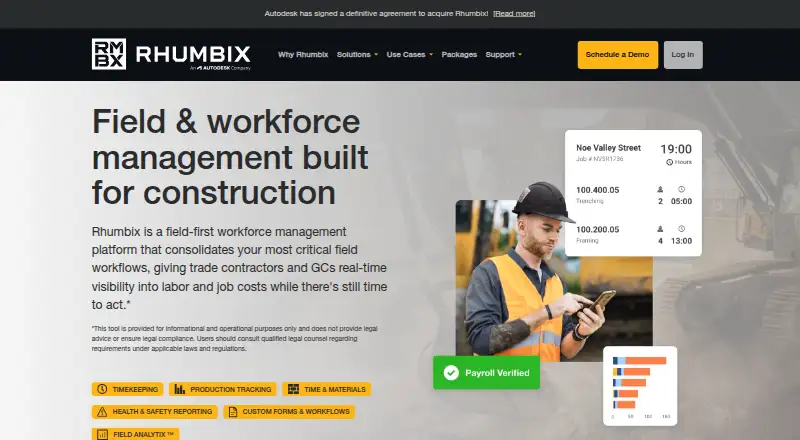
What Rhumbix is
Rhumbix is a workforce management platform for construction contractors that brings field labor and job-cost information together. Its timekeeping tools let workers record payroll-ready timecards, track hours, overtime, and mandated breaks, and clock in using a shared kiosk with identifiers such as PIN codes. Phone timecards can be captured offline and synced after reconnection. Other field workflows include production and materials tracking, daily construction reports, labor compliance reporting, and configurable customer forms. Field Analytix provides performance reporting, while Data Explorer supports custom report and dashboard building without code. Rhumbix lists connections to construction, finance, and project-management systems, bidirectional data flows, REST API endpoints for nearly all its data, and standard file exports. It supports Android, iOS, web, and API access. Pricing is provided on request, and each login counts as a user license. Rhumbix says Autodesk has signed a definitive agreement to acquire it.
Good
- Offline phone timecards sync after reconnection.
- Tracks hours, overtime, and mandated breaks.
- Includes production and time-and-materials workflows.
- Nearly all data has REST API endpoints.
Watch out
- No free plan is listed.
- Pricing requires contacting Rhumbix.
- Each login counts as a user license.
Who it suits
Rhumbix is aimed at construction owners, general contractors, and specialty contractors. Its field tools and reporting can serve project managers, field teams, and payroll or accounting teams.
Verdict
Rhumbix brings timekeeping, job workflows, and reporting into a construction-focused platform. Prospective customers need to request pricing and account for licenses per login.
Plans and prices
From Rhumbix's own pricing page, checked 4 Oct 2026.
| Plan | Price | What it gives you |
|---|---|---|
| Advanced | Priced on request | Plus features · Data Explorer · Enterprise Features |
| Essential — Timekeeping | Priced on request | Timekeeping · Production Tracking |
| Essential — Time & Materials | Priced on request | Time & Materials Tracking |
| Plus | Priced on request | Timekeeping · Production Tracking · Time & Materials Tracking · Daily Construction Reporting · Labor Compliance Reporting · Active Customer Forms |
The facts
Each one read from Rhumbix's own pages, with the date it was checked.
What it does
- Analytics
- Field Analytix provides reporting and performance insights, while Data Explorer is a no-code custom report and dashboard builder.checked 4 Oct 2026
- API
- The integrations page says nearly all Rhumbix data has publicly available REST API endpoints and mentions standard file exports.checked 4 Oct 2026
- Field workflows
- The platform includes production tracking, time and materials tracking, daily construction reports, labor compliance reporting, and configurable customer forms.checked 4 Oct 2026
- Integrations
- Rhumbix lists integrations with Procore, Autodesk, Oracle, SAP, Sage, Viewpoint, COINS, QuickBooks, and ComputerEase, and describes bidirectional data flows with ERP and project management systems.checked 4 Oct 2026
- Offline capture
- The pricing page says users can capture timecards offline on a phone and sync them after reconnecting.checked 4 Oct 2026
- Pricing constraint
- The pricing page directs prospective customers to contact Rhumbix for pricing; each individual with a login counts as a user license.checked 4 Oct 2026
- Product
- Rhumbix is a field-first workforce management platform for construction that gives contractors real-time visibility into labor and job costs.checked 4 Oct 2026
- Security
- Rhumbix says it is SOC 2 Type 2 compliant, encrypts data in transit and at rest, and stores data in a SOC, FISMA, and PCI DSS Level 1 compliant cloud; it also states a commitment to GDPR compliance.checked 4 Oct 2026
- Support
- Rhumbix offers support by email at [email protected] and lists phone support at 855-748-6249.checked 4 Oct 2026
- Timekeeping
- The timekeeping tools capture and submit detailed payroll-ready timecards from the field.checked 4 Oct 2026
- Who it serves
- Rhumbix describes its customers as owners, general contractors, and specialty contractors, including field teams, project managers, and payroll and accounting teams.checked 4 Oct 2026
Where it runs
- Clock and kiosk
- Clock-in and clock-out tracks hours, overtime, and mandated breaks, while Kiosk Mode lets workers clock using a shared device and unique identifiers such as PIN codes.checked 4 Oct 2026
The company
- Company status
- The homepage states that Autodesk has signed a definitive agreement to acquire Rhumbix.checked 4 Oct 2026
The full review of Rhumbix
Rhumbix is a construction workforce platform for contractors connecting field crews with project, payroll, and accounting teams. It is strongest when timekeeping needs to feed broader job workflows and cost reporting; teams seeking only a basic clock may find its scope and per-login licensing hard to justify.
Overview
Rhumbix combines field time capture with tools for tracking production, materials, compliance, and construction reporting. Workers can submit detailed, payroll-ready timecards, while clock-in and clock-out records hours, overtime, and mandated breaks. GPS tracking and job cost codes add job context to labor records, which can help teams follow labor and costs across projects.
Crews can clock in on a shared kiosk using unique identifiers such as PINs, or capture timecards offline on a phone and sync them after reconnecting. Those options suit jobsites with shared equipment or unreliable connectivity. The tradeoff is breadth: a company needing only attendance tracking may not benefit from adopting a larger field-workflow platform.
Key features
Field workflows and reporting
Production tracking, time and materials tracking, daily construction reports, labor compliance reporting, and configurable customer forms extend Rhumbix beyond timekeeping. Field Analytix provides reporting and performance insights; Data Explorer lets users build custom reports and dashboards without code. This range is useful for teams that want field activity and analysis in one system, though the value depends on whether they will use those additional workflows.
Integrations and data access
Rhumbix lists integrations with Procore, Autodesk, Oracle, SAP, Sage, Viewpoint, COINS, QuickBooks, and ComputerEase, and describes bidirectional data flows with ERP and project management systems. Nearly all Rhumbix data has public REST API endpoints, and standard file exports are also available. That flexibility can support organizations connecting field operations to existing business systems.
Security and support
Rhumbix says it is SOC 2 Type 2 compliant, encrypts data in transit and at rest, and stores data in a SOC, FISMA, and PCI DSS Level 1 compliant cloud. It also states a commitment to GDPR compliance. Support is available by email at [email protected] and by phone at 855-748-6249.
Pricing
Rhumbix uses custom pricing, with prospective customers directed to contact the company. There is no free plan. Each individual with a login counts as a user license, so the number of field workers and office staff who need access matters when estimating cost.
| Plan | Includes | Price |
|---|---|---|
| Essential — Timekeeping | Timekeeping and production tracking | Custom pricing |
| Essential — Time & Materials | Time and materials tracking | Custom pricing |
| Plus | Timekeeping, production and time and materials tracking, daily construction reporting, labor compliance reporting, and active customer forms | Custom pricing |
| Advanced | Plus features, Data Explorer, and enterprise features | Custom pricing |
The Essential options suit buyers prioritizing either timekeeping and production or materials tracking. Plus is the broader fit for teams that also need reporting, compliance, and customer forms; Advanced adds custom reporting and enterprise features. Because all plans require a quote, buyers should clarify which modules and login licenses are included before comparing costs.
Platforms
Rhumbix is available on Android, iOS, and the web, with an API for integrations and data access.
Who it's for
Rhumbix is designed for owners, general contractors, and specialty contractors, including field teams, project managers, and payroll and accounting teams. It is a particularly sensible fit when those groups need shared labor records and connected job workflows. Smaller teams looking for a standalone clock may be better served by a narrower product.
Pros and cons
- Pros: Payroll-ready timecards, kiosk clocking, and offline phone capture support varied jobsite conditions.
- Pros: Production, materials, reporting, compliance, and forms give contractors options beyond basic attendance tracking.
- Pros: Named ERP and project-management integrations, REST API endpoints, and file exports support data exchange with other systems.
- Cons: Custom pricing makes the cost harder to assess before contacting Rhumbix.
- Cons: Every login counts as a license, which can make broad field and office access a material cost consideration.
- Cons: Its wide workflow scope may be unnecessary for organizations that only need a simple time clock.
Alternatives
For a narrower comparison of construction timekeeping tools, browse Construction Time Tracking Software.
- Fareclock may suit teams looking for a paid time-tracking option with a free trial and a Pro plan that includes GPS time tracking and shift scheduling.
- BusyBusy is worth considering if a free plan with unlimited users is the priority; its paid Pro plan adds GPS breadcrumbing, supervisor tools, daily sign-offs, photos and notes, and scheduling.
- Miter Job Costing is another paid option with custom quotes based on company size, headcount, and products used.
- Werx offers a free trial and month-to-month plans with active-project limits, making it an alternative for buyers comparing project-based plan caps.
- Workyard offers a free trial and plans that start at $6 per user/month, with annual billing and monthly billing also available.
- ClockShark is an alternative with time and attendance tracking, GPS tracking, job and task tracking, scheduling, manager roles and approvals, and third-party integrations.
- mJob is an alternative with field time entry, GPS geofencing, labor law compliance, time automation, ERP integrations, and offline mode.
- QuickBooks Time is another paid web, iOS, and Android option with plans that include one admin.
Verdict
Choose Rhumbix if your contracting business needs field timekeeping tied to production, materials, compliance, and reporting, especially when offline capture and connections to ERP or project-management systems matter. Its broad workflow coverage is the main reason to choose it; custom pricing and per-login licenses are the main reasons to compare alternatives before committing.
Alternatives to Rhumbix
- 1
BusyBusy
Free planAndroidiOSWebAPI8.1From $9.99 a month - 2
QuickBooks Time
AndroidiOSWebAPI7.8From $20 a month - 3

Fareclock
Free planAndroidiOSWebLinux7.5Free plan - 4
Werx
AndroidiOSWeb7.0From $49 a month - 5

Workyard
AndroidiOSWebAPI7.0From $6 a month - 6
ClockShark
AndroidiOSWeb6.5