BusyBusy
BusyBusy is workforce software for managing field work, with web, iOS, and Android access.
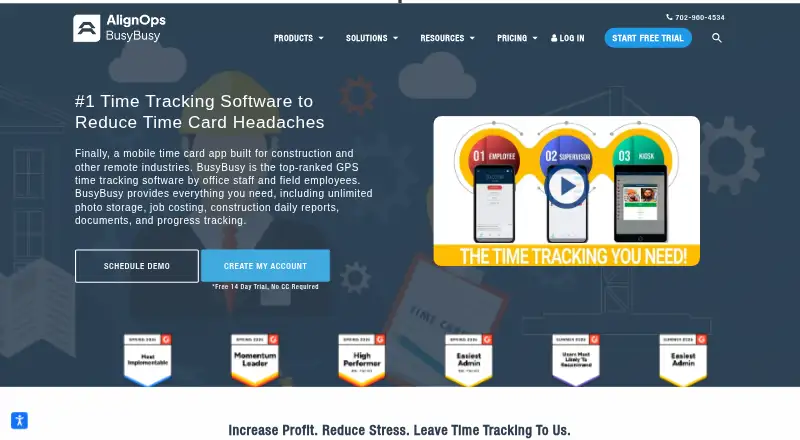
What BusyBusy is
BusyBusy is workforce software for managing field work, with web, iOS, and Android access. It includes geofencing, kiosk mode, and tools for tracking breaks and overtime. Payroll integrations are also listed. The Free plan costs nothing and supports unlimited users. Pro adds GPS breadcrumbing, supervisor tools, daily sign-offs, photos and notes, and scheduling; its price is not listed. Premium includes everything in Pro, along with documents, daily project reports, progress tracking, checklists, and team messaging; its price is also not listed. BusyBusy was founded in 2010 and is headquartered in Englewood, Colorado, United States. Its freemium model includes a free plan and a 14-day trial, giving teams a way to start without a listed subscription charge. The mix of mobile access and operational tools suits organizations that need to coordinate workers and record activity beyond a desktop setting.
Good
- Free plan supports unlimited users.
- Available on web, iOS, and Android.
- Includes geofencing and kiosk mode.
- Tracks breaks and overtime.
- Payroll integrations are listed.
Watch out
- Pro and Premium prices are not listed.
- The free plan includes a 14-day trial.
Who it suits
BusyBusy suits organizations coordinating field workers that need mobile access, attendance tracking, or payroll integrations. Its free plan supports unlimited users.
Verdict
BusyBusy brings field-work coordination and time-tracking tools together across web and mobile platforms. The free plan supports unlimited users, while GPS breadcrumbing, scheduling, and reporting features are listed in paid tiers.
Plans and prices
From BusyBusy's own pricing page, checked 15 Oct 2026.
| Plan | Price | What it gives you |
|---|---|---|
| Free | Free | GPS time tracking · job costing · equipment tracking · unlimited users · free account |
| Pro | $9.99 a month | GPS breadcrumbing · supervisor tools · daily sign-offs · photos & notes · scheduling · per user, per month, billed annually; +$40 Admin license (first user included) |
| Pro annual | $9.99 a month | GPS breadcrumbing · supervisor tools · daily sign-offs · photos and notes · scheduling · per user, per month, billed annually; +$40 admin license (first user included) |
| Pro monthly | $11.99 a month | GPS breadcrumbing · supervisor tools · daily sign-offs · photos and notes · scheduling · per user, per month, billed monthly; +$40 admin license (first user included) |
| Pro | $11.99 a month | GPS breadcrumbing · supervisor tools · daily sign-offs · photos & notes · scheduling · per user, per month, billed monthly; +$40 Admin license (first user included) |
| Premium annual | $14.99 a month | Everything in Pro · documents · daily project reports · progress tracking · checklists · team messaging · video and photo markups · Zapier · PPE scans · per user, per month, billed annually; +$40 admin license (first user included) |
| Premium | $14.99 a month | Everything in Pro · documents · daily project reports · progress tracking · checklists · team messaging · video & photo markups · Zapier · per user, per month, billed annually; +$40 Admin license (first user included) |
| Premium | $17.99 a month | Everything in Pro · documents · daily project reports · progress tracking · checklists · team messaging · video & photo markups · Zapier · per user, per month, billed monthly; +$40 Admin license (first user included) |
| Premium monthly | $17.99 a month | Everything in Pro · documents · daily project reports · progress tracking · checklists · team messaging · video and photo markups · Zapier · PPE scans · per user, per month, billed monthly; +$40 admin license (first user included) |
The facts
Each one read from BusyBusy's own pages, with the date it was checked.
What it does
- API and extensibility
- The help center documents connection through a BusyBusy integration API key that administrators can revoke; no public SDK is described there.checked 15 Oct 2026
- Budgets
- Budget reports compare estimated labor costs or hours with current actuals.checked 15 Oct 2026
- Daily reports
- Customizable daily project reports can include employees onsite, hours, injuries, weather, photos and equipment.checked 15 Oct 2026
- Deployment
- TrustRadius classifies BusyBusy as SaaS and lists Apple iOS and Android mobile applications.checked 15 Oct 2026
- Documentation
- The public help center lists 218 admin articles, 21 supervisor articles, 35 employee articles, 11 equipment guides, 45 operations articles, 95 safety articles and 16 integration articles.checked 15 Oct 2026
- GPS
- The product provides live GPS locations for employees, equipment, and projects on a map.checked 11 Oct 2026
- GPS privacy
- BusyBusy says it records location pins only while an employee is clocked in, during clock actions, photos or significant movement.checked 15 Oct 2026
- GPS tracking
- The product records GPS locations for employees, equipment and projects and shows them on maps.checked 15 Oct 2026
- Integrations
- Official integration listings include Procore, QuickBooks, CompanyCam, ADP, Sage, Viewpoint, Foundation, ComputerEase and Zapier.checked 15 Oct 2026
- Intended users
- BusyBusy describes its time tracking app as designed for construction crews and the construction industry.checked 11 Oct 2026
- Limit: automation and compliance
- An independent 2026 review says BusyBusy lacks advanced automation, paid-break enforcement, scheduling rules and compliance controls.checked 15 Oct 2026
- Limit: connectivity
- Reviewers report slow photo, note and report loading when cellular service is weak.checked 15 Oct 2026
- Limit: integrations
- App Store reviewers report failed or difficult Procore integrations and complaints about promised functionality during implementation.checked 15 Oct 2026
- Limit: location concerns
- App Store reviewers question background location behavior and report inaccurate or intrusive location prompts.checked 15 Oct 2026
- Limit: pricing
- A Capterra reviewer considered roughly $10 per user monthly expensive for a large team despite describing the product as easy to use.checked 15 Oct 2026
- Limit: reliability
- Capterra and G2 reviews mention glitches, inconsistent data entry and occasional reliability problems.checked 15 Oct 2026
- Limit: report sharing
- An independent review says reports are mainly downloadable as CSV and cannot be scheduled by email or shared through links.checked 15 Oct 2026
- Offline mode
- The mobile time clock can operate in offline mode when crews lack cellular coverage.checked 15 Oct 2026
Where it runs
- App system details
- The iOS listing supports iPhone and iPad, is 269.8 MB and has a 4+ age rating; Google Play reports 100K+ downloads.checked 15 Oct 2026
The company
- Company history
- BusyBusy’s announcement says ToolWatch acquired the company in December 2023.checked 11 Oct 2026
- Company size
- LinkedIn lists BusyBusy by AlignOps as privately held with 51–200 employees and headquarters in St. George, Utah.checked 15 Oct 2026
- Founded
- The parent company history places BusyBusy's GPS time-tracking launch in 2010.checked 15 Oct 2026
- Headquarters
- The contact page gives the address as 965 S Tech Ridge Dr #120, St George, UT 84770.checked 11 Oct 2026
Money
- Job costing
- Job-costing data can be filtered by project, employee, cost code, equipment and date.checked 15 Oct 2026
The full review of BusyBusy
Overview
BusyBusy is a time-tracking and workforce management app founded in 2010 and headquartered in Englewood, Colorado. It offers web, iOS, and Android access, with a mobile app and tools including geofencing, kiosk mode, break tracking, overtime tracking, and payroll integrations.
The plan structure ranges from a free option to paid tiers whose prices are not listed. Features named for the higher tiers point to a focus on tracking time and supporting supervisors and project teams: Pro adds GPS breadcrumbing, supervisor tools, daily sign-offs, photos and notes, and scheduling. Premium includes those Pro features plus documents, daily project reports, progress tracking, checklists, and team messaging.
For readers comparing tools by use case, see our Construction Time Tracking Software, Attendance Tracking Software, and Employee Time Tracking Software lists.
Key features
Time and attendance tracking
BusyBusy supports break and overtime tracking. Geofencing and kiosk mode are also listed, alongside payroll integrations. The available details do not specify which payroll systems integrate or how these tracking tools are configured.
Project and supervisor tools
The Pro tier includes GPS breadcrumbing, supervisor tools, daily sign-offs, photos and notes, and scheduling. Premium adds documents, daily project reports, progress tracking, checklists, and team messaging. This tier distinction helps clarify which listed capabilities are reserved for the higher plans.
Mobile access
BusyBusy has mobile apps for iOS and Android, as well as a web platform. That gives teams multiple ways to access the software, though the available details do not describe specific workflows for each platform.
Pricing
BusyBusy uses a freemium model, with a free plan and a 14-day trial listed. The Free plan costs nothing and supports unlimited users. Pro and Premium prices are not listed, so their costs cannot be compared from the available pricing details.
| Plan | Price | Listed features |
|---|---|---|
| Free | free | Unlimited users |
| Pro | Price not listed | GPS breadcrumbing, supervisor tools, daily sign-offs, photos and notes, scheduling |
| Premium | Price not listed | Everything in Pro, plus documents, daily project reports, progress tracking, checklists, team messaging |
Platforms
BusyBusy is available on the web, iOS, and Android. A mobile app is listed, but the available details do not specify differences in features across platforms.
Who it's for
BusyBusy may suit organizations that need time and attendance tools alongside supervisor or project-management features. Its listed capabilities cover breaks, overtime, geofencing, kiosk mode, payroll integrations, scheduling, sign-offs, project reports, and team messaging. Teams should weigh the free plan's unlimited-user allowance against the fact that prices for Pro and Premium are not listed, particularly if they need those higher-tier features.
Construction and field-work buyers can compare it with QuickBooks Time, Workyard, ClockShark, Hammr Time, and eBacon. For attendance-focused comparisons, consider Fareclock, CausewayOne Attendance, and Werx.
Pros and cons
- Pros: A free plan is listed with unlimited users; web, iOS, and Android are supported; the feature set includes break and overtime tracking, geofencing, kiosk mode, and payroll integrations.
- Cons: Pro and Premium prices are not listed; the available details do not identify supported payroll systems or explain platform-specific capabilities.
Verdict
BusyBusy presents a broad set of time-tracking and team features across web and mobile, with a free plan that allows unlimited users. Its tier descriptions make the added Pro and Premium capabilities clear, but the missing prices for both paid plans make cost evaluation difficult. It is worth considering for teams whose needs align with the listed tracking, supervisor, and project tools, provided they confirm plan pricing and integration details before choosing.
Getting started
- Visit https://busybusy.com/
- Choose the Free plan or start the 14-day trial
- Use BusyBusy on Android, iOS or the web
- Set up employee time, projects or cost codes
Limits worth knowing
The Free plan lists GPS time tracking, job costing, equipment tracking and unlimited users. GPS breadcrumbing, supervisor tools, daily sign-offs, photos and notes, and scheduling are listed for Pro; Premium adds documents, reports, progress tracking, checklists and team messaging.
Questions
Does BusyBusy have a free plan?
Yes. The Free plan is listed as free and includes GPS time tracking, job costing, equipment tracking and unlimited users.
Is there a free trial?
Yes. BusyBusy offers a 14-day trial.
Which platforms does BusyBusy support?
BusyBusy is available on Android, iOS and the web.
Can BusyBusy work offline?
Offline mode is listed for Free, Pro and Premium plans.
What integrations are listed?
They include Zapier, QuickBooks Online, Sage Intacct, Viewpoint Spectrum, Procore, Sage 300, Viewpoint Vista, CompanyCam and ADP.
What do Pro and Premium add?
Pro lists GPS breadcrumbing, supervisor tools, daily sign-offs, photos and notes, and scheduling. Premium includes everything in Pro plus documents, daily project reports, progress tracking, checklists and team messaging.
Alternatives to BusyBusy
- 1

Harvest
Free planAndroidiOSWebmacOS8.3From $9 a month - 2

TimeCamp
Free planAndroidiOSWebLinux8.1From $3.99 a month - 3

Timesheets.com
Free planAndroidiOSWebAPI8.1From $4.40 a month - 4
Yaware.TimeTracker
Free planAndroidiOSWebAPI8.1From $3.20 a month - 5

Clockify
Free planAndroidiOSLinuxmacOS8.0From $0.79 a month - 6

Jibble
Free planAndroidiOSWebAPI8.0From $4.49 a month