
Harvest
Harvest is time-tracking software with invoicing for professional teams.
What Harvest is
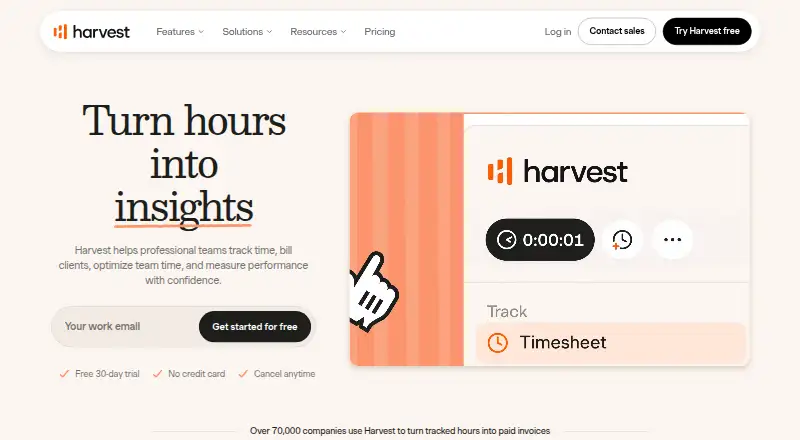
Harvest is time-tracking software with invoicing for professional teams. Users can record time with one-click timers, timesheets, or calendar imports, and offline tracking is supported. Tracked time and expenses can be used to create invoices with online payments. Project tracking, billable time, timesheet approvals, and data export are included. Team administration offers permissions, capacity planning, roles, and rates. Harvest is available on the web, Android, iOS, macOS, and Windows. Its free plan is intended for individual freelancers and includes one seat and two projects. Teams pricing is listed at $11 a month, or $9 a month when billed annually; annual billing gives a 20% discount. A 30-day trial does not require a credit card, but the trial account is deactivated if it is not upgraded afterward. Paid team plans list scheduled phone support. Harvest also lists integrations with accounting tools including Stripe, QuickBooks Online, Xero, and Deel.
Good
- Logs time through timers, timesheets, and calendar imports.
- Offline tracking is supported.
- Creates invoices from tracked time and expenses.
- Supports timesheet approvals and data export.
- Available on web, mobile, and desktop platforms.
Watch out
- Free plan is limited to one seat and two projects.
- Trial account is deactivated if not upgraded after 30 days.
- Teams monthly pricing is $11 a month.
Who it suits
Harvest suits professional teams that need to track billable time and turn logged time and expenses into invoices. Its free plan is specifically described for individual freelancers with one seat and two projects.
Verdict
Harvest brings time tracking, team administration, and invoicing together across web, mobile, and desktop platforms. The free plan is narrow, so teams should consider its seat and project limits when choosing a plan.
Plans and prices
From Harvest's own pricing page, checked 28 Sep 2026.
| Plan | Price | What it gives you |
|---|---|---|
| Free | Free | Built for individual freelancers; includes 1 seat and 2 projects. · 1 seat · 2 projects · $0 forever |
| Teams | $11 a month | Unlimited seats · Monthly pricing |
| Enterprise | — | Unlimited seats |
| Enterprise Plus | Priced on request | For organizations that need Harvest tailored to their business. · Custom integrations · Product customization · Dedicated Customer Success Manager · Custom onboarding and training · Assisted data migration · White labelling |
| Teams annual | $9 a month | For teams that need to track, analyze, and invoice time. · $108 per seat, billed annually |
| Teams monthly | $11 a month | 30-day free trial. |
| Enterprise annual | $14 a month | For teams with advanced reporting and administrative needs. · $168 per seat, billed annually |
| Enterprise monthly | $17.50 a month | 30-day free trial. |
The facts
Each one read from Harvest's own pages, with the date it was checked.
What it does
- Accounting integrations
- Stripe, QuickBooks Online, Xero, Deel, and others.checked 28 Sep 2026
- Annual discount
- Paying yearly gives a 20% discount.checked 28 Sep 2026
- Billable time
- Yeschecked 20 Sep 2026
- Business count
- 70K+ businesses trust Harvest.checked 28 Sep 2026
- Core product
- Time tracking software with invoicing.checked 28 Sep 2026
- Data export
- Yeschecked 20 Sep 2026
- Integrations
- 40+ integrations on homepage; pricing compare says 50+ core integrations.checked 28 Sep 2026
- Invoicing payments
- Invoices from tracked time and expenses with online payments.checked 28 Sep 2026
- Offline tracking
- Yeschecked 20 Sep 2026
- Paid from
- 9checked 20 Sep 2026
- Project tracking
- Yeschecked 20 Sep 2026
- Support option
- Scheduled phone support is listed for paid team plans.checked 28 Sep 2026
- Target users
- Professional teams.checked 28 Sep 2026
Money
- Billing options
- Credit card monthly or yearly; ACH or bank transfer for 10+ seats yearly.checked 28 Sep 2026
- Free limits
- Free plan includes 1 seat and 2 projects.checked 28 Sep 2026
- Free plan
- Yeschecked 20 Sep 2026
- Free trial
- Free, fully functional 30-day trial.checked 28 Sep 2026
The company
- Company owner
- Copyright names Bending Spoons Operations S.p.A.checked 28 Sep 2026
- Founded
- 2006checked 23 Sep 2026
- Headquarters
- Milan, Italychecked 23 Sep 2026
- Large teams
- Personalized consultation for teams with 50+ seats.checked 28 Sep 2026
Where it runs
- Desktop app
- Yeschecked 20 Sep 2026
- Mobile apps
- bothchecked 20 Sep 2026
- Platforms
- Web, desktop, and mobile apps; macOS, Windows, iOS, Android.checked 28 Sep 2026
The full review of Harvest
Overview
Harvest is time-tracking and invoicing software for professional teams that need to turn recorded work into client bills. It is strongest when time capture, review, and billing belong in one workflow; its free tier is too small for most teams.
It combines project tracking, billable time, approvals, and data export. The maker, Harvest, was founded in 2006 and is headquartered in Milan, Italy.
Harvest sits across Time Tracking Software, Time and Expense Software, Time Billing Software, and Employee Time Tracking Software.
Key features
Time entry and billing
One-click timers, timesheets, and calendar imports give teams several routes for capturing work. Offline tracking is also supported, useful when a connection is unavailable. Project and billable-time tracking help organize hours for client work; tracked time and expenses can then feed into invoices with online payments. That joined-up path is the main reason to choose Harvest over a tracker focused only on logging hours.
Team controls and integrations
Approvals, permissions, roles, rates, and capacity planning give managers ways to oversee submitted time and coordinate team availability. Harvest also connects with accounting services including Stripe, QuickBooks Online, Xero, and Deel. The homepage cites 40+ integrations, while the pricing comparison cites 50+ core integrations; either way, the product has a broad integration offering, though teams should verify that a required connection is included.
Pricing
The Free plan costs $0 forever and is built for individual freelancers, with one seat and two projects. It is a practical way for a solo user to try basic tracking, but the project cap makes it a poor fit for someone handling several concurrent clients or jobs.
Teams costs $11.00 per month on monthly billing, or $9.00 per month with annual billing at $108 per seat, billed annually. It includes unlimited seats and a 30-day free trial on the monthly option. The annual rate is 20% lower, but commits the buyer to an annual per-seat charge. This is the core choice for teams needing time tracking, analysis, and invoicing.
Enterprise costs $17.50 per month on monthly billing, or $14.00 per month with annual billing at $168 per seat, billed annually. It is aimed at teams with advanced reporting and administrative needs; those needs make the premium over Teams relevant, while smaller groups without them may not benefit enough to justify it. The 30-day trial is available on the monthly option.
Enterprise Plus has custom pricing and is intended for organizations that need a tailored setup. It adds custom integrations, product customization, a dedicated Customer Success Manager, custom onboarding and training, assisted data migration, and white labelling. It is the option for organizations requiring those services, not a routine upgrade for teams looking only to track time and invoice.
The trial requires no credit card, but the account is deactivated after 30 days if it is not upgraded. Credit-card payments are available monthly or yearly; ACH or bank transfer is available for annual plans with 10 or more seats. Teams with 50 or more seats can request a personalized consultation.
Platforms
Harvest is available on Android, iOS, macOS, the web, and Windows. Mobile apps cover both Android and iOS, and a desktop app is available. This range suits teams whose members switch between phones and computers, rather than a group committed to a single operating system.
Who it's for
Harvest is best suited to professional teams that bill for time and want managers to review entries before those hours become invoices. Its combination of approvals, team administration, and billing is more relevant to that workflow than the one-seat, two-project free plan. Freelancers with only a couple of projects may be comfortable staying free; growing teams should budget per seat.
Pros and cons
- Pro: Tracked time and expenses can flow into invoices with online payment, keeping work records close to billing.
- Pro: Approvals, permissions, roles, rates, and capacity planning support team oversight beyond simple time capture.
- Pro: Android, iOS, macOS, web, and Windows support gives distributed teams multiple ways to use the product.
- Con: The free plan stops at one seat and two projects, so it leaves little room for a growing team or a freelancer managing many jobs.
- Con: Paid team pricing is per seat, making the annual commitment and headcount material budget considerations.
Alternatives
Consider Clockify if a free plan for up to five users matters more than Harvest’s time-to-invoice workflow; its listed platforms also include Linux. Choose Invoice Ninja when invoicing is the priority: its free plan includes five clients, unlimited invoicing, and 11 invoice templates, with support across web and self-hosted options.
Avaza may suit teams comparing a broader free allocation for project collaborators, though its free plan limits timesheet/expense, admin/finance, and resource-scheduling users to one each. Paymo is another free-plan option, with one user, one client, two projects, and 1 GB of storage.
Teamwork.com offers a free plan for five projects and five users, so it is worth considering when those caps fit the group. Bill4Time has a $49.00 per month Time & Billing plan covering time tracking, task and client management, a client portal, and expense management.
Deltek Maconomy is an enterprise ERP for professional services firms, with pricing by demo request. Scoro offers a Time-billing plan at $17 a month, shown as €15 $17 £13 $24.5 $24 per user / month, for its Track and Invoice apps; compare it when that plan's stated scope better matches your needs.
Verdict
Choose Harvest if your professional team needs one system for capturing billable work, approving time, and turning hours and expenses into invoices. Its range of team controls and platforms supports that workflow, but the free tier is a narrow trial-sized fit for most organizations, and paid per-seat costs should be weighed against team size. Look elsewhere if a larger free allowance or a different product focus matters more than integrated time tracking and invoicing.
Getting started
- Visit https://www.getharvest.com/.
- Choose the Free plan or start the 30-day trial.
- Use the web service or an Android, iOS, macOS, or Windows app.
- Set up time entry with timers, timesheets, or calendar imports.
- Use tracked time and expenses to create invoices with online payments.
- Choose monthly or annual billing if upgrading; annual billing gives a 20% discount.
Limits worth knowing
The Free plan includes one seat and two projects. The 30-day trial account is deactivated if it is not upgraded after 30 days.
Questions
What does Harvest cost?
The Free plan is free. Teams is $11 a month, or $9 a month per seat when billed annually; the annual listing is 108 USD per seat, billed annually.
What is included in the free plan?
It includes one seat and two projects and is built for individual freelancers.
Does Harvest offer a free trial?
Yes. The trial lasts 30 days and does not require a credit card. The account is deactivated if it is not upgraded after the trial.
Which platforms does Harvest support?
Harvest supports Android, iOS, macOS, web, and Windows, with mobile and desktop apps.
What can Harvest do with tracked time?
It tracks billable time and projects, and tracked time and expenses can be turned into invoices with online payments.
Which integrations are listed?
Accounting integrations include Stripe, QuickBooks Online, Xero, and Deel, among others.
Alternatives to Harvest
- 1
TMetric
Free planAndroidiOSWebAPI8.9From $7 a month - 2

Clockify
Free planAndroidiOSLinuxmacOS8.8From $0.79 a month - 3

TimeCamp
Free planAndroidiOSWebLinux8.8From $3.99 a month - 4

Paymo
Free planAndroidiOSWebAPI8.8Free plan - 5
Toggl Track
Free planAndroidiOSWebExtension8.7From $9 a month - 6

Jibble
Free planAndroidiOSWebAPI8.7From $4.49 a month