Vmake AI Video Enhancer
Vmake AI Video Enhancer is a browser-based tool for improving video resolution and clarity, with output up to 8K.
What Vmake AI Video Enhancer is
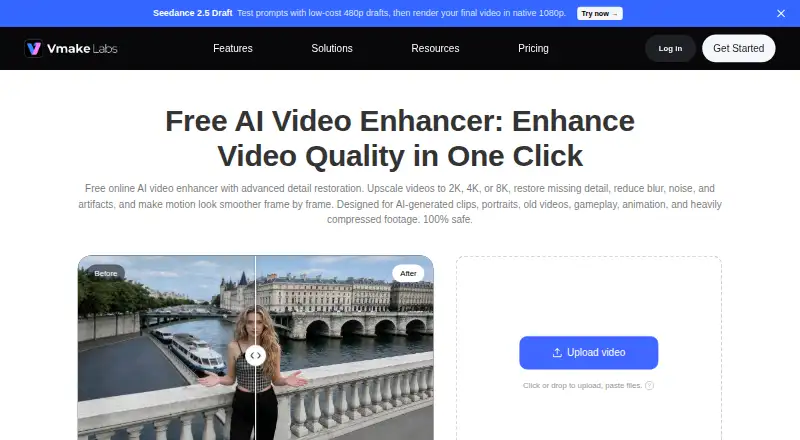
Vmake AI Video Enhancer is a browser-based tool for improving video resolution and clarity, with output up to 8K. It is presented for restoring detail and reducing blur, noise, and artifacts. Users can have it choose an enhancement model automatically or select a resolution, with modes including Portrait, Product, Low-light, Gaming, Anime, Fast, Detail, and Cinematic. AI super resolution and frame interpolation are described as ways to improve image clarity and motion smoothness. It accepts MP4, MOV, M4V, 3GP, and AVI files and can process multiple videos at once. The Free plan costs nothing, offers 20 credits daily valid for one day, limits AI 4K+ to 5 seconds, and exports video up to 720p. Plus and Pro list monthly credits and file quotas, but no prices are provided. The enhancer page says uploaded and enhanced files are automatically deleted after 7 days and only the user can view and edit them. Vmake lists Android, iOS, and web availability.
Good
- Enhances video at resolutions up to 8K.
- Includes eight enhancement modes.
- Supports five video upload formats.
- Can enhance multiple videos at once.
- Files are deleted after 7 days.
Watch out
- Free AI 4K+ use is limited to 5 seconds.
- Free exports are limited to 720p.
- Free credits expire after one day.
Who it suits
Vmake describes the enhancer for content creators, affiliate creators, brand and marketing teams, and game streamers. It may suit people who want browser-based video enhancement with multiple modes and batch processing.
Verdict
Vmake combines resolution enhancement, frame interpolation, and several targeted modes in a browser-based tool. Check the Free plan’s time and export limits against your needs before choosing it.
Plans and prices
From Vmake AI Video Enhancer's own pricing page, checked 4 Oct 2026.
| Plan | Price | What it gives you |
|---|---|---|
| Free | Free | 20 credits daily, valid for 1 day · enhancer: 5 seconds · video export up to 720p |
| Plus | — | 1,000 credits/month, valid for 30 days · enhancer: 10 files/day · AI 4K+: 10 files/month · video export up to 1080p |
| Pro | — | 4,500 credits/month, valid for 30 days · enhancer: 50 files/day · AI 4K+: 50 files/month · video export up to 2K for editing and 4K for generation |
The facts
Each one read from Vmake AI Video Enhancer's own pages, with the date it was checked.
What it does
- Batch processing
- The enhancer page says users can enhance multiple videos at once.checked 4 Oct 2026
- Business focus
- Vmake describes its broader studio as serving small businesses and creators making social media content.checked 4 Oct 2026
- Enhancement models
- It can automatically choose an enhancement model or let users select a resolution, with specialized modes for Portrait, Product, Low-Light, Gaming, and Anime.checked 4 Oct 2026
- File retention
- The enhancer page says uploaded and enhanced files are automatically deleted after 7 days and only the user can view and edit them.checked 4 Oct 2026
- Formats
- The enhancer accepts MP4, MOV, M4V, 3GP, and AVI uploads.checked 4 Oct 2026
- Integrations
- Vmake's developer page describes using its media workflows with Claude Code through VmakeSkill, including video quality enhancement.checked 4 Oct 2026
- Motion and detail
- The page describes AI super resolution and frame interpolation to improve image clarity, output resolution, and motion smoothness.checked 4 Oct 2026
- Privacy disclosures
- The privacy policy says AI feature inputs and generated outputs may contain personal information and may be processed, and that service providers can include cloud infrastructure providers.checked 4 Oct 2026
- Purpose
- The browser-based enhancer upscales videos to 2K, 4K, or 8K and is presented for restoring detail and reducing blur, noise, and artifacts.checked 4 Oct 2026
- Support
- The pricing page lists live chat and email support, and the enhancer page gives [email protected].checked 4 Oct 2026
- Who it serves
- The page describes use by content creators, affiliate creators, brand and marketing teams, and game streamers.checked 4 Oct 2026
The company
- Company
- The site identifies Starii Tech Pty Ltd as the company and says Vmake Labs is built in Palo Alto.checked 4 Oct 2026
Money
- Free usage limits
- The pricing table lists 5 seconds for AI 4K+ and one file for DE-AI on the Free plan; the paid tiers list daily or monthly file quotas.checked 4 Oct 2026
Where it runs
- Other platform apps
- Vmake provides iOS and Android app downloads; the App Store listing also specifies Mac compatibility on Apple silicon.checked 4 Oct 2026
The full review of Vmake AI Video Enhancer
Overview
Vmake AI Video Enhancer is a browser-based tool for increasing video resolution and improving clarity and motion. It suits creators and marketing teams who want several enhancement modes in one workflow, but the Free plan’s short 4K+ allowance and 720p export cap make it a limited option for finished, high-resolution work.
It accepts MP4, MOV, M4V, 3GP, and AVI uploads, and can process multiple videos at once. Uploaded and enhanced files are automatically deleted after seven days; only the user can view and edit them. AI inputs and outputs may contain personal information and may be processed by service providers, including cloud infrastructure providers, so sensitive footage deserves care.
Key features
Resolution and targeted enhancement
Vmake offers AI super resolution up to 8K, with automatic model selection or manual resolution selection. Portrait, Product, Low-Light, Gaming, and Anime modes address distinct kinds of footage; Fast, Detail, and Cinematic are also available. This range is useful when a creator handles varied material, though the Free plan’s 720p export limit constrains the practical result on that tier.
Motion and batch work
Frame interpolation is intended to smooth motion as well as enhance image clarity. Batch processing can save time when several clips need treatment, but the paid plans’ daily file quotas still matter for teams with regular workloads.
Apps and integrations
Vmake has Android and iOS apps as well as its browser-based enhancer; its App Store listing also specifies Mac compatibility on Apple silicon. Its developer page describes using Vmake media workflows, including video quality enhancement, through VmakeSkill with Claude Code. API access is also available.
Pricing
Vmake uses a freemium model. Free is free and provides 20 credits daily, valid for one day, one DE-AI file, five seconds for AI 4K+, and video export up to 720p. It is suitable for brief, low-resolution needs, not sustained high-resolution work.
Plus has no published price. It includes 1,000 credits per month, valid for 30 days, up to 10 enhancer files per day, 10 AI 4K+ files per month, and export up to 1080p. It raises the export ceiling over Free but still caps AI 4K+ use monthly.
Pro also has no published price. For 4,500 credits per month, valid for 30 days, it allows up to 50 enhancer files per day and 50 AI 4K+ files per month. Export reaches 2K for editing and 4K for generation. That higher quota and export ceiling suit heavier workloads; the monthly AI 4K+ allowance remains a limit to plan around. The pricing page lists live chat and email support, and Vmake gives [email protected].
Platforms
Vmake supports Android, iOS, and web. Mac compatibility on Apple silicon is specified for the iOS app listing. The browser enhancer accepts MP4, MOV, M4V, 3GP, and AVI files.
Who it's for
Content creators, affiliate creators, brand and marketing teams, and game streamers are the clearest fit, particularly when they need specialized enhancement modes or batch processing. Vmake’s broader studio is aimed at small businesses and creators making social media content. Users handling sensitive footage should weigh the stated processing and cloud-provider disclosures alongside the seven-day deletion policy.
Pros and cons
- Pros: Output up to 8K, frame interpolation, and several specialized modes cover more than basic upscaling.
- Pros: Batch processing and five accepted video formats suit varied clip workflows.
- Pros: Android, iOS, web, and API access provide multiple ways to use the service.
- Cons: Free exports top out at 720p, with only five seconds for AI 4K+ and one DE-AI file.
- Cons: Plus and Pro have monthly AI 4K+ file quotas, and neither has a published price.
- Cons: Files are automatically deleted after seven days, while AI inputs and outputs may be processed by service providers.
Alternatives
AI Video Upscalers is the category directory for readers comparing more tools. Choose Cutout.Pro if broader platform coverage, including Linux, Windows, and API access, is a priority; its subscription starts at $5 a month for 80 credits, billed monthly.
Media.io AI Video Upscaler is worth considering if a free trial with 720p exports, a watermark, and 1GB cloud storage better matches the job. For an open-source model with downloadable packages and no paid tiers or stated usage limits, consider Real-CUGAN. NextGenUp is another free option, described as open-source under MIT, without a subscription or watermark.
Choose REAL Video Enhancer if a free desktop application for Linux, macOS, or Windows is the fit. Aiarty Video Enhancer may suit users seeking a paid Mac or Windows option; its free version limits videos to under 120 seconds, adds watermarks, and lacks batch export. Free AI Video Upscaler is a straightforward alternative for Android or web users seeking unlimited free use, no signup or watermark, and output up to 4K. Real-ESRGAN is a free, open-source option for readers who prefer that approach.
Verdict
Vmake is a strong fit for creators and small teams who want resolution enhancement, motion smoothing, specialized modes, and batch handling across common video formats. Its main advantage is the breadth of its enhancement workflow; its main drawback is that useful high-resolution work runs into tier quotas and paid-plan prices are unpublished. Choose it if those capabilities fit your workflow and the limits suit your volume; look elsewhere if you need predictable high-resolution capacity or a clearly priced plan.
Alternatives to Vmake AI Video Enhancer
- 1
TensorPix
Free planAndroidiOSWebAPI8.3From $5.50 a month - 2
Cutout.Pro
Free planAndroidiOSWebAPI8.2From $5 a month - 3

Media.io AI Video Upscaler
Free planAndroidiOSWebAPI8.1From $167.88 a year - 4
HitPaw VikPea
AndroidiOSWebAPI7.8From $99.99 a year - 5

Pixop
Free planWebAPILinuxSelf-hosted7.6From $0.02 a month - 6

UniFab Video Enhancer Pro
WebmacOSWindows7.2From $89.99 a year