REAL Video Enhancer
REAL Video Enhancer is a free application for processing video on Windows, Linux, and macOS.
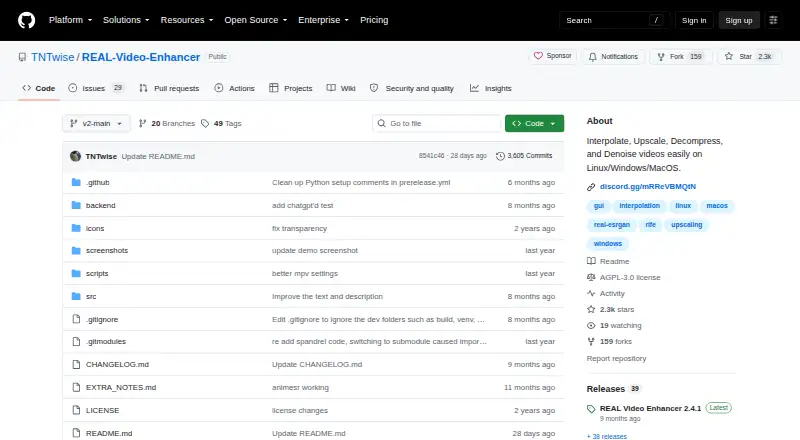
What REAL Video Enhancer is
REAL Video Enhancer is a free application for processing video on Windows, Linux, and macOS. It provides frame interpolation, upscaling, decompression, and denoising, and supports batch processing. Interpolation models include RIFE, GMFSS, and IFRNet; an example use is changing video from 24 to 48 FPS. Upscaling options include SPAN, OpenProteus, AnimeJaNai, AniSD, and AnimeSR, while DeH264 handles decompression and DRUnet and DnCNN are listed for denoising. Scene-change detection is included to preserve sharp transitions, and the application previews its latest rendered frame. Compute options are TensorRT for NVIDIA RTX GPUs, PyTorch for CUDA 12.6- or ROCm 6.2-capable GPUs, and NCNN for Vulkan 1.3-capable GPUs. The listed minimum requirements include a dual-core x64 CPU, Vulkan 1.3-capable GPU, and 16 GB RAM; NCNN also requires 4 GB VRAM and 1 GB free storage. TensorRT optimization can fail with limited VRAM, for which CUDA or NCNN are suggested alternatives. The project is AGPL-3.0 licensed and links to Discord and GitHub issues for support. Its Windows binary may be detected as a trojan due to a PyInstaller false positive.
Good
- Supports interpolation, upscaling, decompression, and denoising
- Batch processing is available
- Includes scene-change detection and rendered-frame preview
- Free on Windows, Linux, and macOS
Watch out
- Minimum requirements include a Vulkan 1.3-capable GPU and 16 GB RAM
- NCNN requires 4 GB VRAM and 1 GB free storage
- TensorRT optimization can fail with limited VRAM
- Windows binary may trigger a trojan detection
Who it suits
REAL Video Enhancer suits users who want interpolation, upscaling, decompression, or denoising on a supported desktop platform. Its GPU backend options and stated hardware requirements are important to check first.
Verdict
REAL Video Enhancer offers several video-processing methods and model options, with batch processing included. Check the hardware requirements and note the stated Windows detection warning before use.
Plans and prices
From REAL Video Enhancer's own pricing page, checked 5 Oct 2026.
| Plan | Price | What it gives you |
|---|---|---|
| REAL Video Enhancer | Free | Free video enhancement application; optional $2.99 Steam donation DLC contains no additional content |
| Steam donation DLC | $2.99, paid once | Donation to support development; requires the base Steam application and contains no content · $2.99 one-time purchase |
The facts
Each one read from REAL Video Enhancer's own pages, with the date it was checked.
What it does
- Compute backends
- TensorRT supports NVIDIA RTX GPUs, PyTorch supports CUDA 12.6 and ROCm 6.2 capable GPUs, and NCNN supports Vulkan 1.3 capable GPUs.checked 5 Oct 2026
- Frame interpolation
- The README describes interpolation such as converting video from 24 to 48 FPS and lists RIFE, GMFSS, and IFRNet models.checked 5 Oct 2026
- Hardware requirements
- The README gives minimum requirements of a dual-core x64 CPU, Vulkan 1.3-capable GPU, 4 GB VRAM for NCNN, 16 GB RAM, and 1 GB free storage for NCNN.checked 5 Oct 2026
- Integration
- Discord Rich Presence is supported for the Discord system package and Discord Flatpak.checked 5 Oct 2026
- Known constraint
- The README says TensorRT optimization can fail with limited VRAM and suggests using CUDA or NCNN instead.checked 5 Oct 2026
- License
- The repository identifies its license as AGPL-3.0.checked 5 Oct 2026
- Other processing
- The project lists DeH264 decompression and DRUnet and DnCNN denoising models.checked 5 Oct 2026
- Purpose
- REAL Video Enhancer provides video frame interpolation, upscaling, decompression, and denoising.checked 5 Oct 2026
- Scene handling
- Scene change detection is included to preserve sharp transitions, and the app previews the latest rendered frame.checked 5 Oct 2026
- Security notice
- The project warns that the Windows binary may be detected as a trojan and attributes this to a PyInstaller false positive.checked 5 Oct 2026
- Support
- The project links to a Discord community and offers support through GitHub issues.checked 5 Oct 2026
- Upscaling
- The README lists multiple upscaling models, including SPAN, OpenProteus, AnimeJaNai, AniSD, and AnimeSR.checked 5 Oct 2026
Where it runs
- Platforms
- The project documents Windows, Linux, and macOS support, including Ubuntu 22.04+ and macOS 15+ ARM or x86 builds.checked 5 Oct 2026
The company
- Steam purchase
- Steam lists a $2.99 donation DLC that contains no content and requires the base REAL Video Enhancer application.checked 5 Oct 2026
The full review of REAL Video Enhancer
Overview
REAL Video Enhancer is a free application for interpolating, upscaling, decompressing, and denoising video on Windows, Linux, and macOS. It suits people who want several processing methods and model choices in one tool, especially those with compatible GPU hardware. Its breadth is appealing, but the stated memory requirements and Windows detection warning are worth weighing before choosing it.
Key features
For frame interpolation, REAL Video Enhancer includes RIFE, GMFSS, and IFRNet models; interpolation can, for example, convert 24 FPS footage to 48 FPS. That gives users distinct model options for increasing frame rate, rather than limiting the application to upscaling. Its upscaling models include SPAN, OpenProteus, AnimeJaNai, AniSD, and AnimeSR, while DeH264 decompression and DRUnet and DnCNN denoising extend it to other kinds of video processing.
Scene-change detection is designed to preserve sharp transitions, an important counterweight to interpolation that could otherwise affect cuts. The application also previews the latest rendered frame, giving users a view of recent output during processing. Batch processing and AI enhancement are supported, and the processing mode covers both modes.
Compute options depend on the GPU: TensorRT supports NVIDIA RTX GPUs; PyTorch supports GPUs capable of CUDA 12.6 or ROCm 6.2; and NCNN supports Vulkan 1.3-capable GPUs. This range is useful for users whose hardware matches one of those paths, but it makes hardware compatibility central to the choice. The project warns that TensorRT optimization can fail with limited VRAM and suggests CUDA or NCNN instead.
The minimum requirements are a dual-core x64 CPU, a Vulkan 1.3-capable GPU, 16 GB RAM, and, for NCNN, 4 GB VRAM and 1 GB free storage. The requirements make this a less natural fit for modest systems. Discord Rich Presence works with the Discord system package and Discord Flatpak. The project is licensed under AGPL-3.0, and support is offered through its Discord community and GitHub issues.
Pricing
The core REAL Video Enhancer application is free, with no free trial. There are no paid application tiers to choose among, so users get the video-enhancement application without a subscription. Steam also offers a $2.99 one-time donation DLC to support development; it contains no content and requires the base Steam application. It is a contribution, not an enhancement feature or a way to expand the application.
Platforms
REAL Video Enhancer supports Windows, Linux, and macOS. Windows users should account for the project's warning that its Windows binary may be detected as a trojan, which the project attributes to a PyInstaller false positive. That warning may give cautious users reason to consider another option or a different supported platform.
Who it's for
This is a strong fit for users seeking a free, batch-capable desktop application with interpolation, upscaling, decompression, and denoising in one place, provided their hardware meets the requirements. It is less suitable for users without a compatible GPU, those who need a low-memory workflow, or anyone who would rather avoid the Windows binary warning.
Pros and cons
- Pros: One free application combines multiple video-processing methods, named model choices, and batch processing, making it useful for more than a single enhancement task.
- Pros: Scene-change detection and a latest-frame preview address transitions and visibility into rendered output.
- Cons: GPU backend compatibility and the stated RAM and VRAM requirements rule out some hardware.
- Cons: TensorRT optimization may fail with limited VRAM, although CUDA or NCNN are suggested alternatives.
- Cons: The Windows detection warning may be a concern for users choosing software for that platform.
Alternatives
For other choices, see AI Video Upscalers and Video Upscaling Software.
- Cutout.Pro is worth considering for users seeking a freemium option across mobile, desktop, web, and API platforms; its listed subscription includes 80 credits per month for $5 a month.
- Media.io AI Video Upscaler may suit someone who wants a free trial and mobile or web access, though its trial is limited to one video, 720p exports, a watermark, and 1GB of cloud storage.
- Real-CUGAN is another free option, with open-source model and downloadable packages and no paid tiers or usage limits stated.
- NextGenUp is a free alternative for users who prefer an MIT-licensed, open-source tool; its free plan has no trial limit or subscription.
- Vmake AI Video Enhancer may fit users who want a mobile or web option, but its free plan gives 20 credits daily, limits enhancement to five seconds, and caps exports at 720p.
- Aiarty Video Enhancer is a Windows and macOS alternative with a free version, but that version limits videos to under 120 seconds, adds an export watermark, and does not include batch export.
- Free AI Video Upscaler may appeal to Android and web users seeking a free tool with unlimited use, no signup, and output up to 4K.
- Real-ESRGAN is another free, open-source option for Linux, macOS, Windows, web, and self-hosted use.
Verdict
Choose REAL Video Enhancer if you want a free desktop tool that brings interpolation, upscaling, decompression, denoising, and batch processing together, and your hardware meets its requirements. Its range is the main reason to choose it; the hardware demands and Windows detection warning are the clearest reasons to look elsewhere.
Alternatives to REAL Video Enhancer
- 1
TensorPix
Free planAndroidiOSWebAPI8.3From $5.50 a month - 2
Cutout.Pro
Free planAndroidiOSWebAPI8.2From $5 a month - 3

Media.io AI Video Upscaler
Free planAndroidiOSWebAPI8.1From $167.88 a year - 4
HitPaw VikPea
AndroidiOSWebAPI7.8From $99.99 a year - 5

Pixop
Free planWebAPILinuxSelf-hosted7.6From $0.02 a month - 6

UniFab Video Enhancer Pro
WebmacOSWindows7.2From $89.99 a year