Uptimely
Uptimely monitors services, pages and pipelines, alerts responders when problems occur, and hosts customer status pages.
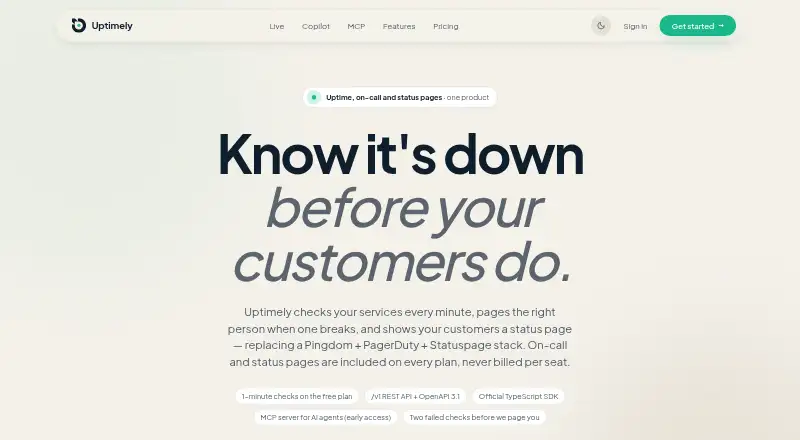
What Uptimely is
Uptimely monitors services, pages and pipelines, alerts responders when problems occur, and hosts customer status pages. Checks cover HTTP, TCP, DNS, SSL, ping and heartbeat, with intervals from once a minute to once a day. By default, two consecutive failed checks open an incident and notify the on-call responder; passing checks resolve it. Status pages can be public or private, support RSS, and can use custom domains on every plan. On-call tools include rotations, escalation chains and scheduled coverage layers, while an acknowledgement stops the escalation chain. Alerts can be sent through Slack, Discord, email, SMS, voice call, WhatsApp, browser push and mobile push. Uptimely also ingests OpenTelemetry logs, traces and metrics. It provides a REST API, TypeScript SDK and remote MCP server; its Copilot requires in-chat approval for each write action. The Free plan allows up to 10 monitors and 1,000 read-only API requests monthly. Pro is $29 a month, billed annually with two months free.
Good
- Checks six listed protocols and signals.
- Status pages support custom domains on every plan.
- Offers multiple on-call and escalation features.
- Free plan includes up to 10 monitors.
- Alerts include SMS, voice and mobile push.
Watch out
- Free API access is read-only and limited to 1,000 requests monthly.
- Uptimely is not listed in the named app stores.
- Pro is $29 a month billed annually.
Who it suits
Uptimely suits teams that need service monitoring, incident alerts, on-call coverage and status pages. Its telemetry ingestion and API tools may also suit teams connecting monitoring to other systems.
Verdict
Uptimely combines monitoring, incident response and status pages with a broad set of alert channels. The Free plan has a defined monitor and API limit, while Pro adds full API access and more capacity.
Plans and prices
From Uptimely's own pricing page, checked 14 Oct 2026.
| Plan | Price | What it gives you |
|---|---|---|
| Free | Free | Up to 10 monitors · 1 status page · up to 3 team members · 1-minute checks · incidents, alerts and on-call · read-only API (1,000 requests/month) · Free forever |
| Pro | $29 a month | Unlimited monitors and status pages · up to 25 team members · Slack, Discord, email, SMS, voice, web push · log and trace search · full API (100,000 requests/month) · webhooks · USD 29.00/month; annual billing gives 2 months free |
| Enterprise | Priced on request | Everything in Pro · monitor volume and terms by arrangement · Custom |
The facts
Each one read from Uptimely's own pages, with the date it was checked.
What it does
- AI Copilot
- The built-in Copilot can answer questions about monitors, incidents and on-call, and requires in-chat approval for each write action.checked 30 Sep 2026
- AI data handling
- When Copilot or MCP is used, relevant monitoring context and questions are sent to a third-party AI model provider; the policy warns outputs may be inaccurate.checked 14 Oct 2026
- Alert integrations
- Native notification channels include Slack, Discord, email, SMS, voice calls, WhatsApp, browser push and mobile push.checked 14 Oct 2026
- API and agents
- The product offers a REST API, an official TypeScript SDK and a remote MCP server for AI clients.checked 30 Sep 2026
- API limits
- Free API access is read-only with 1,000 requests per month and a 60-per-minute burst; Pro permits read/write access with 100,000 requests per month and a 300-per-minute burst.checked 14 Oct 2026
- Check cadence
- Checks can run as often as every minute, and each monitor can use criteria based on status code, response time, keywords or windows of results.checked 14 Oct 2026
- Checks
- It supports HTTP, TCP, DNS, SSL, ping and heartbeat checks at intervals from once a minute to once a day.checked 30 Sep 2026
- Deployment integration
- Devino's Dokploy Community repository documents an Uptimely integration that can create per-service uptime, SSL and domain monitors from a service's monitoring tab.checked 14 Oct 2026
- Documentation depth
- The documentation includes getting-started, monitor, status-page, incident, on-call, maintenance, notification, API, API-reference and MCP sections, plus an OpenAPI 3.1 specification.checked 14 Oct 2026
- Hosting model
- Uptimely is a hosted cloud service and offers no self-hosted edition.checked 14 Oct 2026
- Incident handling
- By default, a second consecutive failed check opens an incident and pages the on-call responder; the incident resolves when checks pass again.checked 30 Sep 2026
- Incident workflow
- Failed checks can open incidents, trigger alerts and on-call escalation, while recovered checks resolve incidents automatically.checked 14 Oct 2026
- Independent alternatives
- AlternativeTo lists more than 50 alternatives and names Uptime Kuma as its best alternative.checked 14 Oct 2026
- Independent description
- AlternativeTo describes Uptimely as a service that monitors uptime, alerts on downtime and creates customer-facing status pages.checked 14 Oct 2026
- Legal entity
- Crunchbase gives the legal name as Devino Solutions Inc and operating status as active.checked 14 Oct 2026
- Licence classification
- AlternativeTo lists Uptimely as freemium and proprietary.checked 14 Oct 2026
- Limit: AI reliability
- Uptimely's terms say Copilot and MCP outputs are probabilistic and may be inaccurate or incomplete, so users remain responsible for operational decisions.checked 14 Oct 2026
Where it runs
- App-store availability
- Uptimely states it is not yet in the Apple App Store or Google Play and is installed from a browser on iPhone, iPad, Android, Mac and Windows.checked 14 Oct 2026
- Device apps
- Browser-installed apps are available for iPhone and iPad, Android, Mac and Windows; the page says Uptimely is not yet listed in the App Store, Google Play or Microsoft Store.checked 30 Sep 2026
The company
- Company founding
- LinkedIn lists Devino as founded in 2023.checked 14 Oct 2026
- Company headquarters
- LinkedIn lists Devino headquarters in Ottawa, Ontario, Canada.checked 14 Oct 2026
- Company industry
- LinkedIn categorizes Devino as an IT services and IT consulting company.checked 14 Oct 2026
- Company services
- Crunchbase says Devino provides software development, web design, automation, developer staffing, cloud and DevOps work, machine learning and API development.checked 14 Oct 2026
- Company size
- LinkedIn lists Devino at 2–10 employees.checked 14 Oct 2026
The full review of Uptimely
Uptimely is a monitoring and incident-response service for teams responsible for keeping websites, services or pipelines available. It is best suited to teams that want checks, on-call escalation and customer status pages together; the Free plan is useful for a small setup, while larger teams will need Pro or custom Enterprise terms.
Overview
Uptimely connects service checks to incident handling: after two consecutive failures by default, it opens an incident and pages the on-call responder, then resolves the incident when checks pass again. This reduces the gap between detecting a problem and routing it to someone, though teams should account for the default two-failure trigger when deciding how quickly they need to be alerted.
Key features
Checks, incidents and on-call
HTTP, TCP, DNS, SSL, ping and heartbeat checks run from once a minute to once a day. That range serves both frequent availability checks and less urgent monitoring, but the once-a-day interval is not suited to rapid detection. Rotations, escalation chains and scheduled coverage layers help assign response across a team; acknowledging an alert stops its escalation chain. Notifications can arrive through Slack, Discord, email, SMS, voice call, WhatsApp, browser push or mobile push.
Status pages and telemetry
Status pages can be public or private, include RSS, and use custom domains on every plan. That makes branded customer updates possible even on Free. Uptimely also ingests OpenTelemetry logs, traces and metrics through OTLP endpoints and exposes a Prometheus-compatible metrics endpoint, a useful fit for teams bringing monitoring data into existing observability workflows.
API and AI tools
A REST API, official TypeScript SDK and remote MCP server support programmatic and AI-client access. The Copilot answers questions about monitors, incidents and on-call, and requires in-chat approval for each write action. When Copilot or MCP is used, relevant monitoring context goes to a third-party AI model provider under terms that prohibit training its general models on that data. The privacy policy says the service uses encryption in transit, scoped access controls and monitoring, and encrypts credentials used for authenticated checks.
Apps and access
Platforms include Android, iOS, macOS, web and Windows, as well as API access. Browser-installed apps are available for phones, tablets and desktop systems, but Uptimely is not yet listed in the App Store, Google Play or Microsoft Store. Teams wanting store-distributed apps should factor that into deployment.
Pricing
Uptimely has a Free plan, a 14-day trial and paid plans from $29/mo. The Free plan is billed free forever and includes up to 10 monitors, one status page, three team members, one-minute checks, incidents, alerts and on-call. Its API is read-only and capped at 1,000 requests per month. This is a meaningful starting point for a small team, but the monitor and seat caps and lack of API writes constrain growth and automation.
Pro costs $29 a month, billed annually with two months free. It raises capacity to unlimited monitors and status pages and up to 25 team members, retains one-minute checks, and adds full read/write API access at 100,000 requests per month, log and trace search, and included alerts and telemetry. It fits teams that need more capacity or API-driven changes; annual billing is the stated term to weigh against the larger allowance.
Enterprise uses custom pricing and custom terms, with custom monitor volume and team size plus everything in Pro. It is the appropriate tier when Pro's defined team and capacity boundaries do not fit. No seat cap is given for Enterprise beyond custom team size.
Platforms
Uptimely supports Android, iOS, macOS, web, Windows and API. The browser-installed device apps broaden access, but they are not yet distributed through the major app stores.
Who it's for
Uptimely suits teams that want availability checks, responder scheduling, a range of alert routes and status pages in one service, especially when OpenTelemetry ingestion or API access matters. Small teams can start on Free; teams needing more than 10 monitors, three members or read-only API access have a clear reason to move to Pro. It is less compelling for organizations that require store-listed mobile apps or need checks more frequently than once a minute.
Pros and cons
- Pros: The default failed-check incident flow connects detection to on-call paging, and acknowledgement stops further escalation.
- Pros: Custom domains are available on every plan, so even Free can support a branded status page.
- Pros: Pro combines unlimited monitors and status pages with 100,000 monthly API requests and log and trace search.
- Cons: Free is capped at 10 monitors, one status page and three team members, with a read-only API allowance of 1,000 requests a month.
- Cons: Mobile and desktop apps are browser-installed rather than listed in the major app stores.
- Cons: Using Copilot or MCP sends relevant monitoring context to a third-party AI provider, even though its terms bar general-model training on that data.
Alternatives
For a broader comparison of products focused on coordinating on-call work, see On-Call Management Software.
- Grafana Cloud Application Observability may suit readers looking for observability with an always-free plan that includes 2,232 host hours and a Pro option billed by host hour plus a monthly platform fee.
- incident.io is worth considering for teams that want native incident response in Slack or Microsoft Teams, with its Basic plan including single-team on-call and a status page.
- PagerDuty offers a free incident-management tier for up to five users, one on-call schedule and one escalation policy.
- PagerTree has a free Basic plan for up to five users and two teams, with three months of data retention.
- AlertOps offers a free plan for up to five users with basic alert routing, three escalation policies and 200+ integrations.
- ilert may fit a small team seeking a free allowance of up to five users, one status page and 100 SMS or voice notifications.
- MonoDuty is another freemium option, with its free plan including one user, five monitors and one on-call schedule.
- TaskCall is an alternative for readers comparing incident-response tools.
Verdict
Choose Uptimely if your team wants monitoring, on-call response and customer status pages together, with API and telemetry options that extend beyond basic uptime checks. Free is a practical small-team entry point, while Pro is the clearer fit for teams that outgrow its caps or need read/write API access. Look elsewhere if app-store distribution or faster-than-minute checks are essential.
Getting started
- Open the Uptimely website
- Create a Free account or select Pro
- Add monitors using supported check types
- Configure on-call rotations and escalation chains
- Publish a public or private status page with an optional custom domain
- Install the browser app on iPhone, iPad, Android, Mac, or Windows
Limits worth knowing
Free includes up to ten monitors, one status page, three team members, and a read-only API limited to 1,000 requests per month. Pro raises API access to 100,000 requests monthly and allows unlimited monitors and status pages.
Questions
Is there a free Uptimely plan?
Yes. Free is available without a listed charge and includes monitoring, incidents, alerts, on-call, and a status page.
What does Pro cost?
Pro costs $29 per month, billed annually with two months free.
Which alert channels are available?
Alerts can be sent through Slack, Discord, email, SMS, voice call, WhatsApp, browser push, and mobile push.
Can I create customer status pages?
Yes. Status pages may be public or private, support RSS, and can use custom domains on every plan.
Does Uptimely have mobile and desktop apps?
Browser-installed apps are available for iPhone, iPad, Android, Mac, and Windows. The product is not yet listed in the App Store, Google Play, or Microsoft Store.
What API options are provided?
Uptimely offers a REST API, an official TypeScript SDK, and a remote MCP server. Free API access is read-only, while Pro provides read/write access.
Alternatives to Uptimely
- 1
Grafana Cloud Application Observability
Free planAndroidiOSWebAPI8.4From $0.03 a month - 2

PagerDuty
Free planAndroidiOSWebAPI8.3From $21 a month - 3

xMatters
Free planAndroidiOSWebAPI8.3From $15 a month - 4
PagerTree
Free planAndroidiOSWebAPI8.2From $15 a month - 5

AlertOps
Free planAndroidiOSWebAPI8.1From $8 a month - 6

incident.io
Free planAndroidiOSWebAPI7.6From $15 a month